
Review metadata, headings, canonicals, links, images, structured data, accessibility, and technical page signals for one live URL.
AI SEO Analyzer
Screpy combines AI-assisted SEO workflows with technical audits, website crawling, keyword rank tracking, Core Web Vitals, and SEO reporting in one workspace. Find issues, prioritize fixes, and monitor progress over time.
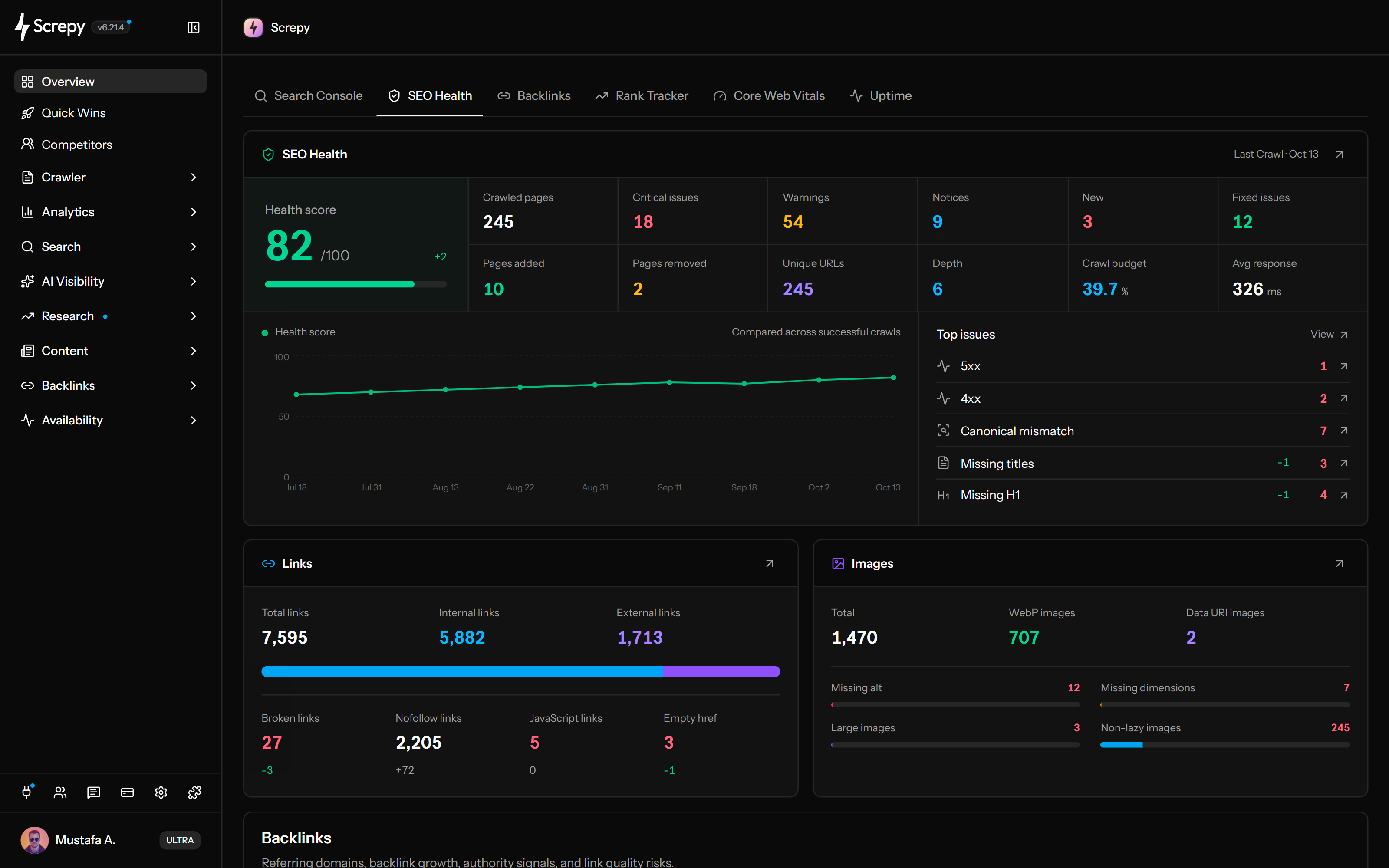










Find Technical SEO Issues
Crawl your website to uncover broken links, missing metadata, indexing signals, and image issues. Open affected pages and understand what needs attention before planning a fix.
- Review crawl errors and redirects
- Inspect page titles, links, and images
- Trace each issue to affected URLs
Discover SEO Quick Wins
Use completed crawls and connected data to find search, content, and internal-link opportunities. Inspect the evidence behind each finding and choose where to focus next.
- Find pages with search potential
- Review internal-link opportunities
- Investigate findings before making changes
Search Console
/pricingImpressions2,860
Position11.4
- Internal links/guides
- Technical SEO/blog
Track Rankings and Search Performance
Follow tracked keyword positions and compare clicks, impressions, and CTR from connected Google Search Console data. See which queries and pages deserve a closer look.
- Track keyword positions over time
- Compare search-performance periods
- Investigate changes by query and page
Monitor AI Search Visibility
See how your brand appears in collected AI answers. Compare competitor mentions and visibility, then inspect the prompts and cited sources behind the results.
- Review brand and competitor mentions
- Open answers and cited sources
- Follow visibility changes over time
Mentions
42- SScrepy42
- Eexample.org31
- Eexample.net22
Plan Content with Keyword Research
Discover related keywords for your market and compare search intent, demand, and difficulty. Use the findings to choose useful topics and shape your next content brief.
- Research keywords by country and language
- Compare intent, volume, and difficulty
- Add selected keywords to Rank Tracker
Volume
2,400Website auditKeyword
Analyze Your Backlink Profile
Explore the websites linking to your domain and the pages they reference. Review referring domains, anchor text, link status, and changes in your backlink profile.
- Inspect source and target pages
- Compare referring domains and link signals
- Review new and lost backlinks
Referring domains
346- blog.example.org
- news.example.net
- guide.example.org
example.com
Monitor Website Speed and Uptime
Monitor PageSpeed, Core Web Vitals, and website availability. Spot slow pages, performance changes, and downtime so your team knows what to investigate.
- Review page-speed results
- Track loading, responsiveness, and stability
- Monitor availability and interruptions
Core Web Vitals
LCP
2.1 sINP
180 msCLS
0.04Availability99.98%
Connect AI Assistants to SEO Data
Bring your Screpy project into a conversation with a compatible AI assistant through SEO MCP. Ask about available SEO findings, inspect the evidence, and plan your next steps.
- Ask questions about your own website
- Review available audit and search data
- Turn findings into a proposed action plan
Show me the broken links.
Screpy
Broken links12
- /old-pricing
404 - /guides/setup
404
Sources: Website audit
Create White-Label SEO Reports
Build reusable report templates with selected project data and available branding options. Preview your report, generate a dated PDF snapshot, and share it with clients or teammates.
- Choose and arrange report widgets
- Preview selected project data
- Download PDF reports for sharing
a
ACMEReports
PDFWebsite audit
87/100
Rank tracker
+24positionsBig on SEO. Light on Your Wallet.
A comprehensive SEO toolkit at a refreshingly affordable price.
- Technical audits, rank tracking & AI visibility
- Keyword research, backlinks & uptime monitoring
- One workspace. Flexible plans. Less to spend.
More stays in your pocket
Exploring SI SEO?
Understand Super Intelligence terminology and connect website audits, search research, rankings, and AI visibility in one practical Screpy workflow.
Website analysis and SEO audits
Check one URL for an immediate answer, create a report for a focused review, or crawl the full website for recurring issues and ongoing monitoring.
Turn a live page analysis into a prioritized, printable SEO report without creating an account.
Crawl pages as one site, find recurring technical and on-page patterns, prioritize fixes, and monitor health after each change.
SEO integrations
Bring the tools your team already uses into one clear SEO workflow.
Connect Screpy to AI assistants and agent workflows through a standard Model Context Protocol interface.
Give me a quick SEO summary for this week.

Organic visibility is up 18%. Your top 10 keywords gained 24 positions.
What should we work on next?
Three high-impact fixes remain: duplicate titles, slow LCP on two pages, and a broken canonical.
I grouped them by impact and added the plan to your weekly SEO briefing.
Bring Screpy data and SEO workflows into your own products, dashboards, and automations with a flexible API.
GET
/v1/projects/{project_uid}/crawls/{crawl_uid}/pages 200 OK {
"data": [
{
"url": "https://example.com/pricing",
"status_code": 200,
"canonical_present": true
}
]
}Connect clicks, impressions, CTR, positions, queries, and pages with the rest of your Screpy workflow.
Connect Cloudflare traffic, crawler, and real-user performance signals with Screpy website analysis.
Connect Screpy MCP to ChatGPT for project summaries, technical SEO context, and prioritized next steps.
Use Screpy MCP in Claude to investigate crawl findings, rankings, performance, and website issues.
Run Screpy MCP tools from Gemini CLI to inspect SEO and performance data from your terminal workflow.
Bring Screpy project context into Cursor while investigating and fixing website SEO issues.
Use Screpy MCP through VS Code and GitHub Copilot Chat during technical SEO implementation work.
Install the Screpy community node to automate projects, crawls, technical SEO data, performance, and uptime workflows.
Big SEO wins. For every kind of team.
Screpy gives different teams a clear view of site health, search visibility, priorities, and progress without forcing everyone into a complex SEO dashboard.
Agencies
Manage client audits, rankings, technical issues, and white-label reports from one workspace while keeping priorities and progress clear for every account.
Marketing teams
Connect SEO monitoring with content and campaigns, then act on visibility, page quality, keyword opportunities, and technical issues before they affect growth.
SaaS teams
Monitor landing pages, product pages, documentation, and releases for crawl errors, slow performance, broken links, and indexing changes that can reduce signups.
Founders
See website health, rankings, performance, and high-priority issues in one focused view so you can invest time where it supports growth.
Ecommerce teams
Protect product and category visibility by monitoring crawlability, broken links, PageSpeed, uptime, and ranking changes before they disrupt customer journeys.
Content teams
Use keyword research, search intent, page signals, and content opportunities to build stronger briefs, refresh weak pages, and prioritize useful topics.
SEO Consultants
Run audits, rank tracking, technical checks, and client reporting without scattered tools while keeping recommendations evidence-based and progress easy to explain.
Developers
Validate releases, migrations, and template changes with crawl and performance data, catching redirects, indexing issues, broken URLs, and regressions before production impact.
Local Businesses
Track Maps rankings, local keywords, and website issues that influence nearby discovery, then prioritize service pages, business details, and practical fixes.
SEO tool comparison
See how Screpy compares feature by feature with Sitechecker, SE Ranking, WooRank, SEOptimer, Semrush, Ahrefs, Serpstat, and Ubersuggest across the everyday monitoring workflows teams actually use.
 | | | | | | | | | |
|---|---|---|---|---|---|---|---|---|---|
| Website Audit | | | | | | | | | |
| On-Page SEO Analysis | | | | | | | | | |
| Website Crawler | | | | | | | | | |
| Rank Tracker | | | | | | | | | |
| Organic Keywords Analysis | | | | | | | | | |
| Keyword Research | | | | | | | | | |
| Backlink Checker | | | | | | | | | |
| Uptime Monitoring | | | | | | | | | |
| White-label Reports | | | | | | | | | |
| Google Search Console Integration | | | | | | | | | |
| PageSpeed Monitoring | | | | | | | | | |
| AI Article Generator | | | | | | | | | |
| Starting Price | $16/mo | $139.95/mo | €109/mo | $99/mo | $50/mo | $29/mo | US$29/mo | $29/mo | $19.99/mo |
User reviews

Jon Phenom
The interface is clean and professional, stripping away the clutter often found in SEO tools to focus on what actually moves the needle. Screpy provides the clarity and data-driven confidence needed to succeed.

Luiz Albertini
Screpy has made a real difference in how I manage SEO for my website. Instead of guessing what to fix, I can now see priorities clearly and take action faster.

Marc G.
This tool provides valuable information to fix issues, improve SEO, and maintain websites effectively.

Marcello C.
Overall, I’m really happy with Screpy. It’s a user-friendly platform that’s packed with valuable tools for website optimization, especially at its price point.

Monica M.
Screpy is a great tool if you want to improve your website seo rating. It’s a all-in-one SEO tool that does keyword ranking, website auditing and also uptime monitoring.

Carlos Angulo
I’ve been using Screpy for over two years now, and it has become the main tool on my SEO workflow. It’s reliable, constantly improving, and genuinely helpful for making better SEO decisions.

Jacob W
For the price point, it offers an impressive suite of SEO tools that helps enhance my website’s optimization efforts. What sets Screpy apart for me is its simplicity and ease of use.

Michael Swan
We’ve been using Screpy for several months, and it has become one of our go-to tools for website monitoring. The dashboard is easy to understand, the performance insights are useful, and it helps identify issues before they affect visitors.

Steve Roehm
I’ve been using Screpy mainly for SEO audits and speed optimization, and I’ve really enjoyed the process. The interface is clean, the suggestions are actionable, and it makes it easy to see where your site stands and how to improve it.
SEO tools and features
Use one workspace for technical SEO audits, website crawling, keyword rank tracking, Core Web Vitals, backlink monitoring, and SEO reports.
Run a complete technical SEO website audit to uncover crawl errors, broken links, on-page issues, image problems, and the fixes most likely to improve organic search performance.
Health score
87 / 100
Track keyword rankings by location and device, compare competitor visibility, and connect organic ranking changes to the pages and SEO work behind your growth.
Ranking movement
+24 positions
Inspect backlink profile movement, referring sources, target pages, anchors, attributes, new, lost, and broken states, seen dates, and review metrics for any domain.
New vs. lost backlinks
+29 net backlinks
Monitor Core Web Vitals and PageSpeed after launches or content updates, then prioritize slow URLs and performance fixes that protect search visibility and user experience.
LCP
1.8sGood
INP
142msGood
CLS
0.04Good
Turn website crawl and Google Search Console data into prioritized SEO quick wins, so your team knows which pages, technical fixes, and content opportunities to address first.
SEO Crawler
Crawl your website like a search engine and review page status, redirects, canonical tags, internal links, and crawl paths in one technical SEO workspace.
Technical SEO Score
Measure overall website health with a technical SEO score that highlights the crawlability, indexability, and on-page signals most in need of attention.
Broken Link Checker
Find broken internal links, failed redirects, empty anchors, and unreachable URLs before they hurt user journeys, crawl efficiency, or important landing pages.
Image SEO Analysis
Group crawled image sources, review alt text, dimensions, response health, loading, and responsive delivery, then trace findings to their source pages.
Core Web Vitals
Track Core Web Vitals across important URLs, including loading performance, interaction responsiveness, and layout stability, before regressions affect visitors or rankings.
Bring Google Search Console clicks, impressions, CTR, average position, queries, pages, countries, and devices into the SEO workflow your team already uses.
Check which crawlable pages Google has indexed, review coverage reasons, and investigate every result with words, headings, internal links, and crawl depth.
Discover organic keywords your website already ranks for, with search volume, CPC, intent, ranking position, and the URLs earning search visibility.
Map Tracker
Track Google Maps rankings and local keyword visibility from the locations that matter to your business, then spot changes in local search performance.
Keyword Research
Find SEO keyword opportunities, understand search intent, and turn high-potential topics into practical content briefs connected to the pages and rankings you want to grow.
Analyze Google search results by keyword and country to understand SERP competition, search intent, and the on-page SEO work each opportunity requires.
Research competitor ads by domain to review advertiser activity, ad previews, formats, and display dates before planning your next search campaign.
AI Article Generator
Create queued article drafts from a title or brief, choose language, tone, reasoning, and instructions, then review the Markdown output before publishing.
Uptime Monitoring
Monitor website uptime across key landing pages and catch downtime early, before availability issues affect users, campaigns, conversions, or organic search visibility.
Group backlinks by source website, compare domain-level counts, rank, spam, broken-link, date, and status signals, and open the links behind each source.
Store reviewed project domains or source URLs with notes, verify the list, remove entries, and export a Google-formatted text file for manual upload.
Compare visits, page views, pages per visit, mobile share, device trends, referrers, countries, browsers, and operating systems beside SEO data.
See which verified bots and AI crawlers access your content, monitor crawl trends, and identify unsuccessful URLs that may limit discovery.
White-label SEO Reports
Create white-label SEO reports with custom branding, live project data, PDF exports, and scheduled delivery for clients, teams, and stakeholders.
Manage multiple websites, crawl settings, locales, and project-level SEO workflows from one organized workspace built for ongoing optimization.
Latest SEO articles
Practical guides, research, and ideas for improving search visibility and website performance.
SEO
18 Google Sheets Add-Ons for SEO Research
Compare 18 Google Sheets SEO add-ons by research task, current prices, free-plan limits and API requirements, with practical workflows to check before buying.
Read article SEO
21 Nuxt SEO Module Checks Beyond Installation
Audit Nuxt SEO module settings, canonicals, indexing rules, metadata and production output with 21 practical checks and a reusable release evidence template.
Read article SEO
21 Astro SEO Checks Beyond Installing an Integration
Audit Astro metadata, rendering, canonicals, index rules and deployed content with 21 practical checks, safe code examples and a release worksheet.
Read article SEO
11 Jekyll SEO Checks Beyond Installing the SEO Plugin
Check Jekyll metadata, canonicals, collection output, sitemaps and deployed pages with version-aware examples and a practical 11-point release worksheet.
Read article SEO
8 GitBook SEO Checks for Public Documentation Sites
Check GitBook SEO across publishing controls, metadata, canonicals, sitemaps, redirects and public pages, with a practical release audit worksheet.
Read article SEO
7 Nuxt Sitemap Checks for Dynamic Pages in Production
Audit Nuxt sitemap sources, rendering, exclusions, locales, caches, and deployed XML, with code examples to catch missing or stale dynamic URLs.
Read article SEO
5 Docusaurus Sitemap Checks Before a Docs Release
Check Docusaurus sitemap URLs, locales, exclusions, lastmod, and deployed XML before release, with a reusable script for missing or duplicate pages.
Read article SEO
6 Next.js Robots.txt Checks Before Deployment
Check Next.js robots.txt before deployment: verify route ownership, preview policy, crawler rules, required resources, sitemap URLs and cached output.
Read article SEO
7 Shopify Hreflang Checks for International Stores
Audit Shopify hreflang with seven checks for Markets, published languages, tag ownership, localized URLs, canonicals, redirects and publishing changes.
Read article Digital Marketing
7 Digital PR Ideas for Startups With No PR Budget
Explore seven digital PR ideas for startups with no PR budget, with evidence checklists, a reusable pitch, and practical ways to measure earned coverage.
Read article SEO
19 Ways Photographers Can Earn Relevant Backlinks
Earn relevant backlinks for your photography website with 19 practical methods, outreach examples, publisher checks and a reusable planning worksheet.
Read article SEO
9 Bulk URL Checkers for Large Lists of Pages
Compare nine bulk URL checkers by job limits, exports, request methods and prices. Learn how to reconcile results before fixing large URL inventories.
Read articleSEO FAQ
Answers about getting started, plans, SEO reports, and connecting your AI assistant through SEO MCP.
What is SEO MCP?
SEO MCP uses the Model Context Protocol to connect a compatible AI assistant to your available Screpy project data. You can discuss actual audit, ranking, and monitoring findings instead of relying only on generic SEO advice. Explore SEO MCP.
What can I ask through SEO MCP?
Ask which links failed in a completed crawl, how saved keyword rankings changed, which performance findings need attention, or where stored AI Visibility results mention your brand. Request source data and analysis dates so you can check the evidence behind each answer.
Do I need to set up my SEO data first?
You need a Screpy account and access to the project. Audit questions require a completed crawl; Search Console questions require a connected, selected property; rankings and AI Visibility require saved tracking results. Connecting an assistant does not create missing data.
How do I connect ChatGPT or Claude to Screpy?
Add https://mcp.screpy.com as a remote MCP connection in a compatible client, sign in to Screpy, and approve access in your browser. The client must support remote HTTP MCP and browser-based OAuth; availability depends on its plan and workspace. No local installation or Screpy REST API key is required. Read the MCP setup guide.
Who can access my project data through SEO MCP?
The authorized AI client can request projects you own or that are shared with your Screpy account. Screpy checks project access on each tool call. Returned data is subject to the AI client's own privacy and retention controls. You can revoke the connection in Screpy's Connected Apps settings.
Which Screpy plan do I need?
Choose a plan based on your websites, tracked keywords, and reporting needs. Features, capacity, and branding depend on the active plan. SEO MCP keeps those limits; your AI assistant may also require its own subscription. Compare Screpy plans.
Can I create white-label SEO reports?
Yes. Use reusable templates, permitted agency branding, and selected project data to generate dated PDF snapshots on demand. Branding, available widgets, and report volume depend on your plan. Weekly email reports are separate; templates do not schedule delivery. Explore white-label SEO reports.
Can I try Screpy without creating an account?
Yes. The free Website Analyzer and SEO Report Generator analyze a single page without registration. Full projects, crawl history, keyword tracking, and project reports require a Screpy account. Try the Website Analyzer. Open the SEO Report Generator.
Does SEO MCP automatically change my website?
No. SEO MCP does not edit or publish your website. Supported actions inside Screpy, such as starting a crawl or managing tracked keywords, require an explicit request. Capacity-consuming and destructive actions also require confirmation.