


Revenue and signup pages
Monitor checkout entry points, pricing pages, lead forms, and signup routes where a slow experience can interrupt a high-value visit.
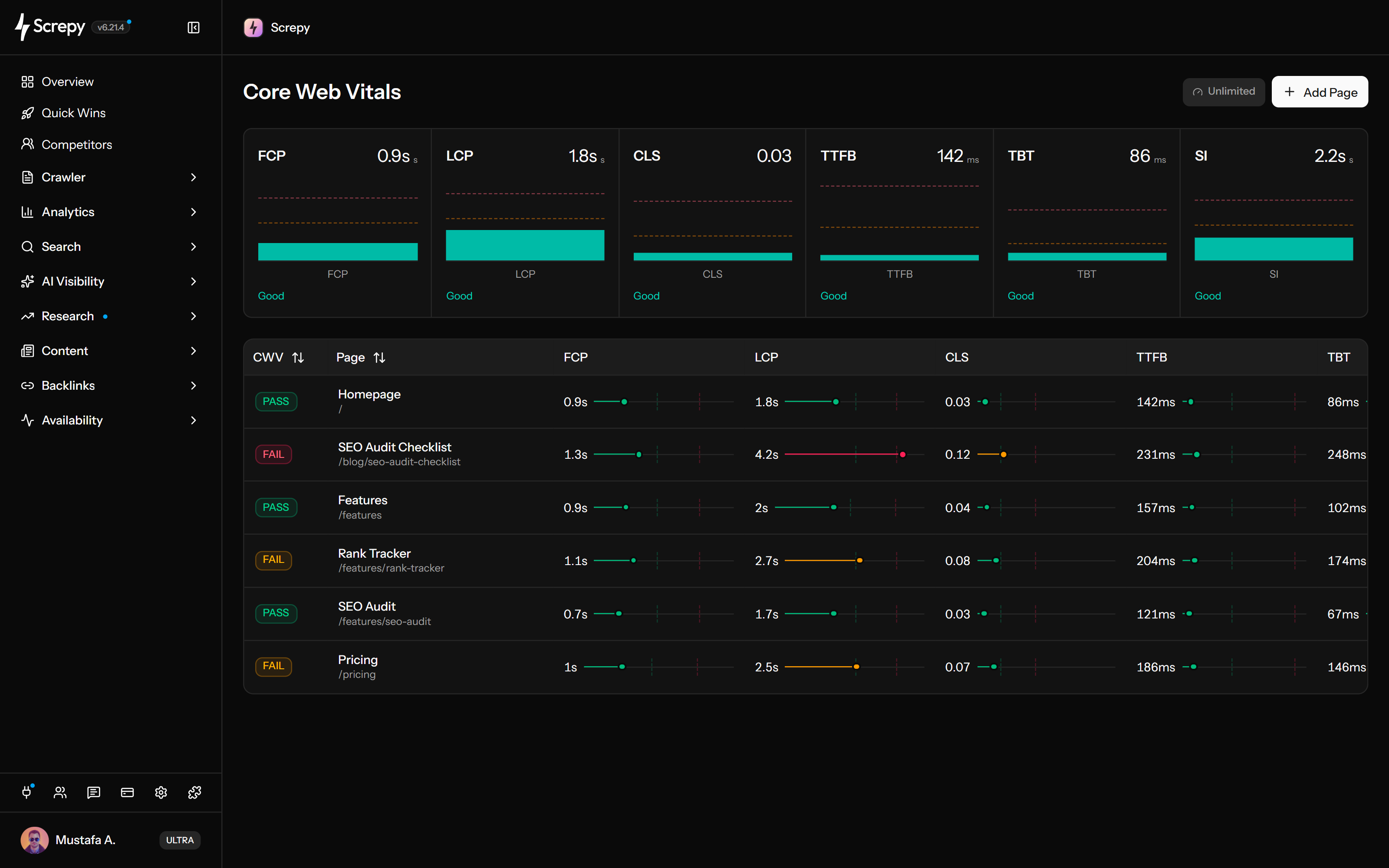
Monitor important public URLs with recurring lab checks. Review loading, response delivery, blocking and layout stability in Screpy's Core Web Vitals screen, with a separate six-metric homepage overview.
See when initial content first appears on a selected URL.
Review time to the first response byte, including connection and delivery delays.
Review main-thread blocking and the homepage's visual loading progress.










Build a useful PageSpeed monitoring set around the pages people actually enter. Screpy includes the project homepage and lets you add public URLs on your project domain or its subdomains.
example.comLab
/1.4 s/shop/linen2.8 s/guides/seo1.9 sManage these checks in the Core Web Vitals screen of your Screpy project. Recurring checks keep selected pages under review as content, templates and scripts change.
Read the individual measurements beside the exact page URL before deciding what needs attention. A status badge provides a quick starting point, while the values reveal different parts of the loading experience.
example.comLab
LCP2.1 s
TBT180 ms
CLS0.04
Use the pattern across metrics to choose a focused investigation. Screpy supplies timing and stability signals, while your team checks the page implementation to confirm a cause.
Lab2,100 ms
The homepage overview adds Speed Index to FCP, LCP, CLS, TTFB and TBT. Use this saved homepage result to consider visual loading progress alongside the first and largest content milestones.
Speed Index2.1 s
A later check can help you assess a focused release, but the current-result screen is not a before-and-after archive. Keep your own baseline so the comparison has a clear reference.
Ask an AI assistant to interpret available saved homepage measurements through SEO MCP. Keep the explanation attached to the returned URL and saved check time rather than treating it as a new test.
/projectsJSON{
"data": [
{ "domain": "example.com" }
]
}Interpret saved homepage speed metrics with SEO MCP. The tool reads available results; it does not run a new test or retrieve every monitored URL.
Reduce guesswork by keeping the URL, measurement scope, and next change specific. PageSpeed Monitoring supplies the lab evidence; the investigation still belongs to your team.
Choose a public page on the project domain or a subdomain, tied to a campaign, organic entry or important template, within your available monitoring allowance.
Confirm the exact URL, available values and lab status. The table does not display a check date, and missing values do not establish a complete measurement.
Use the table's FCP, LCP, TTFB, TBT and CLS to choose an investigation. Use Speed Index only from the homepage overview when visual loading progress is the question.
Keep the same URL and test scope, record the original result, make one meaningful change, and use a later check to see whether the evidence moved in the expected direction.
A smaller, intentional URL set is easier to interpret than a list with no priority. Cover important journeys and templates before low-value edge pages.
Monitor checkout entry points, pricing pages, lead forms, and signup routes where a slow experience can interrupt a high-value visit.
Keep paid, email, launch, and seasonal landing pages in the monitored set while they are actively receiving traffic.
Choose representative articles, category pages, and product pages that bring search visitors into the site.
Monitor one representative URL from each important template so a layout or script change can be investigated with a focused lab result.
Use Screpy as a recurring lab measurement workflow. Keep field data, root-cause diagnosis, historical reporting, alerts, and business outcomes separate unless another source verifies them.
Screpy reports synthetic measurements from a controlled check. Do not present them as the experience recorded from your real visitors.
Record values separately for a later comparison. The view has no multi-point historical chart, visible check-date column or performance alerts.
A weak FCP, LCP, TTFB, TBT, Speed Index, or CLS result identifies where to investigate; it does not prove the implementation change required.
Faster pages can support visitors and page experience, but a lab verdict alone cannot guarantee rankings, traffic, engagement, or conversions.
Monitor selected URLs for current lab results, learn how those signals relate to Core Web Vitals, or audit the wider website when a single metric cannot explain a repeated problem.
Run recurring lab checks for your selected public pages and review available URL metrics in the Core Web Vitals screen.
Separate lab diagnostics from field data and understand how LCP, CLS, TBT, and real-user INP should be interpreted.
Use crawl, link, image and on-page findings to add website context; an audit does not replace a browser performance trace.
Screpy documentation
Learn how to choose monitored URLs, interpret available lab measurements, keep field data separate and record a baseline for a later check.
Learn the concepts behind this workflow and apply them with practical SEO guidance.
Monitor important pages with consistent lab and field measurements, investigate regressions, and verify page speed fixes over time.
Read articleLearn what SERP monitoring is, why it matters, and how tracking competitors, keyword rankings, and search result changes improves SEO strategy.
Read articleLearn what a website analysis tool should measure, from bounce rate and conversions to traffic, rankings, sales, page issues, and optimization tasks.
Read articleAI-proof keywords are search terms that still drive visits beyond AI answers; find them with SERP checks, intent signals, tools, comparisons, and local demand.
Read articleUnderstand URL coverage, daily eligibility, table and homepage metrics, lab status, saved results and the limits of a performance comparison.
Start with the included homepage and representative public campaign, product, pricing or content pages on your project domain or subdomains. The plan allowance determines how many URLs you can add; a public-page check does not complete an authenticated user journey.
Active monitored URLs in eligible projects can be scheduled again once the saved check attempt is at least one day old. Adding a URL does not create an instant result, and exact completion time can vary. No check-date column is displayed in the table.
It is synthetic lab data collected under a controlled test. Field data describes how real visitors experienced a page, so the two sources should be interpreted separately.
This view presents available current URL results and a saved homepage overview. It does not provide performance alerts or a multi-point historical chart. Record a baseline separately before comparing a later check.
This screen does not show a 0–100 Lighthouse or Google PageSpeed score. Its lab status is based on the worst available LCP, CLS or TBT classification. FCP and TTFB are separate diagnostics, and a pass does not certify real-user Core Web Vitals.
PageSpeed Monitoring uses the Core Web Vitals screen. Selected URL rows show FCP, LCP, TTFB, TBT and CLS with a lab status. The homepage overview also includes Speed Index. The table does not show check dates or a 0–100 PageSpeed score.
No. A weak metric narrows the investigation, but it does not prove the root cause. Review the affected URL, template, assets, scripts, delivery path, and wider website audit before choosing a fix.
No. Page speed can support visitor experience and page quality, but rankings and conversions depend on many factors. Treat the lab result as one decision input, not a guaranteed outcome.