
Check Google Index Status
Check which crawlable URLs Google has indexed, review coverage states, and investigate each result with Screpy crawl context.
Index Status helps you review page-level Google index information for the crawlable URLs in a Screpy project. It combines the indexed or not-indexed state with the latest crawl's words, headings, internal links, and crawl depth, so the result has useful context before you choose a next step.
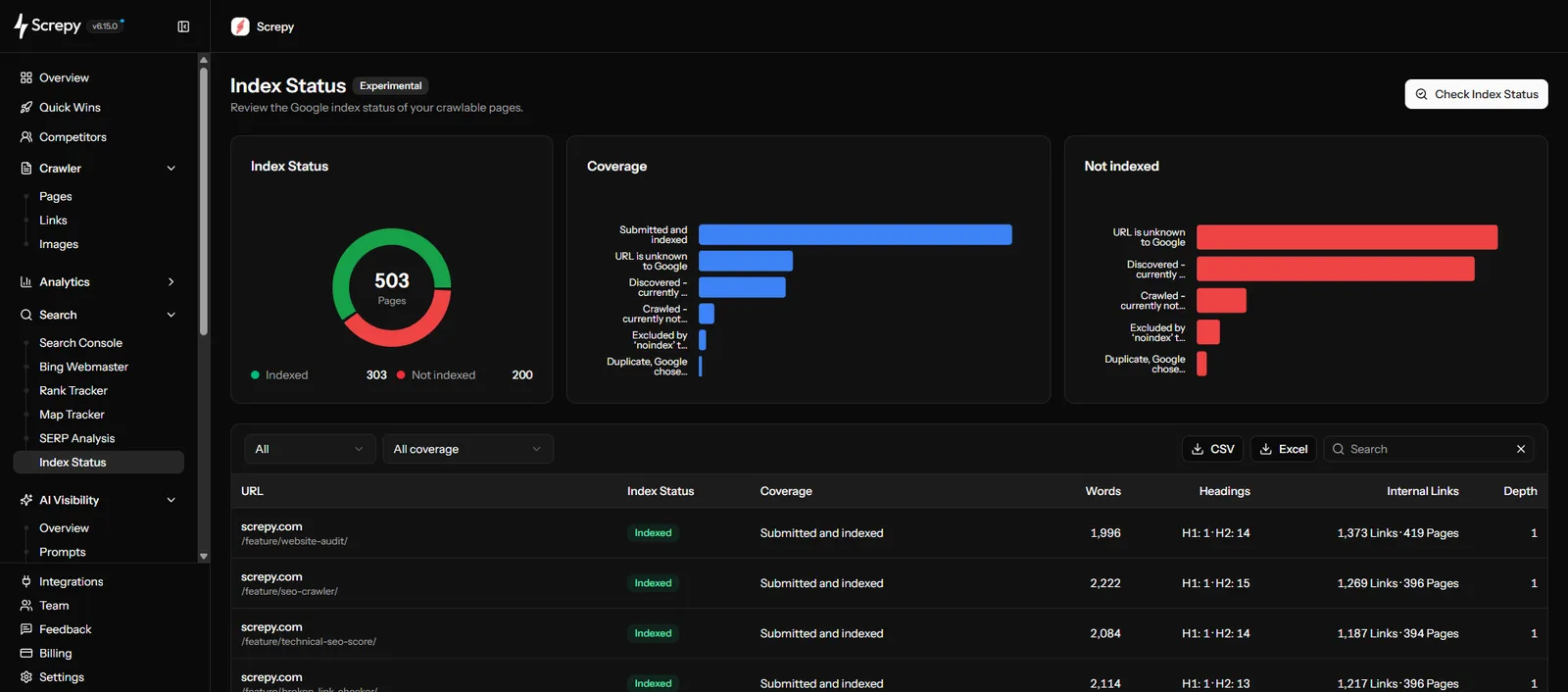
A page-level indexing audit
Index Status reports Google's indexed-page information for the selected audit. It does not request indexing, guarantee that a page will rank or appear in results, or replace a live page test when you need to validate a change.
Before you start
Index Status needs both of the following for the same project:
- A connected Google Search Console property. Connect the property that represents the website and URLs you want to review.
- A completed website crawl. The audit checks the crawlable URLs in that completed crawl, so start or wait for a crawl before beginning the index review.
If the dashboard offers more than one connected property, choose the property that matches the project's canonical website scope. A property mismatch can make URL coverage harder to interpret.
Start an Index Status audit
- Open Index Status from the Search group in the dashboard.
- Confirm the connected Google Search Console property and completed crawl you want to use.
- Select Check Index Status to create the audit.
- Let the audit process the crawlable URLs, then review the results by coverage state or URL.
An audit is intentionally scoped to a completed crawl. This keeps the indexing review focused on a known set of project URLs instead of mixing it with pages that have not yet been crawled.
Continue an incomplete audit
If an audit is incomplete, select Continue Audit from the Index Status page. Continue Audit resumes the existing review rather than discarding the results that have already been processed.
Use this when a large crawl needs more time, or when you return to a project before the first index-status pass has finished.
Read the result table
Use the status and coverage information as an investigation signal, then read it with the crawl data in the same row.
| Signal | How to use it |
|---|---|
| Index status | Separate URLs Google reports as indexed from URLs reported as not indexed. |
| Coverage reason | Group similar not-indexed states before reviewing the affected URLs one by one. |
| Words | Compare the amount of crawlable page text across similar URLs; use it as context, not as a standalone quality score. |
| Headings | Check whether the page has a clear heading structure that supports its intended topic. |
| Internal links | Review how many internal paths point to the page, especially when an important URL is hard to reach. |
| Crawl depth | See how far the URL is from the crawl starting point and use it to investigate site structure or discovery paths. |
An Indexed status means Google has an indexed version of the URL. It does not mean the page will rank for a keyword, earn impressions, or appear in every relevant search result.
Filter and search the audit
Use the filters to keep the review specific:
- Filter to Indexed when you want to compare the pages already represented in Google's index.
- Filter to Not indexed when you need to investigate coverage reasons and the affected crawlable URLs.
- Filter by a coverage state to identify repeated technical or content patterns.
- Search for a full URL, path segment, or page name to inspect a known priority page.
For a large website, begin with business-critical templates, recently changed pages, or groups of URLs that share the same coverage reason. Avoid assuming that every not-indexed URL needs the same fix.
Interpret a finding before acting
Index Status is most useful when it helps turn a broad coverage state into a narrow page review:
- Check whether the URL should be eligible for search in the first place.
- Review the coverage reason and compare it with similar URLs.
- Read the words, headings, internal links, and crawl depth alongside the page's purpose.
- Open the page and relevant Website Audit findings before changing technical settings or content.
- After a meaningful website change, run a new crawl and return to Index Status when Google has had time to process the URL.
Connect indexing work to page value
Prioritize pages that support an important product, topic, campaign, or user journey. A coverage state is not an instruction to change every URL; it is evidence to evaluate with the page's purpose and site architecture.
Limitations
Index Status reflects Google's available indexed-page view through the connected Search Console property. This information can change as Google recrawls and reevaluates a page.
Google's Page indexing report summarizes site-level indexing states, while the URL Inspection tool reports Google's indexed version of one URL and can test whether the live URL might be indexable. These tools answer different questions, and neither guarantees that a page will be indexed.
The audit does not submit URLs for indexing, force a crawl, promise immediate indexing, or guarantee ranking and search visibility. Use it with Website Audit and Search Console performance data to investigate, then validate any important page change in the appropriate workflow.
Related guides
Google Search Console
Connect the property used by Index Status and review search performance data.
Website crawling
Run a completed crawl and investigate page-level technical findings.
Language Mismatch
Check whether localized page content and declared language remain consistent.
Quick Wins
Turn related crawl and search signals into a prioritized next action.