











Screpy - AI SEO Audit Tool

Google Index Status Checker

Check which crawlable pages Google has indexed, review coverage reasons, and investigate the page signals that can help you choose the next SEO action.

TL;DR

Too Long; Didn't Read

Show summary

What is Screpy Index Status?

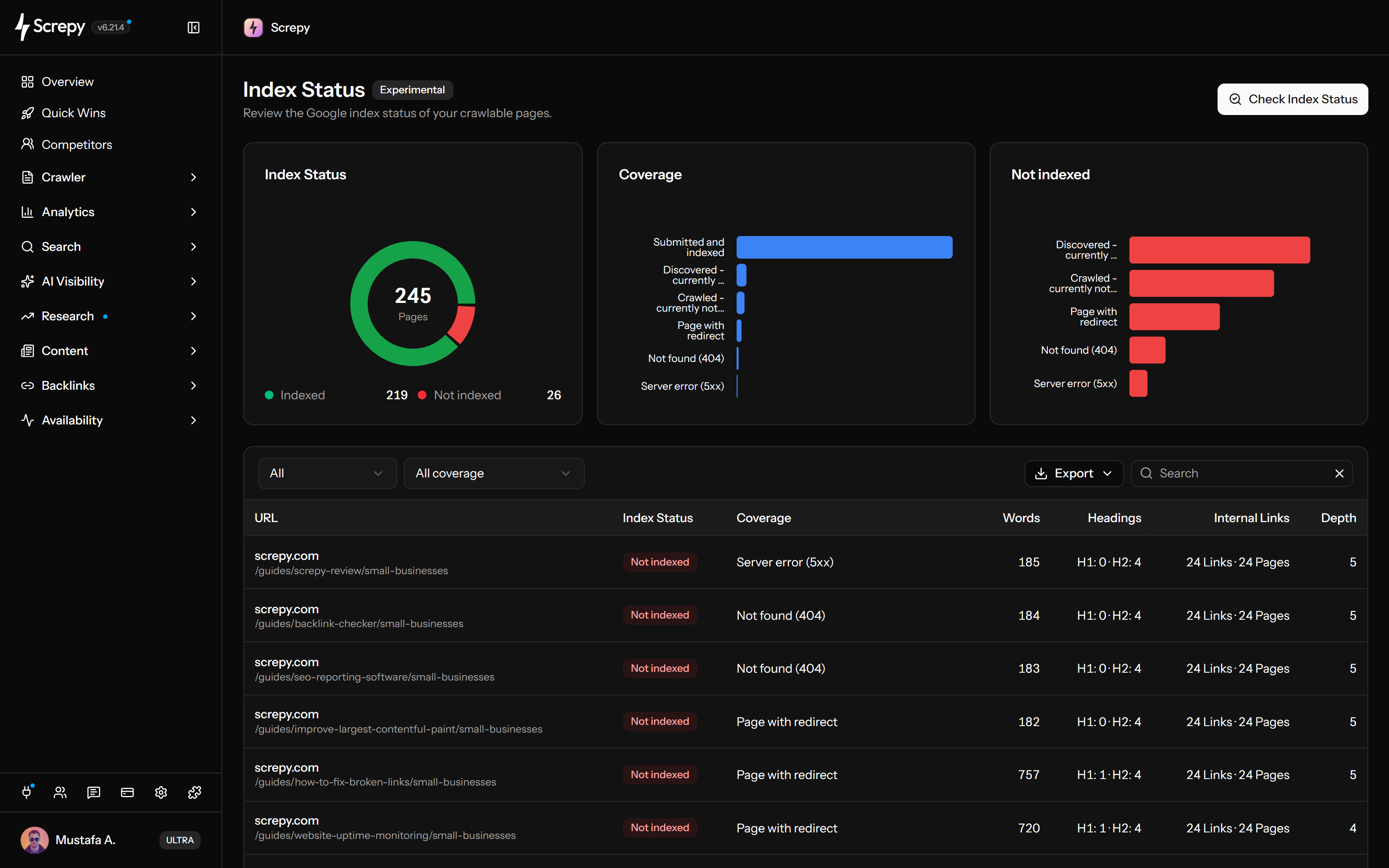
Screpy Index Status compares the crawlable pages in a project with Google index information from a connected Google Search Console property. It groups indexed and not-indexed URLs with coverage context and crawl metrics, so your team can investigate priority pages in one workflow.

Index coverage

  • Screpy Indexed and not-indexed URL status shows how Google currently classifies the crawlable URLs in the selected audit.
  • Screpy Coverage reasons groups not-indexed URLs by the available Google coverage information, making repeated patterns easier to review.
  • Screpy URL search and coverage filters narrow a large audit to the page state or URL pattern you need to investigate.

Crawl context

  • Screpy Words and headings metrics put on-page content signals beside each index status result.
  • Screpy Internal links and crawl depth show how a page is connected within the latest completed crawl.
  • Screpy Page-level review keeps the index status, coverage reason, and crawl context together before you decide what to change.

Audit requirements

  • Screpy Index Status requires a connected Google Search Console property for the same project.
  • Screpy Completed crawl requirement keeps the audit scoped to the project URLs that are ready for review.
  • Screpy Continue audit lets you resume an incomplete index status audit instead of starting the review again.
Uber logo in Screpy SEO platform customer trust section
Philips logo in Screpy SEO platform customer trust section
FedEx Express logo in Screpy SEO platform customer trust section
Bosch logo in Screpy SEO platform customer trust section
Champion logo in Screpy SEO platform customer trust section
Iconfinder logo in Screpy SEO platform customer trust section
T-Mobile logo in Screpy SEO platform customer trust section
Carrefour logo in Screpy SEO platform customer trust section
Stanley logo in Screpy SEO platform customer trust section
Skoda logo in Screpy SEO platform customer trust section
Google Index Coverage

See which crawlable pages Google has indexed.

Review indexed and not-indexed URLs from the connected property without separating coverage information from the project pages you actually crawled.

Learn more about google index coverage
  • Review indexed and not-indexed URLs in one audit
  • Group pages by available coverage reasons
  • Search for a specific URL or page pattern
  • Filter the audit to a single coverage state
Page Investigation

Read index status with the page context behind it.

Use the crawl data next to each URL to investigate whether page content, headings, internal links, or crawl depth need closer attention.

Learn more about page investigation
  • Compare words and headings across the affected URLs
  • Review internal-link counts beside the coverage state
  • Use crawl depth to understand the page path
  • Move from a coverage signal to a focused page review
Connected Workflow

Start with the right property and a completed crawl.

Choose the connected Google Search Console property, wait for the project crawl to complete, then continue an unfinished audit when the review needs more time.

Learn more about connected workflow
  • Select the Search Console property connected to the project
  • Run the audit against the latest completed crawl
  • Continue an incomplete audit from the dashboard
  • Use coverage and crawl context before assigning work
Features

Google index status with useful crawl context.

Index Status keeps page-level Google coverage information beside the crawl metrics your team needs to investigate the result responsibly.

Indexed-page overview

See the indexed and not-indexed crawlable URLs included in the selected audit without treating a coverage result as a ranking promise.

Coverage reasons

Review the available coverage reason for not-indexed pages and filter repeated states before beginning a page-by-page investigation.

Content and link signals

Review words, headings, internal links, and crawl depth beside the URL to understand the page context behind an index status.

Search Console property workflow

Use the connected Google Search Console property and the latest completed crawl as the scope for each authenticated audit.

Google Index Status Checker FAQ

Understand what an Index Status audit reports, what it needs, and where its result should fit in your SEO workflow.

What does Screpy Index Status check?

Screpy Index Status checks the crawlable URLs in a completed project crawl against index information from the connected Google Search Console property. It reports indexed and not-indexed states, available coverage reasons, and related crawl context for the audited URLs.

Does Screpy Index Status request Google indexing?

No. Index Status reports Google index information for the audited URLs. It does not submit indexing requests, force Google to crawl a page, or guarantee that a URL will appear in Google Search results.

Why can an indexed page still have low visibility?

Being indexed means Google has an indexed version of the page; it does not guarantee ranking, impressions, clicks, or a specific position. Review the page, its intent, technical conditions, and search performance before deciding on the next action.

What does an Index Status audit require?

The project needs a connected Google Search Console property and a completed crawl. Index Status uses that scope to review the crawlable URLs in the project.

Can I continue an incomplete Index Status audit?

Yes. When an Index Status audit is incomplete, use Continue Audit in the dashboard to resume the same review instead of discarding its existing progress.