











Screpy - AI SEO Audit Tool

Manage Backlink Disavows

Screpy Disavow Management helps you organize suspicious backlinks by domain or URL, document review decisions, maintain a clear disavow list, and export the file format used by Google.

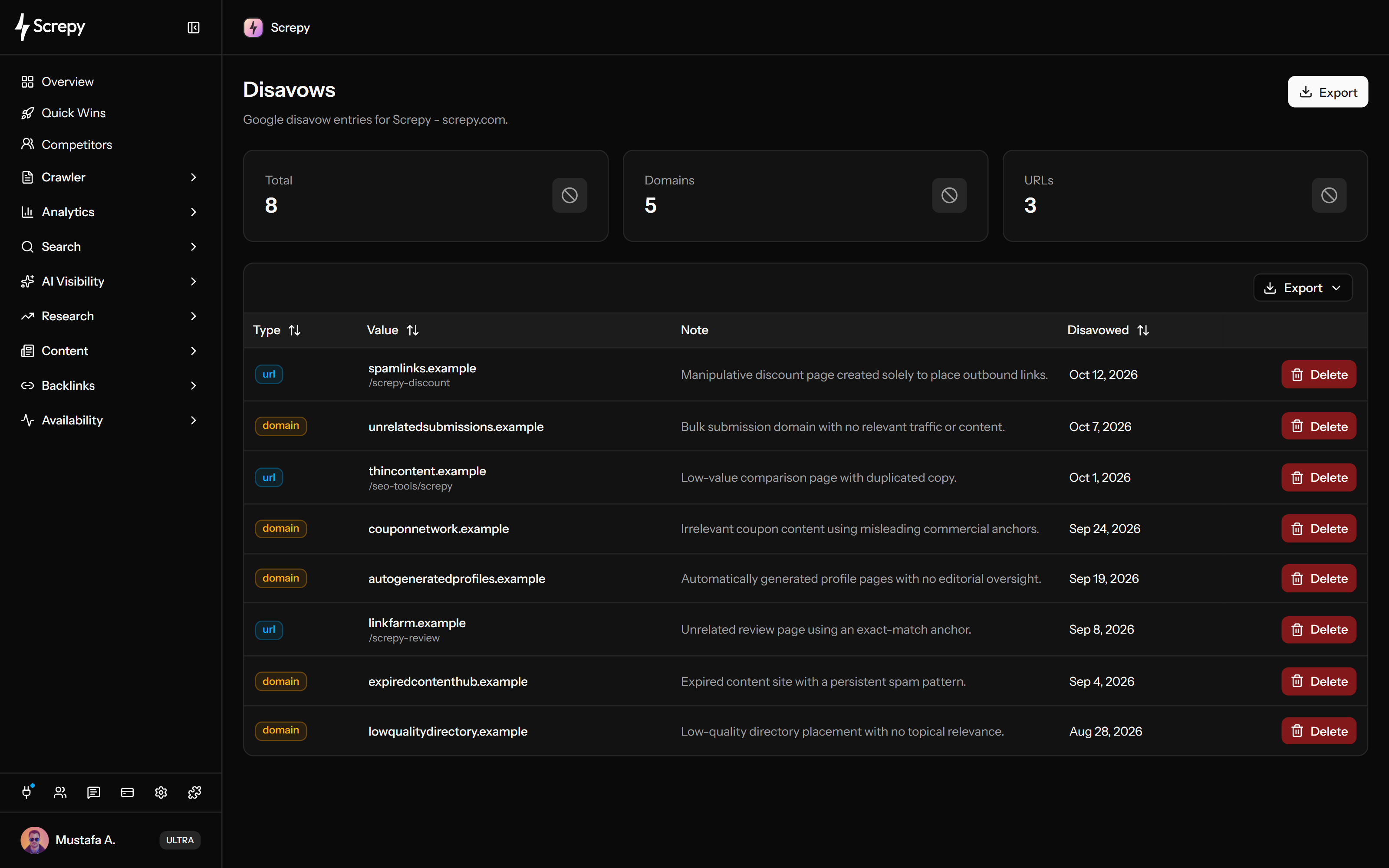
Screpy Disavow Management dashboard with domain and URL entries, review notes, disavow status, and export controls

TL;DR

Too Long; Didn't Read

Show summary

What is Screpy Disavow Management?

Screpy Disavow Management is a manual-review workspace for backlinks a team has decided to include in a Google disavow file. It organizes domain and URL entries, review evidence, notes, history, queues, and a Google-ready text export; Screpy does not automatically decide what to disavow or submit the file to Google.

Review evidence and choose scope

  • Screpy Suspicious link review keeps the source backlink, authority, spam, and status context available for a human decision.
  • Screpy Evidence-based decisions makes clear that a quality signal alone does not prove a link should be disavowed.
  • Screpy Domain disavows applies a decision to an entire referring domain, while URL disavows keeps a page-specific decision narrower.
  • Screpy Domain and URL scope helps reviewers choose the appropriate level before an entry is exported.

Organize the review workflow

  • Screpy Review notes records why a domain or URL was added, changed, or retained for later audit.
  • Screpy Disavow history keeps a traceable record of entries and workflow changes over time.
  • Screpy Review queues keeps suspicious backlinks and domains organized before a final domain or URL action is chosen.
  • Screpy Bulk link review sends selected backlinks or referring domains into the review workflow instead of recreating the context manually.

Prepare, validate, and submit

  • Screpy File format validation checks that domain and URL entries are structured for a Google disavow text file.
  • Screpy Disavow file export generates the Google-ready file for final review and download.
  • Screpy Submission preparation stops before the external Google action, so the authorized user controls any final Search Console submission.
Uber logo in Screpy SEO platform customer trust section
Philips logo in Screpy SEO platform customer trust section
FedEx Express logo in Screpy SEO platform customer trust section
Bosch logo in Screpy SEO platform customer trust section
Champion logo in Screpy SEO platform customer trust section
Iconfinder logo in Screpy SEO platform customer trust section
T-Mobile logo in Screpy SEO platform customer trust section
Carrefour logo in Screpy SEO platform customer trust section
Stanley logo in Screpy SEO platform customer trust section
Skoda logo in Screpy SEO platform customer trust section
Backlink Review

Review suspicious backlinks carefully.

Use backlink details, source relevance, link patterns, and available quality signals to investigate suspicious links before adding anything to a disavow list.

  • Review links with source and target context
  • Use quality metrics as signals, not final decisions
  • Avoid broad disavows without clear evidence
Disavow List

Organize domains, URLs, and review notes.

Keep domain-level and URL-level decisions in a structured list with notes that explain why each entry was selected.

  • Separate domain and URL disavow entries
  • Document the reason behind each decision
  • Maintain a reviewable history for the team
File Export

Prepare a Google-ready disavow file.

Validate the organized list and export it in the text format expected by Google for final review and manual submission.

  • Keep disavow entries consistently formatted
  • Export a clean text file for Google
  • Review every entry before submitting the file
Features

Backlink Disavow Management

Review suspicious links, document decisions, manage domain and URL entries, and prepare a clean disavow export.

Suspicious link review

Review source pages, referring domains, target URLs, relevance, and quality signals before deciding whether a link needs action.

Domain disavows

Organize decisions that apply to all links from a domain when the available evidence supports a domain-level entry.

URL disavows

Keep individual source-page entries separate when a specific URL needs review without excluding the entire referring domain.

Review notes

Add clear notes to explain why an entry was created, changed, retained, or removed during the backlink review process.

Disavow history

Maintain an organized record that makes backlink decisions easier to revisit and explain across teams or client projects.

Disavow file export

Export the reviewed domain and URL entries in a Google-ready text format for a final manual check and submission.

Bulk link review

Work through suspicious backlinks by domain or URL so large profiles can be reviewed consistently before any file is exported.

Submission preparation

Keep the final review history and exported file together so a manual Google submission is easier to validate and explain.

Evidence-based decisions

Review source, target, and quality context before adding an entry so a disavow decision is supported by more than one signal.

Review queues

Keep suspicious links in a clear review workflow so teams can investigate, document, and approve decisions consistently.

Domain and URL scope

Choose the appropriate domain-level or URL-level entry based on the evidence collected for each suspicious backlink.

File format validation

Keep reviewed entries consistently formatted before export so the final text file is ready for a careful manual submission.

Backlink disavow questions.

Important context for reviewing suspicious links, organizing disavow decisions, and preparing a Google disavow file.

What does a backlink disavow file do?

A disavow file asks Google to ignore selected backlinks when evaluating a website. It is an advanced action intended for specific link-related problems, not a routine cleanup step for every low-quality-looking backlink.

Does Screpy automatically decide which links to disavow?

No. Screpy helps organize backlink context, domain and URL entries, notes, and exports. The website owner or SEO professional remains responsible for investigating links and making the final decision.

Should I disavow every backlink with a high spam score?

No. A spam score is only one signal and can produce false positives. Review the source, relevance, link pattern, history, and available Google guidance before adding a domain or URL to a disavow file.

Does Screpy submit the disavow file to Google?

Screpy prepares and exports the organized file. Final review and submission remain manual so you keep control over this sensitive Search Console action.