


After a content update
Follow the target keyword set and ranking URL after a meaningful refresh without assuming that one early movement proves the update worked.
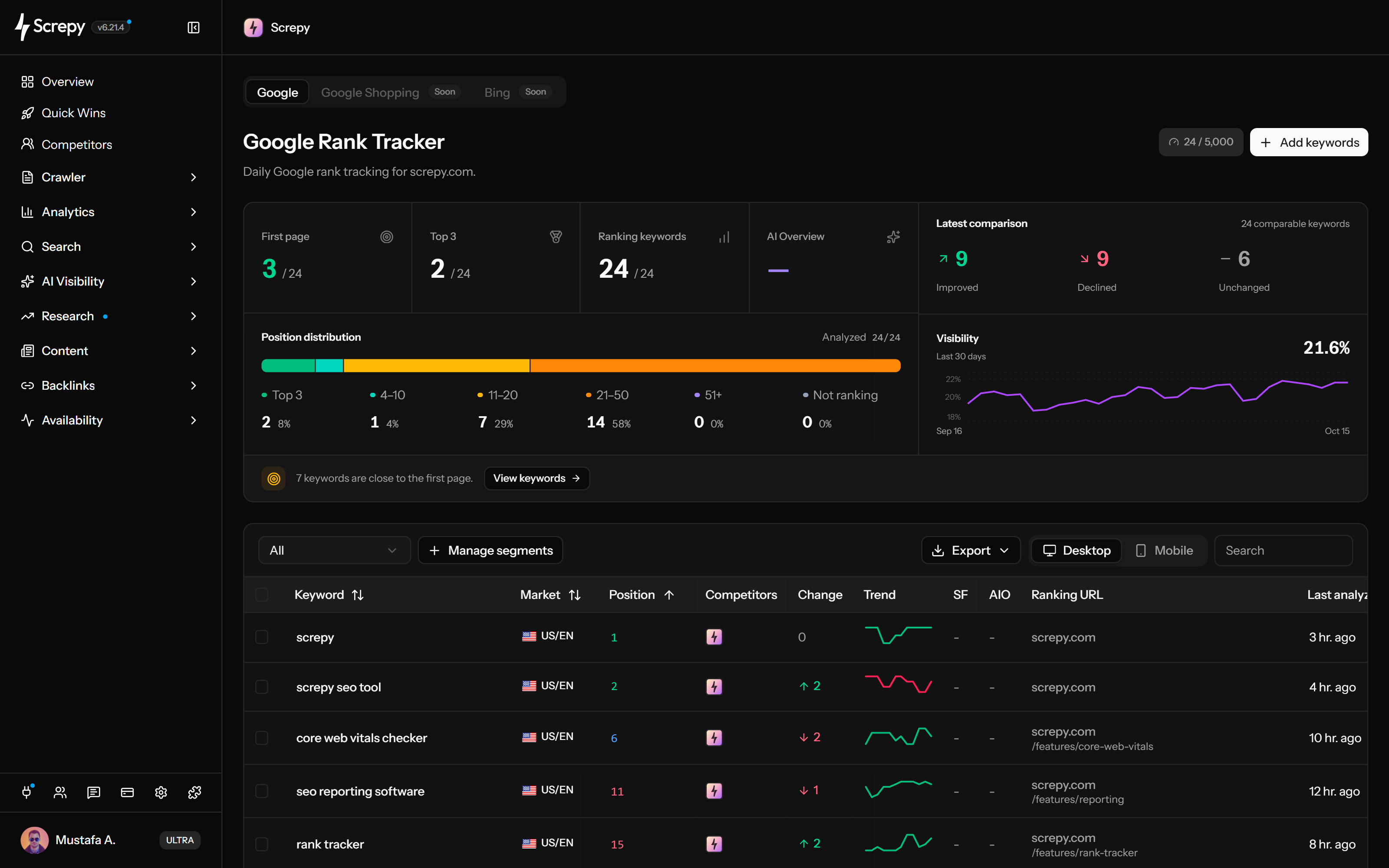
Track selected Google keywords by country, language and device. Review positions, trends, ranking URLs, competitors and visibility, then organize segments and export your results. Set daily, weekly, fortnightly or monthly checks in project settings.










Build a recurring monitor for the search terms your pages need to rank for. Rank Tracker follows your selected Google organic keywords; discovering every keyword a domain ranks for is a separate Organic Keywords workflow.
linen shirtUSKeep each device's results in its own search context. Switch the keyword table between desktop and mobile to compare the same term without mixing their recorded positions.
Read a keyword's movement alongside its last analysis date. A short trend shows recent ranked observations, while the change column distinguishes gains, losses and first appearances.
Rankings
+24 Position
Compare configured project competitors on the keywords you already monitor. Their positions provide context when your page rises or falls; this is not a discovery report of every competitor keyword.
linen shirtGoogleSee the highest-ranked matching project URL recorded for a keyword. An unexpected landing page gives you a concrete starting point for reviewing intent, internal links or a recent page migration.
linen shirtGoogleOrganize tracked keywords around topics or sections of your site. Manage segments with keyword text or ranking URL rules, then review a focused group instead of the whole portfolio.
/shop/linen-shirt
/shop/linen-dress
/guides/linen
Set the pace of recurring checks in project settings. Choose daily, weekly, every two weeks or monthly, and use a custom schedule when a particular start time matters.
Use the overview to read the direction of your tracked portfolio: weighted visibility, seven-day change and the number of keywords in the Top 3 and Top 10. These metrics summarize recorded rankings, not search traffic.
Visibility
62%Read the SERP feature indicators alongside organic position. Where collected, the table distinguishes features detected in the results from features associated with your own site.
linen shirtGoogleClick a keyword to run a new SERP lookup with its search settings. Inspect the results you can retrieve now when a stored ranking needs further investigation.
linen shirtGoogleDownload CSV or Excel for reporting or further analysis. The export includes all tracked keywords for the selected device and segment, rather than only the visible table page.
Ask your AI assistant about tracked keywords, ranking history and segments through Screpy SEO MCP. Find movements worth investigating and keep the country, device and date in context.
Rank tracking is most useful when every term has a purpose, every comparison uses consistent settings, and every response is verified against the page and later checks.
Track queries connected to an important page, market, campaign, or customer journey. A smaller purposeful set is easier to interpret than a large list with no owner or next action.
Use the same country, language, optional location, device, and available check frequency. A settings change can alter the result even when the page itself has not changed.
Compare position, change, recent trend, ranking URL, visibility and last analysis time. Check competitor context and later comparable observations before treating one fluctuation as sustained movement.
Review the ranking page, search intent, recent releases, internal links, crawl and indexability signals, content changes, and competitor movement. Record the change and return after the next comparable analyses.
Recurring position data becomes useful when it supports a concrete content, competitive, market, or reporting decision—not when the team monitors every possible query without a next action.
Follow the target keyword set and ranking URL after a meaningful refresh without assuming that one early movement proves the update worked.
Compare project and competitor positions for the same tracked terms to see whether visibility shifted across the market or only on your site.
Keep country, language, location, desktop, and mobile contexts explicit when teams manage international or region-specific search campaigns.
Compare Screpy and AccuRanker on keyword capacity, result depth, refresh controls and whether you need audits and monitoring alongside rank tracking.
Use Rank Tracker for recurring checks of selected terms, the free checker for one current snapshot, and Search Console for the broader queries and pages where Google measured impressions or clicks.
Monitor a deliberate keyword portfolio with consistent market and device settings, history, ranking URLs, competitors, segments, and exports.
Run a one-time Google keyword check when you need a current result snapshot without creating a recurring project monitor.
Review the wider query and page performance Google measured for a verified property, including clicks, impressions, CTR, and average position.
Screpy documentation
Follow the Screpy guide to add keywords, keep search settings comparable, interpret movement, review history and competitors, and use Rank Tracker data through supported interfaces.
Learn the concepts behind this workflow and apply them with practical SEO guidance.
Compare rank tracking tools with MCP support, saved keyword history, research data, access limits, and a practical test before choosing your connection.
Read articleRank tracking shows keyword positions by location and device; watch SERP features, daily refresh timing, target URL swaps, and sampling that skew reports.
Read articleCan you trust Google rank tracking tools? Learn how to check suspicious drops, distinguish collection issues, and compare positions with Search Console.
Read articleAI keyword rank tracking automates SERP monitoring, flags ranking volatility and competitor gaps, and prioritizes SEO actions by device and location.
Read articleUnderstand tracking scope, search settings, visibility metrics, ranking URLs, competitors, segments, result depth, exports, and how recurring monitoring differs from a one-time check.
A keyword rank tracker records Google organic positions for selected terms with a defined country, language and device. Screpy adds recurring checks, recent trends, ranking URLs, competitors, visibility and segments. Best recorded positions are included in CSV and Excel exports.
Yes. The table compares your project with configured competitors on tracked terms. Competitor positions may be retained from the last full result scan while your own position has a newer check. Use them as investigation context, not proof of what caused your ranking change.
Recurring checks use the first 10 organic results by default. Accounts with Top 100 access can check up to 100 positions. A keyword outside the checked range is not necessarily unindexed; Search Console and Organic Keywords provide complementary search data.
Choose daily, weekly, fortnightly or monthly in project settings; new projects default to monthly. A custom schedule adds a start time in the displayed timezone and the appropriate weekday or day of month. Scheduling sets the start, not a guaranteed finish time.
The dashboard keyword form supports country, language and mobile, desktop or both. API and MCP creation also accept an optional location. Within one project, changing location alone cannot add another copy of the same keyword, country, language and device. Keep the context consistent when comparing checks.
Manual results can vary with location, device, language, personalization, timing, and SERP layout. Compare rankings collected with the same configured context and look for sustained movement rather than expecting every manual search to reproduce one recorded position.
The free Keyword Rank Checker gives you a current snapshot for one keyword search. Rank Tracker is for a selected portfolio that needs recurring checks, position history, market and device settings, ranking URLs, competitors, segments, and exports inside a project.
Yes. CSV and Excel include all keywords for the selected device and segment, even beyond the visible page. Keyword search does not narrow the download. Fields include current and best positions, change, market settings, ranking URL and last analysis time; full history and competitor columns are separate data.
Segments group tracked keywords through keyword-text or ranking-URL rules, including keyword, path, host, or full-URL conditions. You can preview matches, review overlap, and filter to saved segments or keywords that match no segment. Keyword rules also work before a ranking URL is found.
Visibility is a weighted indicator based on recorded keyword positions, not clicks or a share of all Google searches. Top 3 and Top 10 count tracked terms in those position ranges; seven-day change compares visibility over that interval. The overview includes both devices unless a segment narrows its keyword set.
Yes. The keyword table includes the current ranking URL and whether the result belongs to the project domain. A URL change can reveal intent mismatch, competing pages, or a deliberate page transition that deserves investigation.
No. A higher position can improve opportunity, but traffic also depends on search demand, SERP features, title and description appeal, intent, seasonality, brand preference, competition, and whether Google records an impression. Use Rank Tracker beside Search Console and conversion data.
Rank Tracker follows the terms and search contexts you deliberately configure. Search Console reports the broader queries and pages where Google recorded impressions or clicks for a verified property. Use Rank Tracker for controlled monitoring and Search Console for measured search performance; the two datasets are related but not interchangeable.
A comprehensive SEO toolkit at a refreshingly affordable price.