Screpy - AI SEO Audit Tool

Screaming Frog Alternative for SEO Audits

Screpy is a Screaming Frog alternative for teams that want cloud-based website audits, recurring monitoring, rank tracking, uptime, PageSpeed, Search Console, AI visibility, and reports in one workspace. Screaming Frog SEO Spider is stronger for advanced desktop crawling, custom extraction, granular crawl configuration, and local analysis of large websites.

TL;DR

Too Long; Didn't Read

Show summary

Is Screpy a good Screaming Frog alternative?

Yes when you want a cloud SEO crawler that keeps audits, monitoring, rankings, performance, AI visibility, and reports together. Screpy Pro starts at $19/month. Screaming Frog SEO Spider costs $279/year in USD, also offers a free 500-URL crawl, and remains the stronger specialist for configurable desktop crawling and custom extraction.

Choose Screpy when

  • You want cloud crawls, dated audit history, uptime, PageSpeed, rankings, Search Console, AI visibility, and reports in one workspace.
  • Team access and an easier recurring monitoring workflow matter more than advanced crawler customization.

Choose Screaming Frog when

  • You need custom extraction, custom JavaScript, forms authentication, granular spider configuration, or local crawl files.
  • You are an experienced technical SEO who wants direct control over crawling and can provide the required machine memory and storage.

Use both when

  • Screpy monitors website health continuously while Screaming Frog handles specialist investigations and custom extraction.
  • The team needs shareable cloud evidence without giving up a mature desktop crawler for complex audits.

Check before switching

  • Compare crawl capacity, JavaScript rendering, authentication, robots behavior, extraction rules, integrations, exports, and scheduling.
  • Confirm whether each workflow must run in the cloud, on a specific computer, or inside an automated command-line process.

How we compared Screpy and Screaming Frog SEO Spider

Reviewed by Screpy SEO Team on using the cited product and pricing sources.

Workflows reviewed
Pricing and workspace · Crawler control and scale · Technical SEO evidence · History, monitoring, and wider SEO
Plans compared
Screpy Pro · Screaming Frog Free · Screaming Frog Paid
Measured scope
26 criteria across 4 sections, supported by 5 cited sources.
Limitations
This is a source-based comparison, not a controlled benchmark of proprietary data or every paid-account workflow. Verify current pricing and availability before buying.

Screpy vs Screaming Frog pricing

Screpy Pro costs $19 per month for a cloud SEO workspace. Screaming Frog SEO Spider costs $279 per user per year in USD, while its free version crawls up to 500 URLs. The plans are not equivalent: Screpy bundles recurring SEO operations; Screaming Frog licenses a specialist desktop crawler.

Screpy - AI SEO Audit Tool Screpy Pro
$19 /month

For teams that want cloud website audits and ongoing SEO monitoring in one shared workspace.

  • ✓ 5 projects and 5 included team seats
  • ✓ Cloud crawls with Pages, Links, and Images reports
  • ✓ Rank tracking, uptime, PageSpeed, and Search Console
  • ✓ AI visibility and reusable SEO reports
View Screpy pricing
Screaming Frog SEO Spider SEO tool logo in Screpy feature comparison table Screaming Frog SEO Spider Screaming Frog SEO Spider Screaming Frog Free
$0 up to 500 URLs per crawl

For one-off small-site crawls using the core SEO Spider checks on a local computer.

  • ✓ Find broken links, errors, and redirects
  • ✓ Review titles, metadata, directives, hreflang, and duplicates
  • ✓ Generate XML sitemaps and crawl visualisations
  • ✓ Advanced licensed features are excluded
View Screaming Frog SEO Spider pricing
Screaming Frog SEO Spider SEO tool logo in Screpy feature comparison table Screaming Frog SEO Spider Screaming Frog SEO Spider Screaming Frog Paid
$279 /user/year

For technical SEO specialists who need unrestricted desktop crawling and advanced configuration.

  • ✓ Unlimited URLs subject to allocated memory and storage
  • ✓ JavaScript rendering, scheduling, and crawl comparison
  • ✓ Custom extraction, search, JavaScript, and robots.txt
  • ✓ Analytics, Search Console, PageSpeed, and link integrations
View Screaming Frog SEO Spider pricing

Prices checked September 3, 2026. Public USD list prices checked on September 2, 2026. Screaming Frog also lists £199 and €245 annual prices. Each SEO Spider user needs a licence, with volume discounts beginning at five licences. Screpy limits and eligibility depend on the selected plan.

Screpy vs Screaming Frog feature comparison

Compare the crawler architecture, audit depth, monitoring, collaboration, reports, and wider SEO capabilities that determine whether Screpy can replace Screaming Frog in your workflow.

Swipe horizontally to compare →

Capability Screpy SEO tool logo in Screpy feature comparison table Screpy Screpy Screaming Frog SEO Spider SEO tool logo in Screpy feature comparison table Screaming Frog SEO Spider Screaming Frog SEO Spider
Pricing and workspace
Entry price Included

$19 per month

A broader cloud SEO workspace with five projects and five included team seats on Pro.

Included

Free or $279 per user per year

The free version is limited to 500 URLs; the paid licence unlocks advanced features and removes the fixed crawl limit.

Delivery model Included

Cloud workspace

Start crawls and inspect stored results from the web application without installing a desktop crawler.

Different scope

Desktop application

Install SEO Spider on Windows, macOS, or Linux and run crawls using local machine resources.

Team access Included

Shared project workspace

Invite teammates to review the same projects, monitoring history, and reports.

Limited

Licence required for each user

Licences are assigned per user; bulk discounts start with five licences.

Free option Limited

Plan-based access

Use Screpy within the current free-trial and plan rules shown during signup.

Included

500 URLs per crawl

The free desktop version includes core crawl checks with a 500-URL limit.

Crawler control and scale
Crawl scope and depth Included

Project scope, capacity, and depth

Set crawl capacity and internal-link depth, then inspect whether the completed crawl reached the selected limit.

Included

Granular spider configuration

Control limits, include and exclude rules, crawl behavior, URL parameters, content types, and many other spider settings.

Spider and list modes Different scope

Project-based website crawls

Screpy crawls a configured website project and stores the resulting page, link, image, and audit evidence in the cloud.

Included

Spider and list modes

Crawl a website by following links or upload a specific URL list for migrations, validation, and focused technical checks.

Maximum crawl size Higher plan

Plan-aware cloud capacity

Project crawl capacity depends on the selected Screpy plan.

Included

No fixed paid URL limit

Paid crawl size depends on the memory, storage, configuration, and practical limits of the computer running the crawl.

JavaScript rendering Included

Optional rendered-page crawl

Enable JavaScript rendering when the website requires a browser-rendered response for useful analysis.

Included

JavaScript rendering

The paid application can render JavaScript and exposes advanced rendering configuration for technical investigations.

Request pacing Included

Concurrency and request delay

Adjust request pace to the website instead of applying one crawler speed everywhere.

Included

Speed and rate controls

Configure threads, URI requests per second, response timeout, and related crawl-speed behavior.

Forms authentication Not included

Publicly accessible crawl scope

Screpy does not present the same interactive forms-authentication workflow as SEO Spider.

Included

Forms-based authentication

The paid version can crawl selected authenticated experiences after configuration.

Custom extraction and search Not included

Structured SEO reports

Screpy exposes defined page, link, image, and audit fields rather than a general custom scraper.

Included

Custom extraction, search, and JavaScript

Extract or search custom page data and run custom JavaScript during specialist crawl workflows.

Crawl visualizations Different scope

Filterable page and link evidence

Use page, source-link, destination, depth, and audit records to investigate site structure without a dedicated crawl graph.

Included

Crawl, directory, and word-cloud visualizations

Explore tree and force-directed diagrams, directory structures, and Link Score for internal-link analysis.

Technical SEO evidence
Status codes and redirects Included

Page and link evidence

Inspect response status, redirect behavior, source links, destinations, and affected pages.

Included

Detailed response and redirect reports

Review errors, redirect chains and loops, redirect destinations, and related crawl data.

Metadata and headings Included

Page-level fields and issues

Review titles, descriptions, headings, canonicals, directives, and the pages behind each pattern.

Included

Dedicated metadata tabs

Filter missing, duplicate, long, short, or multiple titles, descriptions, and headings.

Canonical and indexability Included

Canonical, robots, and indexability context

Inspect declared canonicals, directives, status, and crawl evidence together.

Included

Canonical and directive auditing

Audit canonicals, robots directives, hreflang, pagination, and indexability signals with detailed filters.

Duplicate content Included

Repeated content signals

Use audit findings and page records to investigate duplicated or weak page elements.

Included

Exact and near duplicates

The paid version detects exact duplicates and configurable near-duplicate content.

Images Included

Image inventory and SEO issues

Inspect discovered images, source pages, alternative text, dimensions, size, and image-related findings.

Included

Image crawl reports

Find large images and missing alt text, with source-page evidence and configurable filters.

Structured data and accessibility Included

Audit findings

Review structured-data and accessibility signals within the wider website audit.

Included

Validation and accessibility auditing

The paid version includes structured-data validation, accessibility auditing, mobile usability, and AMP checks.

Issue guidance Included

Prioritized website audit findings

Group recurring findings and affected pages so teams can move from crawl evidence to a focused fix list.

Included

Issue type, priority, and guidance

The Issues tab classifies crawl findings and provides descriptions and recommendations, while final prioritization still requires website context.

History, monitoring, and wider SEO
Recurring crawl history Included

Dated cloud snapshots

Keep completed crawls with the project and compare later evidence after website changes.

Included

Saved crawls, scheduling, and comparison

The paid version can save crawl files, schedule runs, compare crawls, and detect changes when the host machine or automation runs them.

Uptime monitoring Included

Availability checks and incidents

Monitor selected URLs over time and review detected availability changes.

Not included

Not a hosted uptime monitor

SEO Spider crawls when it is run; it is not positioned as an always-on uptime monitoring service.

PageSpeed monitoring Included

Historical performance monitoring

Track selected performance metrics and compare dated results in the same project.

Different scope

PageSpeed Insights integration

The paid version can retrieve PageSpeed data during configured crawls, but does not replace a hosted performance-monitoring timeline.

Search Console and rank tracking Included

Search performance and tracked positions

Connect Search Console and monitor selected keyword positions alongside technical evidence.

Different scope

Search Console integration, no native rank tracker

SEO Spider can enrich crawls with Search Console data but is not a recurring keyword rank-tracking platform.

Backlinks and AI visibility Higher plan

Additional search visibility workflows

Review backlink evidence and monitor selected prompts across supported AI answer providers.

Different scope

External link integrations and AI-assisted crawling

SEO Spider connects selected link metrics and can use configured AI APIs during crawls, but is not a hosted backlink index or AI visibility tracker.

Reports and collaboration Included

Shared reports and exports

Filter project evidence, export records, and generate reusable or branded SEO reports where eligible.

Included

Exports and Looker Studio crawl report

Export detailed crawl data and use the paid Looker Studio crawl report; team sharing depends on the surrounding file and reporting workflow.

API and agent workflows Higher plan

SEO API and MCP

Use eligible project data in supported API and AI-agent workflows.

Different scope

CLI automation

SEO Spider supports command-line execution and exports for desktop automation rather than a hosted project API or MCP product.

Cloud SEO crawling

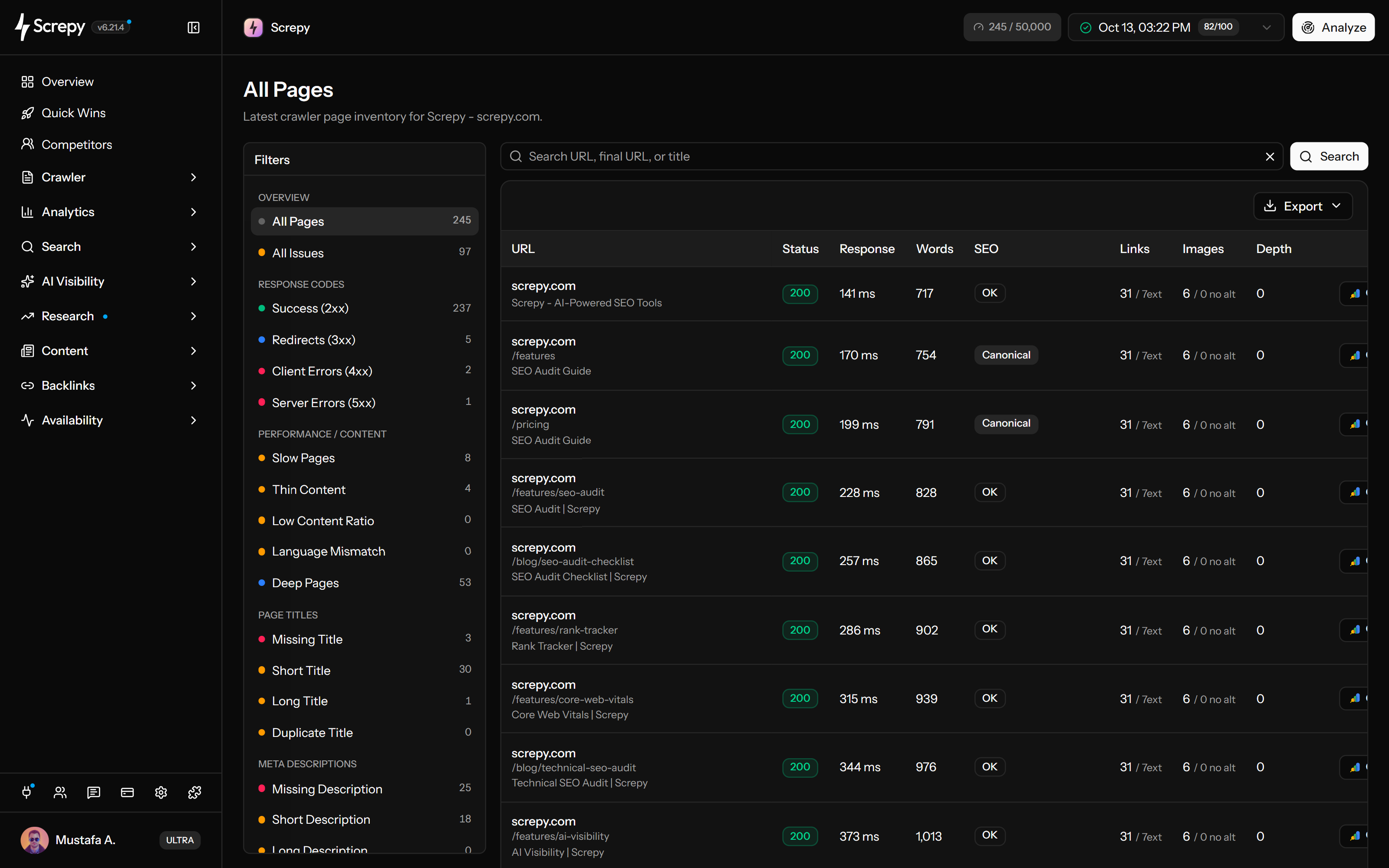
Screpy is a cloud-based Screaming Frog alternative for recurring website audits. Crawl settings, Pages, Links, Images, findings, and dated snapshots stay inside a shared project instead of a local crawl file.

  • Project-level crawl scope, capacity, depth, JavaScript rendering, concurrency, and request delay
  • Filterable Pages, Links, and Images inventories with affected-record evidence
  • Dated crawl snapshots available to the shared project workspace
  • No desktop installation, local database, or dedicated crawl computer
  • One browser-based workspace for teammates reviewing the same audit

Advanced desktop crawling

Screaming Frog SEO Spider offers deeper crawl configuration than Screpy. It remains the stronger choice for technical SEOs who need custom extraction, specialist crawl modes, local storage, and direct control over the spider.

  • Custom extraction, search, and JavaScript for specialist data collection
  • Forms authentication and detailed controls for complex crawl environments
  • Paid crawl size governed by the computer's available memory and storage
  • Spider and list modes for full-site crawls, migrations, and supplied URL sets
  • Crawl visualizations and Link Score for detailed internal-link analysis

SEO monitoring after the crawl

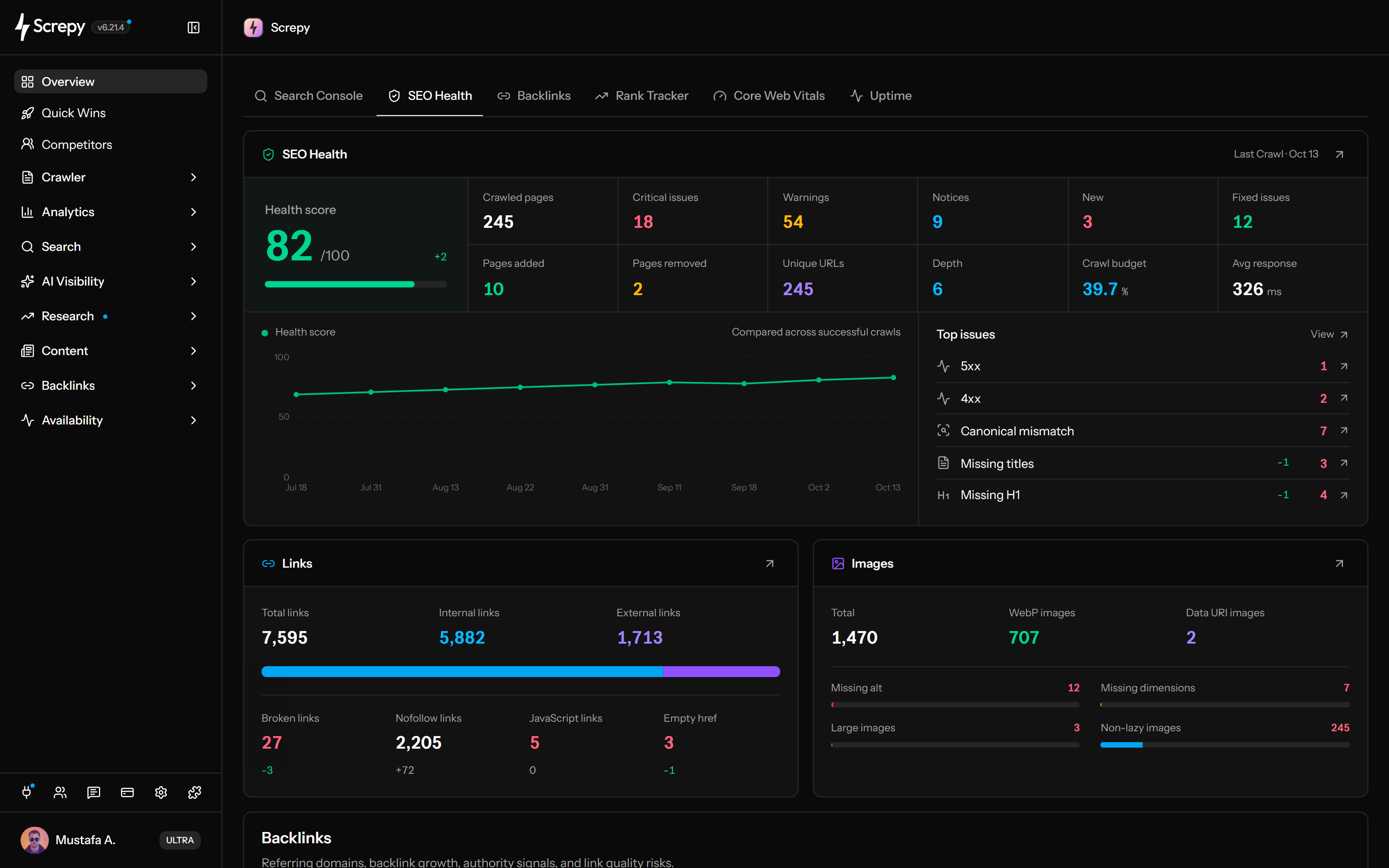
Screpy extends a website crawl into ongoing SEO monitoring. Technical findings stay beside uptime, PageSpeed, Search Console, rank tracking, backlinks, AI visibility, and reports after the first audit ends.

  • Prioritized website audit findings tied to affected pages and technical evidence
  • Recurring uptime, PageSpeed, ranking, and search-performance monitoring
  • One project history for investigation, implementation, and later verification
  • Search Console queries and tracked rankings beside technical website changes
  • AI visibility and backlink workflows without a separate desktop export

SEO audit reporting

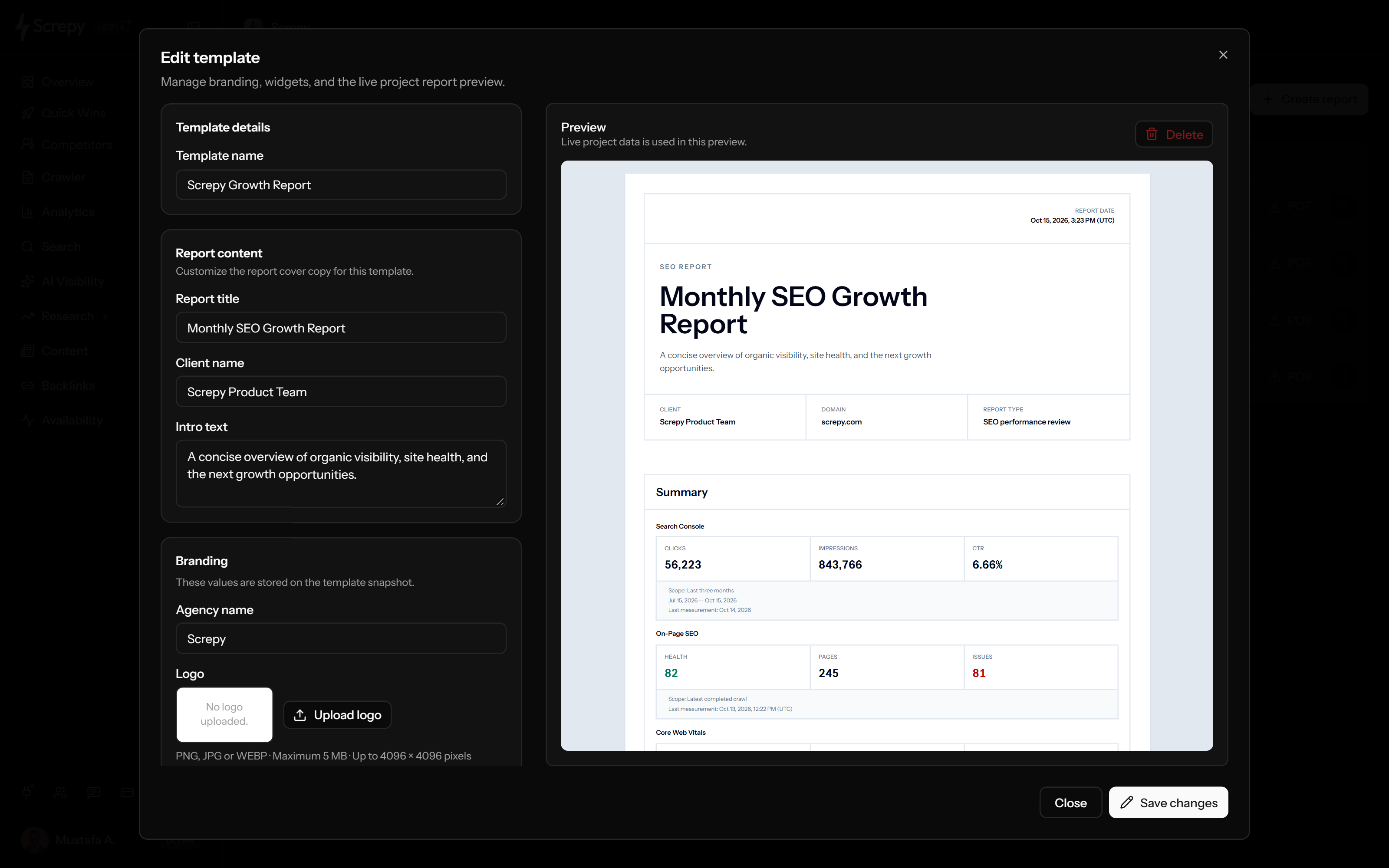
Screpy turns shared crawl evidence into reusable or branded SEO reports. Screaming Frog provides deeper raw exports and a Looker Studio crawl report for teams that prefer to build their own reporting workflow.

  • Screpy supports shared project evidence and reusable SEO report workflows
  • Screaming Frog supports detailed exports and a paid Looker Studio crawl report
  • Choose based on whether the audience needs raw analysis or a maintained client-facing report
  • Keep affected URLs and prioritized findings available after report delivery
  • Separate specialist crawl exports from recurring client monitoring when using both tools

Who should choose Screpy or Screaming Frog?

The better option depends on whether the main job is continuous cloud monitoring or a deeply configurable desktop crawl.

Choose Screpy when a shared, guided cloud workflow is more useful than learning and maintaining an advanced desktop crawler.

  • Cloud access
  • Prioritized findings
  • Ongoing monitoring

Technical SEO specialists

Choose Screaming Frog when crawl customization, extraction, authentication, local files, and detailed filters are central to the work.

  • Custom extraction
  • Granular crawl controls
  • Local data workflows

Choose Screpy for shared monitoring and report delivery; add Screaming Frog when senior auditors need custom investigations.

  • Shared project history
  • Client-ready reports
  • Specialist crawler when needed

Large or complex websites

Test both tools against real crawl size, rendering, authentication, rate limits, storage, exports, and automation before migrating.

  • Representative crawl sample
  • Infrastructure constraints
  • Workflow parity check

How to evaluate Screpy as a Screaming Frog alternative

Do not compare feature lists alone. Run the same representative website through both tools and inspect whether the evidence supports the decisions your team makes.

  1. 01

    Document the current crawl configuration

    Record start URLs, include and exclude rules, robots settings, rendering mode, authentication, speed, extraction rules, integrations, and export templates.

  2. 02

    Run a representative Screpy crawl

    Use a website segment that includes redirects, canonicals, blocked pages, JavaScript templates, images, duplicate patterns, and known errors.

  3. 03

    Compare evidence, not issue totals

    Match affected URLs, source links, destinations, metadata, directives, rendering results, and crawl coverage before judging parity.

  4. 04

    Separate recurring and specialist work

    Move repeat monitoring and shared reports to Screpy while retaining SEO Spider for any custom extraction or advanced crawl configuration Screpy does not replace.

  5. 05

    Verify the next complete cycle

    Confirm the new crawl, prioritization, implementation, export, report, and post-deployment verification workflow before retiring a licence.

Methodology and official sources

This comparison uses public Screpy product information and current official Screaming Frog pages. Capabilities were grouped by the jobs users perform rather than treated as identical checklist items.

Screpy publishes this comparison. Screaming Frog is a trademark of its respective owner and does not sponsor or endorse this page. Prices, limits, integrations, and features can change; verify purchasing and technical requirements on the official pages.

  1. Source 1 · Screaming Frog Screaming Frog SEO Spider ↗ Checked 9/3/2026
  2. Source 2 · Screaming Frog SEO Spider pricing ↗ Checked 9/3/2026
  3. Source 3 · Screaming Frog SEO Spider FAQ ↗ Checked 9/3/2026
  4. Source 4 · Screaming Frog SEO Spider configuration guide ↗ Checked 9/3/2026
  5. Source 5 · Screpy Screpy pricing ↗ Checked 9/3/2026

Related SEO tool alternatives

Compare Screpy with other platforms built for similar SEO workflows.

Sitechecker SEO tool logo in Screpy feature comparison table Sitechecker

Choose based on portfolio size, monitoring depth, collaboration, client delivery, and total cost.

SEOptimer SEO tool logo in Screpy feature comparison table SEOptimer

Choose by the role of the audit: one-time sales asset or ongoing SEO operating signal.

WooRank SEO tool logo in Screpy feature comparison table WooRank

Choose by what happens after the first website review: ongoing SEO operations, prospecting, or enterprise data workflows.

Semrush SEO tool logo in Screpy feature comparison table Semrush

Screpy is the better fit when recurring site monitoring and execution matter more than a broad marketing-intelligence suite. Semrush remains the stronger choice for large-scale keyword, competitor, PPC, and market research.

Screaming Frog alternative FAQ

Answers about crawler differences, pricing, crawl limits, JavaScript, technical audits, monitoring, and migration.

What is the best Screaming Frog alternative?

The best alternative depends on the job. Screpy is a strong option for cloud audits, recurring monitoring, rankings, performance, AI visibility, and reports in one workspace. Screaming Frog remains stronger when you need advanced desktop crawl configuration, custom extraction, authentication, and local control.

Is Screpy a cloud alternative to Screaming Frog?

Yes. Screpy runs website crawls in a cloud project and stores page, link, image, audit, and historical evidence for later review. Screaming Frog SEO Spider is a desktop application that runs using the licensed user's computer resources.

Is Screpy cheaper than Screaming Frog?

Their billing models differ. Screpy Pro starts at $19 per month. Screaming Frog SEO Spider lists a $279 annual licence for one user and also provides a free version limited to 500 URLs per crawl. Compare team size, crawl needs, and the wider tools required rather than annualizing price alone.

Is there a free Screaming Frog alternative?

Screaming Frog itself provides a free version that crawls up to 500 URLs. Screpy access follows the current signup and plan rules. If zero cost is the primary requirement, compare the free crawler's URL limit and missing paid features with the audit scope you actually need.

Can Screpy crawl more than 500 URLs?

Screpy crawl capacity depends on the selected plan and project settings. The 500-URL limit belongs to the free Screaming Frog version; its paid version has no fixed URL limit but practical capacity depends on the computer's memory and storage.

Does Screpy support JavaScript rendering?

Screpy supports optional JavaScript rendering for crawls that need a rendered response. Screaming Frog also supports JavaScript rendering and offers more granular rendering and crawler configuration for specialist investigations.

Can Screpy replace Screaming Frog custom extraction?

Not completely. Screpy provides structured page, link, image, and audit fields, but it is not a general custom extraction, custom source-search, or custom JavaScript crawler. Keep Screaming Frog when those workflows are required.

Does Screpy find broken links and redirects?

Yes. Screpy records page and link evidence so you can inspect response status, source pages, destinations, and affected records. Screaming Frog also provides detailed broken-link, redirect-chain, and redirect-loop reports.

Does Screaming Frog include rank tracking and uptime monitoring?

SEO Spider is not positioned as a native recurring rank tracker or hosted uptime monitor. Screpy includes these workflows alongside website crawling, subject to the selected plan.

Which tool is better for agencies?

Screpy fits agencies that want shared cloud projects, ongoing monitoring, and reusable client reports. Screaming Frog fits technical audit teams that need granular crawler control and custom exports. Many agencies can use Screpy for recurring client operations and SEO Spider for specialist audits.

Does Screaming Frog integrate with Search Console and PageSpeed Insights?

Yes. The paid SEO Spider can connect Google Search Console and PageSpeed Insights data to a crawl. Screpy keeps Search Console and PageSpeed monitoring within its cloud workspace so teams can review those signals alongside ongoing project history.

Should I cancel Screaming Frog after moving to Screpy?

Only after a representative crawl and full reporting cycle proves that Screpy covers the work you perform. Retain SEO Spider if your process depends on custom extraction, forms authentication, granular spider settings, local crawl files, or command-line automation.

Try a cloud Screaming Frog alternative

Run a Screpy website audit and decide whether a shared cloud workflow fits your recurring SEO work. Keep specialist desktop tools wherever their deeper crawl controls remain necessary.