


Compare market messaging
Review how competing advertisers frame the problem, offer, proof, and call to action, then identify a clearer angle your own campaign can test.
Research competitor messaging by domain. Select your project or an added competitor, review up to 120 available public ad records, and compare creatives, advertisers, formats and display dates. Use what you can actually observe to prepare an original campaign brief.
Read the visible message, offer and call to action when a preview is available.
Keep the advertiser name, format and available verification beside the creative.
Review available first and last shown dates without treating them as proof of current activity.
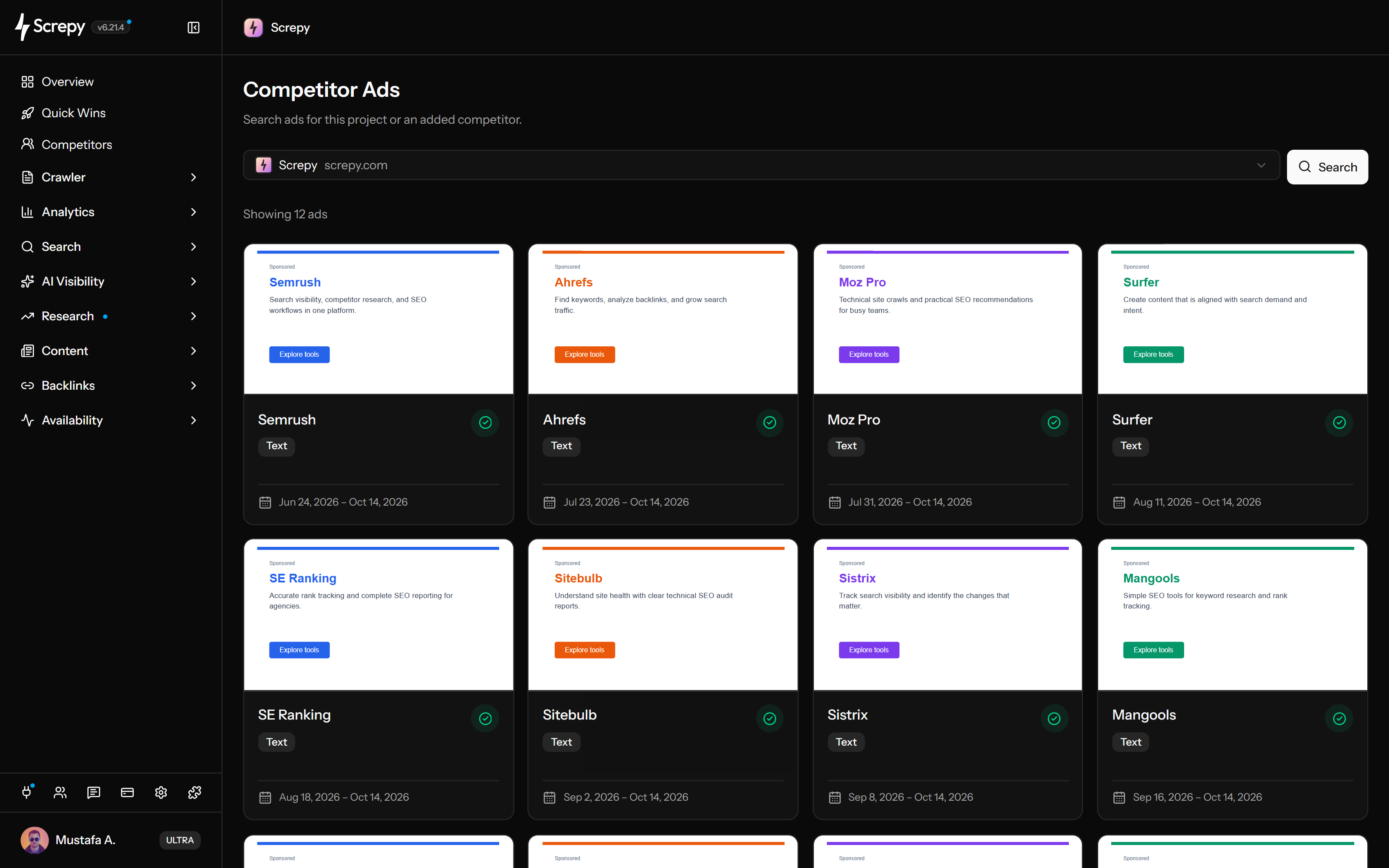










Choose your project or an added competitor to inspect the public ad records available for that business.
Examine the message within its creative format before using it as input for your own campaign.
VideoReview
Check who is named behind a creative, especially when similar brands, resellers or unfamiliar businesses appear.
Use the dates attached to a record to establish context before calling an ad current or long-running.
Period2026
Turn visible patterns into an original messaging hypothesis and choose evidence that can test it.
NotesMD
Plan your next SEO steps with an AI assistant using supported Screpy project data. SEO MCP does not currently expose Competitor Ads records or actions; use the dashboard for that feature’s workflow.
Start with a relevant domain, assess coverage, compare the result set, separate observation from inference, and test the final idea with your own campaign data.
Choose a competitor already added to the project, or add one from the selector. Start the search when the target is selected.
Read the returned ad count and empty state first. Available records are research evidence, not a guarantee that every ad or campaign has been captured.
Compare previews, advertiser names, formats, verification, and date ranges across the grid. Look for repeated positioning and offer patterns rather than one striking example.
Record what the creative visibly communicates. Do not infer budget, targeting, clicks, conversions, or profitability from an ad preview or display date.
Use recurring themes and obvious gaps to form a new messaging or format hypothesis, then validate it with your own campaign and conversion data.
The available records are most useful for messaging research, format exploration, advertiser context, and evidence-based team or client planning.
Review how competing advertisers frame the problem, offer, proof, and call to action, then identify a clearer angle your own campaign can test.
See whether the available records lean toward text, image, video, or mixed formats before deciding which creative direction deserves exploration.
Keep the advertiser name and available verification state beside the creative when similar brands, resellers, or unfamiliar entities appear in the results.
Compare Screpy with SpyFu when public ad creatives, historical PPC keywords, competitor intelligence, technical SEO, pricing, and reporting scope affect the decision.
Public creative evidence can reveal visible patterns. It cannot provide complete campaign coverage, continuous history, private targeting, or verified performance.
An empty or small result set means no additional records were available to this search. It does not prove that the domain has never advertised.
First and last shown dates do not prove uninterrupted delivery, current activity, campaign duration, or the frequency with which an ad appeared.
The report does not expose bids, spend, impressions, clicks, conversions, revenue, or profitability. A visible ad is not evidence that it performed well.
A domain search does not reveal the full keyword list, audience targeting, serving regions, devices, schedules, or destination-page performance behind a campaign.
Review available paid creative, research a domain’s organic visibility, or inspect the current organic result set. These workflows answer different competitive questions.
Search a domain for available ad previews, advertiser context, formats, verification, and display dates.
Research the queries and ranking URLs associated with a project or eligible competitor domain in a selected market.
Inspect the current Google organic result set and page-level evidence for one chosen keyword and country.
Learn the concepts behind this workflow and apply them with practical SEO guidance.
Understand the difference between SEO and SEM, how organic rankings and paid search work, and when Google Ads supports search visibility.
Read articleLearn how to do market analysis with risk management, competitor research, audience questions, rational decisions, and clearer positioning.
Read articleUse 26 Claude SEO prompts with clear inputs, output formats and checks for research, content, links, technical reviews and reporting. Verify before acting.
Read articleCompare SEO MCP servers for audits, rankings, Search Console, and keyword research, with documented limits, access requirements, and small tested tasks.
Read articleUnderstand domain search, available ad records, plan access, daily allowance, previews, advertiser verification, display dates, and the limits of competitive advertising research.
The active project is selected by default. Choose a competitor already added to that project, or add one from the selector, then select Search. Plan limits apply.
Competitor Ads is currently available on Max and Ultra plans. Plan availability can change, so review the pricing page and the access shown in the dashboard before upgrading.
Yes. Successful searches use the active plan's daily allowance, including when results are reused. Failed searches release their reserved allowance. Check the dashboard and current plan details for the available limit.
They are the earliest and latest display dates available for that ad record. Use them as recency context, not as proof that the creative ran continuously or remains active today.
No. Screpy does not claim access to competitor bids, spend, impressions, clicks, conversions, revenue, or return on ad spend. Use the visible creative as research input and validate decisions with your own campaign data.
No. The current workflow is domain-based creative research. It does not reconstruct a complete keyword list, audience targeting, serving settings, campaign structure, or destination-page performance.
It means no available ad records were returned for that domain in the current search. It does not prove that the company has never advertised or that every historical campaign has been checked.
The returned record identifies the advertiser as verified. This helps with identity context; it does not certify the offer, creative quality or performance. If the badge is absent, do not treat that alone as evidence of misconduct.
Select your project or an added competitor to review up to 120 available public ad records. A record can include a preview, advertiser name, format, verification, display dates and an external detail link. The count is the returned record set, not total campaign coverage.
No. Search can reuse recently collected results, and previously collected records can remain visible. First and last shown describe the ad record's available display dates; they do not prove it is running now. A successful search still uses the plan's daily allowance when results are reused.
Some records do not provide a usable image, embedded preview, or external details URL. Screpy shows a clear unavailable state instead of inventing or substituting creative content.