

Publishers and content libraries
See whether verified search and AI crawler families are requesting the site and whether important content paths return non-2xx responses.
Connect the Cloudflare zone matched to your Screpy project and review the latest seven days of verified bot activity. Compare crawler categories, publishers, data transfer, request trends, successful responses, and non-2xx URLs without confusing a crawler visit with an AI citation.
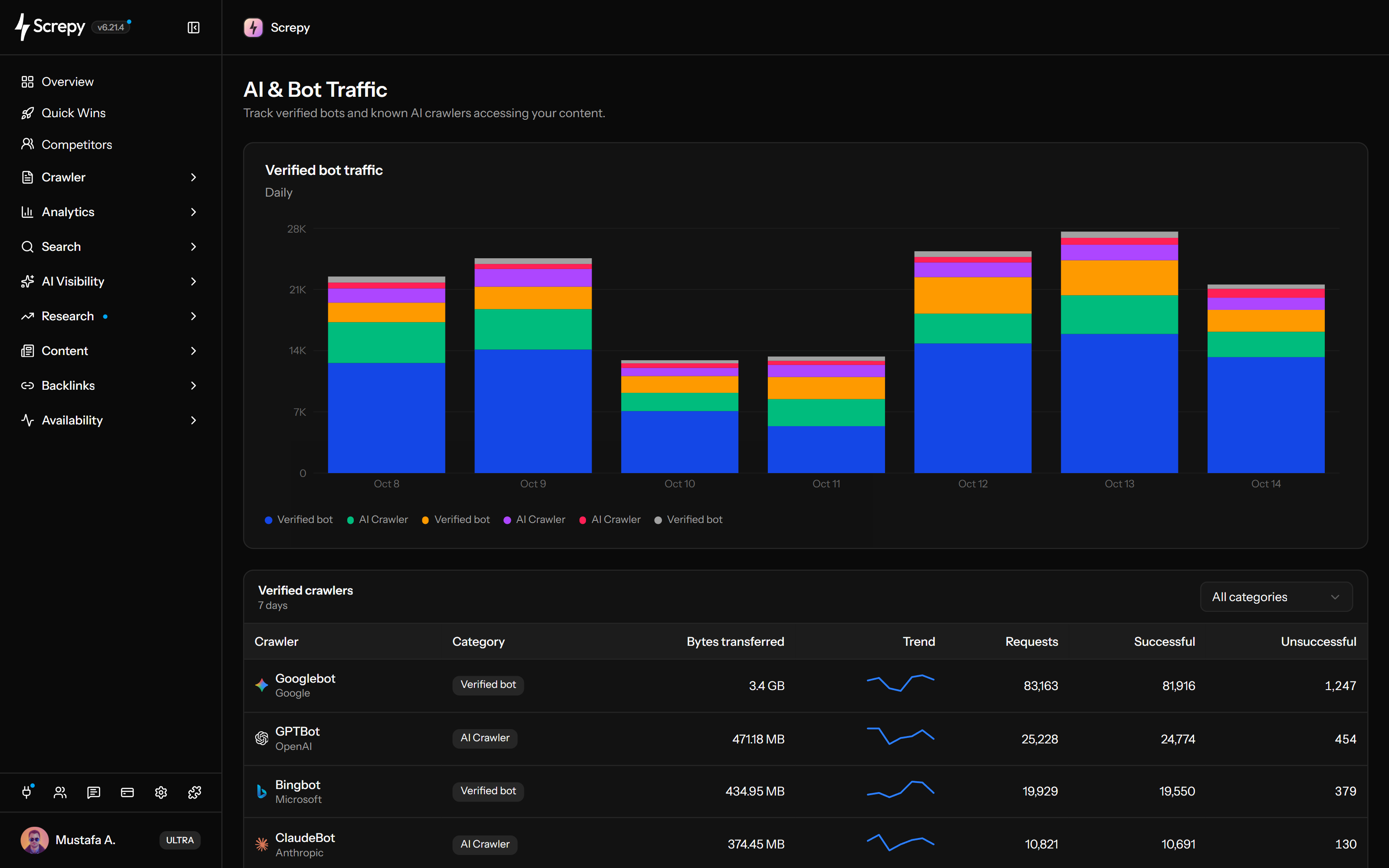










Add your Cloudflare connection to read verified bot requests for the zone matched to your Screpy project. Check the connection and reporting scope before interpreting an empty table.
 Screpy
Find the search and AI crawler families present in the connected data. Names and publisher context help you distinguish who sent requests before investigating their volume or responses.
Requests
42Use the category chart to spot concentrated requests, then check individual crawler sparklines for the same seven-day period. The current view has a fixed window rather than a custom date picker.
Requests
1,860Read request counts and transferred bytes together. They describe traffic volume and response size, not unique people, AI answer popularity or the value of your content.
Separate response classification from a diagnosis. The unsuccessful column includes every non-2xx response, so a high count does not by itself mean the website is broken.
HTTP status
200GET /HTTP/2 200Open a crawler's non-2xx count to see where its requests received those responses. Path, status and frequency give engineering or SEO teams a concrete investigation to follow.
SelectedGPTBot
| URL path | HTTP status | Requests |
|---|---|---|
/guides/seo | 404 | 128 |
/guides/seo | 301 | 36 |
/setup | 503 | 12 |
Ask about Quick Wins built from available search, crawl and connected Cloudflare traffic signals through SEO MCP. Cloudflare access covers those opportunities, not the complete analytics or bot-traffic dashboard.
Start with the busiest categories, select a crawler and inspect repeated non-2xx paths. Check the intended response before handing a specific route or access issue to the team responsible.
Use an active API token that can list the website zone and read analytics, then confirm the project domain has a matching connected zone.
Look for sustained activity, sudden bursts, missing expected categories, or a large Other segment before opening individual crawler rows.
Use requests, bytes transferred, hourly trend, successful 2xx responses, and non-2xx counts to choose the crawler that needs attention first.
Review each repeated path and status, confirm whether it is intentional, investigate unexpected responses, and use later traffic evidence to confirm the behavior changed.
The view is most useful when a team owns enough website context to decide whether a traffic pattern or HTTP response is expected.
See whether verified search and AI crawler families are requesting the site and whether important content paths return non-2xx responses.
Add real request evidence to crawlability discussions without presenting crawler activity as proof of indexing, citations, or answer visibility.
Hand off a specific crawler, path, HTTP status, and request count when an application route or deployment needs technical investigation.
Keep each client or website zone connected to its matching Screpy project and use the same review method across separate properties.
Clear limits make the evidence safer to use in SEO, content, engineering, and AI-search discussions.
A verified crawler request records an access attempt and its response. Even a blocked request can appear; the record does not prove content download, indexing, training, citation or inclusion in an AI answer.
The current Screpy view uses a fixed seven-day period with hourly trend data. It does not promise arbitrary date ranges or long-term bot history.
The view is built from verified bot categories available for the connected zone. It is not a raw server-log explorer or a complete inventory of every scraper.
Screpy reports activity and response outcomes. The current view does not block crawlers, change access rules, send bot alerts, or export a full request log.
Use crawler analytics for website requests, AI Visibility for monitored answers, or Website Audit when a repeated response problem needs a broader technical investigation.
Review seven days of verified crawler categories, request trends, transfer volume, response outcomes, and non-2xx paths.
Monitor selected prompts for brand mentions, citations, source domains, answer position, sentiment, competitors, and share of voice.
Crawl the wider site when non-2xx bot requests point to redirects, broken destinations, internal-link problems, or recurring template issues.
Learn the concepts behind this workflow and apply them with practical SEO guidance.
Learn how llms.txt works, how to create a useful file, what it cannot guarantee, and how to measure whether AI crawlers actually use it.
Read articleRank on ChatGPT by making pages crawlable, answering user questions clearly, and building credible sources that earn citations in relevant search responses.
Read articleLearn what SI SEO means, how to improve AI search visibility, and how to measure mentions, citations, visits, and business outcomes.
Read articleCompare robots.txt testers for AI search crawlers, test the right bot tokens, inspect matching rules, and separate crawl permission from real access.
Read articleUnderstand the connected data source, fixed reporting period, verified crawler scope, response logic, URL drilldown, and the difference between crawler access and AI answer visibility.
The table starts with traffic categorized as verified bots by the connected analytics source. Screpy adds readable identities for known crawler families such as Googlebot, Bingbot, OpenAI, Anthropic, Perplexity, Apple, Meta, and other recognized services when their requests are present. Available rows depend on actual zone traffic.
Connect an active Cloudflare API token that can list the relevant zone and read its analytics. Screpy then matches project domains to accessible zones. If the token lacks analytics permission, the project domain does not match a zone, or the required dataset is unavailable for that zone, the dashboard shows an unavailable state instead of substitute data.
Open the non-2xx count for the affected crawler, review each path and HTTP status, then decide whether the response is intentional. Unexpected redirects, 4xx responses, or 5xx responses can be checked against the live route, internal links, canonical destination, crawl configuration, and a wider Website Audit before a change is made.
No. The current feature is an analytics and investigation view. Access controls, firewall rules, robots directives, crawler alerts, referral analytics, and CSV exports are not managed from this Screpy page.
Screpy uses analytics from the Cloudflare zone matched to a project to report the latest seven days of verified bot traffic. The dashboard includes an hourly category trend and a crawler table with publisher, category, bytes transferred, request totals, successful requests, non-2xx requests, and a per-crawler trend.
No. Screpy reads available aggregated analytics for the matched Cloudflare zone; it does not ingest raw server logs or display each request event. Categories, crawler totals and path details use different groupings and source limits, so they should not be treated as a complete request ledger or expected to reconcile exactly. Missing source data is shown as unavailable.
Screpy counts HTTP 2xx responses as successful. Responses outside the 2xx range are counted as unsuccessful for this view, so the drilldown can include redirects as well as client and server errors. Review the exact status before deciding whether a response needs a fix.
No. The analytics record a verified crawler's request and response during the reporting period. A blocked request can be included, so the record does not even prove the crawler downloaded the content. It does not establish indexing, model training, a brand mention, citation or answer inclusion. Use AI Visibility to examine monitored prompts and stored answers.