


Revenue websites
Keep the storefront, booking site, subscription product, or lead-generation website under recurring external availability checks.
Monitor your project's public URL, review 30-day availability and response times, and investigate failed HTTP checks. Keep incident history and qualifying email alerts alongside your SEO work.
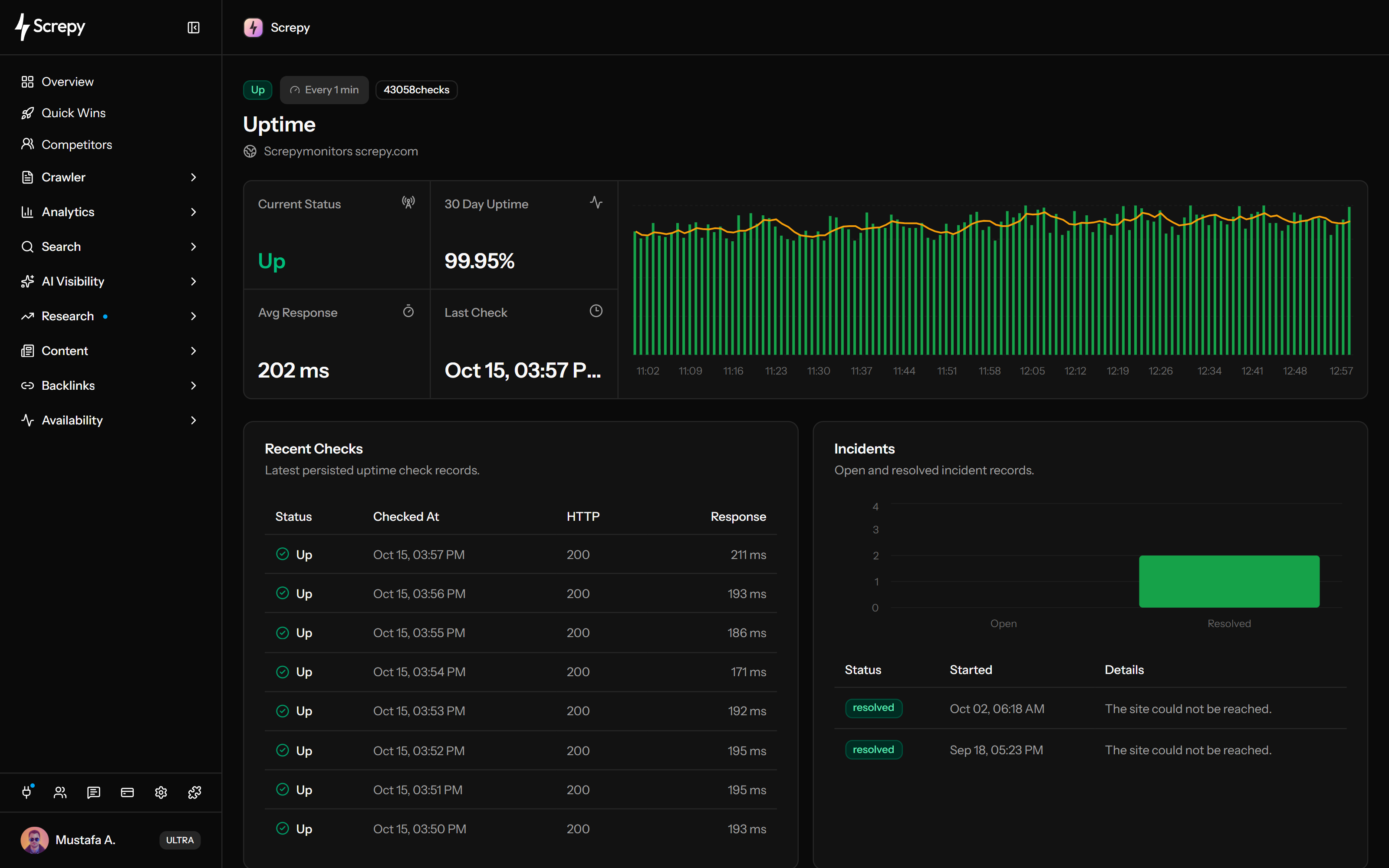










Enable recurring availability checks for the public URL saved in your Screpy project. Choose a useful visitor-facing target before deciding how often to check it.
example.com60 s
See how often the monitored URL responded successfully in the last 30 days. Read the percentage alongside the check count and latest timestamp.
Uptime
93.8%Use the response timeline to spot slower checks and repeated failures. A reachable URL can still respond slowly, so status and latency answer different questions.
Response time
240 msInspect the eight latest checks with status, time, HTTP code and response time. Compare these records with what your public URL is expected to return.
HTTP status
200GET /HTTP/2 200Follow an outage from its first failed check to a later successful check. Keep the incident record separate from the investigation into why the website failed.
Period
12 minSend qualifying outage notices to project members and an optional additional inbox. Incident recording starts before an email becomes eligible.
Projectexample.com
ReviewAsk a connected AI assistant to explain saved availability results for a project you can access. Use timestamps to distinguish recorded evidence from a new check.
/projectsJSON{
"data": [
{ "domain": "example.com" }
]
}Include availability evidence in a saved SEO report for a client or team. A report snapshot answers a different question from a live monitoring screen.
aACMEReportPDF
Use SEO MCP to read a saved project's 30-day uptime summary and recent status/response records. Check the timestamp before treating the latest recorded status as current availability; this response has no incident list or HTTP codes.
Choose a meaningful public target, enable monitoring and route qualifying email to a responsible inbox. When a check fails, investigate the current records and confirm a later successful check.
Use the project's intended public URL. Avoid login-only paths; check redirect destinations separately because uptime checks do not follow redirects.
Enable monitoring in Project settings, save the interval and optional notification email, and confirm eligible paid access and recent check activity.
Read current status, last check, recent HTTP outcomes and incident details. A critical failure deserves investigation now; the 30-day percentage provides context, not a reason to wait.
Compare the recorded failure with deployment, DNS, TLS, hosting and application logs. Confirm a later successful check; incident resolution alone does not verify every visitor path.
Use recurring checks for projects where availability affects sales, leads, campaigns, customer access, or the ability of search crawlers to retrieve public content.
Keep the storefront, booking site, subscription product, or lead-generation website under recurring external availability checks.
Watch the public site that search crawlers and organic visitors must reach before content quality or ranking work can matter.
Track the project website during launches, migrations, redesigns, and active campaigns when an availability problem carries more immediate cost.
Review uptime separately for each available Screpy project so agencies and in-house teams can keep client or brand websites in one workflow.
Screpy supplies external HTTP evidence and incident history for the configured project website. Use infrastructure, logs, transaction testing, and search data when the question extends beyond that scope.
Uptime Monitoring checks the public website URL configured for the Screpy project. It is not a general-purpose list of independent endpoint monitors.
The result describes whether the public target responded. It does not inspect CPU, memory, containers, databases, private networks, or server logs.
HTTP status, timing, and incident timestamps narrow the investigation but cannot prove whether DNS, TLS, hosting, deployment, firewall, or application code caused it.
A working public page is necessary for visitors and crawling, but a high uptime percentage alone cannot guarantee indexing, rankings, traffic, revenue, or conversions.
Monitor reachability over time, audit the wider website when failed URLs or crawl patterns repeat, or inspect page performance after availability is stable.
Review check-based 30-day uptime and response times, recent HTTP outcomes and recorded incidents for the project's public URL.
Crawl the wider website to find repeated failed pages, redirect problems, broken destinations, and technical patterns around an availability issue.
Run recurring lab performance checks when the website is reachable but loading or responsiveness still needs investigation.
Screpy documentation
Learn to choose a public project target, configure monitoring and notifications, interpret response-time evidence and investigate recorded incidents.
Learn the concepts behind this workflow and apply them with practical SEO guidance.
Brand positioning shapes AI search visibility by aligning category, use cases, and proof points across your site and trusted third-party sources in AI answers.
Read articleAI-proof keywords are search terms that still drive visits beyond AI answers; find them with SERP checks, intent signals, tools, comparisons, and local demand.
Read articleAI visibility gaps emerge when you compare brand mentions, citations, and competitor coverage across priority prompts, AI platforms, and topic clusters.
Read articleMonitor brand mentions in ChatGPT with a repeatable prompt set, tracking citation sources, competitor share of voice, sentiment, and response trends over time.
Read articleAnswers about sampling, inactive projects, redirects, missing checks, email eligibility and the difference between availability and page performance.
Email can follow a later failure in an open incident when the response is 404, 410, 500, 501, 502, 503, 504, 505, 507, 508, 525 or 526. Project members and an optional distinct inbox receive qualifying notices. Outage and recovery emails each have a one-per-project-per-24-hours limit. A suppressed incident is not remailed later; recovery email requires an earlier unsuppressed outage notification. Timeouts, no-code errors and other HTTP codes do not qualify.
Screpy records status, HTTP code when available, response time and timestamp for one public project URL. The dashboard uses 30-day checks for uptime and response averages, shows eight recent checks, and separately displays all-time incident counts and the latest five incidents.
The first failed check opens an incident; further failures keep it open, and a later successful check resolves it. The dashboard shows status, start and details, while eligible recovery emails include recorded duration. Checks cannot pinpoint failure onset between samples or guarantee detection of every brief outage.
Yes. Recent response records feed the chart, with up to 160 loaded from 30 days and fewer visible on smaller screens. Its five-check trend differs from the successful-only 30-day average. HTTP response time does not measure page rendering or visitor interactions.
HTTP 200–399 is up; other HTTP responses are down. Timeouts and request errors have separate states. Redirects are not followed, and page content is not validated: a redirect or HTTP 200 error page can be up without proving the intended page works.
Project settings accept 1–60 minutes and paid access is required. Within a day of project-team activity, checks use that interval. After a day they use at least 10 minutes; after seven days, at least 60 minutes. After 30 inactive days, scheduled checks stop. Always check the actual last timestamp.
Persistent server errors can slow crawling and prevent content retrieval. An up result from Screpy is not proof of Googlebot access, successful redirect resolution, indexing or rankings. Investigate the affected URL with crawl and search evidence as well.
No. Screpy checks one public HTTP(S) target. It does not inspect private infrastructure, run login or checkout transactions, test page content, provide geographic availability proof or diagnose the cause of failure. Use logs and dedicated checks for those questions.
A comprehensive SEO toolkit at a refreshingly affordable price.