


Website migrations and URL changes
Record important URLs, redirects, final destinations, canonicals, and internal paths before launch, then crawl the new structure with the same scope.
Run a cloud crawl and map the website from its internal links instead of checking URLs one by one. Configure crawl capacity, depth, JavaScript rendering, concurrency, and request delay; then inspect the exact Pages, Links, and Images records behind every technical pattern.
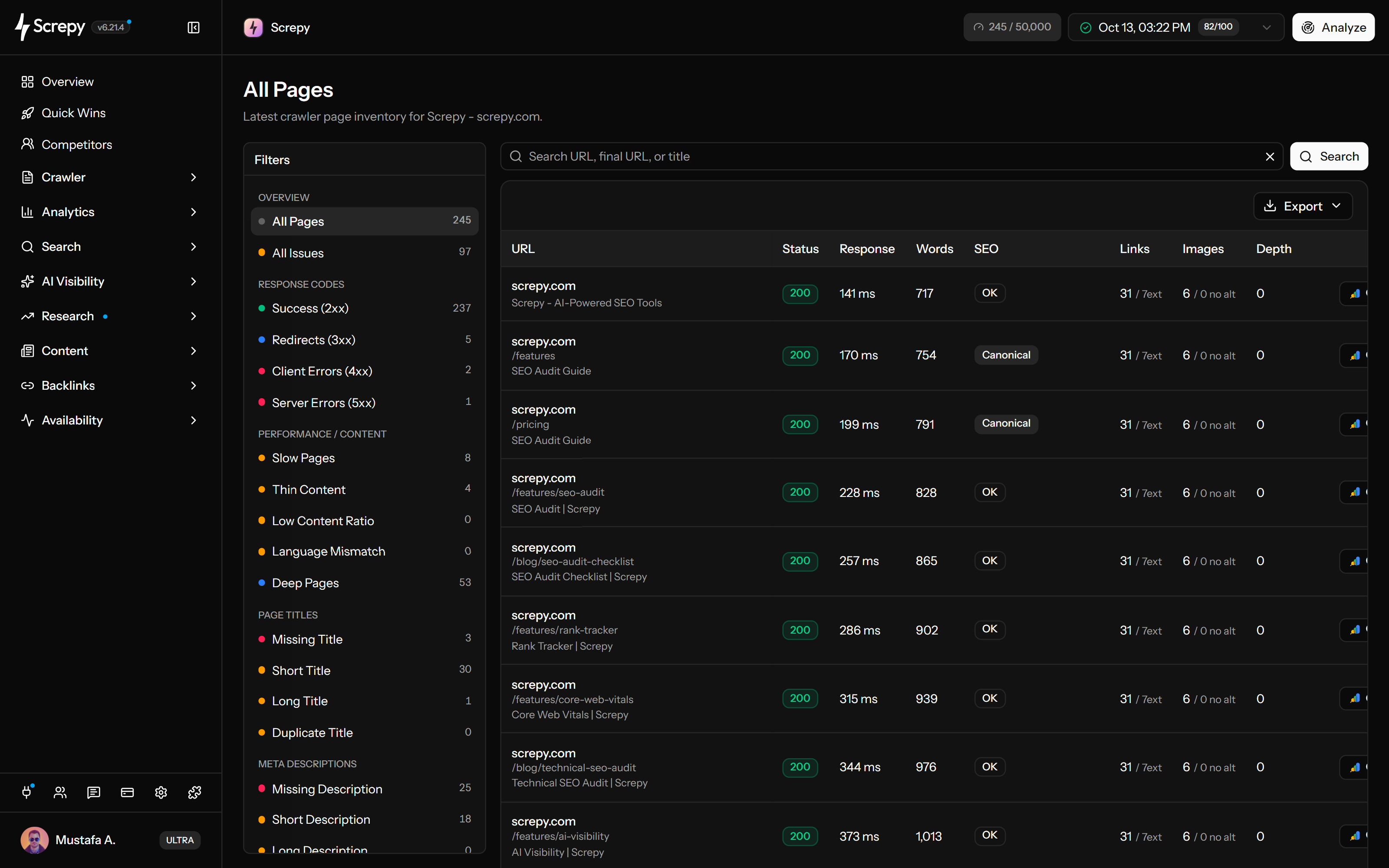










Screpy starts at your project website and follows reachable internal links in the cloud. The first crawl starts during setup; later, use Analyze from the Pages, Links or Images report to create a fresh inventory.
Client-side navigation can hide important links from a crawl of initial HTML. Enable JavaScript rendering when scripts generate meaningful page content or navigation; leave it off when the server already returns the required HTML.
<main id="app">
  <script />
</main>Discovery scope and request pace solve different problems. Depth determines how many internal-link levels are followed, while concurrency and delay control pressure on your server. Increasing depth will not make an unlinked page discoverable.
example.com3
//shop//shop/linen/Understand how a category, product or article is connected to the rest of your site through recorded URLs and links. Use source-page relationships to investigate deep content, outdated navigation and links that send visitors through redirects.
Create an implementation file from the records your team actually needs. Filter the selected crawl before exporting instead of passing along the whole site when the task concerns one template, response status or asset pattern.
A completed crawl records the website as reached at that time. After a navigation change or migration, run another crawl to check discovery and destinations again; old records do not update automatically when the live website changes.
Connect your AI assistant to Screpy’s SEO MCP server. Ask about your latest completed crawl, inspect affected pages and turn technical SEO findings into a clear order of work.
Keep the scope visible, inspect the records behind a pattern, fix the underlying implementation, and use the next crawl to confirm the result.
Confirm the starting URL, URL capacity, link depth, JavaScript mode, concurrency, request delay, robots rules, and crawler access. These settings determine what the snapshot can represent.
Screpy follows accessible internal paths and records each discovered URL, response, depth, destination, link relationship, and related page or image data within the configured scope.
Use Pages, Links, and Images reports to move from a total to representative URLs, source pages, redirect behavior, metadata, canonicals, or image usage before choosing a fix.
Run another crawl after the website changes. Keep scope and settings comparable, then verify that the intended URLs and underlying pattern changed for the right reason.
Crawl data is most useful when the team still knows what changed. Create a baseline before high-risk work and a comparable snapshot after it ships.
Record important URLs, redirects, final destinations, canonicals, and internal paths before launch, then crawl the new structure with the same scope.
Use JavaScript rendering when navigation or meaningful page content is created in the browser, then confirm those URLs appear in the crawl inventory.
Review crawl depth, source pages, anchors, attributes, and repeated navigation paths to find important content that is weakly connected or difficult to discover.
Recrawl after routing, navigation, CMS, template, and component changes to catch repeated technical regressions while the implementation context is still fresh.
Compare Screpy with Screaming Frog when deployment model, crawl controls, custom extraction, recurring monitoring, team access, and reporting affect the decision.
Use SEO Crawler to map discovery paths and inspect page, link, and image records. Use Website Audit when the team needs grouped findings, issue prioritization, and a broader technical health workflow.
Configure a cloud crawl, map reachable URLs, and inspect the raw Pages, Links, and Images records behind technical patterns.
Turn a completed crawl into grouped findings, affected URL patterns, priorities, exports, and a repeatable fix-verification workflow.
Shared templates and changing URL sets create different risks for SaaS acquisition sites and ecommerce catalogues.
Review landing pages, documentation, shared templates, and release regressions as one acquisition surface.
Audit category and product page types, broken shopping paths, and structural catalogue changes.
Screpy documentation
Use the Screpy guides to configure crawl scope, allow crawler access, interpret Pages, Links, and Images reports, and diagnose incomplete results.
Learn the concepts behind this workflow and apply them with practical SEO guidance.
An SEO crawler follows links and checks URLs for broken links, redirect chains, duplicate pages, canonical errors, indexability issues to prioritize fixes.
Read articleOptimize XML sitemaps with canonical-only URLs, accurate lastmod dates, and sitemap index files, then validate in Search Console to spot common crawl errors.
Read articleRedirect chains in SEO: spot multi-hop 301/302 paths in crawl reports, update internal links, and rewrite rules so URLs resolve in one clean hop to avoid loops.
Read articleFix ChatGPT Ads crawl failed errors on Shopify by checking OAI-AdsBot access, robots.txt, redirects, bot protection, product feeds, and landing pages.
Read articleUnderstand crawl discovery, scope, JavaScript rendering, access, request pace, reports, snapshots, and the difference between crawl data and a website audit.
An SEO crawler starts from a website URL, follows accessible internal links within a defined scope, and records technical information about the pages and resources it reaches. The resulting inventory helps teams investigate discovery paths, response codes, redirects, canonicals, internal links, metadata, images, and repeated site patterns.
Yes. Each completed crawl is a dated snapshot. Run a new crawl after a release or fix and compare snapshots with equivalent scope and settings so changes in coverage or issue totals are not confused with a different crawl configuration.
Maximum URLs caps how many discovered URLs the crawl can store. Crawl depth limits how many internal link levels Screpy follows from the starting page. Increasing either setting cannot fix blocked access, missing internal links, redirects, rate limits, or unusable responses.
Yes. Concurrency controls how many requests can run at once. Request delay is available when concurrency is set to 1; with higher concurrency, the saved delay is zero. Reduce request pressure when your server rate-limits automated traffic, then verify the next crawl receives real page responses.
Pages records crawled URLs and their response, depth, metadata, headings, canonical, indexability, content, structured data, social, and related signals. Links connects destinations with status, anchors, attributes, usage, and source pages. Images groups image sources with response, alt text, dimensions, delivery attributes, and page usage.
They answer different questions. Search Console reports Google Search performance and selected indexing information. An SEO crawler proactively follows your internal links and builds a technical inventory you can inspect before Google reports a problem or traffic changes.
Screpy provides an optional JavaScript setting for websites whose important links or content are created in the browser. Rendering can improve discovery for those sites, but it does not bypass robots rules, authentication, firewalls, bot challenges, timeouts, or the configured crawl scope.
Screpy begins from the project website and follows accessible internal links within the configured URL capacity and crawl depth. A page may be missing when it is not linked, sits beyond the selected depth, is blocked, redirects outside the project host, depends on JavaScript rendering, or returns unusable content.
The crawler must receive the real page without a login, CAPTCHA, browser challenge, firewall block, or rate-limit rejection. Allow ScrepyBot and the documented crawler IP through each security layer, confirm robots.txt access, and verify that a successful response contains the real page HTML.
Yes. The Links report helps identify failed or redirected destinations and trace each one back to the crawled pages that reference it. This gives developers and editors a specific source page, shared component, or template to fix instead of only a destination URL.
No. Crawl data helps teams discover and verify technical conditions, but rankings also depend on relevance, content quality, authority, competition, demand, indexing, and how search engines interpret each page. Treat crawler filters as evidence to investigate, not automatic ranking instructions.
The SEO crawler creates the technical inventory: discovered URLs, responses, paths, page data, links, images, and crawl context. Website Audit interprets that crawl as grouped findings, affected patterns, priorities, and a fix-verification workflow. Use the crawler when you need discovery and raw records; use the audit when you need a broader health review and prioritized action.
Understand Super Intelligence terminology and connect website audits, search research, rankings, and AI visibility in one practical Screpy workflow.