

Redirect chains are a stack of two or more 3xx hops between a requested URL and the page that finally loads. They slow real visitors, burn crawl budget, and make it harder to consolidate signals during a site migration or URL cleanup. The fastest way to spot them is to crawl the site or check HTTP status codes for key URLs, then trace common culprits like http-to-https switches, www resolution, trailing slashes, and internal links that still point at retired paths. Fixing them usually means updating those links and rewriting rules so every starting URL reaches one canonical destination with a single 301 redirect, not a hop-by-hop detour that only shows up in crawls and server logs.
Redirect chains and redirect loops: what they are and the difference
Redirect chain example: A to B to C
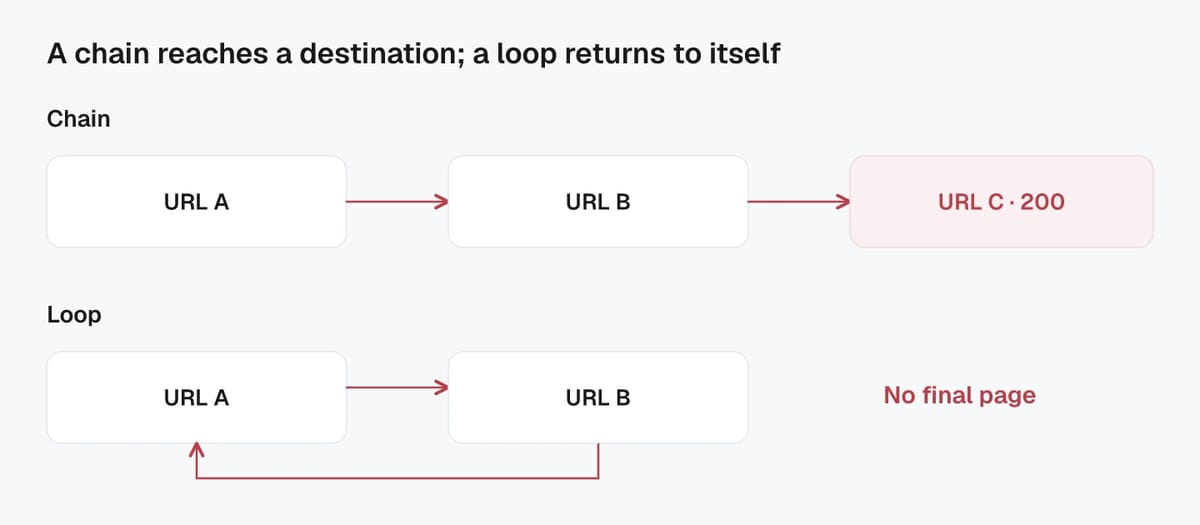
A redirect chain happens when one URL redirects to another URL, which then redirects again, before the user or crawler reaches a final page that returns a 200 status code. In simple terms, there are multiple “hops” instead of one clean redirect.
Example:
- A:
http://example.com/page - B:
https://example.com/page(first redirect, often HTTP to HTTPS) - C:
https://www.example.com/page/(second redirect, often non-www to www plus a trailing slash)
Chains like this often form over time as separate changes stack up: protocol updates, hostname standardization, trailing slash rules, CMS rewrites, and legacy redirects left in place after migrations. Even if each hop is “correct,” the combined path is inefficient. It increases time to first byte, adds risk of tracking parameters getting dropped, and can make it harder for crawlers to process large sites efficiently.
Redirect loop example and why it never resolves
A redirect loop is worse than a chain. It occurs when redirects send the browser or bot back to a URL it has already requested, creating an endless cycle with no final destination.
Example:
- A:
/categoryredirects to/category/ - B:
/category/redirects back to/category
This usually happens when two systems disagree about the “correct” URL format, like conflicting rules between the web server, CMS, plugin, or CDN. Because there is no final 200 response, browsers eventually stop and show an error (often “too many redirects”). Search crawlers may stop trying as well, which can lead to pages not being crawled, not being indexed, or losing visibility until the loop is fixed.
Why redirect chains hurt SEO performance and user experience
Crawl budget waste and slower page loads
Every extra redirect hop is an extra request and response cycle before the real page loads. That adds latency for users, especially on mobile networks. It also slows down bots. Over a large site, those repeated hops can meaningfully reduce how efficiently search engines explore and refresh your URLs.
Google has also been clear that long redirect chains can negatively affect crawling, and it recommends redirecting to the final destination directly instead of chaining multiple steps. A practical note for larger migrations: Googlebot can follow multiple redirects in sequence, but it is better not to rely on that behavior when you can make a single clean hop. You can review Google’s current guidance in its redirects documentation.
Redirect chains are also a performance smell in general. Tools like Lighthouse flag “avoid multiple page redirects” because those extra hops increase load time and can worsen Core Web Vitals indirectly.
Link equity loss and indexing delays
Modern search engines usually consolidate signals through redirects, but chains still create friction. Each hop is another place for something to go wrong: a temporary redirect in the middle, a redirect to a non-canonical version, a blocked URL, or an unexpected parameter drop.
Even when everything is configured correctly, chains can slow consolidation after changes. That means slower reindexing and longer periods where old and new URLs compete, especially after migrations, URL structure updates, or CMS rewrite changes.
Analytics and tracking issues from extra hops
Redirect chains increase the odds that tracking data breaks. Common failures include query parameters being dropped (UTM tags, click IDs), referrers being lost, or cross-domain measurement becoming inconsistent.
In an AI-driven search environment, clean redirects matter even more. AI crawlers and preview systems often fetch pages fast, with tighter timeouts and stricter handling of unexpected hops. Fewer redirects makes your content more reliably retrievable, measurable, and indexable across both classic search and AI-powered discovery.
Common reasons redirect chains happen on websites
HTTP to HTTPS and www to non-www stacking
The most common redirect chain is the “standardization stack.” A site forces HTTPS, then forces either www or non-www, then enforces a trailing slash or removes it. If those rules are implemented as separate steps, a single visit can trigger two or three redirects before the final URL loads.
A typical chain looks like:
http://example.com/page→https://example.com/page→https://www.example.com/page/
This often happens when each change was added at a different time, sometimes by different teams. It is easy to miss because everything still “works” in a browser. But crawlers, performance tools, and analytics systems feel the extra hops at scale.
URL changes from migrations and CMS rewrites
Redirect chains are also a common artifact of migrations. You might redirect old URLs to an intermediate structure first (for example, /blog/2022/post → /resources/post), then later change again (/resources/post → /guides/post). If you do not revisit the original rules, older redirects keep pointing at the intermediate URL, creating a chain.
CMS and plugin behavior can contribute too. Slug changes, category renames, language URL rules, pagination formats, and auto-generated attachment pages can create new redirects without anyone explicitly “adding a redirect.” Over time, those small automatic changes stack up.
Conflicting rules across server, CMS, and CDN
Redirect chains and loops often come from multiple layers trying to “fix” the same URL:
- Web server rules (Apache/Nginx)
- Application or framework routing
- CMS settings and plugins
- CDN edge rules (including bot protection and geo rules)
For example, the CDN forces HTTPS, the origin forces www, and the CMS forces a trailing slash. Each layer can be correct in isolation, but combined they produce extra hops.
This matters even more in an AI search world, where many systems fetch pages quickly for previews, summaries, and indexing. The cleaner your redirect path, the more reliably those systems can retrieve the canonical page without timing out or caching an intermediate hop.
Finding redirect chains on your site with crawlers and reports
Using a site crawler to export redirect chains
The fastest way to find redirect chains is to run a full-site crawl and export every URL that returns a 3xx status code, along with its redirect target. Good crawlers will also show the full path (Hop 1, Hop 2, Hop 3) so you can see exactly where the chain starts and where it ends.
When you export, focus on three columns first: Source URL, Status Code, and Final URL (or “redirect path”). Then sort by “number of hops” to prioritize the worst offenders. Chains that appear on high-traffic templates like navigation, category pages, and internal search pages tend to multiply quickly, so fixing a single template link can remove thousands of redirects.
Finding chains from internal links vs. external backlinks
Not all redirect chains matter equally. Separate them into:
- Chains caused by internal links: These are the easiest wins. If your own pages link to URLs that redirect, you are creating unnecessary hops for users and bots. Update internal links to point directly to the final 200 URL.
- Chains caused by external backlinks: You cannot change the linking site, so the redirect becomes your responsibility. Make sure the “old” linked URL redirects in one hop to the correct destination. This is especially important for high-authority backlinks and PR links.
If you use Google Search Console, the URL Inspection tool can help you sanity-check what Google is seeing for a specific URL, including the canonical and index status.
Spot-checking a single URL in browser, DevTools, or curl
For a quick check, open the URL in a clean browser session and watch the address bar. Then confirm the hops in the Network panel in Chrome DevTools, where you can see the sequence of requests and the 301/302 responses.
From the command line, a simple spot-check is:
curl -I -L https://example.com/old-url
This shows headers while following redirects, so you can confirm whether the URL resolves in one hop or takes a multi-step detour. For AI-driven crawlers and preview bots, this kind of “one URL at a time” validation is useful because it reflects the real retrieval path those systems experience.
Fixing redirect chains by flattening redirects to one hop
Updating redirect rules to point to the final URL
The core fix is simple: any URL that redirects should point straight to the final canonical URL in a single hop. If A → B → C, update the rule for A so it becomes A → C.
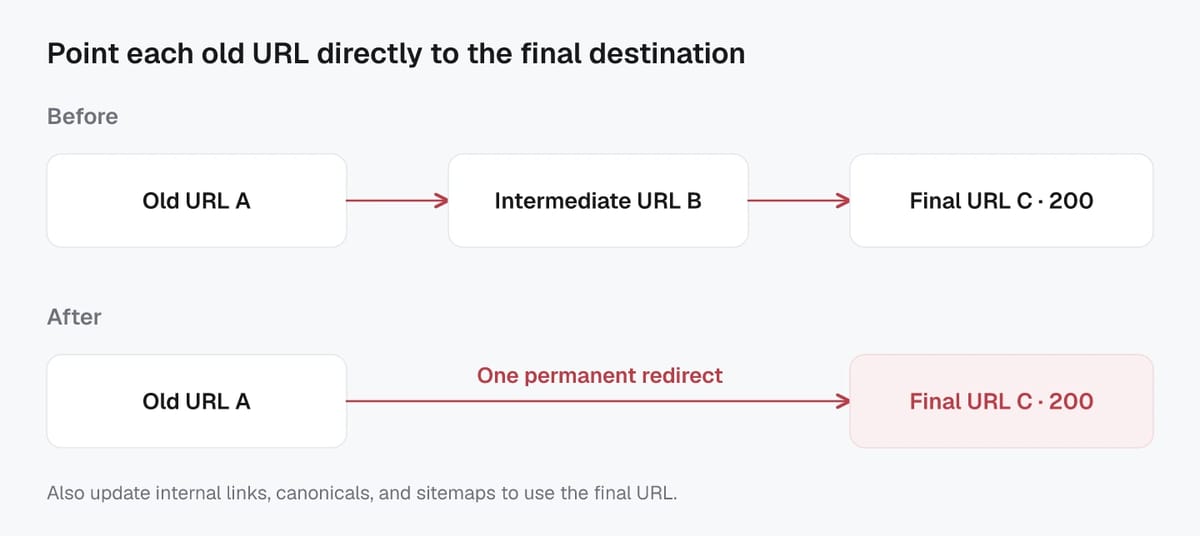
In practice, this usually means tightening your redirect logic so multiple “normalizations” happen at once: protocol (HTTP to HTTPS), hostname (www vs non-www), and URL format (trailing slash, lowercase, index files). When you consolidate, keep the redirect server-side (301 for permanent changes), and make sure the destination URL returns a 200 and matches your preferred canonical version.
Removing unnecessary redirects and obsolete rules
Redirect chains often persist because old rules never get cleaned up after a migration or CMS change. Remove redirects that no longer serve a purpose, especially “temporary” stopgap redirects that were only meant to live for a release cycle.
Also watch for duplicate rules that both fire for the same pattern. Rule order matters. A broad rule can send URLs to an intermediate destination before a more specific rule runs, which is a common hidden cause of chains.
As a quick test: after changes, pick a sample of old URLs (including ones with parameters) and confirm they all resolve with one redirect at most.
Fixing chains that include mixed types (301, 302, meta, JS)
Not all redirects are equal. A chain that mixes 301/302, meta refresh, and JavaScript redirects is more fragile for crawlers and for AI-driven retrievers that want fast, deterministic fetches.
Prefer this hierarchy:
- HTTP redirects at the server/CDN (best for SEO and reliability).
- Avoid meta refresh and JS redirects except in edge cases you cannot control (for example, legacy app flows).
If a redirect is permanent, use 301 (or the platform’s equivalent) consistently. Reserve 302 for genuinely temporary routing, like short-lived tests or maintenance flows.
Redirects combined with canonicals causing double hops
A subtle “chain” can happen even when there is only one HTTP redirect. Example: A 301s to B, but B returns 200 and declares a canonical to C. For bots, that is effectively two steps of consolidation.
Fix it by either redirecting A directly to C, or by aligning canonicals so the 200 page users land on is also the canonical version. This reduces ambiguity for classic search and for AI systems that cluster and summarize content across URLs.
Internal links, canonicals, and sitemaps to update after redirect fixes
Replacing redirected internal URLs with final 200 URLs
After you flatten redirects, remove the cause of new chains by updating internal links to point directly to the final 200 URLs. Redirects are a safety net, not a linking strategy.
Start with links that appear sitewide: header navigation, footer, breadcrumbs, category filters, and on-page modules like “related articles.” Then work through in-content links in your top traffic pages. In most CMS setups, this means updating templates and global components first, then fixing database-stored links in posts, product descriptions, and blocks.
If you have multiple URL versions in use (uppercase vs lowercase, trailing slash vs no slash), standardize your internal linking format so you are not recreating one-hop redirects on every page view.
Canonical, hreflang, and structured data URL cleanup
Redirect fixes should be matched by URL cleanup in your signals:
- Canonical tags should reference the final preferred URL that returns 200. Avoid canonicals pointing to redirected URLs.
- hreflang annotations should also use final 200 URLs for each language and region version. One redirected hreflang URL can create inconsistent clustering.
- Structured data (often JSON-LD) should use final URLs in properties like
urland (when applicable)@id.
This matters for AI-driven discovery too. Clean canonicals, hreflang, and structured data reduce ambiguity when systems try to group, summarize, and attribute your content across similar URLs.
Sitemap and feed updates to stop reintroducing chains
Update every output that can reintroduce old URLs:
- XML sitemaps (including image and video sitemaps)
- RSS/Atom feeds
- Product feeds and merchant feeds
- Any “latest posts” API endpoints used by apps or partners
A good rule: your sitemap should contain only indexable 200 URLs, not redirected URLs. That keeps crawling efficient and helps both search engines and AI crawlers spend time on the pages you actually want surfaced.
Verifying the fix and preventing redirect chain regressions
What good looks like: single hop to final 200
A clean redirect setup is boring in the best way. For any legacy URL you still need to support, the ideal outcome is:
- 0 redirects for canonical URLs you link to internally (they should return 200 immediately).
- 1 redirect max for non-canonical or retired URLs, landing on the final canonical URL that returns 200.
Also confirm the final page is consistent: same preferred hostname (www or non-www), HTTPS, consistent trailing slash rules, and no “hidden” second step like a canonical pointing somewhere else.
Re-crawling to confirm chains are gone
After you deploy changes, re-crawl the site with the same settings you used to find the problem. Compare before and after counts for:
- URLs returning 3xx
- Redirects with 2+ hops
- Redirect loops and redirect-to-redirect patterns
Spot-check a sample of high-value URLs too: top landing pages, top converting pages, and the most linked-to legacy URLs. This is where a small redirect mistake can have outsized impact.
Ongoing monitoring for new chains after releases
Redirect chains tend to come back after CMS updates, CDN rule changes, migrations, or “quick fixes” made under pressure. Prevent regressions by adding lightweight checks to your release process:
- Monitor new 3xx increases and new 2+ hop redirects after deployments.
- Alert on redirect loops immediately.
- Periodically audit internal links so templates do not drift back to redirected URLs.
In an AI-first search world, this monitoring is not just about Google. More systems are retrieving pages for previews, answers, and citations. Keeping redirects predictable and minimal makes your content easier to fetch, attribute, and trust at scale, now and as crawlers get faster and stricter about wasted hops.
Validate redirect fixes with Screpy
Use a before-and-after crawl so the fix is measured rather than assumed.
- Run the Screpy SEO Crawler and save the redirecting source URL, every hop, the final URL, and the final response code.
- Update redirect rules so each retired URL reaches the canonical destination in one server-side hop.
- Replace redirected URLs in internal links, canonicals, hreflang annotations, structured data, XML sitemaps, and feeds.
- Crawl again and confirm that the source returns one expected 301 or 308, the destination returns 200, and no internal link still points at an intermediate URL.
- After a migration, use the Screpy Search Console dashboard to watch the old and new landing pages while search engines process the redirects.
Keep a regression list for redirects created by CMS rules, deployment rewrites, localization middleware, and CDN configuration. A redirect is complete only when the chain is short, the destination is canonical and indexable, and the site itself links directly to the destination.