


Improve existing search visibility
Focus on pages and queries that already have impressions or rankings, then choose a page-level improvement only after validating result context and intent.
Find where your next SEO task can make sense. Quick Wins groups search opportunities from Search Console, internal links from a completed crawl, and request or performance patterns from connected Cloudflare data. Each report explains a different signal; your team chooses and verifies the change.
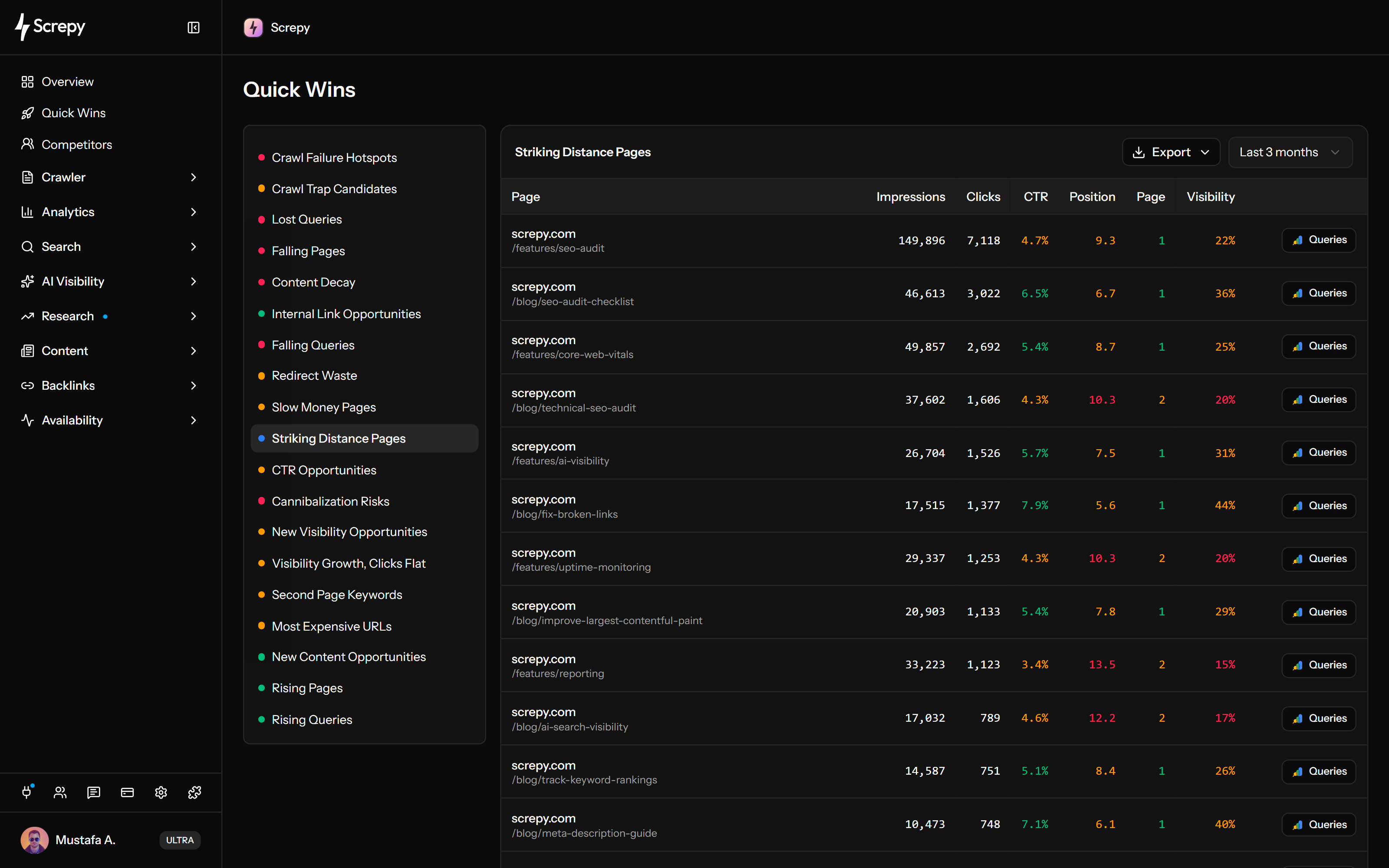
Find pages already earning impressions near stronger rankings. Open their queries before changing content.
Review suggested source and target pages from a completed crawl. Add a link only when it helps readers.
Review paths with real-user performance problems and observed visits. Confirm their business value yourself; the report does not measure revenue.










Separate pages close to stronger average positions from individual queries just outside the top ten.
linen shirt#11
Impressions
2,860Identify search exposure that earns few clicks, then investigate the result and the searcher's intent.
CTR
3%Review sustained page-level decline using several historical periods rather than a single bad day.
Clicks
1,240Use separate reports for disappearing queries and changes in the clicks earned by existing queries or pages.
linen shirtUSExamine how search impressions are split between URLs answering the same query.
linen shirtPages/shop/linen/guides/linenDistinguish newly visible queries from topics that may need a better destination on your site.
linen shirtUSDiscover relevant source and target pages from the latest completed website crawl.
/shop/linen
Investigate repeated unsuccessful bot requests and parameter patterns in connected Cloudflare traffic.
Source/guides
/old-pricing404/setup503Separate avoidable redirect requests from responses that account for substantial data transfer.
Use browser performance and observed visits to choose which pages need further investigation.
PeriodVisits
LCP2.1 s
INP180 ms
CLS0.04
Ask about Quick Wins built from available search, crawl and connected Cloudflare traffic signals through SEO MCP. Cloudflare access covers those opportunities, not the complete analytics or bot-traffic dashboard.
Record the starting metrics and relevant period. Inspect the affected URL, make a focused change, then compare equivalent evidence.
Check that the required integration or completed crawl belongs to the correct project and covers the pages, queries, traffic, and dates you intend to evaluate.
Choose the question first: search positions, CTR, content decline, competing URLs, internal links, bot errors, transferred bytes or browser performance.
Open the underlying page, query, crawl relationship, or Cloudflare evidence. Validate intent, page purpose, indexability, releases, seasonality, competition, and data volume before choosing a cause.
Keep the baseline, source period, affected page or query, planned change, and expected KPI. After publishing, compare a complete search period, run a comparable crawl, or review the relevant performance report.
Start with the report that answers your question about search demand, content, links, bot requests or visitor experience.
Focus on pages and queries that already have impressions or rankings, then choose a page-level improvement only after validating result context and intent.
Use changes across comparable periods to investigate decline, momentum, overlap, and unmet demand before refreshing, consolidating, splitting, or creating a page.
Combine crawl content and link relationships to review contextual internal links, then recrawl comparable scope to verify the published relationship.
Compare failed bot requests, parameter variants, redirects, transferred bytes and poor browser metrics. Add your knowledge of each page's purpose before setting priorities.
Start with the combined opportunity workspace, inspect search-performance evidence directly, or investigate site-wide crawl and technical findings.
Review focused opportunity reports from the Search Console, crawl, and Cloudflare data available for one project.
Inspect clicks, impressions, CTR, average position, queries, pages, countries, devices, and comparison periods directly.
Investigate page, link, image, crawlability, metadata, indexability, and technical evidence across a completed website crawl.
A useful priority depends on the website stage, available time, and who can implement the work.
Find a manageable website priority, send precise fixes to the right person, and monitor important pages.
Build a technical baseline, choose a realistic search opportunity, and protect the next release.
Screpy documentation
Use the Screpy guide to interpret opportunities, validate the supporting data, and choose the most useful next action.
Learn the concepts behind this workflow and apply them with practical SEO guidance.
Bottom-of-funnel keywords: spot pricing, vs, alternatives, and review modifiers, validate intent in SERPs, and map terms to pages built for sign-ups fast.
Read articleRank tracking shows keyword positions by location and device; watch SERP features, daily refresh timing, target URL swaps, and sampling that skew reports.
Read articleGA4 reports for SEO performance: filter organic traffic, compare landing pages, engagement and key events, and tie Search Console queries to conversions.
Read articleCompare 18 Google Sheets SEO add-ons by research task, current prices, free-plan limits and API requirements, with practical workflows to check before buying.
Read articleUnderstand data requirements, opportunity types, date ranges, validation, exports, empty reports, and how to verify work without treating a signal as a guarantee.
An SEO quick win is a focused opportunity supported by enough evidence to justify investigation and a measurable next action. It may involve a page already gaining visibility, a query losing momentum, a relevant internal-link gap, or repeated crawler waste. The report identifies the signal; effort, risk, business value, and likely impact still require judgment.
Single-period search reports offer 7 days, 28 days, 3 or 6 months; cannibalization offers 7 days, 30 days or 3 months. New visibility and flat-click growth compare 7 days, 30 days or 3 months; other comparisons use 7 days, 28 days or 3 months. Decay uses 90, 180 or 365 days. Bot/transfer reports offer 24 hours, 7 or 30 days; slow pages also offer 60 and 90 days. Internal links use a crawl snapshot. Recent search data may be incomplete.
Search Console is required for the query, page, click, impression, CTR, position, cannibalization, content-decay, and comparison reports. The crawl-based and Cloudflare-based reports use their own data sources, so the Quick Wins workspace can still show those categories when their requirements are met.
An empty report can mean no rows matched the current opportunity rules, but it can also mean the integration is not connected, the property or project URL does not match, the selected period lacks enough data, or the required crawl has not completed with representative coverage. Check the source and scope before concluding that no opportunity exists.
Internal Link Opportunities depends on page content and link relationships collected during a completed crawl. Crawl coverage must include the source and target pages you expect the report to evaluate. A partial crawl can only produce partial evidence.
Yes. SEO MCP can retrieve supported Quick Wins for a project you can access, including available search, crawl and connected Cloudflare opportunities. Source requirements still apply; this does not provide the entire analytics or bot-traffic dataset or automatically edit your website.
No. Quick Wins does not edit the website and cannot guarantee clicks, traffic, or rankings. Your team chooses the action. Record the baseline, publish one well-scoped change, then use a comparable search period, a fresh crawl, or the relevant performance report to verify what changed.
No. Multiple URLs associated with one query can be normal when pages serve different intents, formats, locations, products, or stages of a journey. Compare the pages, query intent, ranking history, conversions, and internal links before consolidating, redirecting, differentiating, or leaving them unchanged.
In Screpy, CTR Opportunities lists queries at average positions 1–10 with CTR below 2%. There is no separate minimum-impression rule. A small sample needs caution; check query intent, result appearance and landing page before editing the title.
Yes. Export the selected report and period to CSV or Excel, with up to 1,000 rows. Bot/transfer and slow-page reports remain capped at 50 source rows; filters and source limits can reduce other results. An export is not the complete Search Console dataset.
Search Console supplies query and page performance. The latest completed Screpy crawl supplies internal-link suggestions. Connected Cloudflare data supplies bot-request patterns, transferred bytes and browser performance; each source has its own requirements.
The latest period is compared with a historical baseline across several buckets, ending three days ago. Lost clicks, trend and position inform the score and suggested action. A decline signal does not prove outdated content is the cause.
Failure Hotspots, Trap Candidates, Redirect Waste, Most Expensive URLs and Slow Money Pages need a connected Cloudflare account, matched project zone and suitable permissions. Slow Money Pages also needs browser monitoring enabled and enough observations.
Open the suggested source and target pages, confirm that the relationship is useful to the reader, choose descriptive anchor text that fits the surrounding sentence, and avoid adding a link solely because two pages share a phrase. Recrawl comparable scope after publishing the change.
No. A card is a signal, not a diagnosis. Validate the query, page purpose, search intent, indexability, release history, seasonality, competition, data volume, and relevant technical evidence before deciding why performance changed or which edit to make.
Striking Distance Pages uses page averages at positions 4–15. Second Page Keywords uses query–page pairs at average positions 11–20. These are Search Console averages, not a fixed live result page for every device or location.
Understand Super Intelligence terminology and connect website audits, search research, rankings, and AI visibility in one practical Screpy workflow.