


Service and city queries
Track the searches that combine a real service with the city or neighbourhood a business serves, while keeping each query and market setting explicit.
Track a saved business across Google Maps keywords with consistent country, language and listing rules. Review current and best positions, recent movement, analysis status and a project-wide visibility summary. Added project competitors supply matching position context; CSV and Excel exports cover the loaded table page.
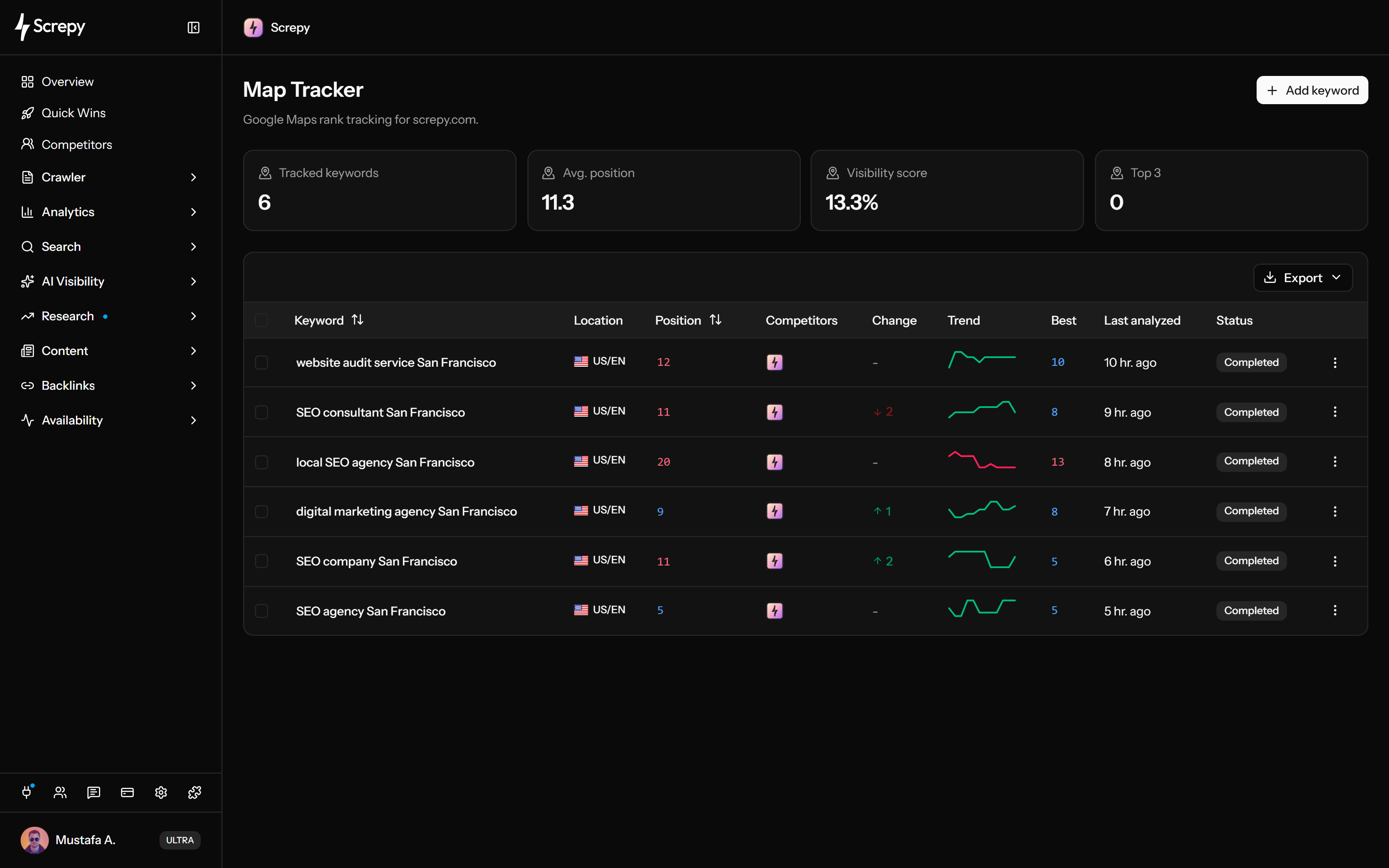










Follow the local searches that lead customers to your business. Save each query with its country and language so later checks answer the same market question.
A recorded position is useful only when it belongs to the intended business. Define the listing before comparing movement, especially when several businesses or branches share a name.
Keep new keywords tied to a deliberate business target. Project defaults reduce repeated setup, while rules already saved on a keyword preserve the target used for its tracking.
Choose a checking rhythm that fits your local SEO work. Map Tracker follows the project's analysis frequency rather than assuming every saved keyword refreshes daily.
Read movement together with the date and condition of the latest check. Current rank, best rank and the recent trend answer different questions about the saved listing.
Rankings
+24 Position
See where the competitors you added to the project appear in the same keyword check. The competitor cell keeps available positions together without presenting every returned business as an identified rival.
linen shirtMapsUse a project-wide summary to see how the tracked query set is performing. Read the score beside individual rows so a percentage does not hide unmatched keywords or stale checks.
Visibility
35%Take the loaded keyword evidence into a spreadsheet for a focused review. Check the actual export fields before using the file as a client report or merging it with another market dataset.
Keep the tracked set focused on searches you can investigate. Use the existing table controls to review saved keywords and remove queries that no longer belong in the monitoring plan.
linen shirtUSChoose local keyword coverage separately from your organic Rank Tracker portfolio. Map Tracker capacity belongs to each project, so planning the monitored query set starts with the project's actual allowance.
Used
24Plan your next SEO steps with an AI assistant using supported Screpy project data. SEO MCP does not currently expose Google Maps Rank Tracker records or actions; use the dashboard for that feature’s workflow.
Keep the query, market and listing target stable, then review dated position evidence and matched project competitors. Use the findings to choose an investigation without treating a single change as its cause.
Review the saved matching filters before adding a keyword. Use an address or Place ID to narrow similar names or shared domains; the form defines rules rather than previewing a live listing search.
Hold the keyword, country, language, and business rules steady. Changing the query or market creates a different result set rather than a clean before-and-after comparison.
Read current and best position, the change from the previous completed result when available, the recent ranked trend and last-analysis time. Check status before comparing your result with matched project competitors.
Review the query, business details, relevant website page, and Google’s relevance, distance, and prominence signals. Change only what is accurate, then wait for later comparable analyses.
The report is most useful when each keyword represents a real customer search, each movement has an owner, and every change can be reviewed again after later comparable analyses.
Track the searches that combine a real service with the city or neighbourhood a business serves, while keeping each query and market setting explicit.
Follow the same keyword set after a meaningful business-profile, service-page, location-page, or local-content change without treating one early movement as proof.
Compare your listing with added project competitors that have matching websites in the same keyword check. A missing competitor match and a domain match alone do not establish a branch-specific result.
Export the loaded table page to CSV or Excel for keyword, recorded positions, best result, last-analysis time and available structured competitor/trend data. Keep country, language, displayed change and status separately because they are not included in that export.
Screpy keeps the monitored keyword evidence clear without presenting a single result set as a geo-grid, a causal ranking diagnosis, or a guarantee about every customer’s search.
Map Tracker follows saved keyword result sets with country and language context. It does not currently produce a multi-pin heatmap across a neighbourhood.
Google Maps results can vary with location, timing, language, device, personalization, business state, and result layout. Treat each analysis as a repeatable monitoring sample.
A position change does not prove which listing, website, review, category, competitor, or proximity signal caused it. Use the report to choose what to investigate.
Screpy records your matched ranking evidence and website matches for added project competitors. Your team handles accurate Business Profile information, website changes, reviews and local SEO decisions; tracking does not edit the listing.
Google Maps listings, organic web positions, and one-time SERP research answer different questions. Screpy keeps those workflows separate so their positions are not mixed.
Follow a saved listing with scheduled keyword checks, current and best positions, recent ranked trends, matching project competitors and loaded-page CSV/Excel exports.
Track recurring organic Google positions by country, language, optional location, and device with ranking URLs and competitor context.
Investigate one keyword result landscape and its search intent without treating that snapshot as the history of a saved Maps listing.
Screpy documentation
Use the Screpy guide to configure keywords and business match rules, read position evidence, and interpret changes in Google Maps visibility.
Learn the concepts behind this workflow and apply them with practical SEO guidance.
Improve Google Maps visibility with an accurate Business Profile, useful local pages, relevant links, and consistent keyword-by-location tracking.
Read articleTrack Google Places rankings with consistent keywords and locations, compare Maps and Local Pack results, and interpret geo-grid coverage with a worked example.
Read articleFind relevant local link opportunities through community partnerships, events, citations, and useful local resources without ranking guarantees.
Read articleOptimize your Google Business Profile with accurate categories, hours, photos, reviews, and a repeatable local visibility check grounded in Google's rules.
Read articleUnderstand keyword and market setup, business matching, position history, visibility metrics, competitors, exports, geo-grid limits, local ranking factors, and how Maps tracking differs from organic rankings.
Yes. CSV and Excel include the loaded page, normally up to 50 rows, rather than the whole portfolio. Fields are keyword, available listing address, current position, competitor positions, recent trend, best position and last-analysis time. Competitor/trend values use JSON cells. Displayed Change, Status and country/language are excluded; Location is a saved address when available.
Map Tracker checks saved keywords using country, language and listing rules, then records the best matching position, available change and best recorded rank. The table shows recent ranked trends, last-analysis time, status and website matches for added project competitors. Summary cards cover all tracked keywords; exports cover the loaded page.
Map Tracker follows business listings inside Google Maps results. Rank Tracker follows organic Google positions for configured keywords and can include country, language, optional location, device, ranking URL, competitors, segments, and exports. Keep the datasets separate because a Maps position is not an organic web ranking.
They define the Google market and interface-language context used for the saved keyword. Keep them unchanged when comparing history so a market-setting change is not mistaken for ranking movement.
The score is 100 times the sum of Top 3 keywords weighted at 1 and positions 4–10 weighted at 0.4, divided by all tracked keywords. Lower or unmatched results contribute zero. It summarizes ranking distribution rather than traffic or search share. The separate average position includes only ranked keywords; review the rows and timestamps beside both values.
Use title, website domain, full website URL, address or Place ID with contains or exact matching. Comparisons ignore letter case, and every nonempty rule must match. The best returned matching rank is recorded. New keywords reuse project defaults, while changing defaults does not rewrite rules already stored on existing keywords.
Manual results can vary with the searcher’s precise location, timing, language, device, personalization, open hours, and current result set. Compare analyses collected with the same saved context and look for sustained movement instead of expecting one manual search to reproduce the recorded position.
Start with services, products, categories, city or neighbourhood combinations, and near-me searches that represent real customer discovery. Prefer a focused set tied to a business decision over a large list of loosely related keywords.
Current public Max includes 50 Map Tracker keywords per project and Ultra 100; Pro does not include Map Tracker. The project's billing owner's entitlement controls access and capacity. Existing subscriptions may differ, so use current pricing and the project controls to confirm your allowance and available frequency.
No. It measures selected results and keeps their history. Google describes local ranking mainly through relevance, distance, and prominence. Use the data to investigate accurate business information, categories, reviews, local pages, links, and competitor context, but do not treat tracking itself as a ranking factor.
No. The current Map Tracker follows saved Google Maps keyword result sets with country and language context. It does not scan multiple latitude-and-longitude pins or produce a street-by-street heatmap. Include meaningful city or neighbourhood intent in the keyword when that reflects the customer search you need to monitor.
Set the analysis frequency in Project Settings: daily, weekly, every two weeks or monthly when eligible, corresponding to 1, 7, 14 or 30 days. The project default is monthly. Checks follow their due schedule; saving a frequency does not launch an immediate analysis or immediately reschedule an already booked check.
Yes, for competitors added to the project whose website domain or subdomains match returned results. The competitor cell shows available positions alongside your match; hover a brand for its position. It does not list every local business or prove which branch of a shared-domain competitor ranked.