

Google Places rankings, a legacy term often used for a business’s visibility in Google Maps and local search results, should be tracked for exact keywords under consistent search conditions. Identify the correct business, save the query and market settings, and compare completed checks over time. Keep Maps, the Search Local Pack, and organic website positions separate. When you need neighborhood coverage, use a geo-grid with fixed coordinates rather than one citywide score. Read positions alongside Business Profile actions and website leads; each measures a different part of local performance.
Google Places rank tracking across keywords and locations
Google Maps, Google Business Profile, and Local Pack rankings
“Google Places” is now commonly used to describe a business’s visibility across Google Maps and local results in Google Search. Track each surface separately. A business can appear prominently in Google Maps yet hold a different position in the Search Local Pack, the map-based group of nearby businesses that may appear above standard organic results.
Your Google Business Profile is the listing that supplies core information such as category, address, hours, reviews, photos, and services. It is not a ranking by itself. Instead, it helps Google assess whether the business is a relevant local result. Google explains that local visibility is driven mainly by relevance, distance, and prominence, so rankings can change by keyword, searcher location, and competitor set. Google’s local ranking guidance is a useful reference when interpreting these fluctuations.
Use this distinction when deciding what to collect:
| Measurement | What a recorded result means | What it does not establish |
|---|---|---|
| Google Maps position | The matched listing’s order in one Maps query result set | Its position in the Search Local Pack |
| Search Local Pack position | Placement in the local business results shown for that Search check | Coverage across all neighborhoods |
| Organic website position | Placement of a website page in web search results | The business listing’s Maps position |
| Profile action | A recorded interaction under Google’s metric definition | A qualified lead or an organic-only source |
Track priority keywords individually, including service-led searches such as “emergency plumber” and location-led searches such as “plumber in Austin.” For each term, record the result surface, device, search point, rank, and the competitors shown. This creates a clearer picture than one overall “Google Maps ranking.”
Rank tracking versus Google Business Profile performance metrics
Google Maps rank tracking measures visibility: where the business appears in sampled results for a saved query. A geo-grid adds fixed search points to answer questions such as, “Do we appear in the top three for this service in this neighborhood?”
Google Business Profile performance measures profile activity, not where a listing ranks. Available metrics depend on the business type and setup. Calls count clicks on the call button, not answered calls or qualified leads; direction requests and website clicks are also actions rather than completed visits or sales. Google says the report can include activity from both organic results and Google Ads. Keep that scope visible before comparing it with an organic Maps report. See Business Profile performance definitions.
Use both data sets together. A ranking increase without more profile actions or leads calls for a separate check of demand and the conversion path; it does not by itself show that tracking failed. Stable positions with rising direction requests may reflect changes in demand or profile engagement. For practical local SEO reporting, compare rank trends with profile actions and website conversions over the same date range.
Why Google Maps rankings vary by search location
Location personalization and proximity in local results
Google Maps rankings are not fixed for an entire city. A business may rank in the top three for a keyword near its address, then rank lower in Maps a few miles away. This is normal in local search because Google evaluates results partly through proximity: how close a business is to the searcher or the location named in the query.
As a hypothetical example, a dentist in central Chicago might rank strongly for “dentist near me” around the Loop but have less visibility in Lincoln Park or Hyde Park, where closer competitors are often more relevant. This is why checking one postal code, city center, or office location can produce a misleading view of local SEO performance.
Search context also matters. Google can interpret a search differently when a person includes a neighborhood, city, “near me” modifier, or service type. Device location settings, map movement, and language can further influence the results shown. Google’s guidance on local ranking factors notes that distance is assessed from the searcher’s location or the location specified in the search.
If the question is coverage across the service area, Google Places rank tracking needs several fixed search points rather than one check. A geo-grid shows where the listing is found within the chosen result depth; it cannot show every customer’s result. For a narrower question such as tracking “dentist in Chicago” over time, a saved query history can still be useful if its market settings remain consistent.
Record location wording separately from the search point. “Dentist in Chicago” is a query; a saved latitude and longitude are a sampling location. Changing one while retaining the other creates a different comparison. Likewise, dragging the map during a manual check changes the context you are inspecting.
Local Pack and Google Maps ranking differences
The Local Pack and Google Maps are related but distinct result surfaces. The Local Pack usually appears in Google Search for queries with local intent and commonly displays a small selection of businesses. Google Maps can show a broader set of listings and gives users more options to refine the search, move the map, filter results, or compare businesses.
A business may rank well in Google Maps while not appearing in the initial Local Pack, or it may enter the Local Pack for one location but rank lower in the expanded Maps results. The interface and returned result set can differ. A pair of screenshots does not establish which ranking signal caused the difference.
For that reason, local ranking reports should label the result type being measured. Avoid combining Maps positions and Local Pack positions into one average rank. Separate tracking makes it easier to identify whether an SEO issue affects broad Maps visibility, the high-value Local Pack, or both.
Google Maps ranking settings for accurate local tracking
Keywords, search locations, devices, and result surfaces
Set the measurement rules before collecting a baseline. A useful Google Maps ranking check identifies the query, intended listing, result surface and search context. Record the settings your tool actually supports; do not assume that a country selector also fixes the search to a neighborhood coordinate.
Choose keywords that reflect real customer intent. Include core services, urgent or high-value services, category terms, and natural location modifiers where people genuinely use them. Track “roof repair,” “emergency roof repair,” and “roof repair in Mesa” separately rather than treating them as interchangeable. A branded search answers whether someone can find the known business; a non-branded service search answers a different discovery question. Keep both labeled if both matter.
For a coordinate-based tool, select the business location and commercially relevant neighborhoods or suburbs. Store the actual points, not just a grid size. Two 5×5 grids with different centers or spacing cover different places. If the tool offers device controls, keep those settings fixed and label mobile and desktop reports separately. If it does not expose a device setting, record that limitation instead of describing the sample as mobile-only.
A local ranking tracking template
Use a setup record that another teammate can reproduce. Grid fields apply only when the selected tool actually samples multiple coordinates:
| Field | Evidence to save | Why it matters |
|---|---|---|
| Exact keyword | The complete query, including any city modifier | Different wording can return a different set |
| Target business | Listing identifier or checked title, website and address match | Similar names and multiple branches can cause false matches |
| Surface | Google Maps, Search Local Pack or organic web results | Position numbers belong to different reports |
| Market settings | Country, language and supported device controls | Preserves the context of the sample |
| Search point | Saved coordinates, or the tool’s documented location method | A city name alone is not a coordinate |
| Grid configuration | Saved points, center, spacing and excluded points | Makes coverage comparisons reproducible |
| Result depth | How many positions the tool checks | Defines what “not found” means |
| Check status | Completed, pending or failed | Unknown results must not become rank losses |
| Timestamp | Check time and timezone | Shows freshness and comparable timing |
| Result evidence | Matched listing, rank, competitors and available snapshot | Lets you verify a surprising movement |
Keep a separate change log for a profile edit, website release, relocation or new competitor. Record the exact action and date without marking it as the cause of a later movement. For a service-area business, use the actual operating context and served places; do not invent a “service hub” to make the grid look stronger.
Weekly monitoring and event-based rank checks
Weekly checks can be a practical starting cadence for a stable local business. A competitive market, seasonal service or active campaign may justify more frequent checks; a quiet market may need less. This is an operating choice, not a Google requirement or a promise that one schedule detects every change.
Add comparable checks after meaningful events such as a category correction, relocation, new service page or duplicate-listing resolution. Inspect several completed runs before treating one movement as a trend. Where opening hours matter to the comparison, note whether checks happened under similar open or closed conditions.
If the keyword, listing rules, grid, device or surface changes, mark a new baseline or keep the series separate. Consistent tracking makes changes useful evidence for local SEO decisions; changing the measuring setup can otherwise look like changing the business’s performance.
Manual Google Maps rank checks and free data sources
Incognito searches and their limitations
An incognito window can reduce the influence of signed-in account history and cookies, so it is useful for a quick, informal Google Maps check. It does not create a neutral local search result, however. Google may still use the device’s location, IP-based general area, browser settings, language, and the place named in the query. Even with personalization settings limited, local relevance remains part of the result. Google’s location controls for Search explain that Google can estimate location from several sources.
For a useful manual check:
- Search the exact saved keyword and identify whether you are inspecting Search or Maps.
- Note the location estimate shown at the bottom of Google Search. For Maps, record the area in view and whether you moved the map or changed filters.
- Identify the correct listing using its website, address and other visible details, rather than the business name alone.
- Keep sponsored placements separate from the organic order you are recording. Save a screenshot, timestamp and device context if you will compare the check later.
This is a documented spot check, not a measurement of an entire city. If its result differs from your tracker, compare the query, listing match, surface and location method before deciding which sample answers your question.
Compare a manual spot check with an automated sample only after accounting for their location methods and settings. A mismatch is worth documenting; it does not automatically invalidate either source.
Using Google Search Console for local visibility clues
Google Search Console does not report a Google Maps position or provide a neighborhood-level Local Pack rank. It measures how a website performs in Google Search, making it a supporting source rather than a replacement for Google Places rank tracking.
In the Performance report, review queries related to priority services and locations. Compare impressions, clicks, click-through rate, and average position over time. Filter by device to see whether mobile local-intent searches behave differently from desktop searches, and use the Pages dimension inside Performance → Search results to identify the website pages associated with those queries. Search Console’s Performance report supports filtering and grouping by query, page, country, device, and search appearance.
Look for patterns rather than exact Maps rankings. Rising impressions for “service + city” queries may show growing local visibility, while falling clicks can point to weaker organic placement, less compelling search snippets, or changes in search demand. Review these website trends alongside profile actions and local position samples, while retaining each source’s definition. A service page can gain organic clicks while the listing loses Maps visibility; the two observations are compatible. If both weaken, the agreement is a reason to investigate, not proof that one profile edit caused both changes.
Free sources can therefore support a small measurement routine: manual checks for selected local results, Business Profile performance for available actions, and Search Console for website search traffic. None supplies an automated, complete neighborhood ranking history by itself.
Local rank trackers and geo-grid visibility scans
How to choose Google Places rank-tracking software
Choose Google Places rank-tracking software based on the question you need to answer. For recurring local queries, look for country and language settings, reliable business matching, position history, and competing results. For neighborhood coverage, choose a geo-grid tracker that checks multiple fixed map coordinates and clearly labels whether it measures Maps or the Search Local Pack.
Screpy Map Tracker follows saved Google Maps keyword result sets. It does not scan multiple map pins or produce a neighborhood heatmap. Use a geo-grid alongside it when you need to compare visibility street by street.
Before choosing software, ask for a sample report and check these details:
| Requirement | What to check before relying on it |
|---|---|
| Correct business | Can the tool distinguish branches and similarly named listings? |
| Search context | Does it save a query/market, a city location or actual coordinates? |
| Surface and depth | Does the report name Maps or the Local Pack and its checked result limit? |
| Missing results | Are not-found, pending and failed checks separate? |
| History | Can you compare the same configuration and see analysis timestamps? |
| Competitor evidence | Can you open the businesses returned for the same sampled check? |
| Reporting | Can exports preserve the settings and definitions you need to explain the result? |
A tool that returns a single query position may be sufficient for a recurring service-and-city watchlist. A question about coverage across streets requires multiple saved points. Neither a polished heatmap nor a low price establishes that a tool samples the search context you need.
Example: track a local query with Screpy
In this illustrative setup, a plumbing business serving Austin starts with one service-and-city query:
- Open Map Tracker in your Screpy project and select Add keyword.
- Enter plumber in Austin, choose United States, and review the language setting as English.
- Use Find your Map listing to confirm the intended business. Check its title, website, and address, then save match rules for the correct listing, such as an exact website-domain match. For multiple branches sharing a domain, also verify the address or another listing-specific identifier so the rule identifies the intended branch.
- Save the keyword and wait for a completed analysis. Review position, change, trend, best position, and last-analysis time, then inspect the competing businesses returned for the same query.
Keep the query, country, language, and business match rules steady when comparing history. The city in the query describes search intent; it is not a fixed coordinate scan. Use the Map Tracker setup guide for the detailed workflow. Tracking records evidence; it does not edit your Business Profile or guarantee higher rankings.
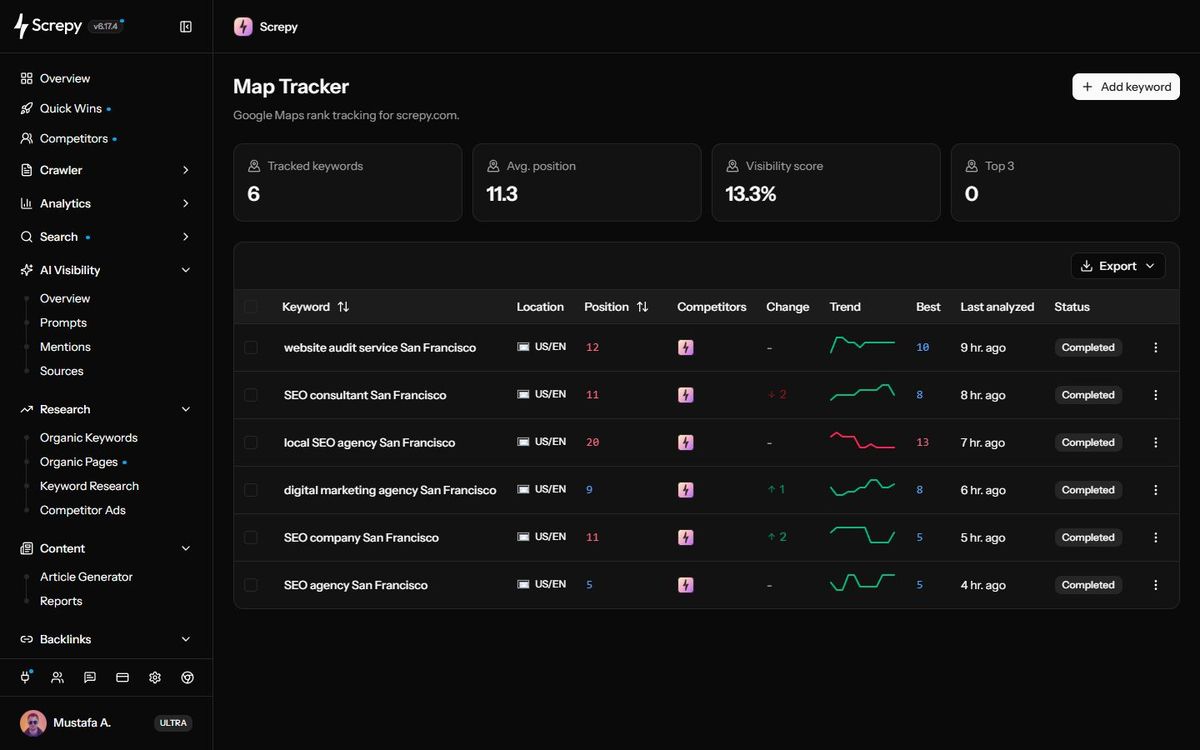
Example check log: keep location and device evidence explicit
For the Austin setup above, record the context before interpreting a change. The positions below are hypothetical:
| Field | First completed check | Later completed check |
|---|---|---|
| Query | plumber in Austin | plumber in Austin |
| Country / language | United States / English | United States / English |
| Listing | Same verified branch and match rules | Same verified branch and match rules |
| Observed Maps position | 8 | 5 |
| Device setting | No device selector in this workflow | No device selector in this workflow |
| Coordinate grid | Not collected | Not collected |
The defensible conclusion is that the matched listing moved from 8 to 5 in these sampled Google Maps query results. This does not establish a mobile-versus-desktop change, a Local Pack position, or neighborhood-wide improvement. Screpy's current Add keyword workflow exposes country and language, not a device selector or map-coordinate grid. Do not label that result “mobile Austin grid.”
If your question specifically concerns mobile and desktop or fixed points around a branch, select a method that exposes and records those settings. Keep those results in their own comparable series. When a listing is not found within the checked results, retain that status; do not substitute a zero position or a failed request for a completed observation.
City, neighborhood, and service-area rank tracking
Coordinate-based geo-grid trackers measure the same keyword at multiple saved points. They can show differences between downtown, nearby neighborhoods and suburbs. Other local trackers follow selected queries or a smaller number of locations. Confirm which approach your report uses before describing it as citywide coverage.
For a storefront, start with the immediate area around the address, then expand to places customers commonly travel from. For a service-area business, track the cities, ZIP codes, or neighborhoods it genuinely serves. Google allows service areas to be defined by places rather than a simple radius, and it expects them to reflect the real area where the business provides services. Google’s service-area guidance is useful when setting realistic tracking coverage.
A service-area setting is business information, not a guarantee of visibility in every listed place. Choose tracking points inside areas where a customer could realistically use the service, without adding fictitious locations or changing the business address to manipulate a report.
Use a consistent grid size, center and spacing for each market. Choose spacing that samples the places your question concerns; tighter spacing inspects a smaller area in more detail, while wider spacing covers more ground with the same point count. Track each priority keyword separately, since strong coverage for one service does not mean the business is visible for every service it offers.
Reading a Google Maps ranking heatmap
A Google Maps ranking heatmap displays ranking positions as colored points on a map. Strong positions are usually shown in one color and weaker or missing positions in others. The value is not the color itself. It is the coverage pattern.
Look for clusters. Strong rankings close to the business and weaker rankings farther away may reflect the normal effect of proximity. A weak area near the business deserves a closer look, but the colors do not identify the cause. Open the point’s result evidence and check the query, listing match, completion status and recurring competitors before reviewing business information.
Avoid judging a heatmap by average rank alone. An average can hide the difference between broad top-three visibility and a small pocket of high rankings surrounded by poor coverage. For a Maps grid, report the share of valid points within a declared Maps position range. If you also track the Local Pack, keep its coverage in a separate report. Then compare the businesses repeatedly returned in weak areas.
Before calling a point “not found,” check that the request completed and that the intended listing was not matched within the recorded depth. A pending or failed request supplies no position. A wrong branch match supplies an invalid comparison. Color keys and missing-result labels vary by tool; read the report’s definitions rather than assigning meaning from color alone.
Use the map to decide which customer-relevant points to investigate. Expanding the grid into distant, unserved areas can lower a score without showing a new business problem; shrinking it to the strongest points can improve the score without gaining visibility.
Local ranking reports that guide SEO actions
Average rank versus visibility across your target area
Average rank is a useful summary only when you know what was included. A mean calculated from found listings can look strong while much of a grid is outside the checked result range. Pair it with found coverage, top-three or top-10 coverage, the result-depth limit and the number of valid checks. Keep keywords and markets separate before making any combined summary.
Consider this hypothetical Google Maps scan, not a customer result. One exact keyword is checked at nine saved coordinates in a 3×3 grid with 1-km spacing. All nine requests complete successfully, use the same market settings and look for the same listing within the first 20 positions. The center and coordinates are retained for later runs. The values below are the listing’s sampled Maps positions:
| Grid row | West point | Middle point | East point |
|---|---|---|---|
| North | 1 | 2 | 4 |
| Middle | 3 | 5 | NF |
| South | 2 | NF | 9 |
Here, NF means not found within the first 20 results at that point. It does not mean the business disappeared from Google, has a position of zero, or is known to rank exactly 21st.
| Report metric | Calculation | Result |
|---|---|---|
| Valid completed checks | 9 completed / 9 planned | 100% |
| Found coverage within depth 20 | 7 found / 9 valid points | 77.8% |
| Top-three Maps coverage | 4 points at positions 1–3 / 9 valid points | 44.4% |
| Top-10 Maps coverage | 7 points at positions 1–10 / 9 valid points | 77.8% |
| Mean of found positions | (1 + 2 + 4 + 3 + 5 + 2 + 9) / 7 | 3.71 |
The mean of 3.71 describes only the seven found results. It cannot replace the 44.4% top-three coverage figure, which describes a different part of the sample. If a report explicitly assigns a penalty of 21 to each NF, its mean becomes (26 + 21 + 21) / 9 = 7.56. That is a reporting convention, not an observed 21st position. Ask which formula is used before comparing scores from different tools.
A depth-100 scan and a depth-20 scan may have different found coverage even without any business change. Similarly, the share of sampled points is not the share of residents, search volume or customers reached. A grid gives equal weight to each point unless you deliberately define a different weighting method. Report any such method instead of calling the result market share.
Top-three Maps coverage also does not establish that the business appeared in the Search Local Pack at those points. That requires a separate check of the Search surface.
Not found versus a failed or missing scan
If one of the nine requests fails, you have eight valid checks and one unknown result. Report completion as 8/9, retry or investigate the failed point, and label any coverage calculated from the eight valid points as provisional. Do not substitute NF or position zero for the failed request. Its business position was not measured.
Removing a weak point can make coverage look better without any listing improving. For a before-and-after report, compare the same saved points and disclose invalid checks in both periods. Prefer a fully completed rerun; if you use only the points valid in both periods, name that reduced sample and its count. Do not compare an eight-point percentage silently with last month’s nine-point percentage.
A completed run with an incorrect business match also needs correction. Check the returned listing and rules before interpreting absence as a ranking loss. “Not found” is meaningful only under the stated keyword, surface, depth, location and matching conditions.
Finding competitors and weak coverage areas
A useful rank report identifies businesses that repeatedly outrank you at specific points. Focus on recurring competitors, not every listing that appears once. Note their location, visible categories, review profiles and linked website pages as investigation clues. They do not reveal the weights Google applied, and copying a competitor’s category is inappropriate if it does not describe your business.
Some weak areas are distant or dominated by closer providers. Others overlap with important locations where your service is genuinely relevant. For the latter, first validate the measurement, then check whether the listing and linked service page accurately represent the business. Use the Google Maps SEO guide and Business Profile optimization guide when an actual information problem needs fixing.
Using rank changes to prioritize local SEO updates
Treat changes as prompts for investigation rather than proof of a cause. A concise report can pair the observed pattern with a bounded next action:
| Observed pattern | First investigation | Avoid assuming |
|---|---|---|
| One point drops once | Completion, matching rules and that point’s returned results | A citywide ranking loss |
| Many keywords suddenly show NF | Listing match, result depth, analysis status and public profile availability | That every result moved below the cutoff |
| Coverage weakens only at distant points | Saved coordinates and nearby competitors | That a profile rewrite removes distance effects |
| Maps positions are stable but leads fall | Demand, profile actions, website conversion path and actual lead records | That the ranking tracker missed an SEO penalty |
| Profile actions rise after an ad campaign | The reporting period and organic/paid scope | An organic Maps ranking gain |
Keep the keyword, grid points, supported device settings and surface constant, and annotate genuine business or website changes. Prioritize a verified problem affecting valuable services and places. Assign an owner, record the correction and compare later completed checks before deciding whether to continue, undo or investigate further.
Method and limitations
This guide describes a repeatable measurement workflow, not a ranking experiment. The Chicago, Austin and nine-point grid examples are illustrative; they are not measurements of a Screpy customer or evidence of an SEO gain. The nine-point calculations use an explicitly chosen 20-result limit. Your tool may check a different depth or calculate averages differently.
A local rank report samples one query under recorded conditions. It cannot establish every customer’s result, why Google selected a listing, or how many leads a position generated. Recheck the same setup over time and keep the result evidence available when someone challenges a movement.
Treat Maps positions, Local Pack results, organic website traffic, profile actions and completed leads as related but separate measurements. Match reporting periods and note business changes, demand shifts and advertising activity before interpreting agreement or disagreement between them. Product workflows can change; the linked Screpy setup guide explains the current dashboard rather than a generic grid interface.
Verification checklist
Before sending a local ranking report to a client or teammate, make sure its numbers can be traced back to comparable checks.
| Check | Evidence to include |
|---|---|
| Correct listing | Matched business and branch, not only the name |
| Comparable setup | Exact keyword, surface, market settings and saved location method |
| Grid consistency | Same coordinates, center, spacing and exclusions across periods |
| Completed results | Planned and valid check counts; failed or pending points labeled unknown |
| Not-found definition | Result-depth limit and matching conditions |
| Honest metrics | Top-three/top-10 denominators and average-rank formula |
| Freshness | Analysis timestamps, timezone and reporting period |
| Competitor context | Repeated competing listings at relevant weak points |
| Business outcome | Profile actions distinguished from answered calls, visits and leads |
| Next action | Verified problem, owner and a later comparable check |
If a field is missing, state the limitation and obtain the evidence before making a ranking claim. A useful report shows what was measured, what remains uncertain and which business decision the evidence supports.