

Start with accurate product data in Google Merchant Center, then confirm how your store supports Google's shopping experience: through a commerce platform's Google channel or a direct Universal Commerce Protocol (UCP) integration. A product feed, cart transfer and checkout on Google are separate pieces of that work.
The important distinction is between helping Google discover an offer and enabling a shopper to buy it through a supported flow. An approved feed does not guarantee a Universal Cart placement, and a cart-transfer integration does not require everything needed for native checkout.
The practical path is to check access, reconcile your catalog, choose the appropriate integration and validate what a shopper can actually complete.
What Universal Cart changes for your store
Google launched Universal Cart in the United States on October 15, 2026, across Google Search and the Gemini app. The feature had been previewed earlier in the year; the October announcement describes the consumer rollout.
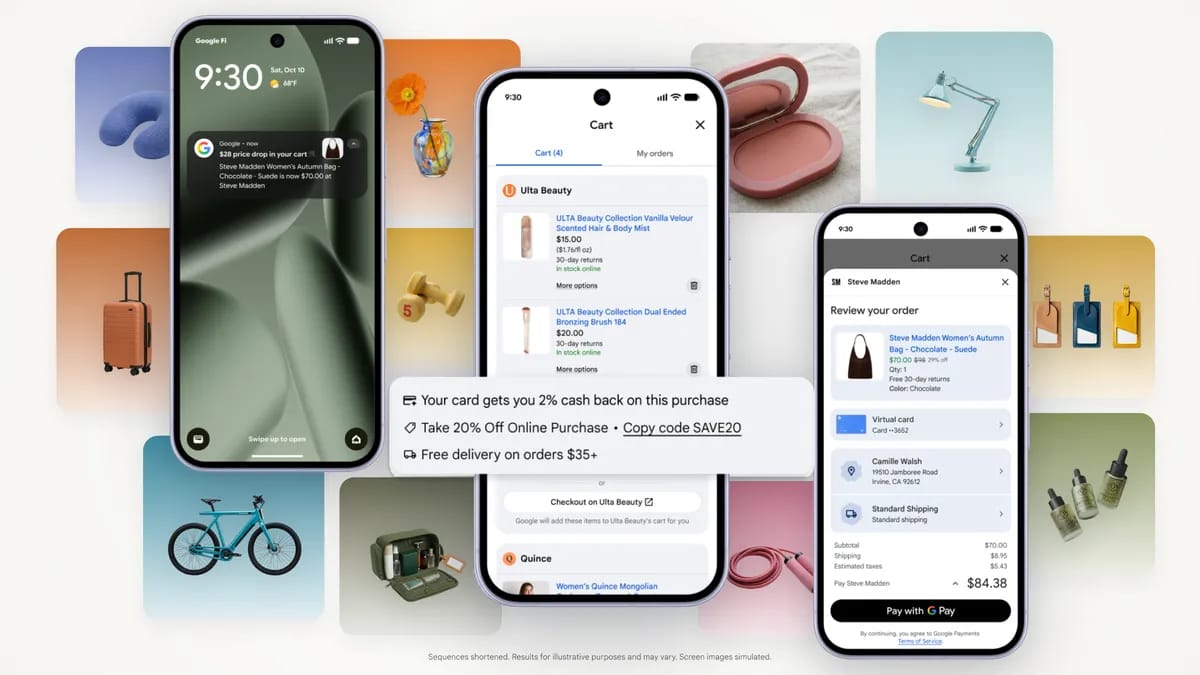
Google's launch illustration uses simulated screens to show the shopping experience. Image source: Google, via the announcement linked above.
Shoppers can collect products from different retailers, return to their saved items and receive price or availability updates. Depending on the supported experience, they can buy through Google or transfer items to a merchant's cart to finish on that store's website. The retailer remains the seller of record and handles the customer relationship after purchase.
For a store, this creates three questions: can Google understand the product, is the relevant purchase path enabled, and does that path work for the chosen offer? Treat those as separate checks. A product appearing in Google Search is useful discovery evidence, but it does not prove that its cart transfer or direct checkout is active.
Confirm which onboarding route applies
Before commissioning an integration, establish who will provide it.
If your ecommerce platform manages the Google channel, start with that platform's current eligibility and channel settings. Google's merchant onboarding guidance directs businesses using a platform or service provider to check its UCP plans with that provider. A managed integration can change the work your own developers need to do.
If you are integrating directly, review Google's implementation requirements and use the UCP Integration Interest Form. Have these details ready:
- Your Merchant Center account ID and store URL.
- The countries you fulfill from and the product categories you sell.
- Your active offer count and existing ecommerce or integration platform.
- The capabilities you intend to support and the people available to implement them.
The form is an access request, rather than automatic enrollment. Google's documentation describes a selected-program process and requires approval before the integration goes live. Follow the instructions for your access path instead of assuming that submitting a form, publishing a profile or passing one test completes onboarding.
The consumer launch and merchant tools also have different rollout conditions. At this review, the Merchant Center UCP hub was rolling out gradually in the U.S.; Google described Canada and Australia as subsequent markets for the following year. A country appearing in an interest-form list does not establish that the feature is live there.
For a store outside the current rollout, maintaining accurate product listings is still useful. Record the integration access state as unavailable until your platform or Google confirms otherwise.
Prepare a consistent Merchant Center catalog
Use one dependable product-data source for your store. Merchant Center supports several product upload methods, including platform connections, files and APIs. Choose the method your team can keep current; adding another feed is not automatically an improvement if two systems overwrite the same offers.
Check the status of your products and your free listings. Google's free listings guidance explains where to review eligibility and issues, while explicitly distinguishing eligibility from guaranteed display. This is a foundation for discovery, not confirmation of Universal Cart enrollment.
Reconcile a representative product sample across your source catalog, Merchant Center and the live store:
| Data to compare | What a useful check establishes |
|---|---|
| Offer ID | The same purchasable item is identifiable across systems. |
| Title and description | The model, material or intended use is described accurately. |
| Variant details | Size, color and grouping refer to the specific offer being sold. |
| Price and currency | The submitted offer agrees with the price a customer can actually pay. |
| Availability | The feed and store agree about whether the item can be purchased. |
| Link and image | The destination and image represent that product or variant. |
| Brand and identifiers | Real manufacturer identifiers are supplied where applicable. |
| Shipping and returns | The offer's purchase conditions are clear and consistent. |
Use the product data specification to check requirements for your category. Do not invent a GTIN or assume every product has the same required attributes.
For example, suppose a feed describes a black, medium bag at $79, but its link opens a brown variant at $89. Fix the mismatch before investigating why an AI shopping interface displays confusing information. An integration cannot make conflicting offers trustworthy.
Keep visible product information and merchant listing structured data aligned. Structured data helps explain an offer; adding it is not a special Universal Cart activation switch.
Screpy's Website Audit can help inspect canonical URLs, broken links, images and structured-data coverage on the website side. Merchant Center diagnostics and UCP validation remain separate checks.
Check Shopify's Google channel before building your own
Shopify merchants should inspect their platform route before commissioning a separate UCP implementation. Shopify's agentic storefronts documentation describes managed access to AI channels, with Google product discovery supplied through Merchant Center or the Google & YouTube sales channel.
Start in Sales channels > Agentic and review the Google AI Mode and Gemini channel. Confirm which products are available to Google and which checkout experience your store currently supports. Shopify's default management setting and its channel-specific controls affect different choices; use the current management instructions when changing those settings.
For Google direct checkout, Shopify currently requires a U.S.-based store selling to U.S. customers, a valid Merchant Center account, eligible products and completed store policies. The Google-specific channel guide also explains that availability is rolling out and may not yet be enabled for a particular store.
If you use the Google & YouTube channel for the feed, check product and shipping synchronization. If another provider manages Merchant Center, establish which system owns those updates.
An enabled setting is therefore only one part of the answer. Ask your team to identify the current Google channel status, a sample of available offers and the actual supported buying flow. That gives you a concrete next task without duplicating integration work your platform already handles.
Choose cart transfer or checkout on Google
A direct UCP integration can support cart transfer, native checkout or both. Choose based on the purchase experience you can reliably operate, rather than treating the two routes as interchangeable.
| Decision | Transfer to merchant cart | Native checkout on Google |
|---|---|---|
| Where the shopper finishes | Your store's checkout | Google's supported checkout interface |
| Core integration | Cart API to create and hand off a populated cart | Checkout session creation, updates and completion |
| Payment handling | Your existing checkout flow | The supported native payment integration |
| Post-purchase integration | Your normal store workflow; the cart-transfer feature does not require UCP order lifecycle | Order updates are part of the native integration |
| Main implementation question | Can the selected items reach a usable merchant cart? | Can the complete supported purchase and order flow succeed? |
There is an important exception to broad setup advice. Google's Merchant Center integration guide describes a cart-transfer-only fast-track that does not require the full native product-feed setup, product warnings or customer-support configuration. Its validation still checks product ID configuration and the Cart API.
That narrower validation path does not make inaccurate product information useful for discovery. It means you should apply the requirements for the capability you are implementing, rather than building native checkout merely to receive a cart.
Use the Cart API guide for the transfer route and the native checkout overview for purchases completed on Google. If your platform supplies either experience, confirm its supported scope before planning custom work.
Set up the cart-transfer path
For a custom integration, give your developer a capability-specific brief. The current Cart API guide documents a one-way creation and transfer flow using CreateCart, available from UCP version 2026-04-08.
The first deliverable is a UCP business profile. This is a publicly accessible JSON document at /.well-known/ucp that declares supported versions, capabilities and service endpoints. For cart transfer, include the dev.ucp.shopping.cart capability in the appropriate version's profile structure.
A useful handoff worksheet looks like this:
| Deliverable | Evidence to ask for |
|---|---|
| Public UCP profile | Its real URL and the capabilities Google discovers from it |
| Version agreement | The supported UCP version used by both sides |
| Cart endpoint | An implemented creation/transfer flow following the official API schema |
| Product mapping | The offer IDs Google sends resolve to the correct store items |
| Request authorization | The supported authentication configuration used for the integration |
| Merchant destination | A working cart with the intended items and quantities |
The public profile and transaction endpoints serve different purposes. Google's authentication guidance describes API keys and OAuth options for API requests, with OAuth recommended. Agree the endpoint configuration for your implementation; publishing a discoverable profile does not require publishing private credentials inside it.
Keep the scope of the initial transfer explicit. The Cart API overview describes creation and transfer, rather than continuous two-way cart synchronization. Some Merchant Center sandbox controls also list optional cart operations. Their presence in a test interface should not be treated as proof that every operation is supported in the production flow you have enabled.
Confirm the API version and activated capabilities with your onboarding contact or platform. A successful demonstration should show the correct merchant cart, not simply a valid profile file or a response from an endpoint.
Enable native checkout only for supported products
Native checkout adds a complete purchasing flow. The direct integration needs checkout session creation, updates and completion, together with the required payment and post-purchase components. Plan it as a commerce implementation with an owner for order handling, rather than as a product-feed change alone.
Google's Merchant Center preparation guide describes native checkout eligibility and product restrictions. Some offers that a store can sell normally, such as subscriptions or personalized goods, are not eligible for this checkout experience. Review the current restrictions against your actual catalog before opting products in.
For native checkout, the feed attribute native_commerce(checkout_eligibility) signals product eligibility. A missing or false value defaults to ineligible. The following is an illustrative supplemental CSV, using invented offer IDs:
id,native_commerce(checkout_eligibility)
BAG-BLACK-M,TRUE
BAG-ENGRAVED,FALSE
Here, the first row represents a standard offer you have already determined is eligible. The second represents a personalized item kept out of native checkout. Setting TRUE does not override product restrictions, missing implementation work or Google's approval process.
Preserve identifier consistency. The preparation guide explains how merchant_item_id can map a feed offer to the identifier expected by the checkout API when the ordinary feed ID differs. Google also recommends a supplemental source for these additional attributes, reducing the risk of disrupting existing product ingestion.
Complete the applicable shipping, returns and customer-support configuration, then verify that the supported payment and order-update flow works. These are native checkout obligations; the eligibility attribute is not a universal Cart API switch or an SEO ranking factor.
Choose a small set of straightforward offers first. Expanding only after their complete purchase and order handling have been validated makes defects easier to isolate.
Validate the experience before calling it live
For a direct integration with hub access, open Settings > UCP integration in Merchant Center. Use the sandbox and the validation checklist for the capabilities you selected. A platform-managed integration may handle these steps differently, so ask the platform which evidence confirms its activation.
Google's validation workflow checks whether the capabilities declared in your profile match the capabilities selected for the account. Native checkout has a broader checklist than cart transfer, including order-status validation. Completion is followed by Google's review and a notification that the account is live or needs further work.
In addition to that official checklist, use a small acceptance sample. The following is a suggested test plan, not a list of tests performed for this article:
| Case | Applies to | Evidence to retain |
|---|---|---|
| Exact product variant | Both paths | The intended offer ID, color and size survive the request and buying flow. |
| Multiple items or quantities | Where supported by the selected flow | The resulting cart or session contains the expected items without silent changes. |
| Unavailable or unsupported offer | Both paths | The flow reports the condition clearly and does not substitute another product. |
| Changed price or inventory | Both paths | The current purchase state is handled according to the API and shown consistently. |
| Transfer to the merchant site | Cart transfer | The destination opens a usable cart populated with the intended items. |
| Successful and unsuccessful payment | Native checkout | Sandbox outcomes are handled correctly, with the expected order state. |
| Order status after purchase | Native checkout | The order system and required status updates agree. |
Keep a record of the environment, API version, selected capability, offer IDs, expected outcome, actual outcome and the issue owner. Use the program's supported sandbox methods for payment testing.
The acceptance decision should be concrete: the intended capability is approved and the supported customer journey has been validated. A publicly readable profile, one successful API response or a product appearing in ordinary search is not enough evidence by itself.
Resolve failures in the small sample before widening the catalog. That makes it easier to distinguish a product-data problem from an integration defect.
Diagnose missing products and broken handoffs
Investigate the layer that failed before changing the catalog or the checkout. The same “not showing” complaint can describe an unavailable merchant feature, an ineligible offer, a discovery problem or an API failure.
| Symptom | First check | What it does not prove |
|---|---|---|
| No UCP integration menu | Account access, market and the current phased rollout | That your developer deployed the wrong endpoint |
| Products approved for free listings but absent from Universal Cart | The specific surface, rollout conditions and supported integration state | That an approved feed guarantees placement |
| Product is discoverable but has no direct checkout | Offer restrictions, market, platform settings and native checkout status | That the product cannot appear in ordinary Google results |
| Profile is reachable but validation fails | Declared version, selected capabilities and service configuration | That a readable JSON file is a complete integration |
| Wrong product or variant reaches the cart | Offer ID mapping and the destination's actual product selection | That Google is intentionally recommending the wrong item |
| Price or availability differs | Source timestamps, current catalog data and the buying response | That a new keyword or schema property will fix the mismatch |
| Cart transfer opens an empty or unusable cart | The actual transfer result and merchant destination behavior | That an HTTP success response proves a working shopper journey |
| Orders exist but website analytics shows fewer checkouts | The purchase location and platform reporting | That every missing client-side event represents a lost sale |
These are starting points for investigation, not automatic diagnoses. Preserve the smallest piece of evidence that shows the failure: an offer status, the discovered capabilities, a sanitized request and response, or the resulting cart state.
A reusable issue record can keep the teams aligned:
Store and shopper market:
Managed platform or direct integration:
Capability and API version:
Merchant Center offer ID and mapped store ID:
Evidence captured at:
Expected behavior:
Actual behavior:
Owner and next verification:
For example, “the medium black bag maps to the brown bag in the transferred cart” is actionable. “Our AI visibility is broken” leaves the catalog, integration and marketing teams investigating different problems.
Keep discovery and transaction evidence separate when closing an issue. Fixing a broken handoff proves that the supported buying path works; it does not guarantee that Google will select the offer for every relevant query.
Measure discovery, transfers and purchases separately
Choose reporting that matches the journey you enabled.
| Question | Evidence to use |
|---|---|
| Can Google discover and show the offer? | Merchant Center product status and relevant listing performance, plus dated observations of the surface |
| Does a cart transfer reach the store correctly? | Transfer validation, merchant cart behavior and the store's available session/order evidence |
| Do native purchases complete? | UCP checkout reporting and the corresponding order records |
| Does the channel create useful business outcomes? | Completed orders, order value, cancellations and customer-service outcomes over a defined period |
Google's UCP analytics guide describes reporting under Settings > UCP Integration > Analytics for UCP-enabled merchants with the required Performance role. Its checkout metrics include Clicks to Buy, Purchases, Purchase Rate, Average Order Value and Cancellations.
Use the report's definitions. A click on a UCP Buy button is not the same event as saving a product in Universal Cart. The documented checkout dashboard should not be presented as a count of every cart save, product impression or transfer to a merchant site.
The purchase location also affects analytics. Shopify's Google channel documentation says ordinary Google Analytics and custom client-side pixels do not fire inside its Google AI Mode and Gemini direct checkout. Review the supported platform and order reporting before interpreting a drop in website checkout events as a drop in purchases.
Compare like-for-like periods and annotate changes to the feed, integration and channel settings. An increase in sales after launch can have several causes; a new shopping interface alone does not establish attribution.
Keep four states in your rollout record: product-data readiness, integration approval, observed availability and completed purchases. That gives the SEO, development and commerce teams a shared account of what has actually been established.
This guide is based on current Google and Shopify documentation reviewed on October 16, 2026. It describes the U.S. launch and documented merchant paths; it does not report a merchant implementation or a controlled performance test. Availability and supported capabilities can change.