


Competitor keyword discovery
Research an eligible competitor domain in the same market to find the terms and ranking pages connected to its existing organic visibility.
- Competitor terms
- Ranking pages
- Market-matched research
Find the Google organic keywords your project domain or an eligible added competitor ranks for. Choose a country and language, connect each query to its ranking URL, and compare position, demand and intent before choosing a page to improve.
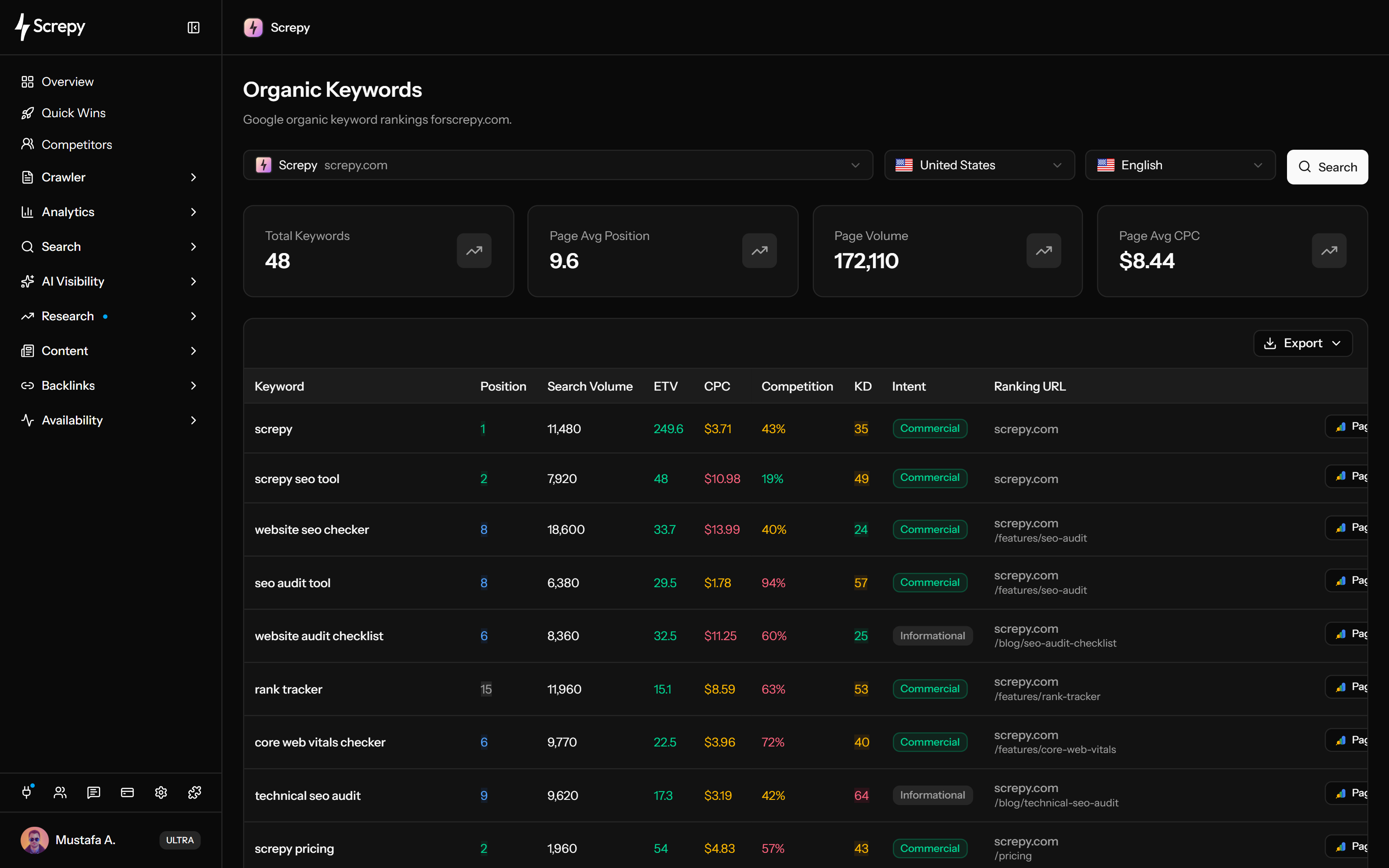










Find searches already associated with the active project's domain. Start with the country and language you serve, then examine each discovered query beside its reported organic position and ranking URL.
linen shirtUSAn added competitor can reveal topics and landing pages worth investigating. Research it in the same market as your project, then decide which terms are relevant to your own audience and offer.
linen shirtUSUse Organic Pages when the question is which URLs carry a domain's search visibility. Its page-level view helps you compare keyword coverage and estimated traffic before choosing a page to investigate.
/shop/linenPagesA ranking opportunity needs more than a large number. Read demand, estimated visits, difficulty and intent together, then validate whether the page can answer a useful question for your business.
Search volume
2,400Move useful findings into recurring monitoring after choosing the query and page you care about. The add action opens a separate Rank Tracker form, giving you a chance to set the right context before tracking starts.
linen shirtUSThe headline total and the other summary cards have different scopes. Use them to understand the domain's discovered footprint and the currently loaded rows without mistaking a page average for a whole-site measurement.
Search volume
2,400linen shirtKeywordClick a positive keyword count in Organic Pages to inspect the terms associated with that URL. This is useful for checking whether a page's discovered searches match the purpose of its content.
linen shirt/shop/linen186Clicks/guides/linen74ClicksThe Pages action in the keyword table answers whether your own site has visibility for the exact query. It reads the active project's connected Search Console property, even when the selected research domain is a competitor.
Save the loaded report for a page review, editorial shortlist or client discussion. Keep the domain and market with the file so later comparisons refer to the same research context.
Plan your next SEO steps with an AI assistant using supported Screpy project data. SEO MCP does not currently expose Organic Keywords records or actions; use the dashboard for that feature’s workflow.
Keep the market context explicit, connect every query to its ranking page, validate the opportunity, and move only useful findings into monitoring or implementation.
Select the project or an added competitor, then choose the country and language that match the audience. Keep this context fixed when comparing websites or repeating the research.
Start with the domain's discovered keyword total. Page Avg Position, Page Volume and Page Avg CPC describe only the loaded rows; compare these page metrics with the query, ranking URL and intent before selecting a term.
Choose terms that fit a real business topic and inspect the page already earning visibility. A promising keyword with the wrong page, weak intent fit, or no useful destination needs more investigation.
Use Organic Pages for URL-level visibility, Search Console for available first-party query-to-page performance, and SERP Analysis for the current result set and competing page formats.
Add important project terms to Rank Tracker for ongoing monitoring, or export the current table to CSV or Excel when the research needs to become a focused backlog or report.
The report is most useful for competitor discovery, page refresh research, ranking-page portfolios, and focused content or client backlogs.
Research an eligible competitor domain in the same market to find the terms and ranking pages connected to its existing organic visibility.
Find keywords already connected to a page, then compare intent, position, demand, and the live SERP before deciding whether the answer needs a meaningful update.
Use Organic Pages to see which URLs hold the broadest keyword coverage, estimated traffic, traffic value, and Top 3 or Top 10 presence.
Compare Screpy with Serpstat when keyword and competitor research, rankings, technical audits, monitoring, AI visibility, pricing, API access, and workflow scope affect the decision.
Treat each row as market-specific research evidence. Confirm the query, page, SERP, and first-party performance before turning an estimate into an SEO task.
Search volume, ETV, CPC, paid competition and difficulty are research estimates. ETV estimates organic traffic volume, not monetary value. Use Search Console for your own Google clicks and impressions and analytics for measured website behavior.
Positions, ranking URLs, and keyword estimates can change by country and language. Compare domains only when the selected context is equivalent.
Organic Keywords provides a broader current-ranking view. Rank Tracker is the dedicated workflow for monitoring a selected keyword portfolio over time.
High volume, estimated visits or CPC and low difficulty do not establish audience fit, business value or the right page format. Confirm the query's intent, ranking page and relevance before creating an SEO task.
Use Rank Tracker for selected-keyword history, Search Console for first-party Google performance, and SERP Analysis for the current competing result set.
Monitor selected project keywords over time with country, language and device settings reviewed before creation. Completed checks build the comparable ranking history.
Review measured Google clicks, impressions, CTR, average position, queries, pages, and available query-to-page relationships.
Inspect the current Google result set, intent, ranking pages, and page patterns before creating or substantially changing content.
Screpy documentation
Follow the Screpy guide to interpret ranking keywords, positions, intent, and the pages appearing in organic search.
Learn the concepts behind this workflow and apply them with practical SEO guidance.
Why do keyword rankings change? Separate real ranking losses from measurement differences, then check search intent, competitors and technical problems.
Read articleLearn what SERP monitoring is, why it matters, and how tracking competitors, keyword rankings, and search result changes improves SEO strategy.
Read articleUnderstand the difference between SEO and SEM, how organic rankings and paid search work, and when Google Ads supports search visibility.
Read articleUse Screpy MCP to read saved keyword rankings, select dated analyses, handle missing positions, and compare compatible checks without guessing live results.
Read articleUnderstand what the dataset represents, how it differs from Search Console and Rank Tracker, and how to use estimated metrics responsibly.
Organic keywords are queries for which a website or page appears in unpaid search results. Screpy uses them to connect a domain’s discovered Google visibility with the position and URL ranking for each term.
Yes. CSV and Excel export the loaded results page, normally 50 rows, in Organic Keywords or Organic Pages. They do not automatically include all server pages, page-keyword dialog rows or ranking history. Save the domain, country and language with your research file.
Organic Keywords is a discovery and current-ranking view, not the dedicated time-series workflow for a selected keyword portfolio. Add important project keywords to Rank Tracker when you need comparable position history and ongoing monitoring.
Organic Keywords discovers terms associated with a domain from a broader keyword dataset. Rank Tracker monitors a deliberately selected keyword set over time in a defined search context. Use discovery first, then move only important terms into tracking.
Search Console reports first-party impressions, clicks, CTR, and average position for a verified Google property. Organic Keywords is an estimated research dataset that can reveal broader domain and competitor visibility without representing measured Search Console traffic.
Organic results and keyword datasets vary by market. Selecting the intended country and language keeps positions, demand estimates, and ranking URLs aligned with the audience you are researching instead of mixing incomparable search contexts.
Yes, when your plan permits competitor research. Add the competitor to the active project, select it with the relevant country and language, and compare its discovered keywords and ranking pages without treating every term as a content recommendation.
Rows show the ranking URL when available. Organic Pages adds estimated organic traffic, keyword count, equivalent paid-search Traffic Value and inclusive Top 3/Top 10 counts. Clicking a positive keyword count opens up to 50 page terms; the separate Pages action in the keyword table uses your active project's Search Console property.
No. Start with search intent, the current ranking URL, business value, and the live SERP. Improve or create a page only when the query belongs to a meaningful topic and the proposed page would answer a distinct user need better.
Search volume estimates demand. ETV means estimated monthly organic traffic volume, not money. CPC is an estimated paid cost per click in US dollars; competition describes advertiser activity and keyword difficulty estimates organic ranking difficulty. These estimates do not guarantee visits, revenue or conversions.