


Publishing and content libraries
Find repeated editorial images, missing contextual alternatives, and shared content patterns across articles, guides, and landing pages.
- Editorial context
- Repeated assets
- Accessible alternatives
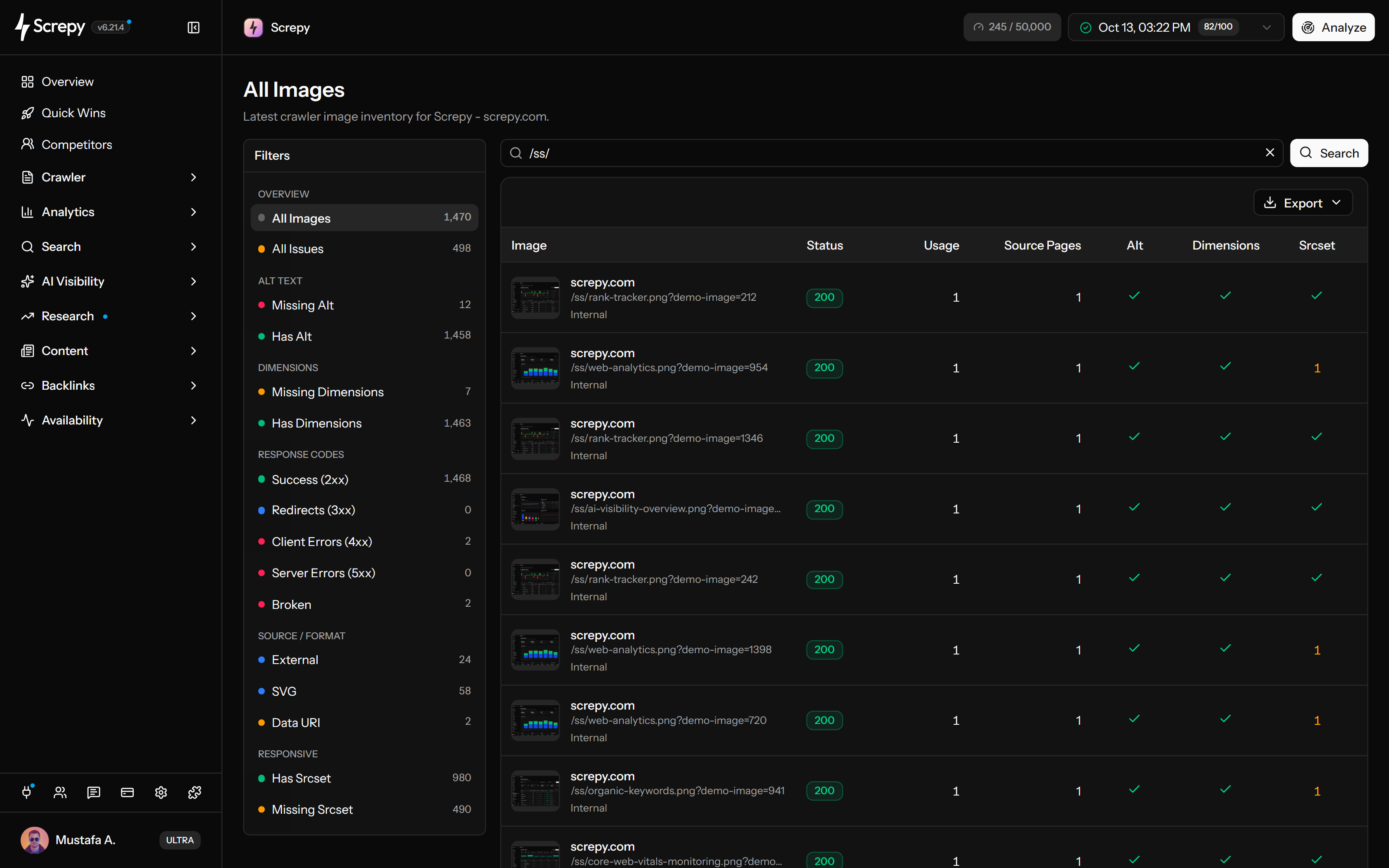
Group the image sources used across your website, filter missing alt text, dimensions, broken responses, and responsive delivery, then trace each finding to the pages and shared components that need review.










An image file can appear with different alternatives on different pages. Screpy groups the source and counts uses with missing or blank alt text, so you can find the affected context before writing a replacement.
A missing product thumbnail and a blocked external image need different fixes. Use the recorded response classes and affected source pages to investigate the file, its URL and the rule serving it.
Find image uses without a recorded width or height and identify repeated templates. This is a markup investigation: the image report does not measure the page's CLS or display a detailed width-and-height table.
Use Has Srcset and Missing Srcset to locate responsive markup across the crawl. Presence is the starting point; the browser's chosen file determines whether the implementation suits a mobile or desktop layout.
Group repeated image sources into a repairable inventory. Usage and distinct source-page counts help distinguish several appearances on one page from a shared component affecting many pages.
/images/linen.jpgJPEG/shop/linen3/guides1External, SVG and Data URI filters classify how images are supplied. Use each view to find dependencies or repeated delivery choices; the classification itself is not an SEO error.
Images24
Download a focused list of image sources for implementation work. CSV and Excel export supports a handoff, while the source-page investigation explains which component or content needs changing.
Use SEO MCP to ask about images found in your completed crawl. Find missing alt text, inspect image records and trace each finding back to its source pages.
Begin with representative crawl coverage, interpret the issue in page context, repair the shared cause, and verify the public result in a comparable crawl.
Choose a crawl whose scope and rendering settings cover the templates you need to review. A partial crawl produces a partial image inventory.
Select the queue relevant to your goal: missing alt, missing dimensions, Broken or missing srcset. All Issues combines these signals; it does not classify every 4xx response or every decorative image as a defect.
Inspect the image in its visible page context. The same source can be decorative on one page, informative on another, or the only content inside a link.
Update the asset, URL, CMS field, component, template, CSS, or delivery rule that created the repeated pattern instead of patching each occurrence independently.
Check representative mobile and desktop pages, confirm the image response and markup, then run a comparable crawl to see whether the intended queue changed.
Grouped image evidence is especially useful for publishing libraries, ecommerce catalogues, redesigns, migrations, and repeatable agency audits.
Find repeated editorial images, missing contextual alternatives, and shared content patterns across articles, guides, and landing pages.
Trace product and category image problems across templates where one unavailable source or markup pattern can affect many shopping journeys.
Create a pre-release inventory, then look for moved sources, missing attributes, or responsive-delivery changes after a template or platform migration.
Turn grouped image evidence into a focused implementation queue while keeping each recommendation attached to the pages and purpose it affects.
A crawler can reveal missing or unsuccessful signals, but the image purpose, rendered layout, delivery strategy, and source-page context determine the correct fix.
The Missing Alt queue includes empty values, but a deliberately empty alt attribute is appropriate for a decorative image. Decide from the page context, not the count alone.
Width and height attributes help reserve space, but CSS and containers can also control layout. Validate the rendered page and measured layout shifts before assigning a cause.
Responsive candidates are useful for many raster images, but not every icon, vector, tiny asset, or fixed-size use needs the same delivery pattern.
Screpy records crawl evidence and source-page relationships. It does not automatically compress files, rewrite alt text, change markup, or guarantee image-search rankings.
Audit images across a completed crawl, investigate them inside the wider crawler workflow, or check the image signals on one public page for free.
Group crawled image sources, filter technical and accessibility findings, and trace repeated assets to every source page.
Review images together with pages, links, responses, crawl scope, and the wider technical SEO inventory.
Check one public URL for image, accessibility, metadata, link, structured-data, and technical page signals without an account.
Screpy documentation
Use the Screpy images guide to interpret issue queues, inspect each asset in its source-page context, choose the correct fix, and verify the result with a comparable crawl.
Learn the concepts behind this workflow and apply them with practical SEO guidance.
Learn image SEO basics, from choosing relevant visuals and file formats to alt text, compression, indexability, page speed, and user experience.
Read articleCompare image audit tools with MCP support by source-page tracing, alt text, rendering coverage, and a practical test for choosing useful audit evidence.
Read articleBuild a stronger blog SEO strategy with better design, image optimization, keyword research, content planning, internal links, and technical checks.
Read articleAvoid SEO mistakes that hold back rankings, including low-quality content, clickbait, duplicate pages, hard-to-read text, and poor user experience.
Read articleUnderstand alt-text context, dimensions, responsive sources, response failures, crawl scope, source pages, and what the report does not change automatically.
No. Responsive source candidates can reduce unnecessary downloads for many raster images, but the right choice depends on the asset, rendered size, layout, browser support, and delivery workflow. Keep a usable src fallback when implementing responsive images.
Screpy groups image sources found in a completed crawl and shows their status, usage, source-page counts and issue counts. Presets cover alt presence, recorded dimensions, response classes, srcset, external sources, SVGs and data URIs. Inspect actual alt wording, dimensions and loading behavior on the source page; these are not detailed columns in the grouped table.
The Broken preset includes recorded 404, 410 and 500–599 responses. Other 4xx responses, such as 403 or 429, remain in Client Errors; a missing status is not automatically Broken. Check the image URL and source page to distinguish a deleted file, access restriction, temporary server failure or intentional redirect before choosing a repair.
No. Screpy identifies crawl findings and their source pages; it does not compress files, generate alt text, resize assets or rewrite markup. Use the report to locate the shared cause, make the change in your CMS or code, and check rendered quality and delivery separately before recrawling.
Publish the change, inspect representative pages at mobile and desktop widths, test the image URL and rendered markup, then run a comparable crawl. Confirm that the intended issue count and source-page uses changed without introducing a new accessibility or delivery problem.
No. Informative images need useful contextual alternatives, functional images should describe their action or destination, and complex images may need nearby explanation. Purely decorative images normally use an intentionally empty alt attribute. Review the image on each source page before changing it.
No. The report identifies missing and present alt values and shows where an image is used. A person who understands the page purpose should decide whether the alternative needs to be descriptive, empty, or supported by a longer explanation.
No. Missing width or height is a useful markup signal, not proof that an image caused layout shift. Inspect the rendered layout and compare measured performance because CSS, containers, fonts, banners, and injected content can also affect CLS.