


Recurring client reviews
Reuse one approved template for periodic client updates while creating a fresh snapshot for each reporting date.
Build reusable client SEO reports with your agency branding, selected project data and a live preview. Generate an on-demand PDF that preserves the evidence available when the report is created.
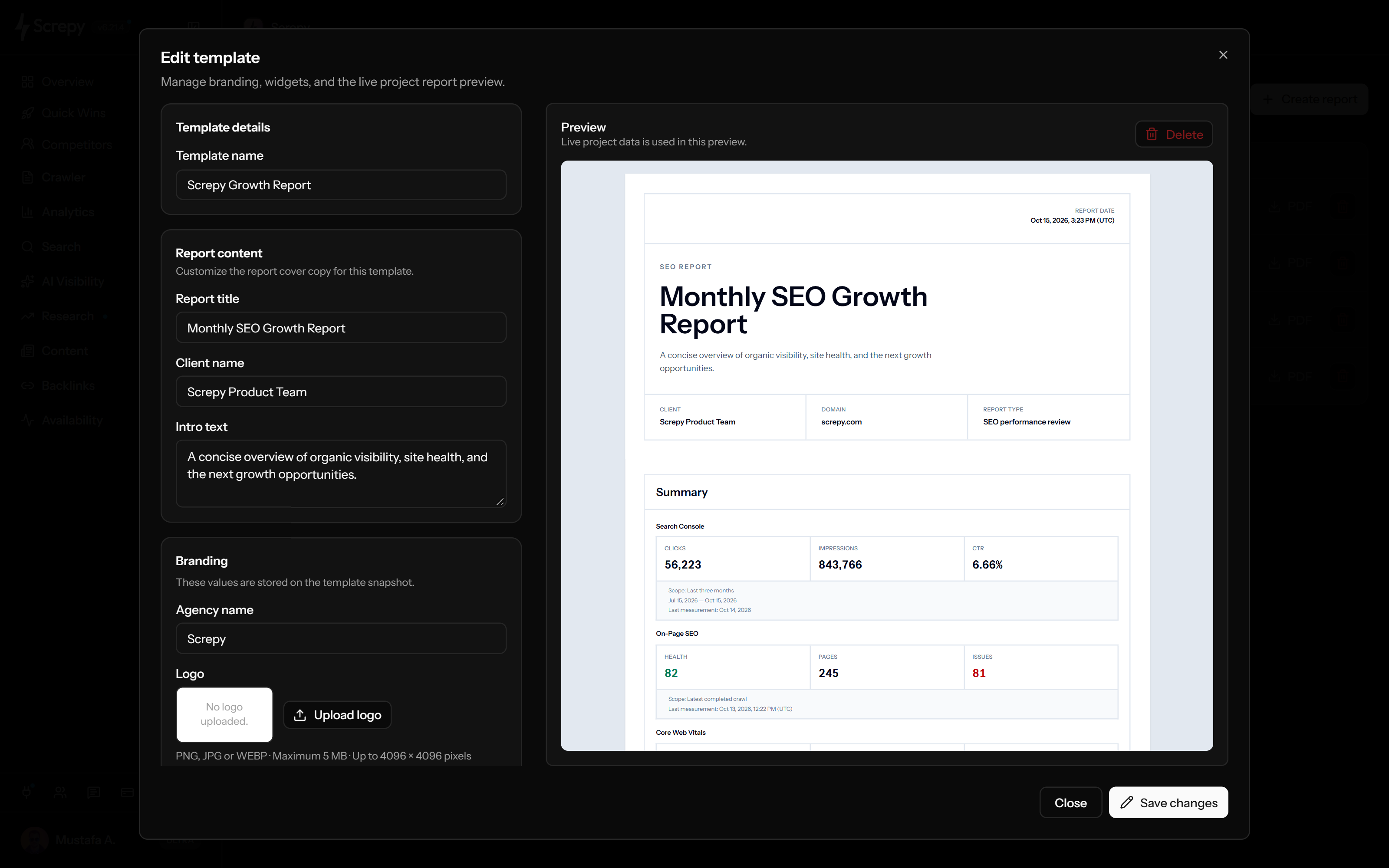










Save the presentation you want to reuse, then generate a new report from the relevant project. A template keeps the layout and client copy consistent without freezing future reports to old data.
aACMEReportPDF
Apply your agency identity through the report's logo, name, primary colour and footer. The editor shows which white-label controls your current plan makes available.
aACMEReportPDF
Build the report from ten predefined widget types instead of exporting every dashboard. Select and order the sections that answer the client's review question.
aACMEReportPDF
Audit1
Rankings2
Mentions3
Bring search visibility and technical evidence into the same document while keeping their meanings separate. A ranking average, search click and crawl issue answer different questions.
aACMEReportPDF
Add evidence beyond conventional search rankings when it belongs in the client discussion. These sections package existing monitoring and link data rather than starting a new campaign analysis.
example.comLab
LCP2.1 s
TBT180 ms
CLS0.04
The PDF creation date is not a shared date range for every metric. Read each section's scope and measurement date before comparing reports or describing month-to-month progress.
Period2026
Inspect the cover and selected evidence in the template editor before generating a PDF. The preview uses the active project's available data, so a reusable template can look different on another client project.
aACMEReportPDF
Create the report on demand from a saved template or the default structure. Screpy collects the snapshot during background generation and keeps the finished document separate from later project changes.
Plan your next SEO steps with an AI assistant using supported Screpy project data. SEO MCP does not currently expose White Label SEO Reports records or actions; use the dashboard for that feature’s workflow.
Define the decision first, reuse the right template, select only supporting evidence, verify the live preview, and review the final point-in-time PDF before sharing it.
Decide whether the report is for a client, manager, developer, or internal SEO review. Write the report title and introduction around the decision that person needs to make.
Start with the default report or save a reusable template with the client-facing copy and branding that should remain consistent across future reports.
Select available widgets for the report goal, then arrange their reading order.
Review the template against current project data. Remove irrelevant sections, check unavailable data, and confirm that the cover and branding identify the right client and project.
Generate a point-in-time report, wait for the PDF to become ready, then read the final document before downloading and sharing it through the channel your team controls.
The useful section mix changes with the reader. Keep each report narrow enough to explain one review, handoff, visibility question, or stakeholder update clearly.
Reuse one approved template for periodic client updates while creating a fresh snapshot for each reporting date.
Lead with the summary and On-Page SEO evidence when a developer or client needs the current crawl health, issue pattern, and next action.
Combine tracked ranking movement with organic keyword evidence when the discussion is about observed search visibility rather than a full technical review.
Select the few site-health, authority, and availability sections an internal stakeholder needs without exposing the entire project workspace.
Screpy reports package available project evidence into an on-demand PDF snapshot. They do not replace live dashboards, create unavailable data, or attach an automatic delivery schedule to every template.
The PDF represents the snapshot created at its generated-at time. Create a new report when the reader needs updated project data.
White-label reports are generated on demand. Screpy weekly email reports are a separate, plan-dependent project notification rather than a delivery schedule attached to a report template.
Widget access, branding, and report volume depend on the active plan and project data. The builder does not invent missing sections.
Use the report title, introduction, summary, and selected widgets to explain the decision. A longer PDF is not automatically a clearer or more useful report.
Build a reusable project report for recurring client work, create a free one-page report for a focused handoff, or run a full website audit before reporting site-wide technical patterns.
Create reusable templates, preview live project data, and generate a dated PDF snapshot with selected Screpy widgets.
Analyze one live URL and turn the page-level findings into a focused, printable report without creating an account.
Crawl the website as a system, find recurring technical and on-page patterns, and establish the evidence needed for a broader health report.
The same reporting tools support different operating models. Agencies coordinate recurring work across a team, while independent consultants need a lighter path from evidence to client review.
Connect separate client projects, audits, rankings, monitoring, and reusable reports in one delivery workflow.
Move from prospect review to evidence-backed recommendations and a clear recurring report.
Screpy documentation
Follow the Screpy guide to create reports, build reusable templates, select and order available widgets, verify the live preview, and review the generated PDF before sharing it.
Learn the concepts behind this workflow and apply them with practical SEO guidance.
Learn how an SEO report generator turns page checks or connected data into useful reports, with a PDF workflow, worked example, and review checklist.
Read articleBrand positioning shapes AI search visibility by aligning category, use cases, and proof points across your site and trusted third-party sources in AI answers.
Read articleGA4 reports for SEO performance: filter organic traffic, compare landing pages, engagement and key events, and tie Search Console queries to conversions.
Read articleTopic clusters for SEO: pick a pillar, group keywords by intent, write supporting pages, and link them to build authority and prevent cannibalization.
Read articleUnderstand the template, branding, widget, snapshot, PDF, availability, and delivery behavior before building a client or stakeholder reporting workflow.
A white-label SEO report presents selected project evidence with client-facing copy and permitted agency branding. In Screpy, a reusable template controls the report structure and each generated PDF stores a point-in-time snapshot.
Deleting the report removes its stored PDF from Screpy. Keep a downloaded copy first if you need it for a client record. Deleting a template is different: it does not rewrite PDFs already generated from it.
Yes. Select at least one available widget and move selected widgets into the order that best supports the report conclusion and intended reader.
The report builder supports ten widget types: Summary, Search Console, On-Page SEO, Core Web Vitals, Rank Tracker, Organic Keywords, AI Visibility, Map Tracker, Uptime, and Backlinks. The active project and plan determine which are available.
No. A downloaded PDF can be shared as a document without giving the reader access to your Screpy project or internal workspace.
No. During PDF generation, Screpy stores the template, branding, selected widgets, project and report data as a snapshot. Later template edits or deletion do not rewrite an already generated PDF; create a new report for updated evidence.
Not in the white-label report builder described on this page. These reports are generated on demand. Screpy weekly email reports are a separate, plan-dependent project notification workflow.
Screpy generates the report PDF in the background and shows its status in the project Reports page. When it is ready, you can download the PDF and share it through the channel your team controls.
Yes, when the active plan includes white-label report branding. A template can store an agency name, logo, primary colour, and footer text. The report editor shows when branding is unavailable on the current plan.
Not through a global report-builder date picker. Each source supplies its own period or latest observation. Search Console uses three months, while AI Visibility and Uptime use thirty days. The PDF generation date does not make these periods identical.
Yes. It loads available data from the active project and shows the template's cover, branding and selected sections. Check source dates and missing-data states: opening the preview does not run a fresh audit of every source.
Yes. Your saved templates can be selected for later reports across projects you can access. Check the client name, introduction, project and data availability before reusing one. Each new report is generated separately; the template is not a team-wide automatic rollout.
No. New reports use the project's billing owner's monthly plan allowance, shared across their projects. Saving or reusing a template does not remove that limit. Check your current plan and the Reports page before creating more PDFs.