

Keep each website, locale, keyword set, crawl configuration, and report history organized without mixing client data.
SEO Software for Agencies
Manage client websites, prioritize technical work, monitor search performance, and deliver clear SEO reports without stitching together a different tool for every step.










Agency SEO becomes harder when evidence is scattered
Client delivery slows down when crawls, rankings, performance checks, and reports live in unrelated tools. Screpy keeps the recurring work attached to the right client project.
Group crawl and page signals into practical issues so account managers and specialists can agree on what should be fixed first.
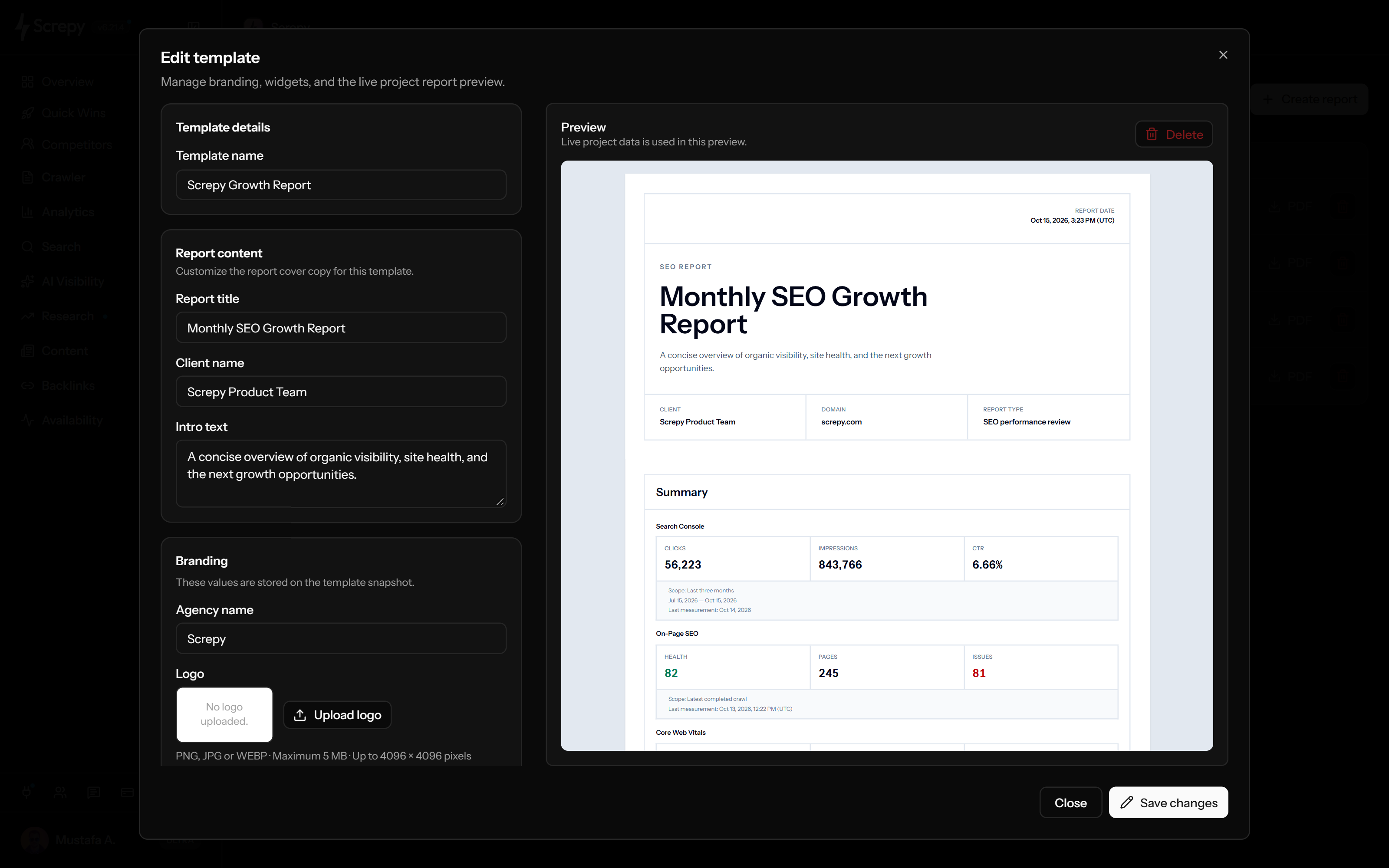
Reuse report templates and populate them with current project evidence instead of recreating a presentation from separate exports.
Manage client SEO without scattered tools
Create a project for each client website and keep its crawl settings, search market, monitored keywords, health signals, and reporting workflow together. The project becomes the working record for the team rather than another disconnected dashboard.
Learn more about project workspace- Separate client websites, markets, and monitoring settings.
- Give delivery teams a consistent place to review current evidence.
- Return to the same project after a fix, release, or client meeting.
Find and prioritize issues across client websites
Crawl the whole site to identify recurring template problems, broken paths, metadata gaps, crawlability issues, and other technical patterns. Review affected URLs and evidence before turning a finding into a recommendation.
Learn more about website audits- Distinguish isolated page problems from sitewide patterns.
- Trace issues back to the URLs and elements that need attention.
- Use comparable recrawls to review whether implemented fixes changed the result.
Track rankings, visibility, performance, and uptime
Follow the signals a retainer promises to monitor. Track chosen keywords by market and device, review performance measurements for important URLs, and see whether availability incidents affected the website.
Learn more about rank and site monitoring- Monitor agreed keyword groups instead of relying on occasional manual searches.
- Watch revenue and campaign pages for speed or availability changes.
- Use dated trends to explain movement without claiming a single cause.
Turn live project data into client-ready reports
Select the sections a client needs, order them around the engagement, add client-facing context, and create a point-in-time PDF. Reports stay grounded in the same project data the delivery team uses.
Learn more about white-label reports- Reuse a consistent report structure across recurring engagements.
- Include audit, ranking, organic keyword, uptime, backlink, and summary widgets as needed.
- Add interpretation and next actions instead of sending raw charts alone.
An agency workflow from onboarding to monthly reporting
Build a repeatable service around evidence, implementation, and verification while keeping the recommendations specific to each client.
-
Establish the client baseline
Create the project, confirm the target market, run the initial crawl, connect available search data, and record the pages and keywords that matter to the engagement.
-
Prioritize the first delivery cycle
Separate blockers and recurring template issues from lower-impact cleanup, then assign recommendations to the people who can act on them.
-
Configure ongoing monitoring
Add the agreed keywords and important URLs, then use rank, performance, and uptime history to watch the areas covered by the retainer.
-
Review completed work
Revisit affected pages and compare current evidence with the prior state before marking a recommendation as complete.
-
Report outcomes and next steps
Generate a dated report, explain material changes, note limitations, and carry the remaining priorities into the next delivery cycle.
Common agency SEO use cases
Use Screpy at the moments when an agency needs to explain a problem, define scope, verify work, or show progress.
Review a prospect website and turn visible technical patterns into a focused discovery conversation.
New-client onboarding
Capture the initial crawl, market, tracked keywords, critical pages, and reporting expectations in one project.
Monitor rankings and site health while maintaining an evidence-backed backlog for recurring work.
Combine current project signals with interpretation, completed work, and the next set of priorities.
Compare crawlability, URLs, links, redirects, and performance around a material website change.
Review the differences in client reporting, integrations, SEO operations, pricing structure, and delivery scope.
Compare audits, rank tracking, research, agency options, monitoring, reporting, and API access.
Which agencies Screpy fits
Screpy fits agencies that want one focused cloud workspace for technical audits, selected keyword monitoring, performance, uptime, and reusable client reports. It can complement a specialist research platform when an engagement requires a larger keyword or backlink database.
- A practical fit for small and midsize agencies running recurring SEO retainers.
- Useful for teams that want delivery evidence and client reporting connected to the same project.
- Not positioned as a replacement for every enterprise market-intelligence or outreach platform.
- Compare the workflow with AgencyAnalytics or SE Ranking before consolidating an existing stack.
e1
example.comOwner
MKe2
example.orgMember
ALe3
example.netMember
JDSEO guides for agencies
Continue with practical guides related to the website, search, and reporting workflows on this page.
SEO
How to Build a Weekly SEO Dashboard
Weekly SEO dashboard setup for GSC and GA4: track clicks, impressions, rankings, top pages, and organic conversions with week-over-week trends by device.
Read article SEO
What Should a Keyword Ranking Report Include?
Keyword ranking report essentials include current and prior positions, visibility, ranking URLs, SERP features, key movers, and traffic context for decisions.
Read article SEO
What Is an SEO Report Generator and How Does It Work?
Learn how an SEO report generator turns page checks or connected data into useful reports, with a PDF workflow, worked example, and review checklist.
Read article SEO
How AI Prioritizes Technical SEO Audit Findings
Learn how AI interprets crawl, search, and performance data to group technical SEO findings, estimate impact, and prioritize verification.
Read articleRelated SEO solutions
Explore the closest Screpy workflows for teams with overlapping responsibilities.
Move from prospect review to evidence-backed delivery and reusable client reports.
Connect search evidence, content priorities, campaign QA, and stakeholder reporting.
SEO software for agencies FAQ
Practical answers about client projects, audits, reporting, access, and agency fit.
Can clients log in to Screpy?
Team access and project organization can support collaborative delivery, but access conditions vary by plan. Review current team-seat details on the pricing page before defining a client-access process.
Is Screpy a replacement for AgencyAnalytics?
Screpy overlaps in client reporting and recurring SEO workflows, but the products have different scopes and integration models. Read the AgencyAnalytics comparison to evaluate the current differences for your service mix.
Can an agency manage multiple client websites in Screpy?
Yes. Client websites can be organized as separate projects with their own settings, crawls, monitored keywords, and reports. The number available depends on the selected plan, so confirm current limits on the pricing page.
Does Screpy create white-label SEO reports?
Screpy supports reusable report templates, client-facing copy, configurable sections, branding where the plan allows it, previews with current project data, and point-in-time PDF generation.
Is Screpy suitable for enterprise SEO research?
Screpy is designed as a focused audit, monitoring, visibility, and reporting workspace. Agencies that need very large market databases, broad PPC intelligence, or specialist outreach may still use another platform alongside it.
Can agencies track rankings for different client markets?
Rank Tracker monitors selected Google keywords with country, language, device, and optional location settings. Each client project can use the market configuration relevant to that website.