

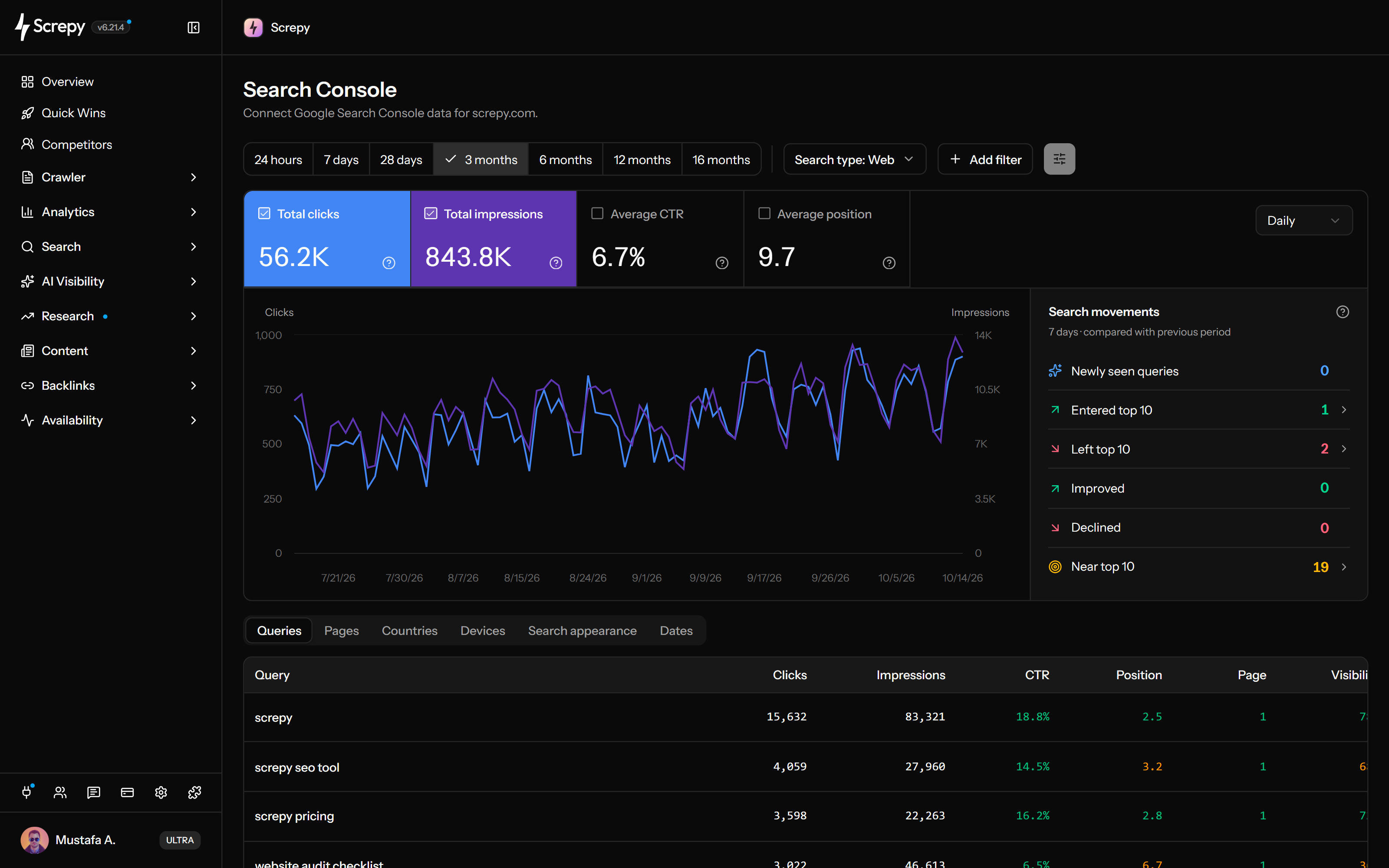
Review Search Console queries and pages alongside crawl and monitoring context instead of treating clicks as a standalone report.
SEO Tools for Marketing Teams
Bring website, search, content, performance, and reporting evidence into one workflow so in-house teams can make clearer campaign and prioritization decisions.










Marketing decisions weaken when SEO evidence arrives too late
Content calendars and campaigns often move ahead before the team reviews existing search demand, page performance, or technical risk. Screpy brings those signals into the planning cycle earlier.
Check whether an existing URL already has impressions, rankings, links, or intent alignment before creating another competing page.
Build reports around the work completed, material movement, current constraints, and the next action rather than charts alone.
Bring search evidence into campaign planning
Review the queries and pages already earning impressions before finalizing a campaign brief. Search Console can reveal the language Google users see, the landing pages associated with it, and where stronger alignment or a clearer snippet may help.
Learn more about search console- Filter performance by query, page, date range, device, country, and search type where available.
- Check whether multiple pages compete for the same user need.
- Use crawl and page evidence before deciding the problem is copy alone.
Prioritize existing pages before creating more content
Combine search visibility with current page quality and internal-link context. Refreshing an established page may be the better decision when it already addresses the intent, while a new page is justified when the audience need is genuinely distinct.
Learn more about content opportunities- Find pages near meaningful visibility thresholds without treating position alone as value.
- Review declining or underperforming content in the context of intent and site changes.
- Add descriptive internal links where they help users discover the next relevant page.
Monitor organic landing pages after campaigns launch
Add the pages with continuing organic value to the project, crawl their public paths, and monitor selected rankings, performance, and uptime. The team can then catch regressions after design, tracking, content, or infrastructure updates.
Learn more about campaign monitoring- Check the page and its internal links before the campaign goes live.
- Monitor important evergreen destinations after the paid promotion ends.
- Escalate issues with exact URLs, timestamps, and the observed condition.
Share progress with stakeholders
Build a recurring report from the same project evidence the marketing team reviews. Add context about what changed, what was completed, what remains uncertain, and which decision comes next.
Learn more about seo reports- Select the audit, search, ranking, uptime, backlink, and summary views relevant to the audience.
- Avoid claiming that one campaign or edit caused every observed search change.
- Keep a dated record for quarterly planning and future comparisons.
A weekly in-house marketing workflow
Put search evidence beside the team’s existing planning and campaign rhythm so SEO becomes a recurring decision input rather than a separate quarterly project.
-
Review material search changes
Check the queries, pages, rankings, and website alerts connected to current business priorities, ignoring fluctuations that do not change a decision.
-
Examine existing pages first
Identify whether the opportunity needs a refresh, stronger internal discovery, technical repair, clearer intent, or a genuinely new page.
-
Prepare the campaign or content brief
Include the audience problem, target page, search evidence, competing results, proof requirements, and how success will be measured.
-
Check the published experience
Verify the public URL, links, indexable signals, performance, and availability after launch while the team can still correct regressions quickly.
-
Report the decision, not only the metric
Explain what was observed, what the team changed, what remains uncertain, and what the evidence suggests doing next.
In-house marketing use cases
Use Screpy wherever a campaign, content, or stakeholder decision depends on how the public website performs in search.
Select existing pages from query, page, ranking, and crawl evidence before opening a new production brief.
Check the page, internal paths, metadata, performance, and availability around launch.
Summarize material visibility movement, work completed, website health, and the next priorities for stakeholders.
Find the pages and queries where a focused improvement may be more useful than publishing another URL.
Compare search intent, live results, keyword evidence, and available competitor advertising before choosing an angle.
Review the terms and ranking URLs associated with the domain before prioritizing a new campaign or content cluster.
Keep the website settings, crawl history, search market, monitoring, and reports tied to the same in-house project.
Inspect available public ad examples and dates without presenting them as private campaign performance data.
Connect SEO context to AI-assisted workflows
Screpy fits in-house teams that want shared SEO evidence without making every marketer operate a specialist platform. The REST API and SEO MCP can make supported project context available to approved tools and assistants while the team retains responsibility for decisions.
- Use current project evidence to improve briefs, investigations, and recurring reporting workflows.
- Keep a human reviewer responsible for claims, priorities, and published changes.
- Treat generated analysis as assistance, not a substitute for customer, product, and business context.
- Use specialist market, conversion, or product analytics when the question sits outside public SEO evidence.
e1
example.comOwner
MKe2
example.orgMember
ALe3
example.netMember
JDSEO guides for marketing teams
Continue with practical guides related to the website, search, and reporting workflows on this page.
SEO
How to Use GA4 Reports for SEO Performance
GA4 reports for SEO performance: filter organic traffic, compare landing pages, engagement and key events, and tie Search Console queries to conversions.
Read article SEO
What Should a Keyword Ranking Report Include?
Keyword ranking report essentials include current and prior positions, visibility, ranking URLs, SERP features, key movers, and traffic context for decisions.
Read article SEO
How to Build a Weekly SEO Dashboard
Weekly SEO dashboard setup for GSC and GA4: track clicks, impressions, rankings, top pages, and organic conversions with week-over-week trends by device.
Read article SEO
30 Search Console Regex Patterns for SEO Analysis
Use 30 Search Console regex patterns to filter queries and pages, check examples, and interpret brand, content and URL performance with clear limits.
Read articleRelated SEO solutions
Explore the closest Screpy workflows for teams with overlapping responsibilities.
Monitor product-led landing pages, documentation, releases, rankings, and AI visibility.
Manage audits, rankings, monitoring, and client reporting across separate projects.
SEO tools for marketing teams FAQ
Answers about Search Console, content planning, campaign monitoring, reporting, and AI-assisted SEO workflows.
Does Screpy replace a content strategy?
No. Screpy provides keyword, search, page, competitor, and technical evidence. The team still needs customer knowledge, positioning, editorial judgment, distribution, and a useful reason for each page to exist.
Can marketing teams create stakeholder SEO reports?
Yes. Reusable report templates can include selected project widgets and client-facing interpretation, then generate a dated PDF snapshot. Teams should explain limitations and decisions rather than presenting metrics without context.
How can a marketing team use Screpy with AI assistants?
Supported Screpy data and workflows are available through the authenticated SEO MCP and REST API. Teams should define approved use cases, review outputs, and keep sensitive or unsupported context in the systems responsible for it.
Can Screpy monitor a campaign landing page?
Screpy can audit a public page and monitor selected routes for performance and uptime. It can also track relevant keywords and Search Console performance where configured, but conversion outcomes should come from the team’s analytics platform.
Should we refresh an existing page or create a new one?
Review whether the existing page serves the same intent, already earns visibility or links, and can be improved without confusing its purpose. Create a new page when the audience need and expected answer are meaningfully distinct.
How can a marketing team use Search Console data in Screpy?
A connected Search Console property can provide clicks, impressions, CTR, average position, queries, pages, filters, and query-to-page analysis. Screpy combines that evidence with related crawl, ranking, and opportunity workflows.