


Migrations and URL changes
Find old paths left behind by a redesign, CMS migration, taxonomy change, or product URL update before they become permanent navigation debt.
- Old route discovery
- Migration-rule review
- Post-release recrawl
Crawl your website, group repeated link destinations, filter broken internal and external links, and trace every failed target back to the source pages that contain it.
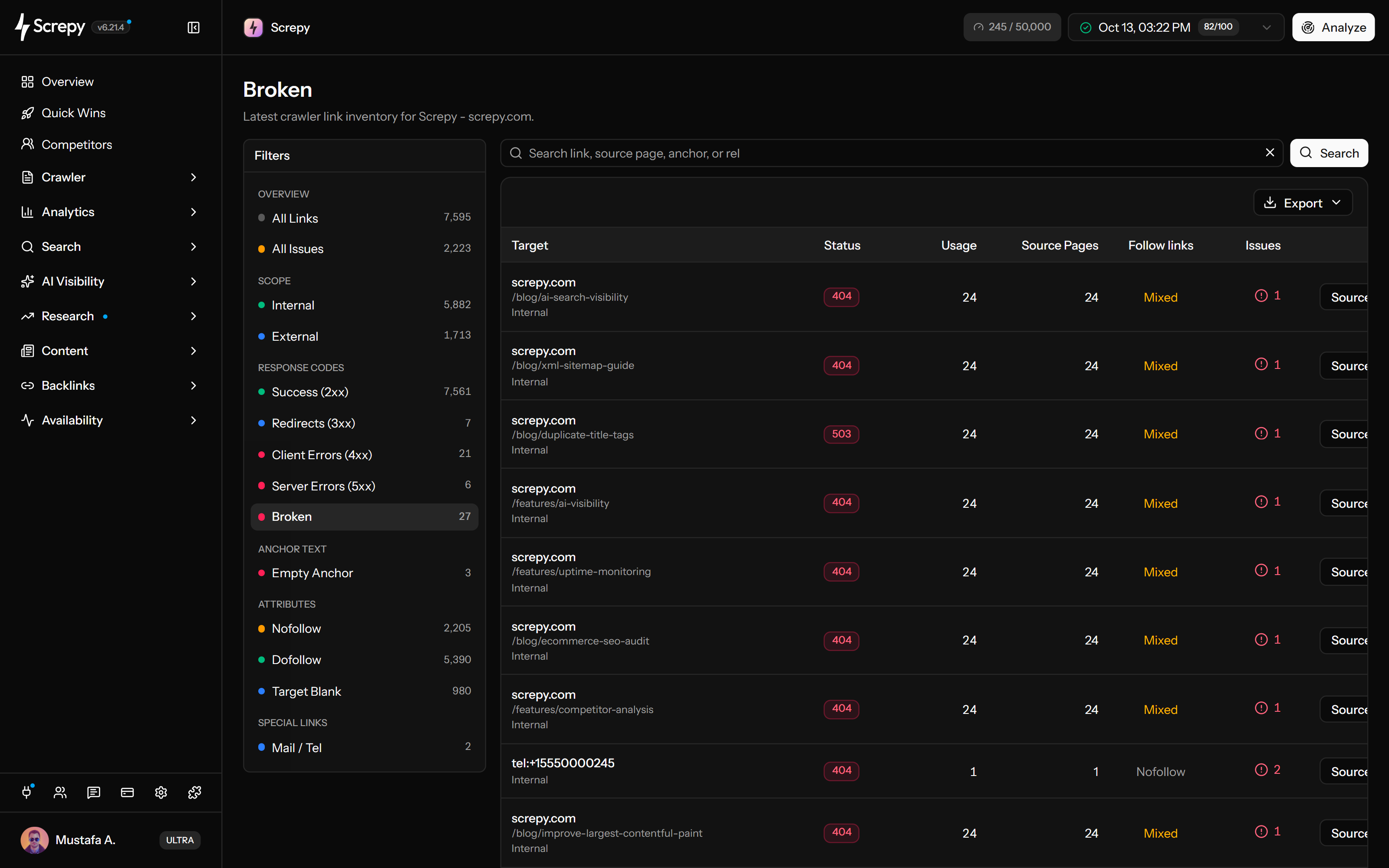










Start with a completed crawl to find failed paths within your website. Screpy groups repeated destinations and shows their recorded status, usage and source-page counts, helping you separate one missing page from a sitewide link problem.
Source/guides
/old-pricing404/setup503Review unavailable references to other websites without treating every recorded failure as a reason to remove a citation. The External view separates third-party destinations; recorded status and source context help you decide what needs checking.
Sourceexample.org
/old-pricing404/setup503Open Source Pages for a destination to see matching crawled pages and usage per page. Many uses on one page are different from one use across many pages; the counts help identify a content edit or a shared menu, footer or template repair.
/shop/linen
Use the Redirects (3xx) view to locate recorded redirect responses, then confirm the intended final destination. A legitimate redirect can preserve an old public address while your own source links can point directly to the current URL.
Narrow the Links table with a preset and search, then export the loaded destination rows as CSV or Excel. Share a focused set of targets and counts with the person who owns the repair.
After publishing a repair, run another crawl with comparable scope and inspect the destination and its sources again. A lower broken count is useful only when the affected visitor path is actually repaired.
Ask your AI assistant to find broken links in your Screpy crawl, identify the pages linking to them and explain which destinations need attention through SEO MCP.
Do not stop at a 404 count. Confirm crawl coverage, separate ownership, find the source relationship, repair the root cause, and prove the change in a comparable crawl.
Use a starting URL, depth, page capacity, and rendering mode that can reach the templates and content areas you intend to evaluate. A partial crawl can only produce a partial link inventory.
Start with the Broken view, then separate internal destinations from external references. Internal URLs are normally under your control; external failures may require replacement, removal, or manual verification.
Open Source Pages, compare usage counts, and inspect representative pages. A failure repeated across hundreds of URLs often belongs to one shared component rather than hundreds of independent edits.
Restore, correct, replace, remove, or redirect the destination according to user intent. Then recrawl the same scope and confirm controllable source links now point to a successful intended URL.
The workflow is most valuable when one routing, content, or template change can affect many user journeys at once.
Find old paths left behind by a redesign, CMS migration, taxonomy change, or product URL update before they become permanent navigation debt.
Use source-page and usage counts to identify one broken footer, menu, product card, or reusable component that affects many pages.
Review outdated external references and internal content links so readers still reach a useful, current destination.
Compare link findings after content releases, routing changes, deleted pages, or recurring site maintenance.
Audit the full link graph, investigate links within a broader technical crawl, or check one live page without creating an account.
Crawl a website, group link destinations, filter broken internal and external links, and trace each target to its source pages.
Connect link findings with page, image, crawlability, metadata, indexability, and other technical SEO evidence.
Check links discovered on one public page without starting a full website crawl. This snapshot cannot establish broken-link coverage across the whole site.
Learn the concepts behind this workflow and apply them with practical SEO guidance.
Compare broken link checkers that show source pages, trace redirects, preserve link context, and provide useful reports for fixing links on your website.
Read articleFind broken internal links with Screpy MCP, trace source pages and anchors, choose the right repair, and verify changes against a fresh website crawl.
Read articleBuild 11 n8n SEO workflows for Search Console, sitemaps, broken links, page speed and publishing checks, with node setups, clear outputs and failure handling.
Read articleAn SEO crawler follows links and checks URLs for broken links, redirect chains, duplicate pages, canonical errors, indexability issues to prioritize fixes.
Read articleUnderstand destination failures, source pages, internal and external ownership, redirects, false positives, prioritization, repair choices, and recrawl verification.
A broken link sends a visitor to a missing or failing destination. In Screpy, the Broken filter specifically includes recorded 404, 410 and 5xx responses. Use Client Errors (4xx) to investigate other client responses such as 403 or 429. Missing status or a network failure is not automatically included in Broken; confirm the destination before changing its source link.
No. Redirects can be intentional and necessary. For links you control, the cleaner result is usually to point directly to the intended final URL while keeping legitimate redirects for old public URLs that still receive traffic or backlinks.
Not exactly. A 404 is a destination response. It becomes a broken-link problem when another crawled page links to that unavailable URL. A useful audit therefore needs both the failed destination and the pages that reference it.
Publish the repair, run a new crawl with comparable settings, and confirm the source pages now point directly to a successful intended destination. A working replacement page alone does not prove the original source link was updated.
Yes. The Links report separates internal and external destinations. Internal failures usually require a repair within your website, while an unavailable third-party reference may need to be verified, replaced, or removed.
No tool can guarantee a ranking increase. Repairing broken internal paths can improve navigation, crawl access, and maintenance quality, while fixing external references can improve usefulness and trust. Search performance still depends on relevance, content quality, competition, authority, and many other signals.
Broken Link Checker focuses on link destinations, usage, issue counts, and source pages. Website Audit connects those findings with pages, images, crawlability, metadata, indexability, and the wider technical SEO investigation.
Restore the destination when it should still exist, correct a mistyped URL, replace an outdated reference, remove a link that no longer helps, or redirect an old internal URL to its closest relevant replacement. Do not send every missing page to the homepage.
Start with internal links in navigation, conversion paths, important landing pages, and shared templates. Then review high-usage destinations and external references that materially support the page. Prioritize user impact and source-page importance, not only the raw number of observations.
A website broken link checker crawls pages, discovers link destinations, checks whether those destinations can be reached, and shows the source pages that contain failed links. Screpy groups repeated destinations so one shared problem can be investigated as one root cause.
A destination may require a session, restrict automated requests, rate-limit access or have failed temporarily when the crawl ran. The report records that crawl’s response; opening the link later does not refresh it. Inspect the recorded status, verify the visitor experience, and recrawl after an access or link repair.
The destination tells you what failed; the source page tells you where to fix the relationship. Screpy shows source pages and usage counts so you can distinguish one isolated content link from a destination repeated by a navigation element, footer, or shared component.
A global footer, navigation menu, reusable card, or CMS template can generate the same link on every page. Screpy groups destination usage and lists source pages so the shared component can be repaired once instead of editing every URL separately.