


Recover links after a migration
Find external links whose destination is unavailable after URL changes, then choose between restoring the page and adding the closest relevant redirect.
- Broken destinations
- Changed URLs
- Relevant recovery path
Select your project or an added competitor to review backlink totals, referring domains, profile movement, source and target URLs, anchors, link attributes, broken destinations, and first-seen dates. Use every metric as investigation context—not an automatic verdict about a link.
producthunt.com/posts/screpy → screpy.com
check your website · dofollow
live · 2026-09-18
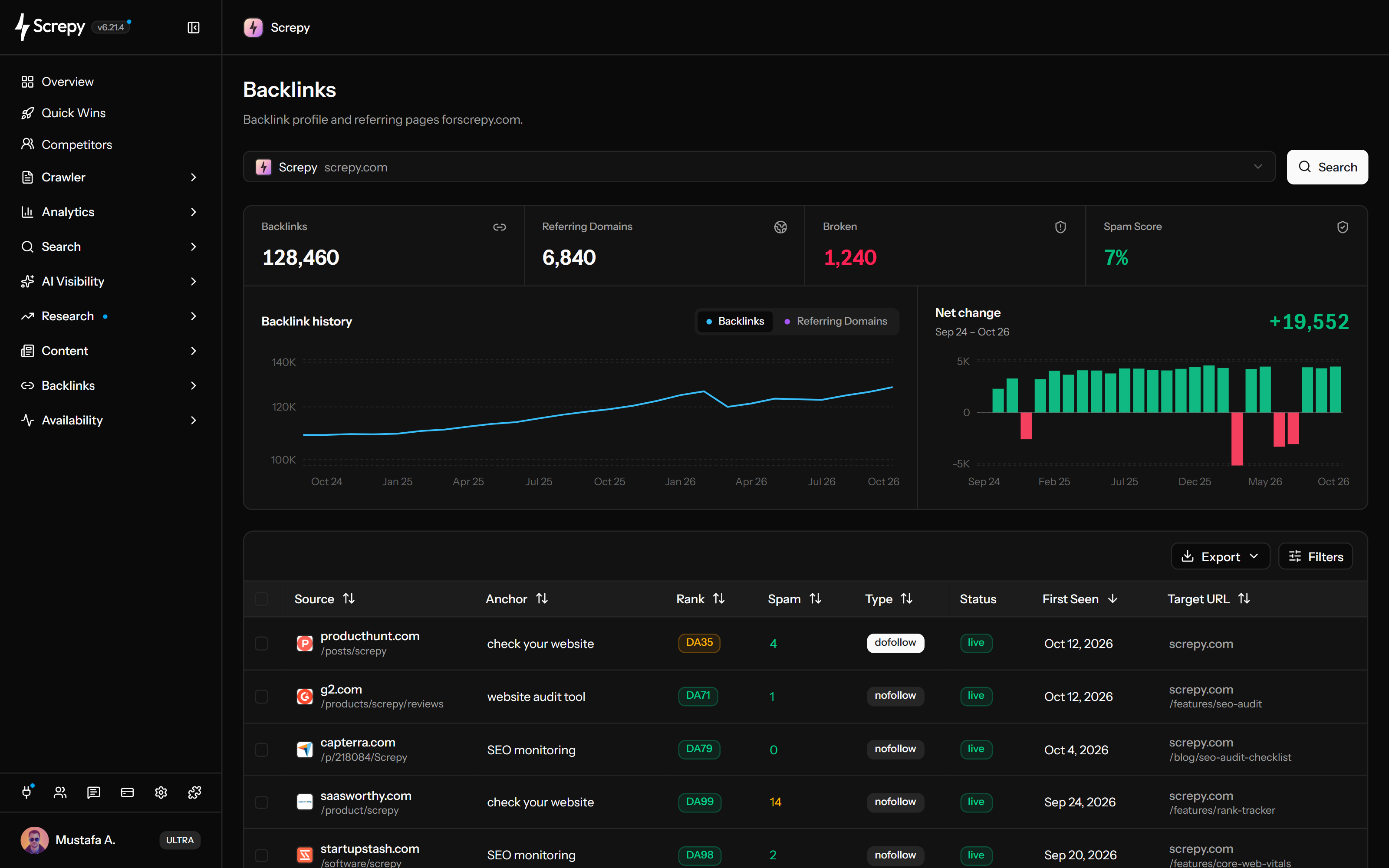










Start with the domain you are investigating. Screpy brings backlink totals, referring-domain diversity, broken backlinks and the profile's spam score together before you inspect individual links.
Look at backlink and referring-domain totals across the recorded dates. The chart helps locate a change worth investigating without turning an observed increase into a claim about a campaign's success.
Links
1,240Follow the evidence from the referring page to the linked destination. Keep the source URL, anchor text, target URL and first-seen date together when assessing a placement.
/shop/linen
The Type, Rank, Domain and Spam columns help you compare records. Use them alongside the actual referring content rather than replacing editorial judgment with one score.
example.orgnofollow
A lost placement and a broken destination require different checks. Use the recorded status to start the investigation, then verify what the source page and linked URL currently do.
Source/guides
/old-pricing404/setup503Select an added competitor to study its sources, anchors and linked destinations. Continue to Link Building's Backlink Gap when the question is which source domains appear for that competitor but not for your project.
Download CSV or Excel for an investigation or handoff. Understand which rows and fields were exported before treating the file as an archive of the whole backlink profile.
When the evidence supports a disavow decision, move selected sources into the project's separate Disavow Management list. Analysis does not automatically remove, reject or submit links.
disavow.txtReviewdomain:example.org
https://example.net/linksBring available backlink evidence into your own reporting workflow. API access uses an authorized project and the same project or added-competitor target constraints, with the relevant feature allowance.
/projectsJSON{
"data": [
{ "domain": "example.com" }
]
}Connect your AI assistant to review backlink profiles and records for an eligible project or an added competitor. Table exports cover a requested page; follow pagination for more. Disavow list changes require explicit confirmation and do not submit anything to Google.
Start with one domain and a dated baseline, isolate the records behind the movement, verify important source and destination pages, then take only the action the evidence supports.
Select the project for monitoring and recovery work or an added competitor for research. Keep the same target when comparing two reporting dates.
Record backlink and referring-domain totals, broken backlinks and the profile's spam score. Read the historical chart for net changes between recorded backlink totals, not separate counts of every gained and lost link.
Inspect source URLs, anchors, target URLs, follow flags, visible states and First Seen dates. For grouped loss or recovery investigations, use Link Building's separate Lost Links and Broken Links views, then open the affected domain's records.
Open important referring pages and target URLs before assigning a cause. A discovery state or score is a lead for investigation, not proof that a link exists, disappeared, helps, or harms rankings.
Restore a useful destination, add a relevant redirect, contact the publisher when appropriate, document the loss, or export the evidence. Use disavow only in the separate controlled workflow when Google guidance supports it.
The same dataset can support migration recovery, earned-media review, competitor research, and protection of linked content when each investigation begins with a specific question.
Find external links whose destination is unavailable after URL changes, then choose between restoring the page and adding the closest relevant redirect.
Inspect newly discovered sources, anchors, destination pages, and follow attributes, then verify the live placements behind a campaign update.
Select an added competitor to study available referring sources, linked pages, anchors, and profile movement without assuming the dataset reveals how or why each link was earned.
Identify destination pages receiving external links before consolidating content, changing URLs, removing pages, or redesigning internal publishing workflows.
Backlink datasets are sampled observations of a changing web. Screpy surfaces evidence for review without presenting coverage, scores, or timing labels as complete or causal search-engine data.
Discovery and recrawl schedules differ between tools. A missing record does not prove that a live link does not exist, and a stored record may need a fresh source-page check.
Rank and spam scores help compare records inside the dataset. They do not prove ranking value, search-engine trust, a penalty, or the need to remove a link.
A state can change because a page was recrawled, redirected, unavailable, reclassified, or newly discovered. Confirm important changes on the live source and destination.
A backlink gain or loss can coincide with ranking movement without causing it. Compare content, technical changes, search demand, competitors, and Search Console evidence before drawing a conclusion.
Inspect individual backlinks for evidence, group sources by domain when the pattern matters, or manage a carefully justified disavow file for a project you control.
Select your project or an added competitor, inspect its available profile and link records, and export the currently loaded result page.
Group backlinks by the websites providing them and open the recorded links associated with one source domain.
Organize selected URLs or domains for a project you control and export a file only when removal efforts and Google guidance justify it.
Screpy documentation
Use the Screpy guide to review backlink data, investigate referring pages, and evaluate changes without relying on one metric alone.
Learn the concepts behind this workflow and apply them with practical SEO guidance.
Use AI to triage backlink data, find relevant outreach candidates, and review link risks with human checks instead of unverified ranking predictions.
Read articleLearn what backlinks do for SEO, how to earn relevant editorial links, and how to assess a backlink profile without treating every weak link as a penalty.
Read articleCompare link audit tools with MCP support, including crawl source pages, backlink research, access limits, and a practical test for checking returned evidence.
Read articleDiscover how to use AI for better search rankings through machine learning, NLP, analytics, content optimization, and smarter SEO decisions.
Read articleUnderstand what Screpy reports, how backlink and referring-domain records differ, why datasets change, and when a metric or disavow action needs extra caution.
A recorded broken backlink points to a destination observed returning a 4xx or 5xx response. Check its current response before restoring useful content or redirecting to a relevant replacement. A redirect is not automatically a broken link.
Yes. Add the competitor to the active project, then select it to review the available backlink profile. Treat the result as research context: it does not reveal private outreach, contracts, traffic value, or why any specific link was earned.
The field records the link attribute reported for the backlink. It is useful context, but it does not by itself prove how much ranking value a search engine assigns to the link or whether the link is editorially useful.
No. Spam, rank, page-rank, and domain-rank metrics are third-party review signals rather than Google metrics or penalty decisions. Check the source, relevance, link pattern, target page, acquisition history, and any Search Console manual action before choosing an action.
A backlink is one recorded link from a source page to a target URL. A referring domain is the website that hosts one or more of those source pages. One domain can contribute many backlinks, so raw link count and domain diversity answer different questions.
A backlink checker shows external links pointing to a website. Useful details include the referring domain, source page, target URL, anchor text, follow status, discovery status, and available quality signals.
New and lost states help narrow an investigation, but they can reflect discovery timing, recrawling, changed source pages, redirects, or unavailable destinations. Verify the live source and target before concluding that a campaign gained a link or that a publisher removed one.
Each backlink service discovers, recrawls, stores, deduplicates, and classifies the web on its own schedule. Coverage and freshness therefore differ. Use one consistent source for trend comparisons and verify important links on the live source page.
No. Backlink Checker is an analysis workflow. Disavow Management is separate and is available only for project domains you control. Google says most sites do not need the disavow tool and warns that incorrect use can harm search performance.
A comprehensive SEO toolkit at a refreshingly affordable price.