


Choose whether a new page is justified
Compare the current result set with the page you already have before creating another URL for a query that may share the same audience need.
- Existing-page fit
- Distinct audience need
- Result-set evidence
Review the first Google organic results page for one keyword and country, with up to 10 results. Compare titles, snippets and your project's matches while automatic URL assessments add on-page SEO signals and available lab performance context.
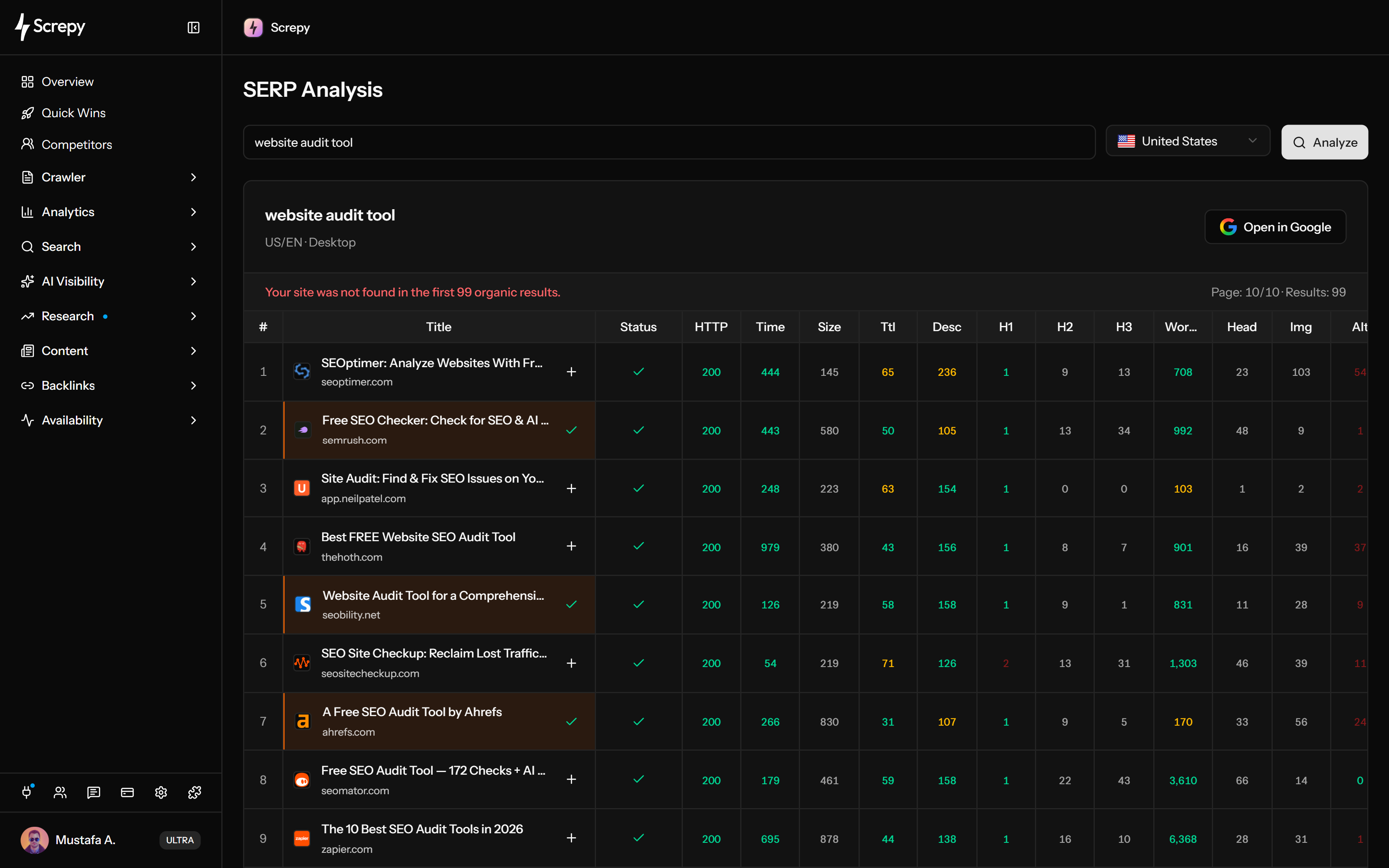










Check the organic pages Google returns for a query before choosing what to publish or improve. Start with the country your page serves so the competitive evidence belongs to the right audience.
linen shirtGoogleRead the competing promises before copying a page structure. Titles, snippets and destination URLs help you see whether the query is served by guides, product pages, comparisons or another format.
example.com › guides
SEO · TitleDescriptionSeparate your own result from competing pages without manually scanning every hostname. The Owned result badge identifies matches for the active project within the returned organic group.
linen shirtGoogleTechnical and content evidence loads beside the search results, making a page's reported ranking and its fetched-page condition easier to compare. Every returned URL is assessed automatically.
/guides/seo200
Spot page resources worth investigating while comparing competitors. The compact counts help choose a follow-up inspection; they do not judge whether an image or link serves the reader well.
Compare the markup signals available on ranking pages before deciding what your own page needs. Separate a detected tag or count from proof that Google accepts or uses it.
ArticleJSON-LD@contextschema.org
@typeArticle
headlinelinen shirt
Add an available URL lab measurement to the page review. The compact CWV badge and its LCP/CLS details help investigate loading and visual stability alongside the technical snapshot.
example.comLab
LCP2.1 s
TBT180 ms
CLS0.04
Plan your next SEO steps with an AI assistant using supported Screpy project data. SEO MCP does not currently expose SERP Analysis records or actions; use the dashboard for that feature’s workflow.
Review the organic group first, then focus on representative pages and your own result. Each returned URL is assessed automatically; keep the snapshot's limits visible before choosing a research, page or monitoring action.
Begin with the keyword for a page you may create, refresh, or defend. A precise query makes the returned titles, snippets, and pages easier to interpret.
Use the intended market rather than assuming one result set represents every audience. Keep the country consistent when repeating the analysis.
Compare the returned positions, titles, URLs and snippets, available sitelink labels and any owned result. Look for audience expectations rather than phrases to copy.
Review the assessments loaded beside relevant leaders and your own result when present. They are fetched automatically for returned URLs; compare technical and content evidence without turning correlation into a ranking rule.
Research adjacent demand when the topic is unclear, improve the page when the answer is weak, or add the keyword to Rank Tracker when ongoing movement matters.
The workflow is most useful before creating another URL, refreshing an existing answer, benchmarking a project result, or explaining the next action to a team.
Compare the current result set with the page you already have before creating another URL for a query that may share the same audience need.
Use titles, snippets, destinations, and page types as evidence of what searchers may expect, then design a more useful answer rather than a close imitation.
When the project appears in the results, compare its page snapshot with representative competitors and identify differences worth investigating.
Use one consistent SERP review to explain why a page should be created, refreshed, consolidated, or monitored before assigning the work.
A result snapshot supports a page decision, but it does not classify intent automatically, explain ranking causes or replace historical monitoring. Its available performance measurements are lab evidence rather than a real-user field assessment.
SERP Analysis reviews the returned result set at analysis time. Use Rank Tracker when the decision depends on comparable movement over time.
Titles, snippets, URLs, and page types provide clues, but the workflow does not replace a person deciding what the searcher is trying to accomplish.
A heading count, word count, schema item, or performance value can correlate with a result without being the reason that page ranks.
The URL performance summary is a lab assessment. LCP and CLS details may be unavailable; the overall badge also considers available TBT, which is not INP. Read it beside the fetched-page condition, not as Google's field assessment or a ranking guarantee.
Discover possible queries, investigate the current organic result set, or monitor selected positions over time. Each workflow answers a different decision.
Find related ideas and compare demand, CPC, paid competition, organic difficulty, intent and trend estimates before choosing a query for SERP review.
Inspect the current organic result set and page-level evidence for one chosen keyword and country.
Monitor a deliberate keyword portfolio on a consistent schedule when movement and history matter.
Screpy documentation
Use the Screpy guide to analyze a keyword by country, interpret the organic result set, inspect individual page signals, and turn the evidence into a practical decision.
Learn the concepts behind this workflow and apply them with practical SEO guidance.
SERP feature visibility tactics: map intent to snippets, PAA and rich results with clear headings, schema markup, plus Search Console tracking by query.
Read articleKeyword ranking report essentials include current and prior positions, visibility, ranking URLs, SERP features, key movers, and traffic context for decisions.
Read articleRank tracking shows keyword positions by location and device; watch SERP features, daily refresh timing, target URL swaps, and sampling that skew reports.
Read articleAverage position in Google Search Console: interpret rankings by query and page, account for SERP features, and spot misleading averages vs clicks and CTR.
Read articleUnderstand the result set, country context, owned-result label, page inspection, Core Web Vitals coverage, workflow differences, and interpretation limits.
Enter a keyword and country to review the first organic page, with up to 10 results showing available position, title, URL, domain and snippet. Sitelink labels and project-domain matches add context. Each returned URL automatically loads a page snapshot and available lab performance details.
Returned URLs are assessed automatically for HTTP response, response time, page size, title/meta lengths, heading and word counts, images and missing or empty alt, links and reported broken links, canonical, JSON-LD, Open Graph, language and hreflang. Snapshots may be reused for one hour; counts and presence signals still require context.
The CWV badge shows an available URL lab assessment, with LCP and CLS details. Its rating uses the worst available LCP, CLS or TBT category, so Passed/Failed is not Google's real-user field verdict. TBT is not INP, and missing measurements are unavailable. No ranking improvement is guaranteed.
SERP Analysis is a current result-set investigation. Rank Tracker monitors a deliberately selected keyword portfolio over time so changes can be compared on a consistent schedule.
Search results can change with time, location, language, device, personalization, and result experiments. Screpy provides a repeatable country-based research view, not a promise that every browser will display the identical order.
Owned result marks a returned domain matching the active project's normalized hostname or one of its subdomains. It distinguishes your pages in this result group; absence from the first page does not prove absence from Google's index or all rankings.
No. Use the result set to understand the audience expectation and identify gaps. The goal is to create or improve a page that answers the need more clearly, accurately, and usefully than an imitation would.
Yes. Choose the country associated with the audience and page being researched. Search results can vary by market, so keep this setting consistent when comparing repeated analyses.
Keyword Research starts with a seed and finds related ideas with demand, CPC, paid competition, organic difficulty, intent and trend estimates. SERP Analysis starts with a chosen query and country and examines the first organic page and its URL-level evidence.
No. The result set provides evidence through titles, snippets, URLs, page types, and recurring patterns. A person should use that evidence to decide which audience need and page purpose best fit the query.