


Plan a new page around real demand
Explore how an audience describes a problem before choosing the landing page, guide, comparison, checklist, or product workflow that can answer it.
- Audience wording
- Intent-fit format
- Focused primary topic
Turn one seed topic into market-specific keyword ideas. Compare volume, CPC, competition, difficulty, intent, and trend signals, then validate the results and track only the terms that fit your audience.
Start with seo audit in the United States and English market.
Compare seo audit, seo audit tools, and seo audit tool by volume, intent, and difficulty.
If the page helps readers choose a tool, inspect seo audit tools first. Check the SERP before tracking it.
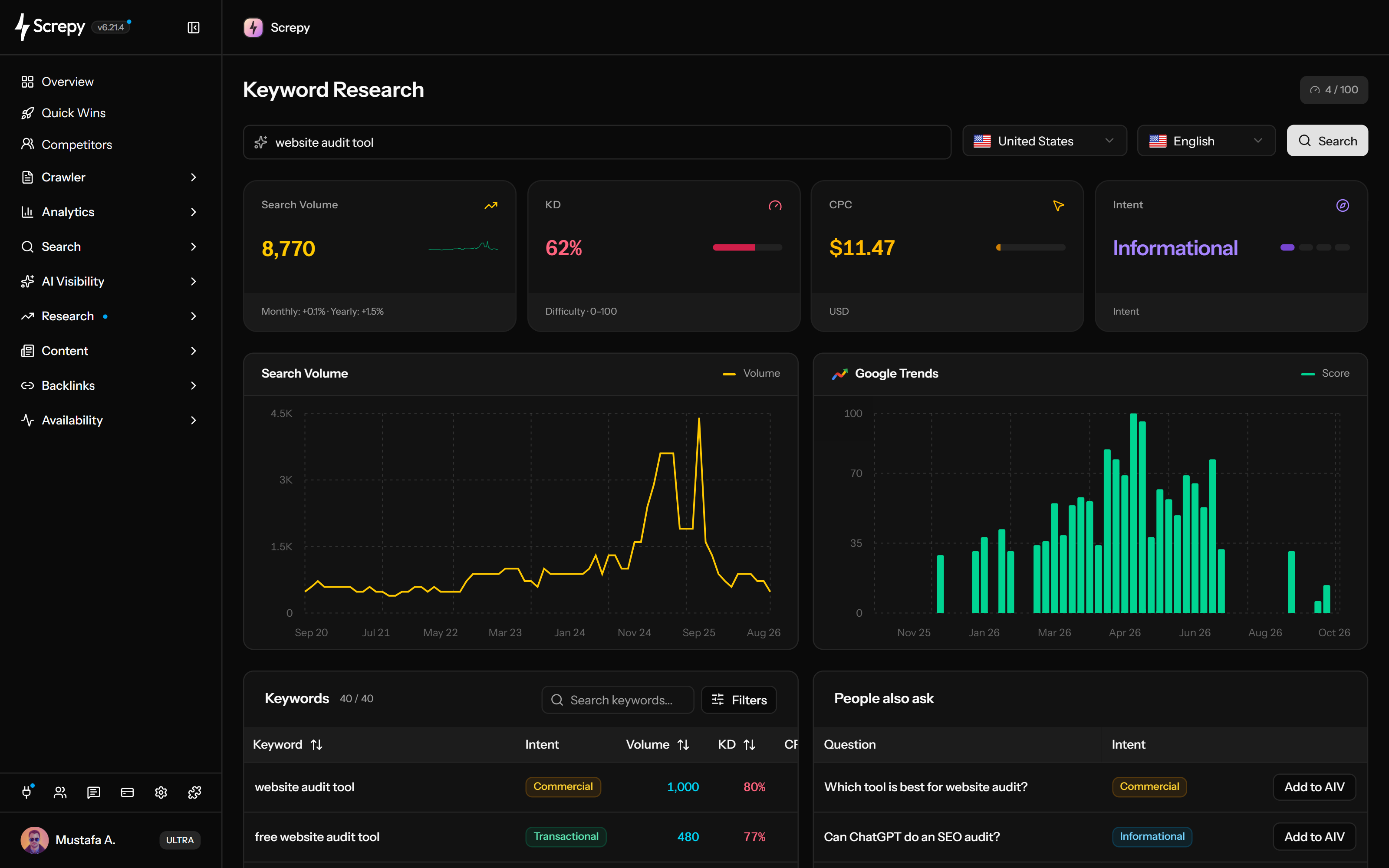










Start with a product, service or audience question instead of a domain. Keyword Research expands that seed into related terms so you can decide which searches belong in your content plan.
linen shirtUSA useful keyword in one market may have different demand or wording in another. Set the audience country and language before searching, then keep those settings consistent when comparing ideas.
Shortlist terms by demand, ranking difficulty and relevance to your offer. The table separates organic difficulty from advertising signals so a competitive paid keyword does not automatically look like a difficult SEO target.
Search volume
2,400A seasonal topic needs different publishing timing from a steadily growing one. Compare available change signals with the seed chart before treating a recent increase as lasting demand.
Search volume
1,240Move a deliberate shortlist into recurring rank checks after validating the page intent. The table action opens a separate keyword form; it does not silently turn every research idea into a tracked keyword.
linen shirtUSChoose the kind of answer a searcher needs before choosing a page title. Intent labels help with the shortlist, while the current results show whether a guide, product page or comparison is a better fit.
linen shirtIntentexample.com/shop/linenlinen shirtTitle · Description
example.org/linenlinen clothingReview · Google
Before creating a new page, check whether your website already receives visibility for the exact query. The Pages action uses the project's connected Search Console property, giving you evidence from your own site.
linen shirt/shop/linen186Clicks/guides/linen74ClicksSave the current results page for editorial planning or a client review. Keep the search context with the file so a later comparison does not mix countries, languages or seed topics.
Daily research usage belongs to the project's billing account and is shared across its projects. Check the dashboard usage indicator before researching several markets or moving through result pages.
Used
24Plan your next SEO steps with an AI assistant using supported Screpy project data. SEO MCP does not currently expose Keyword Research records or actions; use the dashboard for that feature’s workflow.
Use a consistent market, read the result set as a whole, remove ideas that do not fit the audience, and validate the page before tracking or publishing anything.
Use a product problem, service, question, or category as the seed. A specific starting point produces a more useful set than an unrelated list of broad terms.
Choose the market the planned page will serve. Keep these settings consistent when comparing ideas because demand, CPC, difficulty, and wording can change by locale.
Read keyword count, combined volume, average CPC and average difficulty for the returned set. Use up to 12 available seed-chart months for context; the totals are not a forecast of your page traffic.
Compare volume, CPC, paid competition, organic difficulty, intent, and recent change together. Remove terms that do not match the audience, offer, or page purpose.
Open the current Google results, inspect available Search Console query-to-page evidence, and add only selected project terms to Rank Tracker for ongoing monitoring.
The workflow is most useful when a team needs to choose a page, improve an existing answer, expand a commercial topic, or build a maintainable backlog.
Explore how an audience describes a problem before choosing the landing page, guide, comparison, checklist, or product workflow that can answer it.
Find relevant variants, then use available query-to-page evidence and the live result set to decide whether the current answer needs a meaningful update.
Compare modifiers and adjacent terms without assuming the highest-volume phrase is the one most likely to attract a qualified visitor.
Turn selected, validated terms into a smaller set of page decisions, owners, SERP reviews, and tracked keywords that a team can actually maintain.
Compare Screpy with Mangools when keyword research, SERP analysis, rank tracking, technical audits, AI visibility, pricing, and workflow scope affect the decision.
Research estimates narrow the decision; they do not guarantee rankings, clicks, or conversions. Confirm intent, competition, existing performance, and page usefulness before acting.
Estimated demand does not predict clicks, conversions, or the traffic one page will receive. Use Search Console and analytics for first-party performance.
Paid-search competition and organic keyword difficulty are not interchangeable. Neither metric proves that a page can or cannot rank.
An intent classification summarizes likely behavior. Confirm the dominant page formats, result features, and audience need before planning content.
Country, language, seasonality, and data freshness affect the numbers. Keep the research context stable when comparing topics or revisiting a decision.
Start with a seed topic for new ideas, a domain for existing organic visibility, or a keyword for the current competing result set.
Generate related ideas for one seed topic, compare market-specific demand and intent signals, and move selected terms into monitoring.
Research the queries and ranking URLs already associated with a project or eligible competitor domain in a selected market.
Inspect the current Google result set and dominant page patterns before choosing the format, angle, or scope of a page.
Screpy documentation
Follow the Screpy guide to research a seed topic, keep country and language context explicit, interpret demand and intent signals, validate the page, and monitor selected terms.
Learn the concepts behind this workflow and apply them with practical SEO guidance.
See how AI transforms keyword research with NLP, machine learning, search intent analysis, long-tail discovery, and stronger SEO planning.
Read articleLong-tail keywords: spot intent-rich queries in Search Console, autocomplete and competitor SERPs, then prioritize by difficulty, value and right page type.
Read articleFind SEO keywords for a vibe-coded website by checking customer language, search intent, and real results, then map each query to the right page.
Read articleUse MCP for keyword research with real search-volume and SERP examples, then combine market data with Search Console to identify useful content gaps.
Read articleUnderstand the metrics, market settings, workflow handoffs, plan allowance, and limits behind Screpy Keyword Research.
Read available monthly and yearly changes for individual ideas and up to 12 monthly points in the seed chart. Seed analysis can be reused for up to three months, so check the month labels. The chart is not live demand, a forecast or a history for every idea.
Intent labels group a keyword as informational, navigational, commercial, or transactional when that signal is available. Treat the label as a research shortcut and confirm it against the live result set.
Yes. Select the country and language that match the audience you want to reach. Use the same settings when comparing related searches so the metrics remain meaningful.
No. Closely related keywords that share the same intent can often be answered by one strong page. Create another page only when the audience needs a meaningfully different answer or task.
Each successful research request counts toward the daily allowance of the project's billing account, including pagination requests across its projects. Failed requests, empty input and blocked access do not count; a successful request with no ideas does. The dashboard shows usage and plan availability.
Yes. For eligible project terms not already tracked, the table action opens the keyword form with the term prefilled. Review country, language and device before confirming: the research market is not automatically copied, and tracking requires available keyword capacity.
Enter one seed and choose a country and language. Screpy returns up to 100 related ideas with available volume, CPC, paid competition, organic difficulty, intent and monthly or yearly changes. Summary metrics describe that returned set; the chart shows up to 12 available months for the seed.
No. Search volume is an estimate of market demand, not a forecast of visits to one page. Ranking position, result features, intent, snippet appeal, brand familiarity, and competition all affect actual clicks.
Keyword Research starts with a seed topic and discovers related ideas. Organic Keywords starts with a domain and shows the queries and ranking URLs already connected to that domain’s estimated Google visibility.
Competition reflects paid-search advertiser activity, while keyword difficulty estimates organic ranking difficulty. Compare them separately and inspect the current results before deciding whether to target a term.
Understand Super Intelligence terminology and connect website audits, search research, rankings, and AI visibility in one practical Screpy workflow.
A comprehensive SEO toolkit at a refreshingly affordable price.