

Build a category visibility baseline
Track a deliberate set of questions around the category, important use cases, customer problems, and commercial comparisons.
- Focused prompt library
- Country and language context
- Consistent later comparisons
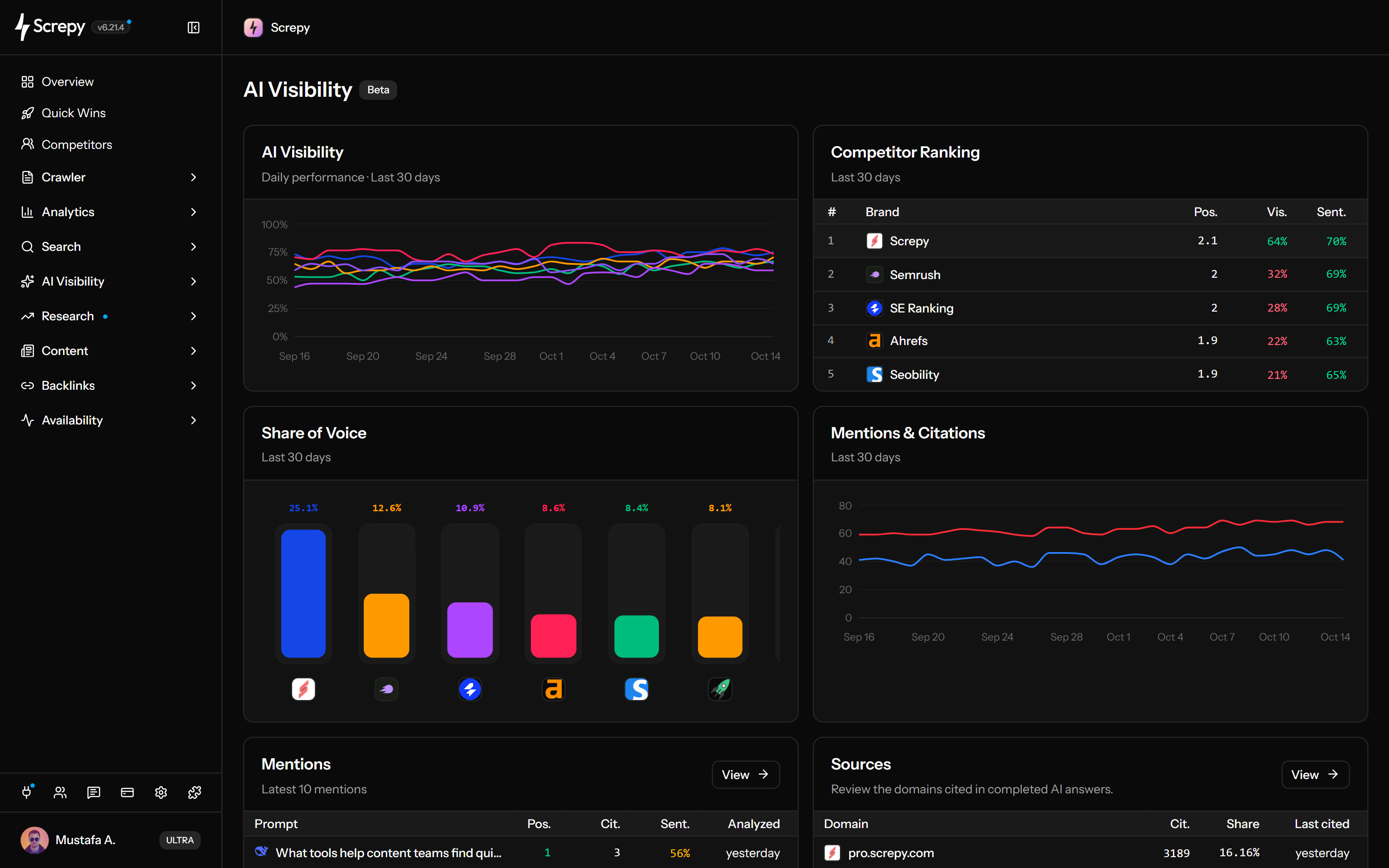
Monitor a focused prompt set across supported AI platforms. See when your brand and competitors appear, where they are positioned, how they are described, and which URLs earn citations.










Choose the customer questions your AI visibility report should answer. A focused prompt library makes category, comparison and use-case research repeatable without claiming to observe every AI conversation.

example.com Mentions
Citations [1] [2]Set AI platforms and monitoring frequency in project settings. New prompts receive an initial analysis; recurring checks then build evidence on the chosen schedule.
Save a question group for a category, comparison theme or market instead of rebuilding filters each time. Segments match prompts by rules and can be reused in Prompts and Mentions.
linen shirt?
linen clothing?
cotton shirt?
Move from a reported mention to the complete saved answer. Select your brand or a tracked competitor to investigate the questions where it appears and the context around the mention.
Mentions
42Identify the pages and domains repeatedly cited in stored answers. Source coverage helps you investigate the evidence behind responses before choosing a content or distribution action.
example.com [1]
example.org [2]
example.org/guidesexample.net/researchBenchmark your brand against configured competitors over the last 30 days. Visibility and share of voice answer different questions, so read their denominators before interpreting a lead or gap.
Mentions
42Review how a saved answer describes a particular brand. Read the original statements with the score to distinguish favorable wording, criticism and neutral descriptions.
Positive
70/100Follow daily platform visibility in the last 30 days using the project's timezone. Keep prompts, markets and competitors consistent when investigating movement across repeated analyses.
Visibility
62%Take saved monitoring evidence into reports or your existing workflow. Dashboard file exports and stored-data API/MCP access serve different needs.
Use SEO MCP to investigate stored AI Visibility results. Ask about brand mentions, tracked prompts and cited sources; answers use your collected results rather than live searches of every AI platform.
The useful unit is not one impressive answer. It is a focused prompt set, a stable market and platform context, and enough stored evidence to investigate changes responsibly.
Open the project that represents the brand you want to monitor. Check the project brand and tracked competitors before interpreting mentions or share of voice.
Use the AI platforms available to the project, then keep each prompt tied to the country and language your customers actually use.
Add category, use-case, comparison, and problem-focused questions manually or review Screpy’s prompt suggestions before selecting what to monitor.
After analyses complete, move from the Overview to individual prompts, answers, mentions, citations, and source domains instead of acting on one percentage alone.
Use aggregates to find the question, then verify the stored response, brands, citations, and recurring source pattern before planning a response.
Use the same prompt wording, platforms, country, language, competitors, and reporting context before treating movement as a trend.
Identify whether the movement concerns brand visibility, competitor share, answer position, sentiment, mentions, or citations.
Read the stored response and detected brands. Confirm that the answer actually addresses the intended customer question.
Inspect the URLs and domains cited for that prompt, then check whether the pattern repeats across providers and other monitored questions.
Use the evidence to plan a content, positioning, technical, or distribution change, then compare later analyses without claiming direct causation.
The product supplies the prompt, answer, brand, competitor, and citation evidence. Your team decides which content, positioning, technical, or distribution response is justified.
Track a deliberate set of questions around the category, important use cases, customer problems, and commercial comparisons.
Find prompts where competitors appear more often or earlier, then open the answers and citations before deciding what the gap means.
Review which URLs and domains receive citations across multiple prompts and providers instead of treating a one-off source as a durable pattern.
Use the REST API or Screpy MCP to read stored AI Visibility evidence and manage tracked prompts without exposing dashboard export or manual reanalysis actions.
Compare Screpy with Peec AI when prompt limits, model coverage, citation research, technical SEO, and reporting depth affect the decision.
Generated answers vary. These boundaries keep sampled monitoring useful without turning one run into a promise about rankings, traffic, or every AI conversation.
Screpy analyzes the prompts configured in the project. It does not observe every private question people ask an AI assistant.
A cited URL proves that it appeared in one stored answer. Generated responses and cited sources can change between analyses.
Answer mentions and citations measure a different discovery surface from configured Google keyword positions and Search Console performance.
Content, models, sources, competitors, prompts, and market settings can all affect the result. Use trends as evidence to investigate, not as a guaranteed outcome.
AI answers, crawler requests, and Google positions are separate signals. Screpy keeps each workflow distinct so the evidence is not mixed.
Monitor selected prompts for brand mentions, answer position, sentiment, citations, sources, and competitor share of voice.
Review verified crawler requests and unsuccessful URLs. Crawler activity does not prove that a page appeared in an AI answer.
Track configured Google keyword positions by market and device without treating an AI answer mention as a search ranking.
Learn the concepts behind this workflow and apply them with practical SEO guidance.
Learn what SI SEO means, how to improve AI search visibility, and how to measure mentions, citations, visits, and business outcomes.
Read articleAI visibility ROI connects citations, share of voice, branded search, assisted conversions, and revenue to costs for a practical, defensible ROI model.
Read articleCompare 15 current AEO tools for AI search visibility, prompt monitoring, citations, competitors, crawler activity, and optimization workflows.
Read articleAn AI visibility audit benchmarks brand mentions and citations across ChatGPT, Perplexity, and Google AI Overviews, then prioritizes technical and content fixes.
Read articleUnderstand what Screpy monitors, how visibility is calculated, and how to interpret sampled AI answers responsibly.
Yes. Export Prompt, Mention and Source tables as CSV or Excel from the dashboard. Exports include all rows matching the applicable search, view, segment, brand or market filters, not only the visible page; available filters differ by table. File exports are not available through the API or MCP.
Screpy supports monitoring through selectable platforms including OpenAI, Gemini, and Perplexity. Additional supported platforms and prompt allowances depend on the current plan and project configuration, so review the pricing page for current availability.
Yes. When the analyzed answer includes citations, Screpy records the cited URLs and groups source activity by domain, prompt, and provider for investigation.
Yes. The REST API and Screpy MCP can read stored AI Visibility data and add or delete tracked prompts. They do not expose CSV or Excel exports, prompt suggestions, or manual reanalysis.
Generated answers can vary by platform, model behavior, time, market context, and available sources. Use a consistent prompt set and compare trends across multiple analyses instead of treating one answer as a permanent result.
AI Visibility analyzes selected prompts to find brand mentions, citations, sources, and competitor share of voice in monitored answers. AI and Bot Traffic reports verified crawler requests to website URLs. A crawler request does not prove that the content appeared in an AI answer.
No. AI visibility, mentions, and citations are monitoring signals. They do not guarantee clicks, rankings, conversions, or revenue, and movement does not by itself prove which change caused the result.
Over the last 30 days, Screpy divides a brand's mentions by all mentions of the project brand and configured competitors on the project's enabled platforms. This differs from visibility, which uses answer count as the denominator. Keep the monitored questions and brand set consistent when comparing results.
AI visibility measures how often the project brand is detected in the analyzed answers for the selected prompts and reporting view. It is a monitoring signal for a defined prompt set, not a measurement of every private AI conversation.
Daily visibility divides completed, brand-analyzed answers mentioning your brand by all such answers for that platform and day, then multiplies by 100. The Overview chart covers the last 30 days in the project timezone. Prompt-table visibility uses stored completed answers, not a selectable Overview date range.
AI Visibility analyzes selected prompts and generated answers for mentions, citations, sources, sentiment, and competitor presence. Rank Tracker monitors configured Google keyword positions by market and device. The two workflows measure different discovery surfaces.
Start with focused questions tied to your product category, important use cases, customer problems, and commercial comparisons. Keep the wording, country, and language stable when comparing results, and avoid near-duplicate prompts that overweight one topic.
No. Screpy analyzes the prompts configured in your project across supported AI platforms. It does not observe every private conversation or every question people ask an AI assistant.
A mention means the analyzed answer names the project brand or a tracked competitor. A citation means the stored answer references a URL. A brand can be mentioned without its website being cited, and a URL can be cited without a prominent brand mention.
Understand Super Intelligence terminology and connect website audits, search research, rankings, and AI visibility in one practical Screpy workflow.
A comprehensive SEO toolkit at a refreshingly affordable price.