
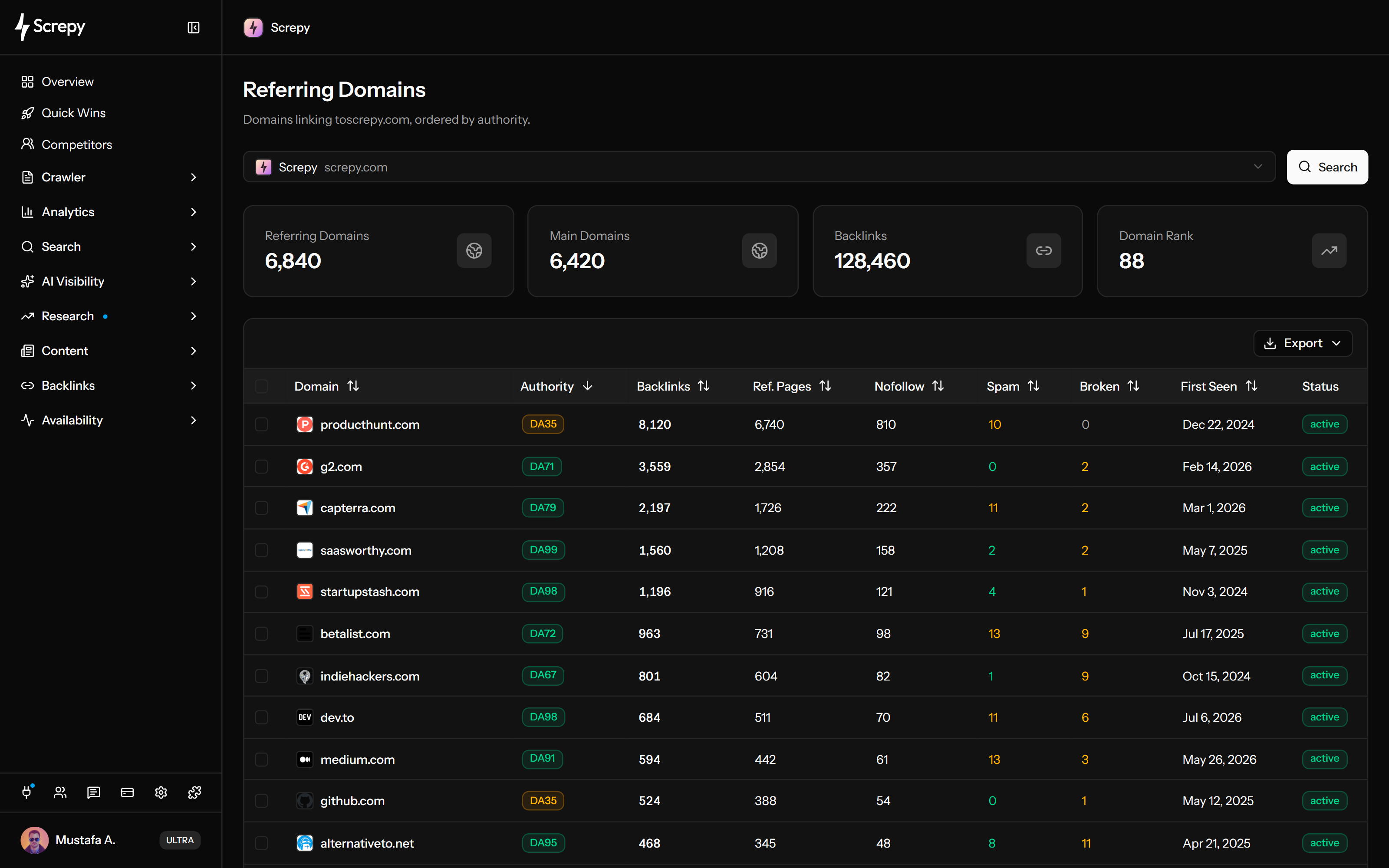











Referring and main domain totals
Start with separate referring-domain and main-domain counts alongside the backlink and domain-rank summaries for the selected target.
Enter your website or a competitor domain to group available backlinks by source website. Compare referring and main domain totals, backlink and referring-page counts, nofollow pages, rank and spam context, broken links, first-seen dates, and active or lost status—then open the exact links behind a domain.
Too Long; Didn't Read
Screpy Referring Domains groups available backlinks by source website. It combines profile totals with a sortable domain table and a link-level drilldown so you can compare source diversity, inspect the records behind each domain, and keep risk decisions tied to evidence.
See referring-domain, main-domain, backlink, and domain-rank totals before comparing individual sources. Use the same view for your own website or a competitor domain.
Sort the domain table by rank, backlinks, referring pages, nofollow pages, spam score, broken backlinks, or first-seen date. Keep every score in context instead of treating it as a verdict.
Click a domain’s backlink count to inspect its recorded source URLs, anchors, targets, follow attributes, state, rank, and first-seen date in one paginated detail view.
Select a source domain for the separate disavow workflow only when the target is a project you control. Verify important links and follow Google guidance before deciding that a disavow file is warranted.
Learn more about controlled action
Compare source websites consistently, then open the backlink records behind the domain when a count, status, or score needs investigation.
Start with separate referring-domain and main-domain counts alongside the backlink and domain-rank summaries for the selected target.
Compare how many backlinks and distinct referring pages each source domain contributes to the available profile.
See how many recorded referring pages from a source use nofollow links without treating that attribute as a quality verdict.
Use rank and spam metrics to compare sources inside the dataset while keeping relevance, placement, and live-page evidence in the final judgment.
See how many recorded backlinks from each source are marked broken, then verify important source and destination pages live.
Review when a source was first observed and whether it is currently reported as active or lost before investigating a meaningful change.
Sort by domain, rank, backlinks, referring pages, nofollow pages, spam score, broken backlinks, or first-seen date and review large result sets page by page.
Open a source domain’s individual backlinks with source URL, anchor, target URL, rank, dofollow or nofollow type, live or lost state, broken state, and first-seen date.
Choose the target, establish a baseline, sort sources around one question, open the recorded links, and verify the pages that matter before taking action.
Use a project domain for ongoing review and controlled disavow selection, or enter a competitor domain when the goal is source-landscape research.
Start with referring domains, main domains, backlinks, and domain rank so later domain-level findings remain connected to the same target and reporting date.
Order the table by rank, backlinks, referring pages, nofollow pages, spam score, broken backlinks, first-seen date, or status instead of scanning every metric at once.
Click the backlink count to inspect source URLs, anchors, targets, link attributes, state, rank, and first-seen dates before interpreting a source relationship.
Check important source and destination pages, document what changed, recover a useful target when appropriate, and use the separate disavow workflow only when evidence and Google guidance justify it.
Group links by source when a competitor comparison, migration issue, publisher review, or repeated-source pattern would be harder to understand one backlink at a time.
Enter a competitor domain to study available source-domain concentration, link counts, status, and the individual records behind relevant websites without assuming the dataset explains how each link was earned.
Sort sources by broken backlinks, open the affected records, and verify whether an external link points to a changed or unavailable destination before choosing a relevant recovery path.
Group available links by publisher, compare the pages behind each source, and verify the anchors and destinations associated with earned-media or partnership work.
Compare backlink and referring-page counts to distinguish a one-page mention from a source contributing many recorded pages, then inspect the links before deciding whether the pattern matters.
Referring-domain data is an observed, changing view of the web. Screpy helps you prioritize evidence without presenting coverage, scores, counts, or timing labels as complete search-engine truth.
Discovery, recrawl, and host-normalization methods differ between tools. A missing domain does not prove that no live link exists, and a stored record may still need a live source-page check.
More referring domains or more links from one domain do not automatically make a profile stronger. Relevance, placement, editorial context, and destination quality still matter.
Use comparative metrics to prioritize review, not to prove ranking value, a penalty, harmful intent, or the need to disavow a source.
First-seen, active, lost, and broken labels depend on discovery and recrawl timing. Verify important source and destination URLs before assigning a cause or reporting a change.
Group sources when domain-level patterns matter, inspect individual backlinks when the exact placement matters, or manage a carefully justified disavow file for a project you control.
Group available backlinks by source website, compare domain-level metrics, and open the records behind each source.
Review individual source pages, anchors, targets, link attributes, dates, state, and profile movement for a domain.
Organize reviewed URLs or domains for a project you control and export a file only when removal efforts and Google guidance justify it.
Screpy documentation
Follow the Screpy guide to group backlinks by source website, compare domain-level evidence, and open the individual links behind a domain.
Learn the concepts behind this workflow and apply them with practical SEO guidance.
Learn how AI improves backlink analysis by identifying quality links, evaluating authority, auditing profiles, and shaping smarter SEO strategies.
Read articleSEO alerts to track in GA4 and Search Console: indexing and crawl errors, ranking volatility, Core Web Vitals shifts, plus security or manual actions.
Read articleAn SEO report generator gathers rankings, traffic, backlinks, and audit data into branded, scheduled reports that highlight progress, issues, and next steps.
Read articleLearn whether backlinks still matter for AI search, how authority affects retrieval and citations, and why relevance and trusted mentions beat volume.
Read articleUnderstand what the domain-level view measures, why tools disagree, and when a source requires deeper link-level review.
A referring domain is a website that links to another website. One referring domain may provide one backlink or many backlinks from different pages.
A backlink is one recorded link from a source page to a target page. A referring domain is the source website that provides one or more backlinks. Screpy groups available backlink records by source domain and lets you open the individual links behind each domain.
No. Domain diversity describes the breadth of recorded sources, not the value of every source. Relevance, placement, editorial context, destination quality, and whether the link is live still require review.
It is the number of recorded referring pages from a source domain whose links are marked nofollow. Nofollow is a link attribute, not proof that the source is low quality or that the link has no discovery or audience value.
No backlink index covers the whole web. Tools discover and revisit pages on different schedules, normalize hosts differently, and may report sampled data. Compare trends inside one consistent dataset and verify important links on the live source page.
The recorded links may have been removed, redirected, made unavailable, or reclassified during a later crawl. Discovery and recrawl timing can also change the reported state, so verify important source and destination URLs before assigning a cause.
No. Rank and spam metrics are comparative review signals, not Google verdicts. Examine the actual source pages, anchors, targets, relevance, link pattern, and broader history before making a risk decision.
Yes. You can enter another public domain to compare its available source-domain profile. Disavow selection remains restricted to a project domain you control.
No. Referring Domains is an analysis workflow. For a project domain you control, selected sources can be reviewed in the separate Disavow Management workflow. Google says most sites do not need the disavow tool and warns that incorrect use can harm search performance.
Build a domain-level view of your backlink sources, investigate the records behind meaningful patterns, and keep every recovery or risk decision tied to live evidence.