

Group crawl findings across category, product, filter, and campaign URLs instead of reviewing random pages alone.
Ecommerce SEO Tools
Audit category and product pages, find broken shopping paths, monitor revenue-driving URLs, and track the searches customers use to discover what you sell.
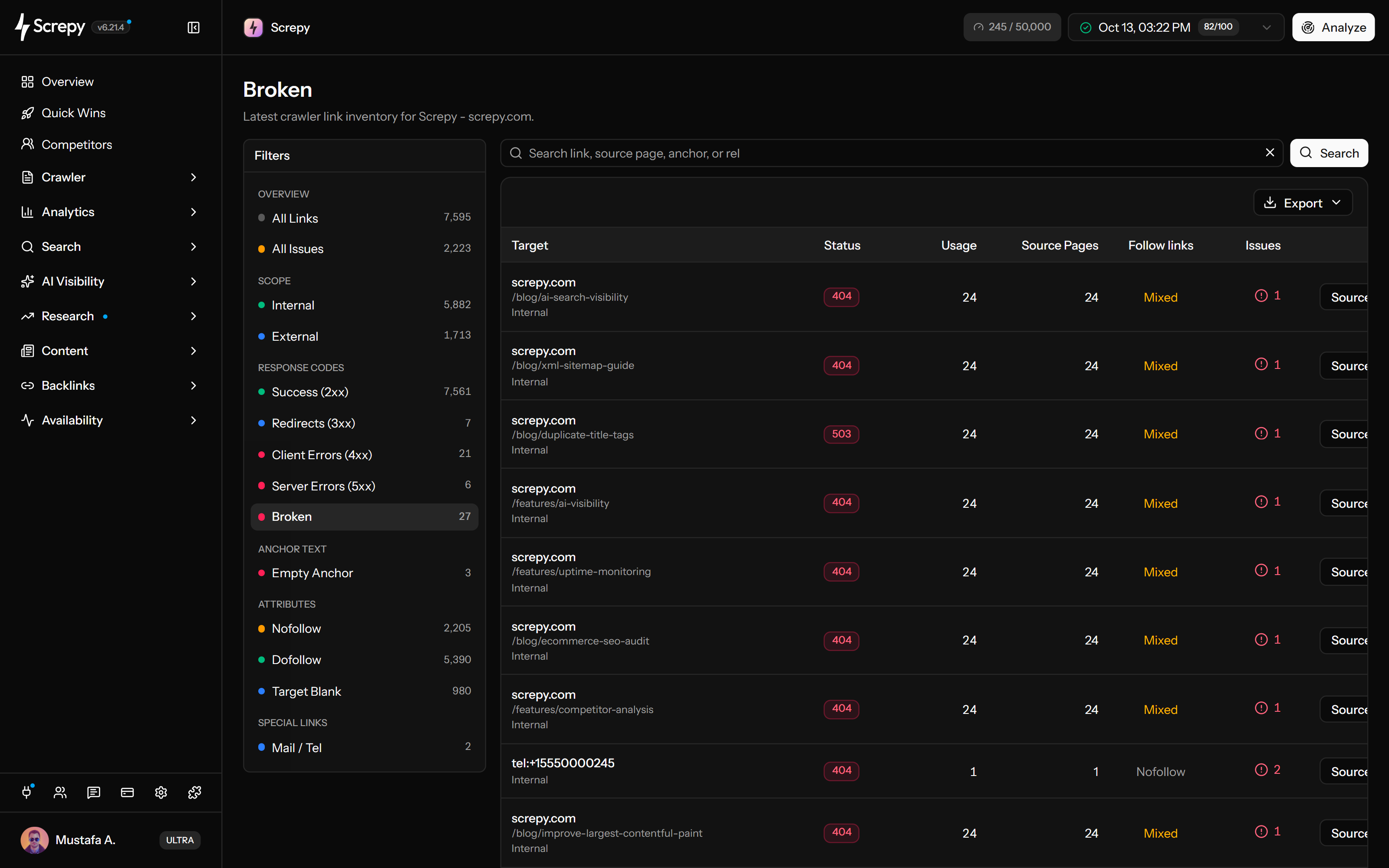










Ecommerce SEO problems often spread across a page type
A navigation update, product feed, media template, or removal policy can affect many URLs at once. Screpy helps teams see the pattern and the shopping paths involved.
Find the source pages still linking to failed destinations and decide whether to update, redirect, or remove each path.
Monitor important templates and landing pages after image, script, theme, or infrastructure changes.
Audit category and product page health
Crawl publicly reachable commercial URLs and review whether each page type supports discovery and navigation. Look for recurring metadata, canonical, link, image, response, and crawl-depth patterns rather than chasing isolated warnings.
Learn more about ecommerce website audit- Compare templates for categories, products, campaigns, and informational support pages.
- Inspect how internal links guide crawlers and customers toward important inventory.
- Review parameter and filter behavior without assuming every generated URL should be indexed.
Find broken paths in the shopping journey
Identify failed internal and external destinations, then trace each occurrence back to the category, product, navigation, editorial, or campaign page that links to it. Use that context to choose the right repair.
Learn more about broken link checker- Find links left behind after product or category removal.
- Review redirect chains and unexpected response codes on commercial paths.
- Preserve a useful next step for customers when inventory changes.
Monitor PageSpeed on revenue-driving pages
Add representative category, product, campaign, and checkout-entry pages to recurring performance checks. Compare results after changes to themes, media, scripts, personalization, or delivery infrastructure.
Learn more about performance monitoring- Monitor representative templates instead of a single homepage score.
- Pair lab measurements with real-user data when your analytics stack provides it.
- Investigate regressions before attributing them to one asset or vendor.
Track commercial search visibility
Monitor the category, product type, brand, and seasonal terms connected to customer discovery. Keep country, language, device, and optional location settings consistent so the trend remains comparable.
Learn more about rank tracker- Group keywords by category, intent, market, or seasonal campaign.
- Check whether the intended category or product page ranks for the term.
- Use Search Console to add query, impression, click, and page context where available.
An ecommerce SEO monitoring workflow
Build the review around page types and commercial events so the team can act before small template problems spread across the catalogue.
-
Define priority page types
Identify the categories, products, campaigns, editorial pages, and shopping-entry routes that carry the most discovery or revenue risk.
-
Crawl and sample the catalogue
Review shared patterns across representative URLs, then expand the investigation when evidence suggests a broader template or navigation issue.
-
Monitor critical routes
Track availability and performance for the pages customers depend on, and follow the commercial searches tied to those destinations.
-
Review every material catalogue change
Check removals, redirects, navigation updates, seasonal launches, and migrations for broken paths and unintended index signals.
-
Verify repairs in context
Recrawl affected routes, confirm the failed condition changed, and continue watching the relevant page type or keyword group.
Ecommerce SEO use cases
Use Screpy around catalogue changes and customer journeys where a technical issue can affect many public URLs.
Find links to removed inventory and choose an intentional redirect, replacement, or removal path.
Check the landing page, linked products, performance, availability, and tracked commercial searches.
Review how category depth, internal links, redirects, and crawl discovery change after the new structure ships.
Inspect alt text, dimensions, response health, loading behavior, source usage, and responsive image coverage.
Capture priority URLs before the move and compare crawl, redirect, performance, uptime, and ranking evidence after launch.
Review seasonal launches and website migrations
Screpy analyzes publicly reachable web URLs; it does not claim a private integration with Shopify, WooCommerce, or another commerce platform. Teams use crawl and monitoring evidence alongside their catalogue, analytics, and order data.
- Use Screpy to review the public experience search engines and customers can reach.
- Keep platform administration, inventory, conversion, and order evidence in the systems that own those data.
- Choose representative URLs when the catalogue is larger than the plan’s current crawl or monitoring limits.
- Bring engineering or platform specialists into migrations, rendering problems, and complex faceted-navigation decisions.
e1
example.comOwner
MKe2
example.orgMember
ALe3
example.netMember
JDSEO guides for ecommerce sites
Continue with practical guides related to the website, search, and reporting workflows on this page.
SEO
How Does an SEO Crawler Find Technical Website Issues?
An SEO crawler follows links and checks URLs for broken links, redirect chains, duplicate pages, canonical errors, indexability issues to prioritize fixes.
Read article SEO
How to Find and Fix Duplicate Content Issues
Duplicate content issues often come from URL variants and syndication; consolidate signals with canonicals, 301 redirects, and clean internal linking for SEO.
Read article SEO
What SEO Alerts Should You Monitor Before Traffic Drops
Choose SEO alerts for indexing, rankings and organic traffic. Set useful GA4 rules, verify site changes, and triage warnings with clear owners and evidence.
Read article SEO
How URL Parameters Affect Crawling and Indexing
URL parameters can waste crawl budget and create duplicates; set canonicals, noindex/robots rules, and GSC checks so Google indexes the right URLs for key pages.
Read articleRelated SEO solutions
Explore the closest Screpy workflows for teams with overlapping responsibilities.
Connect search evidence, content priorities, campaign QA, and stakeholder reporting.
Find practical website priorities and monitor search health without a complex SEO stack.
Ecommerce SEO tools FAQ
Answers about product and category crawling, broken links, images, performance, rankings, and platform scope.
Can Screpy monitor ecommerce PageSpeed?
Screpy provides recurring lab checks for selected public URLs. Monitor representative category, product, and campaign templates, and combine those measurements with real-user data when available.
Can Screpy audit ecommerce product and category pages?
Yes. Screpy can crawl publicly reachable URLs within the configured project scope and report technical, on-page, link, image, response, and other website signals across commercial page types.
Does Screpy measure ecommerce revenue or conversion rate?
No. Screpy focuses on website health, SEO, visibility, performance, uptime, and reporting. Revenue, checkout behavior, and conversion analysis should come from the commerce and analytics systems that capture those events.
Can I track ecommerce category rankings?
Rank Tracker can monitor selected Google keywords by country, language, device, and optional location. Group commercial terms by category, market, or campaign and review which URL ranks for each one.
How should an ecommerce site handle removed product URLs?
The right choice depends on replacement inventory, demand, links, user intent, and platform behavior. Use the broken-link and source-page evidence to decide whether to update a link, redirect to a relevant replacement, preserve useful content, or return an intentional removal response.
Does Screpy integrate directly with Shopify or WooCommerce?
This page does not claim a private platform integration. Screpy analyzes the public website and can monitor its URLs, while catalogue, order, and conversion data remain in the commerce and analytics systems that provide them.