

URL parameters are the key-value bits after the ? that create new URLs for the same page, and search engines treat each variation as a separate crawl target. On sites with filters, sorting, pagination, or tracking tags, those extra URLs can multiply quickly, wasting crawl budget and producing near-duplicate pages that compete for indexing. Clean handling usually means deciding which versions deserve to be discovered and indexed, then reinforcing that choice with consistent internal linking, a stable parameter order, and canonical tags pointing to the preferred URL while keeping throwaway parameters out of your sitemaps. A subtle gotcha is that broad robots.txt blocks can prevent crawlers from seeing those consolidation signals, so a quick fix sometimes leaves the wrong URLs hanging around.
URL parameters and query strings: syntax and common examples
Key value pairs after the question mark
A URL parameter (also called a query string parameter) is the part of a URL that starts after the ?. It passes key=value pairs to the server or application.
Example:
https://example.com/products?category=shoes
In this URL, category is the key and shoes is the value. Search engines generally treat different query strings as different URLs, even when the page content looks the same. That is why parameters matter for crawling and indexing: one “page” can turn into many crawl targets.
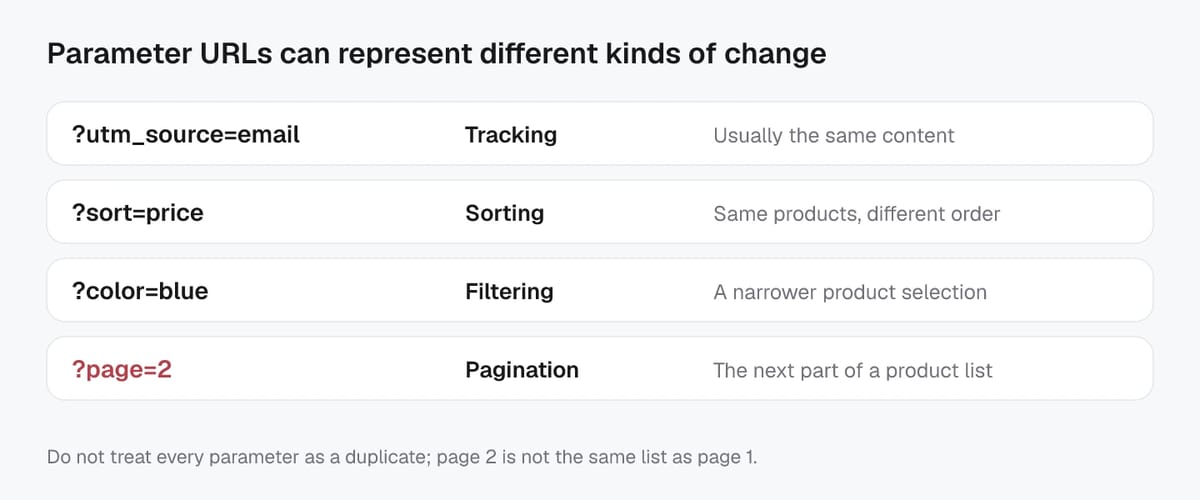
Common parameter patterns you will see on real sites include:
- Tracking:
?utm_source=newsletter - Sorting:
?sort=price_asc - Filters:
?color=black - Pagination:
?page=2 - On-site search:
?q=running+shoes
Multiple parameters and repeated keys
Multiple parameters are separated with &:
https://example.com/products?category=shoes&color=black&sort=price_asc
Order can also vary:
?sort=price_asc&color=black&category=shoes
To humans, those look equivalent. To crawlers, they are usually different URLs unless you standardize them (for example, consistent internal linking and a canonical URL).
Some platforms repeat the same key to represent multi-select filters:
https://example.com/products?color=black&color=blue
Others use comma-separated values:
?color=black,blue
Both approaches can work, but repeated keys can increase the number of URL combinations you need to control.
Encoding and case sensitivity basics
Query strings follow URL encoding rules. Spaces often appear as %20 or +, so running shoes might become running%20shoes or running+shoes. Special characters like & and = must be encoded when they are part of a value.
Case handling varies. The hostname is case-insensitive, but paths and parameters can be case-sensitive depending on the server and application. In SEO practice, it is safer to treat ?Color=Black and ?color=black as different URL variants and pick one consistent format to avoid duplicate versions.
Parameter types that create URL variants (tracking, facets, sorting, pagination)
Tracking and session identifiers
Tracking parameters are meant for analytics attribution, not for creating new indexable URLs. The usual suspects are utm_*, gclid, fbclid, and msclkid. Session identifiers in the URL (for example, ?sessionid=...) are even riskier because they can generate a unique URL per visitor. Google explicitly recommends avoiding session IDs in URLs where possible.
SEO impact is straightforward: these parameters can create duplicate URL variants, dilute signals, and burn crawl capacity. A practical rule is: do not internally link to temporary tracking or session URLs, and make sure your canonical points to the clean version without the tracking string.
If you need a reference for what UTMs are for, Google’s own URL builder for UTM parameters is a good baseline.
Filters, facets, sorting, and search terms
Faceted navigation (filters like color, size, price) and sort orders (?sort=price_asc) can create a near-infinite number of combinations. Google has called faceted navigation one of the most common sources of overcrawling issues, mainly because every combination looks like a “new page” to a crawler.
These parameter URLs are not automatically “bad.” Some filtered pages deserve to be indexed when they match real demand (for example, a popular category + brand filter). The key is to separate high-value, stable facet pages from low-value “UI state” variants, and keep the low-value ones from becoming widely discoverable.
Pagination and localization parameters
Pagination parameters like ?page=2 are a normal way to split long lists. Google’s current guidance is to give each paginated page a unique URL, link the sequence with crawlable <a href> links, and avoid canonicalizing every page to page 1.
Localization parameters like ?lang=en or ?currency=USD can also create duplicates and indexing confusion, especially if content changes by user context. When you have true language or region variants, use dedicated URLs and connect them with hreflang so search engines can select the right version.
Discovery vs crawling vs indexing vs canonicalization for parameter URLs
How parameter URLs get discovered from links and sitemaps
Parameter URLs are usually discovered the same way any URL is: Google follows links it finds on pages it already knows about, and it can also pick up URLs from XML sitemaps. The difference is volume. A single filter widget can generate hundreds or thousands of distinct URLs, and every crawlable <a href> to those variants is effectively an invitation for bots to keep exploring.
Sitemaps can help surface important URLs faster, but they also amplify mistakes. If parameter variants leak into your sitemap, you are signaling that those URLs matter. For most sites, that means unnecessary discovery of duplicates like tracking-tag versions, “sort by” versions, or deep filter combinations.
Crawling costs: URL explosion and infinite spaces
Crawling is not free. Search engines have finite time and resources per site, and parameter combinations can create “URL explosion” where crawlers spend their budget on low-value variations instead of new or updated pages.
Some parameter patterns create near-infinite spaces, such as:
- Facets that can be combined in many ways (brand + size + color + price + availability)
- Sort parameters that do not change core content value
- Internal search parameters with endless queries
- Calendar-style or pagination parameters that keep going (
page=9999)
Even if only a fraction gets crawled, that fraction can still be large enough to slow discovery of your real priority URLs.
Indexing and canonical selection outcomes
Indexing is the step where Google decides whether a crawled page should be stored and shown in results. When many parameter URLs look similar, Google often clusters them and chooses one “canonical” URL to represent the set. Your canonical tag is a strong hint, but it is not a guarantee, especially if other signals conflict (internal links, redirects, sitemap URLs, or inconsistent parameter formats).
For the AI search era, canonicalization is also about clarity. When your preferred URL is consistent, it is easier for ranking systems and AI-driven experiences to attribute signals, extract the right content, and avoid mixing snippets from multiple URL variants. A good mental model is Google’s own breakdown of how Google Search works: discovery leads to crawling, crawling feeds indexing, and canonicalization shapes which URL version gets treated as the primary one.
Duplicate and near-duplicate pages caused by parameter combinations
Signal dilution and competing URL versions
When URL parameters create multiple versions of the same product list or content page, those URLs can start competing with each other. Backlinks, internal links, and engagement signals get split across variants like ?sort=, ?ref=, ?utm_*, or slightly different filter combinations. Over time, this dilution can show up as unstable rankings, the “wrong” URL appearing in search results, or important pages being discovered slower because bots spend time crawling duplicates.
In practice, parameter duplicates also create noisy internal reporting. Teams see multiple URLs for what is essentially one page, which makes SEO audits and performance analysis harder.
When parameter pages add unique value
Not all parameter URLs are SEO clutter. Some parameter-driven pages genuinely serve a distinct intent and can deserve indexing, especially when they are:
- Stable and repeatable (the page will exist tomorrow in the same form).
- Substantially different from the parent page (unique item set, helpful copy, or meaningful sorting that changes what users see first).
- Supported by demand (people search for that exact filtered combination).
- Curated and linkable (you are willing to feature it in navigation and maintain it like a category page).
A good example is a high-level facet that behaves like a real category, such as “Men’s Running Shoes” or “4K Monitors,” rather than a narrow combination like “Size 10, color navy, under $83.17, in-stock only.”
Canonical selection mismatches and their impact
Canonical tags are hints, not rules. If Google sees stronger signals pointing to a parameter URL than to your preferred clean URL, it may pick the parameter variant as the canonical anyway. Common causes include inconsistent internal linking, parameter URLs included in XML sitemaps, conflicting redirects, or mixed protocols/hosts.
In the AI search era, mismatched canonicals can have a second-order effect: systems that summarize or extract content may pull from inconsistent URL variants, which increases the chance of mixed signals, duplicated snippets, or outdated versions being surfaced. Consistency across canonicals, internal links, and sitemaps is what keeps the “main” version clearly understood.
Decision rules for which parameter pages should be indexable
Indexable facets vs crawlable-only variants
A practical way to manage parameter URLs is to sort them into two buckets: indexable facet pages and crawlable-only variants.
Make a parameter page indexable when it behaves like a real landing page:
- The URL is stable (not tied to a session, campaign, or user state).
- The result set is meaningfully different from the parent page.
- There is clear search demand for that exact combination.
- You are willing to support it with internal links, consistent titles, and (ideally) helpful copy.
Everything else should usually be crawlable-only. That includes most sort orders, most deep filter combinations, and most internal search URLs. For these, your default stance is: keep them accessible for users, but prevent them from becoming search entrances. Common implementations are a self-consistent canonical strategy (pointing to the preferred indexable URL) and/or noindex for low-value variants that you still need crawled for discovery.
Non-discoverable variants and when to block links
Some variants should be non-discoverable: even if bots can technically crawl them, you should not help them find them.
Typical examples include tracking parameters (utm_*, gclid), session IDs, “compare” states, and infinite spaces like internal search queries. The best control here is usually product and template-level: avoid publishing crawlable links that generate these URLs, keep them out of sitemaps, and normalize URLs so internal links consistently point to the clean version.
This matters more in the AI era because multiple crawlers (not just traditional search bots) follow links and can amplify URL bloat. Cleaner discovery paths reduce wasted bot traffic and keep your primary URLs as the ones that get referenced and summarized.
Decision table: parameter type vs indexable, discoverable, primary control
| Parameter type | Indexable? | Discoverable? | Primary control |
|---|---|---|---|
utm_*, gclid, fbclid |
No | No | Canonical to clean URL + don’t link/include in sitemaps |
Session ID (sid=, session=) |
No | No | Remove at source (app), avoid crawlable links |
Sorting (sort=) |
No | Limited | Canonical to default sort; keep out of sitemaps |
Pagination (page=) |
Usually yes | Yes | Self-canonical per page; strong internal pagination links |
High-demand facet (ex: category=shoes&brand=nike) |
Yes | Yes | Self-canonical, internal links, stable URL pattern |
| Deep/low-demand facets (many combined filters) | No | Limited | noindex and/or canonical to broader page; restrict internal links |
Internal search (q=) |
Usually no | No | Prevent discovery, keep out of sitemaps; consider noindex if crawled |
Localization (lang=, currency=) |
Sometimes | Limited | Prefer dedicated URLs + hreflang; avoid duplicate parameter variants |
Controls that influence crawling and indexing (canonical, noindex, robots, redirects)
rel=canonical: consolidation without stopping crawl
rel=canonical tells search engines which URL you want treated as the primary version when multiple parameter URLs show the same or very similar content. It is a consolidation signal, not a crawl blocker. Google can still crawl parameter variants if it keeps finding them in internal links, sitemaps, or external links.
Use canonical when the page should remain accessible to users (filters, sorts, tracking-tag variants), but you want ranking signals unified on one clean URL. For parameter-heavy templates, consistency matters more than perfection: always canonicalize to the same preferred format (same parameter order, same casing, no tracking strings).
If you are permanently replacing one URL with another, a 301 redirect is usually the stronger choice than canonical, because it changes the URL that users and crawlers reach.
noindex and when it still gets crawled
noindex (via a meta robots tag or X-Robots-Tag header) is for URLs you do not want in search results. It does not mean “never crawled.” In fact, Google typically needs to crawl the URL to see the noindex, and it may recrawl periodically to confirm the directive is still present.
One common pitfall: if you block the URL in robots.txt, Googlebot may not be able to fetch the page and therefore cannot see the noindex or canonical signals. That can leave you with “indexed, though blocked” style situations where the URL exists in the index without content context.
For AI visibility, the robots meta tags documentation also notes that nosnippet-style controls can affect how content is used across Google surfaces, including AI features.
robots.txt and robots meta tradeoffs
Think of robots.txt as traffic control for crawling. It is useful for reducing crawl load and keeping bots out of low-value URL spaces (endless filter combinations, internal search URLs, or utility endpoints). But it is a blunt tool: it does not reliably prevent indexing, and it prevents crawlers from reading on-page signals like canonicals and meta robots directives.
In parameter SEO, a safe pattern is:
- Use canonicals and
noindexto control indexing and consolidation. - Use
robots.txtto reduce crawling only after you are confident you are not hiding signals you need Google to see.
Auditing parameter URL impact in Search Console, logs, and crawls
Sampling indexed parameter URLs and coverage reasons
Start in Google Search Console’s Page indexing report. Look for patterns where parameter URLs show up as “Not indexed,” especially for reasons tied to duplication or low value (for example, duplicate canonicalization outcomes, noindex, or “Crawled - currently not indexed”). Open an issue and review the example URLs to spot which parameters are driving the problem.
Then use the URL Inspection tool on a handful of representative parameter URLs. You are looking for two things: the Google-selected canonical versus your intended canonical, and how Google discovered the URL (internal link, sitemap, or external reference). This is the fastest way to confirm whether Google is treating a parameter variant as the main version.
Finding internal link and sitemap leakage
Most parameter SEO problems are self-inflicted. They happen because internal links and sitemaps keep publishing the variants.
Run a crawl (Screpy, Screaming Frog, or similar) and audit:
- Internal links that include
utm_*,sort=,page=, or deep facet combinations. - Filter UIs that generate crawlable
<a href>links for every combination. - Canonical tags that point to a URL format you never link to.
Also review your XML sitemaps directly. A simple check is searching for ? in the sitemap files. If parameter URLs are present, either they truly are indexable landing pages, or they are leaking into discovery.
Quantifying crawl waste by parameter pattern
Use the Crawl Stats report to understand Google’s crawl volume, response issues, and spikes. It will not name specific parameter patterns, so pair it with server log analysis.
In logs, group requests by parameter pattern (for example, “any URL containing utm_” or “any URL with sort=”) and measure:
- Total bot hits vs. hits to canonical URLs
- 200 vs. 3xx/4xx/5xx rates
- Crawl frequency of low-value variants over time
In 2026, it is also smart to segment AI-related crawlers separately. OpenAI documents its crawler user agents and purpose in its crawler overview, which helps you decide whether parameter-heavy URL spaces are being hit by non-search bots as well.
Related Screpy guides
- How Trailing Slashes Affect SEO and Indexing
- What Is a URL Audit and How Do You Perform One?
- How Can AI Improve Keyword Rank Tracking?
Method and limitations
This guide is a practical review framework, not a controlled experiment or a guarantee of rankings. Record the tested URL, date, device or market, baseline output, exact change, and post-change result. Validate material recommendations against the current primary documentation and test risky changes on a staging site first.
Verification checklist
| Check | Evidence to record |
|---|---|
| Baseline | URL, date, device or market, and current metric or output |
| Change | Exact action, configuration, and environment |
| Outcome | Re-run the same check and compare the result and limitations |