

Server-side rendering (SSR) delivers a page's main content in the HTML response, reducing its dependence on browser JavaScript. Client-side rendering (CSR) builds that content in the browser and can work for Google Search when rendering and route signals are reliable. For public landing pages, categories and articles, HTML-first delivery is often easier to verify; for private dashboards, interaction and access control drive the choice. Neither approach guarantees indexing, rankings or fast performance. Choose by page type, content freshness and the output crawlers can actually access, then check how the page behaves after JavaScript runs.
SSR and CSR explained with SEO-focused definitions
Server-rendered HTML vs browser-rendered HTML
Server-side rendering (SSR) produces HTML on the server for the requested page. A well-implemented public route returns its main text, headings and links as part of that response. The visitor does not need the browser to fetch another content payload and construct the entire page before those elements exist.
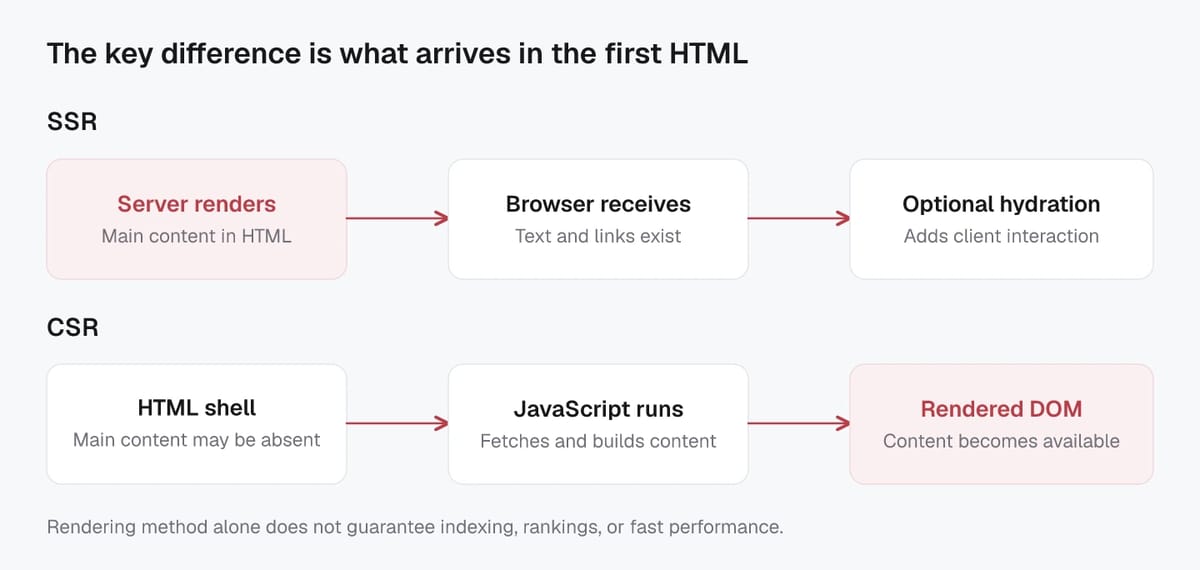
Client-side rendering (CSR) sends an HTML shell and lets JavaScript build the page in the browser. The shell might contain navigation or a loading state, while a script fetches the article, product or category data and inserts it into the document. That browser document is the DOM, the page structure that scripts can change after the response arrives.
The SEO distinction is the dependency: does the initial response already answer the page's main question, or must client code run successfully first? Neither label tells you whether the resulting content is accurate, whether the URL should be indexed, or whether the page loads well for your visitors.
Also separate a single-page application from its delivery method. An application can server-render its first visit and use client-side navigation afterward. A website can use one method for articles and another for account screens. Record the behavior of the route you are checking instead of assigning one label to the whole stack.
Populated source HTML alone does not prove request-time SSR. Static generation can return equally complete HTML prepared earlier. Google's overview of rendering on the web distinguishes these approaches; your framework's route configuration and build behavior establish which one produced the response.
Hydration and why pages can still be interactive
Hydration connects a framework's client-side behavior to HTML that has already been generated. It separates content delivery from additional application interaction. Ordinary HTML links and forms have browser behavior without framework hydration; a complex filter or editor may need JavaScript.
For example, a hypothetical category page could deliver its heading, introduction and product links in HTML, then hydrate its sorting controls. A visitor can read and follow the category before the enhanced controls are ready. If the product list exists only after those controls initialize, the route still has a client-side dependency for that content.
In React, hydrateRoot attaches React to existing server-rendered HTML and expects the initial client output to match it. Treat hydration mismatches as bugs. Check whether the browser removes a heading, replaces the product list with a loader, or changes page identity after startup. HTML-first delivery only helps the intended page if the client preserves its useful content.
Search engines crawling, rendering, and indexing JavaScript pages
Crawl discovery and link extraction differences
Google can discover links in the initial response and in rendered HTML. Its crawlable-link guidance supports ordinary anchors with an href, including anchors inserted by JavaScript. A clickable element with only an event handler does not provide the same crawlable destination.
For example, a category name rendered as an anchor to a product collection gives both visitors and crawlers a URL. A button that changes application state without a destination serves a different purpose. Use buttons for actions and anchors for navigation; choosing SSR does not correct a component that uses the wrong element.
The useful distinction is when those destinations become available. HTML-first navigation makes the first set of links available before the application starts. Browser-generated navigation depends on the script and any required data completing successfully. Inspect both outputs before deciding that links are missing.
Rendering queues and indexing latency risks
Google's JavaScript processing documentation describes crawling, rendering and indexing as separate stages. Successful HTTP 200 responses enter the rendering queue, except pages carrying a noindex robots directive. This includes pages whose HTML already contains their content. Server rendering does not bypass that queue.
The wait can be a few seconds or longer; neither mode provides a dependable publication-to-indexing deadline. Blocked pages or resources also affect what Google can process. An unindexed URL therefore needs investigation before its rendering method becomes the explanation.
For a newly published article, keep two questions separate: can the current route deliver its content, and has Google processed that version? If the first answer is yes, investigate Google's recorded crawl, index status and canonical choice. Rebuilding the application around SSR without identifying a delivery problem may leave the real cause untouched.
Non-Google bots and tools: verify rendering support
Google's rendering capabilities are not a specification for every crawler. Its dynamic-rendering guidance notes that some crawlers cannot execute JavaScript. A search bot, link-preview service and website auditor may each retrieve different output.
Check the relevant service's documented capabilities and the settings of the audit you actually ran. Record whether the result came from a plain HTTP fetch or a JavaScript-rendered session, and whether resource failures prevented completion. A tool's empty-content result alone cannot establish what another crawler saw.
For tools under your control, compare a known public URL in both modes. For external services, use their available inspection evidence. These checks establish compatibility with a particular consumer.
SSR vs CSR differences that matter for SEO outcomes
Indexability and content visibility at first load
Compare the page you deliver, rather than assuming the architecture label describes every part of it. An SSR route can still defer its product list to a browser fetch; a client application can have selected routes generated ahead of time.
Use these checks to compare implementations of the same public page:
| Check | With server-rendered content | With browser-rendered content |
|---|---|---|
| Main text and headings | Check that the response contains the relevant page content, rather than a server-rendered loader. | Check that the completed DOM contains that content and that required requests succeed. |
| Navigation links | Inspect destinations in the response and ensure they remain usable after hydration. | Inspect the generated anchors and confirm their destinations work on a direct request. |
| Page-specific signals | Check response and final DOM for the intended title, description and canonical. | Check that route changes update those signals consistently. |
| Missing-page behavior | The route handler must distinguish a valid page from a permanent deletion. | The direct request must distinguish those states, even when client navigation handles the interface. |
| Performance | Measure server response time as well as loading and interaction after startup. | Measure script/data dependencies as well as loading and interaction. |
| Audit evidence | Record what the response contains and whether hydration changes it. | Record what was fetched, what rendered and which resources failed. |
A populated response establishes content delivery, not index inclusion. An empty response establishes a dependency, not a failed Google render. Google also states that HTTP 200 does not guarantee indexing; an empty or error-like successful response may be treated as a soft 404. Keep delivery evidence and index evidence separate.
Internal linking and crawl path reliability
Direct access is the practical test for a crawl path. Imagine a visitor selecting a product from a collection: the application displays it correctly, but refreshing its URL returns the generic homepage. The navigation demonstration succeeded; the public product route did not.
Check representative links from navigation, pagination and related-content components with a fresh request to their destination. Verify the intended page identity, including its heading and canonical, rather than accepting any response that returns 200. Repeat after a client-side route change if the application uses one.
The anchor requirements described above apply in either mode. SSR helps expose a route; it cannot make a nonexistent destination work. Conversely, a generated anchor can support a crawl path when the destination is independently accessible.
Metadata, canonicals, and structured data handling
Google can process JavaScript-set titles, descriptions and canonicals. Its guidance recommends providing the canonical in HTML where possible and keeping it consistent if scripts modify it. Make each page's identity stable across the response, startup and subsequent navigation: one intended canonical, a relevant title and description, and language-specific URLs that are not accidentally replaced by a shared template value.
Structured data follows a related check: does the markup describe the page visitors actually see? Google supports JavaScript-generated structured data, but specifically warns that dynamically generated Product markup can make Shopping crawls less frequent and less reliable. That qualification matters for product pages even when a browser test succeeds.
When a price or availability changes, compare the visible product information with its structured data. Moving JSON-LD into the initial response will not correct inconsistent underlying values. Choose a delivery path that keeps those values aligned, then validate the resulting markup.
SEO pros and cons of server-side rendering
Less dependence on JavaScript for important entry pages
Server-side rendering is useful when an acquisition page should deliver its central message and navigation with the document itself. A homepage can expose its offer, a collection can expose product destinations, and an article can expose its text before the browser starts the application.
This gives a team a clear delivery requirement: the initial document should contain the page's essential public information. Agree which information is essential before implementing the route, rather than treating any server-produced markup as completion.
Caching and scalability considerations
Generating a document for each request creates a server-side workload. The useful question is how much of that work must repeat and how long public content may remain unchanged. A cache policy should follow the page's requirements, rather than a blanket instruction to cache every SSR response aggressively.
For a public collection, list the values that actually change the response. If locale changes the copy or currency changes displayed prices, those variants need appropriate separation. Do not add a device variant simply because a device exists; determine whether the delivered content differs. Unnecessary variants make cache behavior harder to reason about.
Define invalidation alongside storage. A product update may affect its page, collection entries and structured data. Decide which outputs must refresh together, who triggers the refresh, and what evidence confirms that it happened. A fresh browser value beside a stale server-rendered price is a consistency problem even if the page loads quickly.
Personalized or authenticated information requires its own handling. Do not reuse private output as a shared public response. If a route combines public content with account-specific controls, review both the shared document and how the private portion is authorized and displayed.
Compare cache hits with misses when evaluating server response time. A fast cached page can conceal an expensive first request. Investigate repeated database work and sequential data fetching before assuming that changing the rendering mode is the only remedy.
Core Web Vitals after hydration
SSR still has browser costs. Rendering on the web explains how server processing affects time to first byte and how hydration can add substantial client work. Delivering useful HTML early does not remove the application's JavaScript workload.
Use Core Web Vitals to assess loading through Largest Contentful Paint, responsiveness through Interaction to Next Paint, and visual stability through Cumulative Layout Shift. A page can show its heading quickly while filters respond slowly or late content shifts the layout.
Inspect those specific symptoms. Check whether a filter's startup work delays interaction, whether images reserve space, and whether the main content waits behind other requests. Lab measurements help investigate a repeatable issue; real-user field measurements show how visitors experience it across conditions. Report which evidence you used. A single lab score cannot establish that all visits meet the field thresholds.
SEO pros and cons of client-side rendering
When CSR works fine for SEO
SSR is not a prerequisite for every JavaScript page to appear in Google Search. Public CSR pages can work when their content renders successfully and their routes provide the intended search signals. The question is whether that dependency is acceptable for the pages and consumers you need to support.
An authenticated dashboard has a different purpose from a public product page. Choosing CSR for the dashboard can suit its interactive workflow without making search acquisition part of the decision. Enforce authentication on the server; an indexing directive is not access control.
For public CSR routes, use these acceptance conditions:
- Each intended page has a stable URL that works on a direct request.
- Main public content appears without requiring an account or an action to reveal it.
- Required scripts and data are accessible to the relevant crawler, and failed requests do not silently replace the page with unrelated content.
- Navigation exposes usable anchors, and page-specific titles and canonicals stay consistent after route changes.
- Valid pages, permanent removals and temporary failures have deliberately different behavior.
Pre-rendering selected acquisition routes can reduce their client dependency while leaving the application interactive. Those routes use HTML-first delivery; the rest can remain client-rendered.
Common failure modes: blank HTML and missing links
Start with the observed symptom. An application shell is a reason to inspect rendering, not enough evidence to conclude that Google cannot index the page. Use this diagnostic table before planning a migration:
| Symptom | Evidence to obtain next | Focused correction if confirmed |
|---|---|---|
| Raw HTML contains only a shell | Rendered content and failed-resource details for that URL | Repair the failing content dependency, or pre-render the essential content if that dependency is unsuitable. |
| Navigation works, but direct loading shows a generic page | Response status, heading and canonical on a fresh destination request | Implement the destination route and its page-specific output. |
| A page has the previous route's title or canonical | Compare direct loading, startup and client navigation | Update route metadata consistently and remove conflicting signals. |
| Main content disappears for logged-out access | Data-request authorization and the public page's access requirements | Make intended public content accessible while retaining authorization for private data. |
| A deleted page returns a successful empty shell | Direct response and the permanent-removal decision | Return an appropriate 404 or 410 for the genuinely removed URL. |
Initial HTML has noindex, removed only by JavaScript |
Robots directive in the response | Correct the initial directive if the page should be indexable. |
The last case is particularly important: Google may skip rendering when initial HTML contains noindex, so a script intended to remove it may never run.
Treat error classification carefully. An out-of-stock item may still have a useful product page. A temporary data-service failure is also different from a permanent removal; Google's HTTP status guidance distinguishes server errors from missing URLs. Avoid converting every failed browser request into a permanent indexing instruction.
For the broader implementation workflow, see how to make JavaScript websites crawlable for Google. Fix the specific broken route or dependency first, then compare its delivery again.
Hybrid rendering options: SSR plus hydration, SSG/ISR, and dynamic rendering
Static generation and incremental regeneration for SEO pages
Hybrid delivery lets the page's initial content and its subsequent interactions use different approaches. SSR plus hydration delivers server-produced HTML and then attaches application behavior. A statically generated page can also add client-side interactions. Choose each part according to its job instead of assigning one mode to the entire site.
Static site generation, or SSG, produces pages ahead of requests. It can suit articles and documentation when publication changes trigger a rebuild or another defined update path. Its freshness constraint matters: editing a content record does not, by itself, prove that the served document changed. Decide how that edit reaches the generated page.
Incremental static regeneration, or ISR, allows supported frameworks to regenerate individual pages after their initial generation. It is a framework capability, not a Google indexing feature. Its timing depends on the implementation and cache behavior.
For example, the current Next.js ISR guide, which covers applications without Cache Components enabled, illustrates time-based revalidation: after the interval, the next request can receive the cached page while regeneration happens in the background; a later request receives the updated output.
In a hypothetical 60-second configuration, expiry is therefore not a promise that every visitor sees a content edit exactly 60 seconds after it happened. The triggering request, regeneration and successful replacement all matter. A team needing stricter freshness should evaluate its actual on-demand update or request-time delivery path.
For a blog, a short delay after an edit may be acceptable. For a price change, the same delay may conflict with the page's requirements. Write down the permitted stale window and how an editor confirms the update reached the public document. Then choose SSR, static generation or regeneration around that requirement.
Dynamic rendering as a workaround and its risks
Dynamic rendering serves a rendered version to selected crawlers while visitors receive the client application. Google describes it as a workaround it does not recommend, because it adds complexity and resource requirements; it recommends server rendering, static rendering or hydration instead.
Google's guidance says that serving similar content to bots and visitors is generally acceptable, while serving substantially different content can constitute cloaking.
If you inherit such a setup, identify the reason it exists before replacing it. Compare the two versions' main content, links, metadata and update timing. Check whether crawler detection sends the intended request down the intended path. A corrected user page with an outdated crawler snapshot still leaves a delivery gap.
Retain a temporary workaround only for a demonstrated compatibility need, with an owner and an exit condition. It introduces another output to maintain; adding it because a page has weak rankings does not establish that rendering was the cause.
Choosing a rendering strategy by page type and monitoring SEO
Page type to rendering approach matrix
Start with the route's purpose, how frequently its public content changes, and how long a stale version is acceptable. These are conditional starting points for a design review:
| Page type | Delivery options to evaluate | Requirement that decides the choice |
|---|---|---|
| Homepage and brand landing pages | SSG for stable copy; SSR when request-time content is needed | Main offer and navigation must be available on a direct visit; define how campaign edits reach the page. |
| Category and collection pages | SSR, SSG or incremental regeneration, depending on catalogue updates | Product destinations, pagination and summaries must remain accessible; decide acceptable update delay. |
| Product and service detail pages | SSR or generated HTML with an adequate refresh path | Public content, current values and structured data must agree; choose around freshness requirements. |
| Blog, documentation and guides | SSG or incremental regeneration when publishing can refresh output | Editors need a verifiable path from a published change to the public document. |
| Public forums and reviews | SSR or regeneration when updates meet the permitted stale window | Decide how new contributions appear and whether moderation changes invalidate output. |
| On-site search results | CSR or HTML-first delivery according to access and performance needs | Decide indexing policy separately; a search interface does not automatically require a particular mode or robots directive. |
| Private dashboards and tools | CSR where it suits the interaction model; server delivery where useful | Enforce access control and measure the actual workflow; public search acquisition is usually a separate route. |
A site can use several of these approaches. A generated help centre and a client-rendered dashboard can coexist without requiring the same freshness or indexing policy. Resolve those requirements before choosing a framework-wide default.
Validating raw HTML vs rendered DOM in audits
A raw response answers what the server delivered for a particular request. A rendered DOM answers what the browser constructed after scripts ran. For HTML-first pages, confirm that essential content survives startup. For CSR, confirm that the dependencies produce the intended public content. The outputs can differ legitimately; record which differences matter.
Compare the heading, main text, links, title, canonical, robots directive and relevant structured data. If the site uses language or regional versions, check its hreflang implementation and page-specific URL signals. Google supports equivalent HTML, HTTP-header and sitemap methods, so missing HTML hreflang alone is not proof that alternate versions were never declared. Validate the method the site actually uses. For response-versus-DOM comparisons, use the same URL and access conditions; a logged-in browser and an anonymous fetch may differ because of access, rather than rendering.
Google's URL Inspection tool provides a different kind of evidence. Its indexed report describes Google's recorded information; the live test checks current accessibility and processing. A successful live result does not guarantee indexing. Use the indexed report for Google's selected canonical rather than assuming a live test predicts that selection. When available, inspect the retrieved content and resource details to investigate a delivery discrepancy.
Screpy's website audit can help review page titles, canonicals, content and link relationships across routes. Record the crawl's rendering settings and compare relevant snapshots after a release. These audit records help locate patterns; they do not replace Google's index-status evidence.
Keep the three observations distinct: the current HTTP response, a current rendered session, and Google's recorded or live inspection result. A finding in one is a lead to verify in the others.
Reproduce a source-HTML check for one public URL
Fetch the public URL without a logged-in session and save the response and headers. Replace the example address with the actual route you are investigating:
curl -L --max-time 20 -sS -D response-headers.txt https://example.com/services/ -o response.html
Read the final response status and URL after redirects, then inspect response.html. Search for the page-specific heading, meaningful main text, and a normal destination link. Text inside a JSON data script alone is not the same as visible semantic HTML.
For example, these simplified snippets represent different delivery evidence:
<!-- HTML-first example: page content is present in the response -->
<main><h1>Emergency plumbing in Austin</h1><p>Service details...</p>
<a href="/contact/">Request a visit</a></main>

<!-- Client-rendered shell example: inspect what the script adds next -->
<div id="app"></div><script type="module" src="/app.js"></script>
The second response alone does not prove an indexing failure. Compare it with the rendered DOM under the same access conditions, inspect missing or blocked resources, and use Google's inspection evidence where available. Likewise, seeing the first snippet does not prove that Google indexed the page. Record the observation time, status, canonical and robots signals, and the specific missing content before deciding whether delivery needs to change.
After resolving a representative route, use the website audit to examine the affected route group with appropriate crawl settings. Check whether the problem affects one page, one template, or the whole crawl before proposing a rendering migration.
Observed example: essential content in a public HTTP response
On October 16, 2026, an anonymous HTTP request to Screpy's average position guide returned 200. Before executing page JavaScript, its response contained the canonical, main heading and contextual product link below. Presentation attributes are omitted from this excerpt:
<link rel="canonical" href="https://screpy.com/blog/how-to-read-average-position-in-google-search-console/">
<h1>How to Read Average Position in Google Search Console</h1>
<a href="https://screpy.com/feature/search-console/">Screpy's Google Search Console dashboard</a>
You can repeat the direct-request check with that URL and look for the same elements in the saved response. This observation establishes that those elements were available in the HTTP source at the recorded check. HTML alone does not tell you whether the origin used SSR, a static build or cached output, and it does not establish that Google indexed the page. That distinction prevents a useful source check from turning into an unsupported rendering or ranking claim.
Release checks for public routes
Consider a hypothetical shop updating its rendering approach for a collection and a product while permanently removing a third product. This is an acceptance example, not a reported customer result. The team chooses HTML-first delivery for the two active pages and requires a price edit to reach both their visible information and their markup through its defined update path.
| Route | Expected direct-request result | Content and navigation acceptance | Change to verify |
|---|---|---|---|
| Active collection | 200 with the intended collection identity | Collection heading, summary and product anchors in the response; useful content remains after startup | An updated product summary reaches the collection; a permanently removed product is no longer linked there. |
| Active product | 200 with that product's identity | Main product details, correct canonical and consistent visible/structured values | A controlled price edit reaches each applicable output within the team's permitted stale window. |
| Permanently removed product with no replacement | 404 or 410 on a direct request | A clear missing-page state; no generic homepage masquerading as the product | Direct access and client navigation both show the removal appropriately; related links are reviewed. |
The removed-product case assumes a genuine permanent removal. An available page for an out-of-stock product or a real replacement calls for a different decision. Client navigation can display a missing-page state, but the HTTP status check belongs to a direct request.
For the price edit, record the old value, the changed value and the update time. Inspect the public response and rendered page after the update operation; compare structured data where applicable. Repeat with a cached response and a cache miss, documenting which path was observed. If one layer is stale, record the gap and repair its refresh path rather than accepting the other layer's success as proof.
Create a short handoff record for each route: URL, deployment identifier, observation time, request or navigation method, cache state if known, expected result, actual result, unresolved difference, owner and recheck. Label Google inspection evidence as indexed or live, with its own timestamp. Unknown cache state or unavailable inspection evidence should remain explicitly unknown.
After release, compare Search Console periods with consistent page, search-type and other relevant filters. Review query mix alongside clicks, impressions, CTR and position; a change in those aggregates alone cannot isolate the effect of rendering.
For stable editorial pages, choose generated HTML when the publishing workflow can refresh it reliably. For pages requiring current request-time information, evaluate SSR and its caching behavior. Keep client rendering for the interactions and routes where its dependencies satisfy the agreed requirements. Accept the decision when the representative routes deliver the right content, signals and freshness, then monitor the search outcome separately.