

Canonical tags are a simple HTML signal that tells search engines which URL is the preferred version when duplicate content appears across multiple addresses. Set one clean, indexable URL as the canonical, then add a rel=canonical link in the head of every alternate page, including the canonical page itself. To make the hint stick, keep the same preferred URL in internal links and sitemaps, and avoid pointing canonicals at redirected, blocked, or non-200 pages. If Google keeps picking a different version, the culprit is often inconsistent URL formatting, parameters, or mixed signals that quietly override your intent.
Canonical URL vs rel="canonical" tag: what each means
Canonical URL definition
A canonical URL is the single “main” URL that should represent a piece of content when multiple URLs are duplicates or near-duplicates. In practice, it’s also the URL Google may choose to show in search results for that content cluster, even if users can access the same page through other variations (parameters, sorting, print views, etc.).
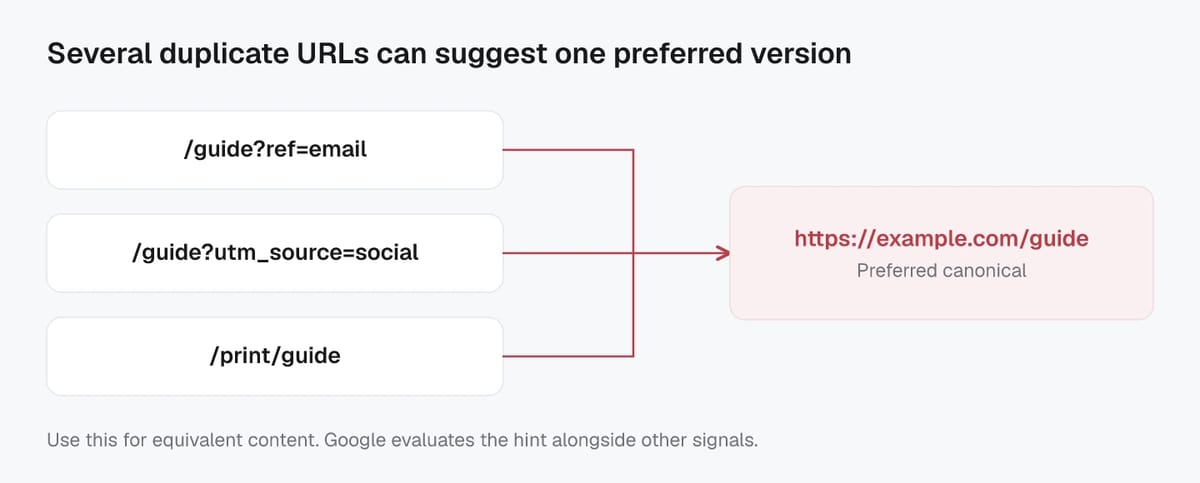
Important nuance: the canonical URL is not only what you want to be canonical. It is the version search engines select as the best representative after evaluating all the signals they see (page content, redirects, internal links, sitemaps, and canonical annotations). That’s why SEOs often talk about “Google’s chosen canonical” versus “user-declared canonical.”
Choosing a consistent canonical URL also matters beyond classic SEO. Many crawlers and content consumers (including AI-powered discovery and summarization systems) tend to prefer the most stable, representative URL when they cluster duplicates.
rel="canonical" tag definition
The rel="canonical" tag (often called a “canonical tag”) is the most common way to suggest your preferred canonical URL. It’s an HTML link element you place in the <head> of a page, pointing to the canonical version. It can also be sent as an HTTP response header for non-HTML files like PDFs.
This tag is a strong hint, not an absolute command. If other signals conflict, Google may ignore your canonical tag and pick a different canonical URL. The safest mindset is: use rel="canonical" to declare your preference, then back it up with consistent internal linking, clean redirects, and a sitemap that lists the same preferred URL.
Google’s official overview of how canonicalization works is in its canonicalization documentation.
Why canonical tags matter for duplicate and near-duplicate pages
Consolidating ranking signals and links
When the same (or very similar) content lives at multiple URLs, search engines may treat those URLs as separate candidates. That can split signals that help pages rank, such as external links, internal links, user engagement signals, and overall relevance. A well-implemented canonical tag helps search engines cluster those URLs and credit the preferred version as the main representative.
In day-to-day SEO, this is how canonicals reduce “ranking dilution.” Instead of four URLs each earning a little authority, you’re guiding signals toward one clean URL. This also makes reporting clearer. You get a single page to optimize, measure, and improve, rather than chasing performance across URL variants.
For the AI search and answer era, consolidation matters even more. Many AI-powered systems summarize and cite sources. When your content is spread across multiple URLs, it increases the chance the system picks a less ideal version (with parameters, tracking, or outdated templates) as the “source of truth.”
Preventing index bloat from duplicate URLs
Duplicate URLs can quietly inflate the number of pages that get crawled and considered for indexing. Over time, that can create index bloat: lots of low-value URL variations competing for crawl attention and muddying your site’s quality signals.
Canonicals help reduce this by guiding crawlers away from indexing duplicates and toward the preferred URL. That typically leads to:
- More efficient crawling (less time spent reprocessing the same content).
- Cleaner index coverage (fewer “Duplicate, Google chose different canonical” style issues).
- More stable search snippets, since the indexed URL is more predictable.
Canonicals are not a cure-all for every duplication problem, but they are one of the safest ways to keep duplicate and near-duplicate pages organized without removing user-facing URL options like filters or tracking parameters.
Common duplicate URL causes that canonicals can fix
Tracking and session parameters (UTM, IDs)
Campaign tracking is one of the most common causes of duplicate URLs. A single page can be shared as ?utm_source=..., ?gclid=..., ?fbclid=..., or with a long string of partner IDs. Session IDs can create the same problem when they end up in the URL.
In these cases, the content is usually identical, so the clean, parameter-free page should be the canonical. The canonical tag helps Google cluster all those tracked versions back to one preferred URL, instead of letting a tracking URL become the one that gets indexed and shown in search.
A practical 2026 tip: make sure your own internal links do not accidentally “inherit” tracking parameters (for example, from analytics scripts or templating). If Google sees parameterized URLs everywhere in navigation, it can treat them as the main version even if your canonical points elsewhere.
http/https, www/non-www, trailing slash, case
Technical URL variants create duplicates even when no parameters exist. Common examples include:
httpvshttpswwwvs non-www- Trailing slash vs no trailing slash
- Uppercase vs lowercase paths (often treated as different URLs on many servers)
Canonical tags can help consolidate these variations, but they work best when your site also sends consistent signals: internal links, sitemaps, and redirects should all point to the same preferred format. Otherwise, you’re telling search engines two different stories.
Faceted navigation, sorting, and filters
Ecommerce and large content sites often generate near-infinite URL combinations from filters and sorting (color, size, price ranges, “sort=low-to-high,” and so on). Many of those pages are near-duplicates, and canonical tags are a clean way to point them back to the core category or collection page.
The key is intent. If a filtered page is not meant to rank, canonicalize it. If it serves a real search demand and has unique value (copy, products, indexable pagination strategy), treat it as its own indexable page and avoid canonicalizing it away.
Google’s guidance on consolidating duplicate URLs is summarized in its duplicate URL consolidation documentation.
Adding a canonical tag correctly in HTML head
Correct canonical tag format and placement
Place the canonical tag in the <head> of the HTML document, and keep it clean and unambiguous. The standard format looks like this:
<link rel="canonical" href="https://example.com/preferred-page/" />
A few implementation details matter:
- Put it in the
<head>, not the body. - Use a full, absolute URL (including
https://and the correct host). - Output only one canonical tag per page. Multiple canonicals are a common reason Google ignores them.
- Make sure the canonical URL is the version you actually want people and crawlers to land on (readable, stable, and consistent with your internal linking).
Self-referencing canonicals and preferred URL selection
A self-referencing canonical means the canonical page points to itself. This is a best-practice default because it removes doubt. If every indexable page declares its own preferred URL, you reduce the chance that tracking URLs, alternate paths, or CMS quirks become the “main” version.
When you choose your preferred URL format, lock in the basics across the site: HTTPS vs HTTP, www vs non-www, trailing slash rules, and lowercase paths. Then make your canonicals match that exact format everywhere.
Canonical tags for paginated and variant pages
For pagination, avoid canonicalizing every page in the series to page 1. In most cases, each paginated page should self-canonicalize so Google can crawl deeper pages and discover items linked there. Google’s current pagination guidance also emphasizes structuring pagination so it’s crawlable and indexable where needed. You can review the latest recommendations in Google’s pagination best practices.
For variants (like product color or size URLs), canonical decisions should follow intent:
- If variant pages are near-duplicates and you don’t need them indexed, canonical them to the main product page.
- If a variant has meaningful unique content (pricing, specs, availability, unique copy), let it self-canonicalize and optimize it as its own landing page.
Canonical tag best practices that Google actually respects
Use absolute URLs and one canonical per page
Use an absolute URL in your canonical tag (full https://, hostname, and path). Relative canonicals are easier to break during templating changes, migrations, or when content is served through multiple hosts. Google explicitly recommends absolute URLs for canonicalization.
Also, keep it to one canonical per page. If a page outputs multiple canonical tags (common with conflicting plugins or themes), Google may ignore the hints.
A good operational habit for 2026: make sure your canonical URL matches what your site consistently uses in navigation, breadcrumbs, and sitemaps. If your internal links keep pointing to parameterized or mixed-format URLs, Google may treat those as the “real” version.
Canonical target must be 200 and indexable
Your canonical target should return a 200 OK and be indexable. If you canonicalize to a URL that redirects, errors, is blocked in robots.txt, or is marked noindex, you’re sending mixed signals. Google’s canonicalization docs also caution against using robots.txt as a canonicalization tool and note that noindex isn’t a recommended way to “force” canonical selection within a site.
In practice, the safest setup is: canonical points to a live page, that page is allowed to be crawled, and it’s eligible to be indexed.
Avoid canonical chains and cross-domain surprises
Avoid canonical chains, like Page A canonicals to B, and B canonicals to C. Chains slow down consolidation and increase the odds Google chooses a different canonical. Point every duplicate directly to the final preferred URL.
Cross-domain canonicals are supported (a duplicate can have a canonical on another domain), but they’re easy to misuse. Keep cross-domain canonicals for clear cases like content syndication, and verify you’re not accidentally canonicalizing production pages to a staging domain or a partner’s copy. For Google’s full best-practice checklist, follow the consolidate duplicate URLs guidance.
Canonical vs 301 redirect vs noindex: picking the right signal
When a 301 redirect is the better fix
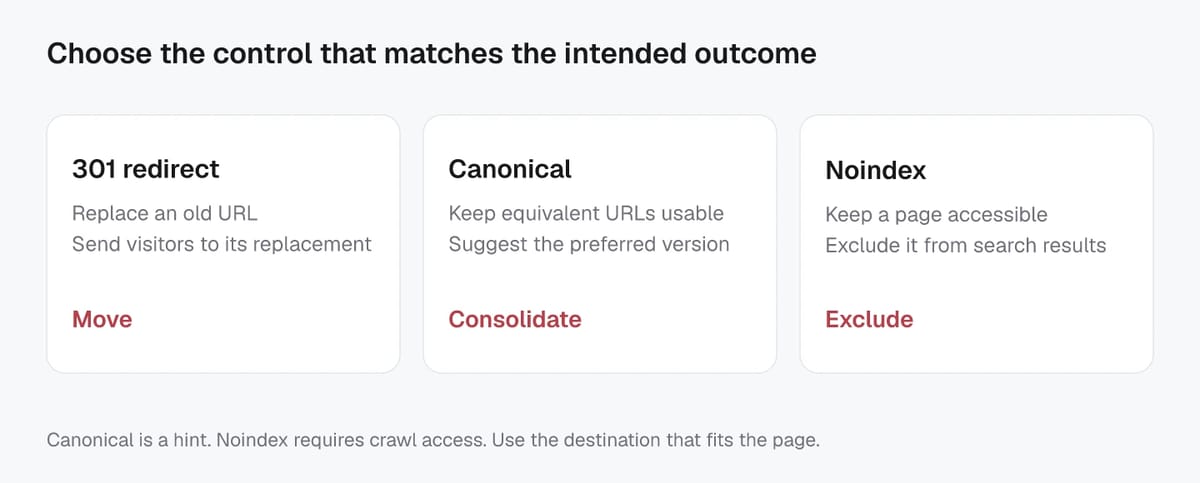
Use a 301 redirect when the old URL should be replaced, not just consolidated. A 301 is typically the cleanest option for permanent URL changes because it sends users and crawlers to the new address and acts as a strong canonicalization signal in Google’s indexing systems. Google also lists redirects as the strongest way to indicate a preferred canonical when duplicates exist. In other words, if there’s no good reason to keep the duplicate URL accessible, a redirect is often the most reliable fix.
Common 301 use cases:
- You changed a URL slug or migrated from HTTP to HTTPS.
- You consolidated duplicate pages into one new page.
- You retired thin or outdated pages and merged them into a better resource.
From an AI discovery standpoint, redirects also help because there’s less ambiguity about which URL should be cited, crawled, or treated as the “real” version.
When noindex is safer than canonical
Use noindex when you need the URL to remain accessible for users, but you do not want it appearing in search results at all. Examples include internal search results pages, certain account pages, or temporary campaign pages that shouldn’t be discoverable via Google.
Be careful with “noindex + canonical” combos. If you’re trying to consolidate duplicates, Google explicitly recommends rel="canonical" rather than relying on noindex to influence canonical selection within a site. That’s because noindex blocks the page from Search instead of cleanly clustering duplicates. This is covered in Google’s guidance on consolidating duplicate URLs.
Decision factors: keep URL accessible vs replace it
- Replace it: Use 301 redirect (best for permanent moves and legacy URL cleanup).
- Keep it accessible but consolidate SEO signals: Use canonical tag.
- Keep it accessible but keep it out of Search: Use noindex.
SECTION OUTLINE:
Verifying Google’s chosen canonical and troubleshooting mismatches
Check the chosen canonical in Search Console URL Inspection
Crawl and sitemap signals that influence canonical selection
Reasons Google ignores your canonical and what to change
Verifying Google’s chosen canonical and troubleshooting mismatches
Check the chosen canonical in Search Console URL Inspection
In Google Search Console, use the URL Inspection tool on both the URL you want indexed and a few common duplicates (a UTM version, a sorted URL, a trailing-slash variant). You’re looking for two fields:
- User-declared canonical: the URL from your rel="canonical" tag (or other canonical signal).
- Google-selected canonical: the URL Google chose as the best representative.
If Google-selected canonical does not match, run a Live Test after your fixes, then request indexing for the canonical URL (not every duplicate). Expect some lag. Canonical clustering can take time, especially on large sites or when many conflicting URLs exist.
Crawl and sitemap signals that influence canonical selection
Canonicals rarely fail in isolation. Google weighs the whole set of canonicalization signals, including:
- Internal links: navigation, breadcrumbs, and “related” modules should consistently point to the preferred URL.
- XML sitemap URLs: include only canonical URLs where possible.
- Redirects: if duplicates redirect inconsistently (or redirect to a different URL than your canonical), Google may follow the redirect logic.
- Content and templates: near-duplicates usually cluster cleanly; pages with meaningful differences may not.
- Rendering: if the canonical tag is injected late via JavaScript, Google may miss it or treat it as less reliable than server-rendered signals.
In an AI-driven search landscape, consistency matters more. When multiple URL versions float around, non-Google crawlers and AI systems can also pick the “wrong” one to cite or summarize.
Reasons Google ignores your canonical and what to change
Common causes of “Google chose different canonical” and the practical fix:
- Canonical target is not 200 OK (redirect, 404, soft 404): point canonicals to a final, live URL.
- Canonical target isn’t indexable (robots.txt blocked or noindex): make the target crawlable and index-eligible.
- Conflicting signals: internal links and sitemap favor a different URL than your canonical; align them.
- Canonical chains: A -> B -> C; update everything to point directly to C.
- Duplicate or malformed canonicals: multiple canonical tags, relative URLs, or the wrong hostname; output one absolute canonical.
- Content mismatch: the “duplicate” page is actually meaningfully different; let it self-canonicalize or redesign the duplication strategy.
Method and limitations
This guide is a practical review framework, not a controlled experiment or a guarantee of rankings. Record the tested URL, date, device or market, baseline output, exact change, and post-change result. Validate material recommendations against the current primary documentation and test risky changes on a staging site first.
Verification checklist
| Check | Evidence to record |
|---|---|
| Baseline | URL, date, device or market, and current metric or output |
| Change | Exact action, configuration, and environment |
| Outcome | Re-run the same check and compare the result and limitations |