

Used correctly, noindex and nofollow give you direct control over search visibility: which URLs can appear and which links pass trust. Noindex is a robots directive delivered in a robots meta tag or an X-Robots-Tag header that tells compliant crawlers not to keep a URL in their index; it only works after they can fetch the page. Nofollow is about links, usually set with rel=nofollow, and is best reserved for paid, user-generated, or untrusted outbound links rather than internal navigation. Choose noindex for pages like login screens, internal search results, and post-purchase confirmations, but avoid adding it to content you want indexed or canonicalized. A small configuration mismatch can turn a tidy cleanup into an indexing headache, especially when crawl access is restricted.
Noindex vs nofollow: what each directive actually does
Indexing vs crawling vs link signals
Indexing, crawling, and link signals are related, but they are not the same thing.
Crawling is when a bot requests a URL and downloads the content. Indexing is when a search engine decides to store that URL (and its content) in its searchable index, so it can appear in results. Link signals are the trust and context cues search engines may extract from links, like discovery paths, anchor text, and other ranking signals.
A noindex directive tells compliant search engines not to keep a URL in their index. It is typically delivered via a meta robots tag or an HTTP header, and the bot generally has to be able to fetch the page to see the directive. In other words: noindex is about visibility in search, not about preventing access.
In the AI search era, this distinction matters more. Many AI experiences pull from search indexes or search-crawled sources. If a page is noindex, it is less likely to be eligible for those surfaces. But noindex is not a universal “AI opt-out” for every third-party system on the web.
Meta robots nofollow vs rel="nofollow" links
There are two common “nofollow” concepts:
- Meta robots
nofollow(page-level): a hint to not follow links on that page. rel="nofollow"(link-level): a hint on a specific link that you do not want to endorse, commonly used for paid, sponsored, or user-generated links.
Modern search engines may treat nofollow as a hint, not a guaranteed instruction, especially for ranking and link evaluation. This is why nofollow is best used for risk management (ads, affiliates, untrusted UGC), not as a precise sculpting tool for internal PageRank.
When both directives are used together
Using noindex, nofollow together is usually a “belt and suspenders” choice for pages you do not want indexed and that you also do not want to pass link signals from, such as thin internal utilities (some filter states, certain account pages, or low-value parameter URLs).
Two practical cautions:
- If you also block the URL in robots.txt, Google may not be able to crawl the page to see the noindex, which can delay removal.
- If your goal is only “don’t index this page,” prefer
noindexwithout nofollow so crawlers can still discover important links, unless you have a clear reason to restrict link following.
For implementation details, Google’s robots meta tag documentation is the most reliable baseline.
Robots directives you can combine with noindex and nofollow
index, follow, and default behavior
If you do nothing, the default behavior is effectively “index and follow”: search engines can index the page (if it’s otherwise eligible) and use links on it for discovery.
In modern SEO, you rarely need to write index or follow in a meta robots tag. They are typically redundant, and leaving them in templates can create confusion during audits. If you want to be explicit, Google documents all as the default directive and notes it has no effect when listed. The practical takeaway is simple: only add a robots directive when you’re changing behavior (like noindex or snippet controls), not to restate the default.
noarchive, nosnippet, and max-snippet basics
Snippet and preview controls matter more in 2026 because they affect both classic blue-link results and AI-driven experiences.
Google’s current documentation states that nosnippet prevents text snippets and video previews, and also prevents the content from being used as a direct input for AI Overviews and AI Mode. max-snippet lets you cap snippet length, where max-snippet:0 is equivalent to nosnippet. You can also control preview media with max-image-preview (none, standard, large) and max-video-preview (seconds, with 0 meaning a static image and -1 meaning no limit). These rules are detailed in Google’s robots meta tag specifications.
One nuance worth remembering: snippet limits may not apply the same way when information is being shown via certain rich results and structured data.
Robots values that are ignored or discouraged
Some robots values still show up in legacy templates, but are no longer useful, and in some cases are explicitly ignored.
For Google Search, noarchive is listed as historical and no longer used because the cached link feature no longer exists, and nocache is not used. Google also lists nositelinkssearchbox as no longer used. On the other hand, Bing still documents support for several of these legacy controls in Bing’s supported robots meta tags and attributes.
Also consider removing long-deprecated directory directives like noodp and noydir. They add noise without delivering reliable modern behavior.
Implementing meta robots tags in HTML and common CMS setups
Single page meta robots syntax and placement
For an HTML page, the cleanest way to control indexing is a meta robots tag in the <head> of the document. A typical noindex looks like this:
<head>
 <meta name="robots" content="noindex">
</head>
You can combine directives with commas:
<meta name="robots" content="noindex, nofollow">
Google can respect the tag even if it appears in the body, but in practice you should keep it in the <head> so it’s consistently delivered across templates and easier to audit. Also make sure it’s present in the initial HTML response, not injected only by client-side JavaScript, since rendering behavior varies by crawler and by crawl budget.
If you need the official syntax list (and what Google actually supports), use the robots meta tag specifications.
Targeting specific bots with name="robots"
If you want rules that apply to one crawler but not another, you can use a crawler-specific name value. For Google Search, the documented user-agent tokens are primarily googlebot (web results) and googlebot-news (Google News). Example:
<meta name="googlebot" content="nosnippet">
You can also use multiple tags. One important behavior to understand is that when different meta robots tags are present, search engines may effectively apply the “sum of negative rules” for that bot. So mixing directives like nofollow on robots and noindex on googlebot can still result in noindex, nofollow for Googlebot. Use this intentionally, or you can accidentally make a page more restricted than you planned.
Preventing accidental noindex on templates
Most real-world noindex problems come from templates, not from one-off pages. A few practical safeguards:
- Separate page-level controls from global settings. If your CMS has a “discourage indexing” or “site visibility” switch, don’t also hardcode noindex in the theme.
- Scope rules tightly. Apply noindex only to the exact page types that need it (internal search, checkout, staging paths), not entire post types by default.
- Audit your canonicals. A noindex page can still have a canonical tag, but if you accidentally noindex your canonical pages, you can suppress the URLs you actually want indexed.
- Treat environments differently. It’s fine to noindex staging, but make sure that rule cannot ship to production via shared templates, environment variables, or copied headers.
A simple habit that prevents surprises: whenever you publish a new template or CMS update, spot-check a few URLs and confirm the meta robots tag is exactly what you intended.
Using X-Robots-Tag headers for PDFs and non-HTML files
When headers are better than meta tags
X-Robots-Tag is an HTTP response header that can carry the same kind of robots directives you’d normally place in a meta robots tag, but it works even when there is no HTML <head>. That makes it the go-to option for PDFs, images, video files, CSVs, and other non-HTML assets that you still want to keep out of search results or control in previews. Google documents this approach alongside meta robots in its robots meta tag specifications.
Headers are also better when you need to apply rules at scale, like “noindex all PDFs in /docs/” or “noindex anything under /staging/,” because you can enforce the directive at the web server or CDN layer without touching templates.
One practical benefit for AI-era SEO: snippet and preview directives can help you control how (or whether) content is reused in search-generated answers. If your goal is to prevent a page from being used as a source excerpt, you’ll typically look beyond noindex and focus on snippet controls.
Basic header examples for noindex and nofollow
Common patterns:
X-Robots-Tag: noindex(keep the URL out of the index)X-Robots-Tag: noindex, nofollow(keep it out of the index and discourage link following from that document)X-Robots-Tag: none(commonly treated as equivalent tonoindex, nofollow)
You can also target specific bots:
X-Robots-Tag: googlebot: noindex
If directives conflict (between headers and meta tags, or multiple headers), the more restrictive rule can win, so keep your setup consistent. MDN’s X-Robots-Tag header reference summarizes the format and common behaviors.
Where to set headers in common stacks
You can set X-Robots-Tag in several places:
- Apache:
mod_headersin your virtual host or.htaccess(useful for matching file extensions like.pdf). - Nginx:
add_header X-Robots-Tag "noindex";inside alocationblock (for folders or regex matches). - CDNs/WAFs: response header rules (handy when you can’t change origin config quickly).
- Application layer: frameworks like Node/Express, PHP, or Java can set headers per route, which is ideal for dynamic file endpoints.
Whatever stack you use, confirm the header is present on the final, indexable response (usually a 200) for the exact URL you’re trying to control.
robots.txt vs meta robots vs X-Robots-Tag: choosing the right tool
Decision table: goal to best directive
Index removal vs crawl blocking
| Goal | Best tool | What to avoid | Why |
|---|---|---|---|
| Keep a URL out of Google’s index (or remove it after it’s already indexed) | noindex via meta robots (HTML) or X-Robots-Tag (any file) |
Blocking the URL in robots.txt |
Search engines must be able to crawl the URL to see noindex. If crawling is blocked, the directive can’t be read and may be ignored. |
| Stop bots from fetching a URL (save crawl budget, hide low-value endpoints, reduce server load) | robots.txt Disallow |
Expecting Disallow to reliably deindex URLs |
robots.txt primarily controls crawling, not guaranteed deindexing. A URL can still appear as a “URL-only” result if discovered via links. |
| Keep a page indexed but limit how it appears (snippets, previews, AI answer reuse) | nosnippet, max-snippet, max-image-preview, max-video-preview in meta robots or X-Robots-Tag |
Using noindex when you still want rankings |
These directives shape presentation without removing the URL from the index. |
| Apply rules to PDFs and non-HTML assets | X-Robots-Tag |
Trying to use meta tags in non-HTML files | Headers work across file types and are easier to enforce at scale. |
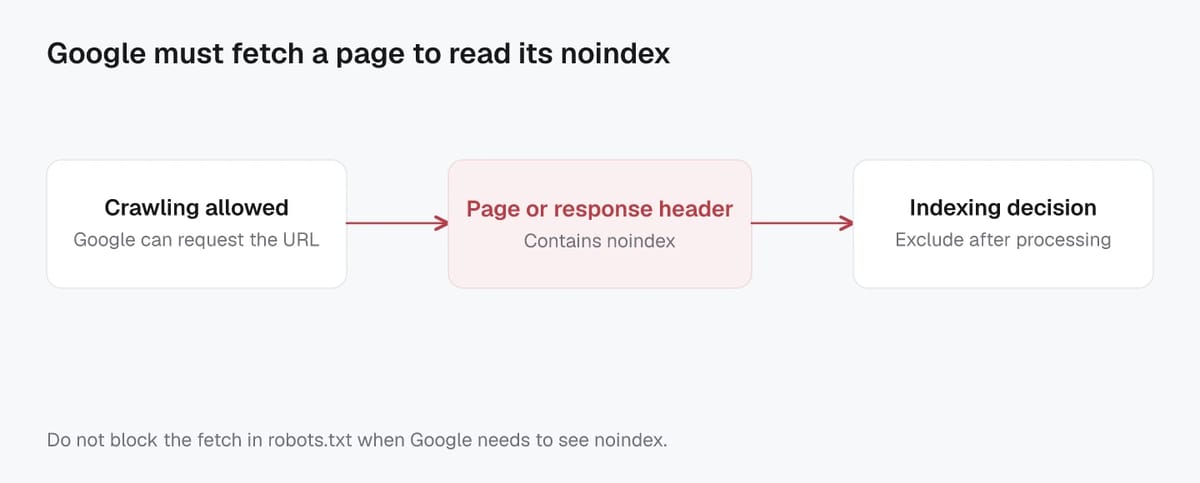
Google documents supported directives and the key “must be crawlable to be honored” rule in its robots meta tag specifications.
Why robots.txt can block noindex from being seen
This is the most common cleanup mistake: you add noindex and also Disallow the same URLs in robots.txt. The result is that Googlebot may never fetch the page again, so it never sees the noindex. That can leave the URL lingering in the index (often with limited details, because the content can’t be crawled).
If your goal is deindexing, the safest sequence is usually: allow crawling, serve noindex (meta robots or X-Robots-Tag) until the URL drops out, then optionally block crawling later if you still have a reason to. In an AI-first search landscape, this “crawlability first” rule also applies to snippet and preview controls, because those directives can only be processed if the bot can actually access the content.
Conflicting directives and edge cases that cause surprises
Canonical plus noindex: what wins and why
When a page has both rel="canonical" and noindex, noindex wins for that specific URL. The canonical is a strong hint about which URL you prefer indexed. Noindex is a directive telling the crawler not to index the page at all.
This combination often backfires because it sends two different messages: “Don’t index this URL” and “Treat this other URL as the main one.” In practice, you should avoid pairing them unless you have a very specific technical reason and you are monitoring outcomes closely.
A cleaner rule of thumb:
- Use canonical when you want one version indexed and the others consolidated.
- Use noindex when you want this page out of search, even if it has links or resembles another page.
Google’s canonical guidance also warns against using noindex as a way to manage canonical selection within a site, because it removes the page from Search entirely. rel="canonical" guidance.
Disallow, redirects, and soft 404 interactions
These three can create “why is this still indexed?” moments:
- Disallow + noindex: If you block crawling in
robots.txt, Google may not be able to fetch the page to see the noindex directive. That can slow down or prevent deindexing. - Redirects: If a URL 301s to a new location, the old page’s meta robots is usually irrelevant because crawlers focus on the destination. Put indexing rules on the final URL.
- Soft 404s: A “not found” page that returns
200 OK, or redirects every missing URL to an unrelated page, can be treated as low-value and excluded. Use a real404/410, or redirect only when there is a clear equivalent replacement.
Pagination, faceted URLs, and parameters at scale
Pagination and facets are where noindex/nofollow mistakes can quietly drain organic performance.
For pagination, avoid blanket noindex on page 2+ of categories and blogs if those pages help discovery. A common safe approach is to let paginated URLs be crawlable, keep strong internal linking, and avoid canonicals that point every page back to page 1 unless you are sure you want only page 1 indexed.
For faceted navigation and URL parameters, the risk is creating near-infinite, duplicative URLs. In 2026, this also affects AI-driven search because engines may surface whichever variant they can crawl and understand fastest. The scalable approach is to:
- Pick a small set of indexable facets that match real search demand.
- Canonicalize or noindex the rest, and control crawl paths so bots do not get stuck in endless combinations.
- Keep the indexable facet pages consistent, content-rich, and internally linked so they earn the right to be indexed.
Verifying and troubleshooting noindex and nofollow in production
Confirming tags in HTML source and response headers
Start by checking what Google and real users actually receive, not what your CMS preview shows.
For HTML pages, view the raw HTML and confirm the meta robots tag is present (or absent) as expected: noindex, nofollow, nosnippet, etc. Then check the HTTP response headers for X-Robots-Tag, because it can silently override a clean HTML template, especially after server, CDN, or security changes.
Also confirm the basics that commonly masquerade as “noindex problems”:
- The final URL returns a 200 (not a redirect chain or an error).
- You’re not seeing a different version due to geo, cookies, A/B tests, or device variation.
- Canonical, hreflang, and pagination tags match your intent.
A fast way to spot issues at scale is to run a crawl (Screpy or any comparable crawler) that collects both meta robots and X-Robots-Tag across templates, PDFs, and parameterized URLs.
Validating with crawlers and Search Console
Use the URL Inspection tool to compare Google’s indexed version versus a live fetch, and to see key debugging data like rendered HTML and HTTP headers. You can find the workflow in Google’s URL Inspection tool help page.
If a URL shows “not indexable” in the live test, look for the exact blocker: a noindex directive, robots.txt restrictions, authentication, or a non-200 response. Keep in mind that Search Console reporting can lag, so prioritize the live test for “what’s true right now.”
Removing directives and getting pages reindexed safely
When you accidentally noindex something important, fix it in this order:
- Remove noindex everywhere (HTML templates,
X-Robots-Tag, CMS settings, plugins). - Ensure the URL is crawlable (not disallowed in robots.txt) and returns 200 OK.
- Update your XML sitemap so the corrected URLs are included, ideally with accurate
lastmod. - In Search Console, run a live test and then Request indexing for the most critical pages. For large sets, rely on sitemaps rather than individual requests.
Finally, be patient but systematic. Reindexing can take days, sometimes longer, and AI-driven search features usually follow the same “must be crawlable and index-eligible” foundation before they can confidently use a page as a source.
Related Screpy guides
- How to Use Crawl Stats to Understand Googlebot Activity
- How to Use Log File Analysis to Understand Googlebot
- How to Fix Duplicate Content With Canonical Tags
Method and limitations
This guide is a practical review framework, not a controlled experiment or a guarantee of rankings. Record the tested URL, date, device or market, baseline output, exact change, and post-change result. Validate material recommendations against the current primary documentation and test risky changes on a staging site first.
Verification checklist
| Check | Evidence to record |
|---|---|
| Baseline | URL, date, device or market, and current metric or output |
| Change | Exact action, configuration, and environment |
| Outcome | Re-run the same check and compare the result and limitations |