

Orphan pages are live URLs with zero internal links pointing to them, so visitors and search crawlers rarely stumble across them. They commonly appear after site migrations, CMS template changes, or campaign landing pages, and they can get indexed without any real place in your architecture. To find them, crawl from the homepage and then compare that URL list with your XML sitemap, Google Search Console, and analytics or log data to uncover pages that were seen but not linked. Fix each one deliberately: add a relevant contextual link, consolidate duplicates with a 301 redirect, or remove or noindex content that should stay out of search. The easy mistake is clearing the report while still leaving the page disconnected from the topics and navigation that explain why it exists.
Orphan pages in SEO: definition and what counts as orphaned
Orphan vs noindex, canonical, and redirected URLs
An orphan page is a live URL on your site that has no internal links pointing to it. In other words, a crawler that starts at your homepage and follows links through your navigation and content will never reach that page.
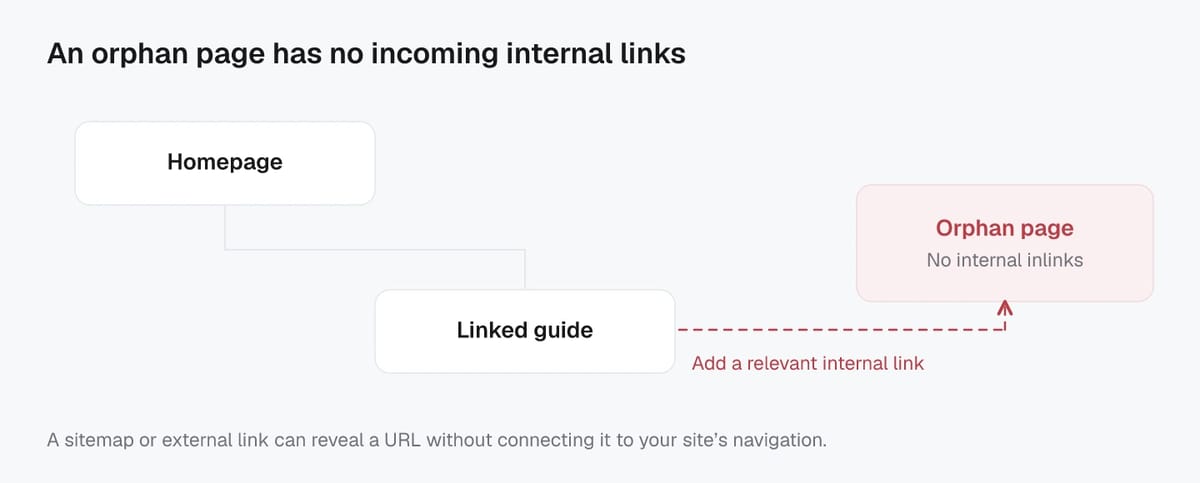
That is different from other “not showing in Google” situations:
- Noindex: the page can still be linked internally, but it includes a directive telling search engines not to index it. A noindexed page is not automatically an orphan, and an orphan page is not automatically noindexed.
- Canonical: the page exists, but you are signaling that a different URL is the preferred version to index. Canonicals are mainly for consolidating duplicates, not for discovery. Google’s guidance on using canonicals is covered in its documentation on canonical URLs (rel="canonical").
- Redirected URLs: a URL that returns a 301/302/308 is not an orphaned page in practice because it is no longer a destination page. The real question becomes whether the redirect target is properly linked and discoverable.
Crawlable but unlinked vs truly undiscoverable pages
Most orphan pages are still crawlable. They can be discovered through an XML sitemap, Search Console history, external backlinks, internal site search results, or even a direct visit.
A more severe case is a page that is truly undiscoverable, meaning it has no internal links and also has no reliable discovery path such as a sitemap entry or external link. If it is also blocked by robots.txt or sits behind a form, it may be effectively invisible to both search engines and many AI-driven discovery systems.
In 2026, this matters beyond “classic SEO.” AI crawlers and AI answer engines tend to favor content that is easy to find and easy to place in context. Orphaned URLs usually lack that context because they are not connected to related pages through internal linking.
Why orphan pages hurt crawling, indexing, rankings, and UX
Lost internal link equity and weaker topical authority
Internal links do two jobs at once: they help search engines discover URLs, and they help distribute internal link equity (often described as PageRank-like value) across your site. Orphan pages miss both benefits. Even if an orphan page gets indexed from a sitemap or an external link, it usually ranks worse because it is not supported by relevant internal links that signal importance and context.
They also weaken topical authority. When your strongest pages do not link to related supporting content, you lose the clear “topic cluster” structure that helps search systems understand what you cover and which pages are your best answers. In the AI search world, that missing context matters even more. A disconnected page is harder for retrieval systems to place into a coherent set of related answers, summaries, or recommendations.
Wasted crawl budget and delayed discovery
Orphan pages create inefficiency. Search engines may still find them through sitemaps, parameters, or old URLs, but they are less likely to be crawled predictably and refreshed at the right cadence. Over time, that can lead to slower discovery of new content, delayed updates being reflected in search, and more crawling spent on low-value URLs that are not tied into your main architecture.
This is especially common after migrations, navigation changes, or when old campaign landing pages remain live. The site “works,” but crawlers keep bumping into disconnected URLs that do not help users or your core SEO goals.
User journeys and conversion paths break
Orphan pages are often dead ends. Users can land on them from search, email, ads, or bookmarks, then struggle to find the next step because there is no meaningful pathway into your main site content. That hurts engagement and conversions.
It also makes measurement messy. If a high-intent landing page is orphaned, it may underperform simply because users cannot reach related product, pricing, or supporting pages. Fixing the internal linking often improves UX first, and rankings follow because the page is finally part of a clear journey.
Common causes of orphaned URLs on websites
CMS changes, migrations, and navigation updates
The most common orphan-page pattern is structural change. A CMS redesign, theme swap, or navigation rewrite can quietly drop internal links that used to exist. During migrations, it is also easy to lose “secondary” pathways like category pages, related-articles modules, breadcrumb links, or footer links. The URLs still resolve (200 status), but they no longer have any internal inlinks.
Another frequent cause is publishing workflow drift. Teams create new pages from templates, but forget to place them in a hub, category, or internal linking plan. This is especially common with help docs, location pages, and long-tail blog posts.
In 2026, AI-assisted content production can amplify the problem. When teams publish higher volumes of pages faster, internal linking often fails to scale at the same pace. The result is more content that exists, but is not integrated into your information architecture.
Seasonal, campaign, and expired content
Campaign landing pages, limited-time promos, event pages, and seasonal guides often go live with links from ads, emails, or social, not from your permanent navigation. After the campaign ends, the page may remain live but gets removed from menus and internal links. That turns a once-useful landing page into an orphan.
The same happens with expired product pages, discontinued services, or outdated announcements. If you keep them for historical reasons, make sure they still have a clear path to current alternatives and updated information.
Filters, parameters, and duplicate URL variants
Faceted navigation and URL parameters can generate thousands of crawlable URL variants (sort orders, filters, pagination, tracking parameters). Many of these variants are not linked consistently, or they become reachable only through on-page interactions that crawlers do not follow reliably.
Duplicates also appear from technical inconsistencies like http vs https, trailing slashes, uppercase vs lowercase, and index.html versions. Even when you canonicalize or redirect later, these variants can linger in sitemaps, analytics, or external links and show up in audits as “orphan-like” URLs that need consolidation.
Finding orphan pages using a tool-agnostic workflow
Collect known URLs from multiple sources
Start by building a “known URLs” list: every address that might exist on your site, whether it is linked internally or not. The key is to pull URLs from more than one place, because each source has blind spots. Include at least:
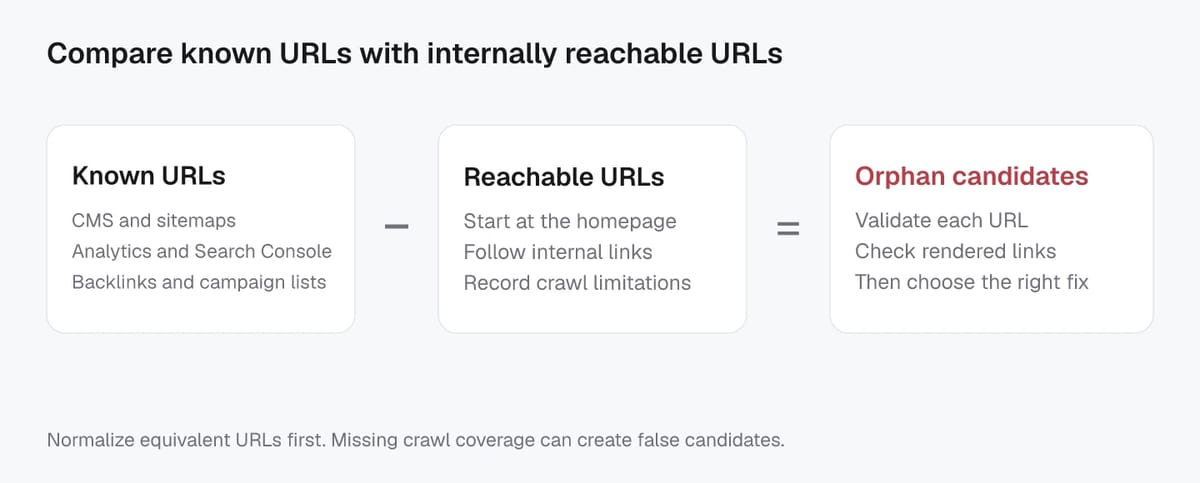
- URLs your site has published (sitemaps, CMS exports, database dumps).
- URLs search engines have seen (indexing and performance exports).
- URLs users have actually landed on (analytics landing pages).
- URLs discovered externally (backlinks, marketing campaign lists).
Before you compare anything, normalize the data so you do not create false “orphans.” Standardize protocol (https), host (www vs non-www), trailing slashes, URL decoding, and remove obvious tracking parameters where appropriate.
Crawl to map internally reachable URLs
Next, crawl your site the way a search engine would: start from your canonical entry point (usually the homepage) and follow internal links. This crawl creates your “internally reachable” list.
To keep the crawl meaningful, set consistent rules:
- Follow only HTML links you consider valid internal linking (navigation, content links, breadcrumbs).
- Decide how to treat parameters, pagination, and faceted URLs.
- Record final URLs after redirects, plus status codes and canonicals, so you can interpret results correctly.
For JavaScript-heavy sites, make sure your crawl approach can capture links that appear in rendered HTML, not just raw source, otherwise you may overcount orphans.
Diff the lists to surface orphan candidates
Now compare the two sets:
- Known URLs MINUS internally reachable URLs = orphan candidates
Treat this as a review queue, not a final verdict. Some candidates will be intentional (noindex pages, retired content kept for users, gated pages). Others will be true problems: valuable pages that are disconnected from your topic hubs, navigation, and internal link paths. In AI-driven discovery, this “connectedness” is often the difference between content that gets surfaced and content that stays invisible.
Screpy SEO MCP can help review the crawl-side evidence for your candidate URLs. Supply the known-URL inventory separately and ask which candidates appear in the completed crawl and what recorded links reach them. An incomplete crawl cannot establish that a page has no internal links.
Best sources to pull URLs for orphan page discovery
Google Search Console and index coverage exports
Google Search Console is usually the fastest way to uncover “known but unlinked” URLs, because it reflects what Google has actually discovered. Start with the Page indexing report, which surfaces indexed and not-indexed URLs and the reasons behind exclusions. Exporting those URL samples gives you a strong baseline list, especially after migrations or navigation changes.
Also pull URLs from Performance data (pages that received clicks or impressions). A page that shows up in Performance but has zero internal links is a classic orphan candidate. For larger sites or teams that want automation, the Search Console APIs (including URL Inspection) can help you spot newly discovered URLs that are not connected internally.
Analytics landing pages and conversion URLs
Analytics adds a user-first angle: it shows the pages people actually enter on, even if those pages are not in your main navigation. Export landing pages for a meaningful time window (often 3 to 12 months, depending on seasonality). Then layer in conversion paths and key event pages (thank-you pages, pricing pages, lead-gen steps). If a high-intent landing page is effectively isolated, it is not just an SEO issue. It is a revenue leak.
Be careful with URL noise here. Normalize case, trailing slashes, and parameters so “same page, different URL” does not inflate your orphan list.
XML sitemaps, HTML sitemaps, and backlink tools
XML sitemaps are a publisher-controlled inventory, so they are ideal for catching URLs that should exist, even if they are currently unlinked. Make sure you are using the standard Sitemaps protocol, and avoid listing redirected, canonicalized, or noindex URLs unless you have a deliberate reason.
HTML sitemaps can also reveal older legacy sections that still need internal links. Backlink tools are useful for finding orphan pages that remain alive because other sites still link to them.
Server logs for large sites (optional)
Server logs show what bots and real users requested, including URLs that never appear in your crawler’s link graph. For enterprise sites, logs are often the best way to catch orphan pages created by parameters, internal search, or legacy URLs that still get hit by search engines and AI crawlers.
Fix options for orphan pages: link, redirect, noindex, or remove
Decision tree: keep and link in vs merge and redirect
Start by deciding whether the orphan URL is still the best page to keep.
If the content is accurate, useful, and unique, keep it and link it in. Your goal is to make the page reachable from relevant hubs and related pages, not just “somewhere on the site.”
If the page overlaps heavily with a stronger, more current URL, merge the content and use a permanent redirect to the best replacement. Google treats permanent redirects (like 301/308) as a signal that the redirect target should be canonical.
A quick rule that works well in 2026: if you would not confidently recommend the orphan page as the best answer in your own site’s flow, it probably should not stay as a standalone URL.
When to use noindex vs 404/410 removal
Use noindex when the page should remain accessible to users (for example: internal-only resources, thin utility pages, or limited-audience content) but you do not want it indexed. Google supports noindex via a meta tag or HTTP header.
Use 404 (Not Found) or 410 (Gone) when the page should not exist anymore. For Google Search, URLs returning a 4xx status generally aren’t indexed, and already-indexed URLs that return 4xx can drop out over time.
Where to add internal links for reliable discovery
For pages you keep, add internal links where they create the most stable, “always-on” discovery:
- Topical hub pages (category, service, or documentation index pages)
- Contextual in-content links from closely related pages (often the highest impact)
- Breadcrumbs and related-content modules that reinforce hierarchy
This isn’t just for traditional crawling. In an AI-driven search landscape, strong internal linking helps your content show clear relationships, which improves how systems interpret and retrieve the right page for the right query.
Validating fixes and preventing orphan pages going forward
Recrawl checks: internal inlinks and navigation paths
After you add links, redirect, or remove an orphan URL, validate the change with a fresh crawl that starts from your homepage. The page should now show at least one internal inlink, ideally from a relevant hub or a closely related page, not just a footer link.
Sanity-check the user path too. Open the page and confirm there is a clear route to the next step: a related article, a product category, a demo or contact page, or the primary hub for that topic. If you cannot reach the page through normal navigation or contextual links, search engines and AI systems will treat it as less connected, even if it is technically discoverable via a sitemap.
Also confirm the technical outcome matches the decision you made:
- Kept pages return 200 and are internally linked.
- Redirected pages resolve in one hop to the correct destination.
- Removed pages return the intended 404 or 410 consistently.
Recheck indexing signals in Search Console
In Google Search Console, spot-check a sample of fixed URLs with the URL Inspection tool. You are looking for the expected canonical, crawlability, and indexing status. If you redirected or removed a page, inspect both the old URL and the new target (or replacement) to confirm Google can understand the change.
Expect reporting to lag sometimes, so focus on whether Google can crawl the page and whether the canonical and internal linking now support the version you want indexed.
Ongoing monitoring with scheduled audits and publishing safeguards
Preventing orphan pages is mostly process:
- Add a publishing rule: every new indexable page must be linked from a hub and at least one related page.
- Make migrations and navigation updates include an internal linking QA step, not just redirect checks.
- Schedule monthly (or quarterly) “crawl vs known URLs” diffs to catch new orphan candidates early.
Looking ahead, this discipline becomes even more valuable. As search becomes more AI-assisted, content that is well-linked and clearly grouped is easier to retrieve, summarize, and recommend than content that exists in isolation.
Method and limitations
This guide is a practical review framework, not a controlled experiment or a guarantee of rankings. Record the tested URL, date, device or market, baseline output, exact change, and post-change result. Validate material recommendations against the current primary documentation and test risky changes on a staging site first.
Verification checklist
| Check | Evidence to record |
|---|---|
| Baseline | URL, date, device or market, and current metric or output |
| Change | Exact action, configuration, and environment |
| Outcome | Re-run the same check and compare the result and limitations |