

A URL slug is the short, descriptive text at the end of a page’s web address (after the /), like /running-shoes, and it becomes part of the permalink people share. Because it often appears in search results, a clean slug helps visitors predict the page and helps search engines interpret relevance, which supports SEO. Keep it readable and stable by using lowercase, separating words with hyphens, and including only the main keyword, not dates or extra filler. A surprisingly costly mistake is renaming slugs after publishing without setting up a redirect.
URL slug meaning and where it appears in a URL
Slug vs full URL path, subfolders, and domain
A URL slug is the readable text in a URL’s path that identifies a specific page. In practice, it is usually the last part of the path, after the final /.
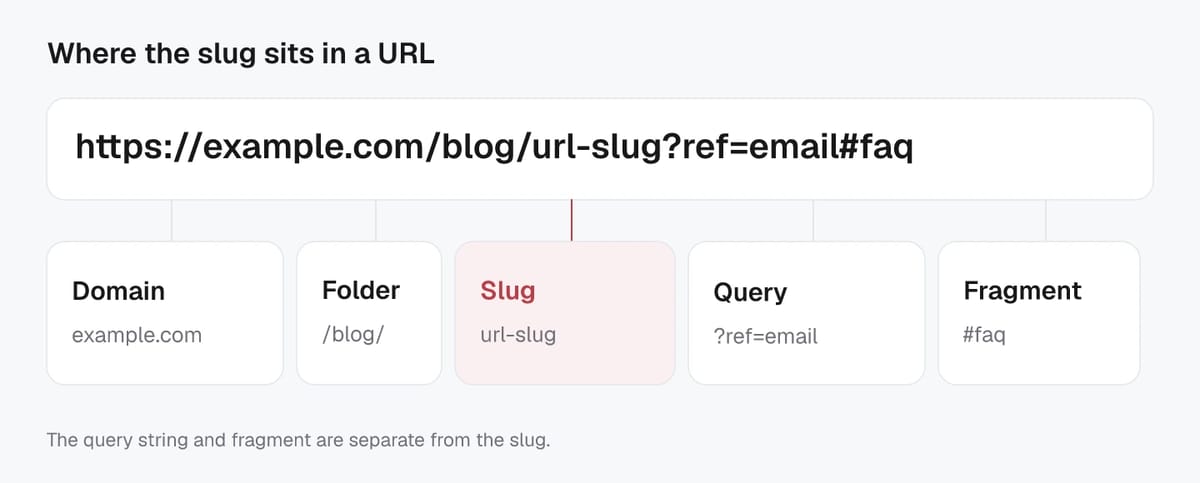
Example:
https://www.example.com/blog/url-slug-guide/
- Domain:
example.com(plus the protocolhttps://and optionalwww) - Subfolder(s):
/blog/ - Slug:
url-slug-guide(the page identifier people tend to remember and share)
It helps to think of the slug as the “page name” portion of the address. On many sites, the slug is a single segment. On others, it can work together with subfolders to describe hierarchy, like categories, collections, or language folders. In those cases, the full URL path includes everything after the domain (for example, /blog/url-slug-guide/), while the slug is typically the final segment (url-slug-guide).
Because “slug” is a publishing and SEO term (not a formal internet standard), different CMS platforms may label it slightly differently. Some call it “URL handle,” “permalink,” or “URL key,” but the idea is the same: a short string that maps to the page.
What is not part of the slug (parameters, fragments)
Two common URL parts are often confused with slugs, but they are not:
- Query parameters (everything after
?), like?ref=newsletteror?color=blue. These are usually used for filtering, tracking, or sorting. - Fragments (everything after
#), like#pricingor#faq. These jump to a section on the page and typically do not change the main page content on the server.
Example:
https://www.example.com/blog/url-slug-guide?ref=newsletter#faq
Here, the slug is still url-slug-guide. The ref=newsletter parameter and #faq fragment are separate from the slug.
Why URL slugs influence SEO, clicks, and user trust
Slugs as a lightweight ranking factor
URL slugs are not where SEO “wins” are made, but they still matter. A slug gives search engines a small, additional clue about what a page is about, especially when the page is new or when other signals are mixed.
Google’s guidance is consistent: keep URLs simple and understandable, use readable words, and use hyphens as separators. These are not magic ranking hacks, but they reduce ambiguity and help Google interpret and canonicalize your URLs more reliably over time. For the most current baseline rules, align with Google’s own URL structure best practices.
Readable URLs and CTR in search results
Even when you rank, people still need to click. A clean slug can act like a mini preview of the page. It reassures searchers they will land on the right topic, which can improve click-through rate when the title or snippet is competing with similar results.
Readable slugs are also easier to scan on mobile, where search results are condensed and trust signals matter. In 2026, that trust effect extends to AI-driven search experiences too. When AI summaries show citations or source links, a clear URL path can make your page look more credible at a glance than a long string of IDs and parameters.
Slugs and sharing links on social or email
Most “earned” traffic comes from messy sharing: copied links in Slack, forwarded emails, or social posts with truncated previews. Short, descriptive slugs tend to survive these contexts better.
They also build confidence when someone hesitates before opening a link. If the slug reads like plain language, recipients are more likely to believe it is relevant and safe to click.
SEO-friendly URL slug best practices that consistently work
Keep it short, descriptive, and specific
A good URL slug tells a human what the page is about in a quick glance. Aim for clarity over cleverness. Short slugs are easier to scan in search results, easier to share, and less likely to be truncated in emails or social previews.
“Short” does not mean vague. Prefer specific nouns over broad labels. For example, /url-slug-best-practices is clearer than /seo-tips. As a practical guideline, try to keep slugs to a few words. If you need a long phrase to explain the page, the page topic may be too broad.
In AI-driven discovery (AI Overviews, chat-style search, enterprise RAG tools), the same rule applies. When a model cites or recommends a source, a clean, descriptive slug reinforces topical relevance and reduces “what am I clicking?” friction.
Use the primary keyword without stuffing
Include the primary keyword when it naturally matches the page intent, but do it once. A slug is not a place to repeat variations. Keyword stuffing in the URL looks spammy, can reduce trust, and does not add meaningful ranking value.
Choose the version of the keyword that best matches how users talk about the topic. If your page is about “URL slug,” use that phrase. Avoid forcing extra modifiers unless they add real meaning (like “guide,” “examples,” or “checklist”).
Remove filler words that add no meaning
Strip words that do not change the meaning, such as “the,” “and,” “of,” “a,” and “to,” when removing them keeps the slug readable. Also remove marketing fluff like “best,” “top,” or “ultimate” unless it is central to the promise of the page.
A quick test: if you read the slug out loud, does it still sound like a clear label for the page? If yes, it is probably clean enough.
URL slug formatting rules for clean, consistent URLs
Hyphens vs underscores and word separators
Use hyphens (-) to separate words in a slug. They are the most readable option for people, and Google explicitly recommends hyphens over underscores in URLs because they help identify concepts in the URL more clearly (URL structure best practices).
Avoid alternatives like:
- underscores (
url_slug_example) - concatenated words (
urlslugexample) - spaces (they become encoded and look messy)
- long strings of separators (
url---slug---example)
If you need hierarchy, use folders for meaning (like /blog/ or /category/) and keep the final slug clean.
Lowercase letters and avoiding special characters
Make slugs lowercase and stick to a limited character set. Many servers treat uppercase and lowercase URLs as different pages, which can accidentally create duplicates (/Guide vs /guide). Google also notes URLs are case sensitive, so consistency matters for crawling and canonicalization.
For characters, the safest approach is plain ASCII: letters, numbers, and hyphens. Special characters, symbols, and quotes can cause encoding issues or look untrustworthy when copied into chats and emails. At a standards level, URLs allow a defined set of unreserved characters, and other characters may need percent-encoding, as described in RFC 3986.
In an AI search and citation world, this is practical: clean slugs reduce parsing errors and help your pages look like stable, reliable sources when surfaced as references.
Numbers, dates, and stop words in slugs
Numbers are fine when they add meaning, such as:
- product model numbers (
/ipad-pro-13/) - versioned documentation (
/api-v2/) - step-based content that will stay stable (
/seo-audit-checklist-10-steps/)
Dates and stop words are more situational. Removing small words (like “and” or “the”) usually improves readability, but do not remove them if it makes the slug confusing.
When dates in slugs help or hurt
Dates help when the content is genuinely time-bound, like “tax brackets 2026,” annual reports, event pages, or yearly benchmarks. They hurt when the page is meant to be evergreen, because the URL looks outdated, and updating the year often forces a new URL (and a redirect plan) to stay consistent. In AI-driven results, evergreen pages with dated slugs can also be skipped by users who assume the advice is stale, even if the content has been updated.
Good vs bad URL slug examples you can copy
Blog post slugs
Good blog post slugs are short, clear, and match the topic a reader expects. They avoid internal jargon and don’t try to cram the whole headline into the URL.
Good examples
/what-is-a-url-slug//url-slug-best-practices//seo-audit-checklist//technical-seo-basics/
Bad examples
/what-is-a-url-slug-and-why-does-it-matter-for-seo-the-complete-2026-guide-to-better-rankings/(too long)/seo_blog_post_17_final2/(not descriptive, uses underscores)/best-seo-best-seo-best-seo/(keyword stuffing)/index.php?id=8419(unreadable, low trust)
If your CMS auto-generates a long slug from the title, trim it to the core topic before publishing.
Product and category page slugs
For ecommerce, slugs should prioritize clarity and consistency. People often share product links in messages, and a clean slug improves trust.
Good product slugs
/products/black-running-shoes//products/nike-air-max-90/(brand + model when relevant)/products/standing-desk-55-inch/(meaningful spec)
Bad product slugs
/products/black-running-shoes-free-shipping-best-price-buy-now/(promo fluff)/products/sku-948573-xxl-variant-2/(internal codes)/products/black%20running%20shoes/(encoded spaces)
Good category slugs
/category/running-shoes//category/standing-desks/
Bad category slugs
/category/shoes/running/shoes-for-running/(redundant)/category/collection?id=12(unclear)
Common mistakes to avoid
The most common slug issues are easy to prevent, but painful to fix later:
- Changing a slug after it’s indexed without a proper redirect plan.
- Creating duplicates like
/blue-widgetsand/blue-widgets/or mixed case versions that resolve separately. - Using special characters that get encoded and look messy when shared.
- Stuffing keywords or adding sales copy that reduces trust.
- Letting parameters become “the main URL” for indexable pages (often caused by filtering or tracking links being shared as canonical pages).
Editing a URL slug in common CMS platforms
Changing slugs in WordPress
In WordPress, the slug is usually edited inside the post or page editor. In the block editor, open the right-hand settings sidebar and look for Permalink or Slug, then type the new value and update the content. The Page/Post Settings sidebar documentation shows where that field lives in the editor UI.
You can also change a slug from the content list using Quick Edit (Posts or Pages), which is handy for small fixes across many URLs.
Two practical notes for SEO:
- Changing a slug changes the URL. Plan a redirect if the old URL has traffic or backlinks.
- Avoid frequent edits. Stability matters for crawling, indexing, and consistent internal linking.
Changing slugs in Shopify
In Shopify, “slug” is typically called the URL handle. You edit it in the Search engine listing area for that item (product, page, or blog post). For products, open the product in your admin, find the Search engine listing section, click edit, then update the URL handle and save. Shopify documents this under adding and updating products.
When you change a handle, make sure a redirect is created so the old link does not break. Shopify supports URL redirects, and many screens offer an option to create one automatically.
Slug edits for posts, pages, categories, and products
Slug changes are not only for blog posts:
- WordPress categories and tags: changing the category or tag slug can affect archive URLs, menus, and internal links.
- Shopify collections and pages: editing the handle updates the public URL for that collection or page, so redirects matter here too.
- Products: handle changes can be higher impact because product URLs get shared widely across ads, emails, and marketplaces.
Before saving a slug change, double-check that the new URL matches the page intent and that you have a redirect plan for the old one.
Changing an existing slug without hurting SEO
When it is worth changing a slug
Change a slug when it fixes a real problem, not just to “polish” SEO. It is usually worth it if the current slug is:
- Misleading (doesn’t match the page intent or topic anymore)
- Unreadable (IDs, random strings, weird encoding, or special characters)
- Overly long or stuffed (looks spammy and hurts trust when shared)
- Causing duplication (multiple URLs resolving to the same content because of inconsistent structure)
It is often not worth changing if the page already earns steady traffic and links, and the only benefit is swapping word order or removing one stop word. Small gains rarely offset the migration risk.
301 redirects, canonicals, and internal link updates
A slug change is a URL change, so treat it like a mini migration. Google’s guidance for URL changes is to use permanent redirects (typically 301 or 308) and keep redirects in place so Google and users can reach the new URL. The safest playbook is described in Google’s site moves with URL changes.
Key steps that consistently prevent SEO loss:
- 301/308 redirect old URL to new URL with a 1:1 mapping (avoid sending many old URLs to one generic page unless it truly matches intent).
- Update internal links so your site points directly to the final URL, not the redirected one.
- Update your XML sitemap to list only the new URLs.
- Use a self-referencing canonical on the new URL and make sure it returns a 200 status (not a redirect).
Redirect chains (A to B to C) slow crawling and dilute clarity, especially when AI systems and chat-style search try to pick a single “best” URL to cite.
Avoiding duplicate URLs and trailing slash issues
Duplicate URL variants are one of the easiest ways to accidentally weaken a slug change. Pick one standard and enforce it:
- trailing slash vs no trailing slash
- lowercase vs mixed case
- www vs non-www
- HTTP vs HTTPS
Then redirect all other variants to the preferred format. Also watch for query parameters that create indexable duplicates (filters, sorting, tracking). If a parameter version can be indexed, make sure you have a clear canonical strategy so search engines and AI assistants consistently learn and reference one stable URL.
Related Screpy guides
- What Is a URL Audit and How Do You Perform One?
- How Does AI-Powered SEO Analytics Turn Search Data Into Actions?
- What Is an SEO Report Generator and How Does It Work?
Verification checklist
| Check | Evidence to record |
|---|---|
| Baseline | URL, date, device or market, and current metric or output |
| Change | Exact action, configuration, and environment |
| Outcome | Re-run the same check and compare the result and limitations |