

Crawl budget is the set of URLs Googlebot can and wants to crawl on your site, shaped by both your server’s capacity and Google’s demand for your pages. It matters when key pages are getting discovered late, recrawled too slowly, or skipped while bots spend time elsewhere, which can delay indexing of new and updated content. The fastest wins usually come from shrinking your “URL inventory” by eliminating duplicate and parameter-driven URLs, fixing redirect chains and server errors that slow crawls, and using robots.txt to block sections you never want fetched. A common mistake is trying to save crawl resources with noindex, even though the page still needs to be crawled for Google to see it.
Crawl budget in Google: meaning and what it includes
Crawl demand vs crawl capacity (crawl rate limit)
In Google, crawl budget is the set of URLs Google can and wants to crawl on a given hostname. It is not “a fixed number” you can set. It is an outcome of two forces working together: crawl capacity limit and crawl demand. Google documents this model directly in its crawl budget guidance.
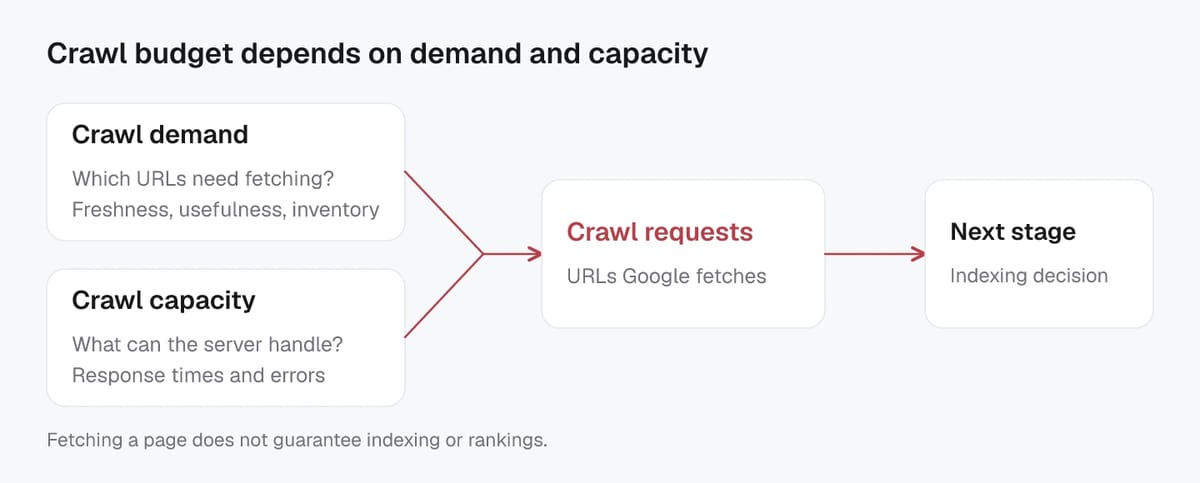
Crawl capacity is the practical ceiling. Google tries to crawl without harming your servers. So it adjusts things like parallel connections and the delay between requests. If your site is consistently fast and stable, capacity can rise. If Google sees timeouts, slow responses, or 5xx errors, it backs off.
Crawl demand is whether Google has a reason to spend crawling resources on more of your URLs. Demand tends to be higher when:
- Your site has a lot of unique, useful content (not just unique URLs).
- Pages change often and need refreshing.
- URLs are popular and frequently referenced.
- Google expects important reprocessing events (like a migration).
A hidden crawl-budget killer is “perceived inventory”: if your site generates huge volumes of duplicate or near-duplicate URLs (parameters, faceted filters, session IDs, internal search), Google may burn time sampling those instead of reaching what matters.
Crawl budget vs indexing and ranking
Crawl budget is about fetching. It does not guarantee indexing, and indexing does not guarantee ranking. Google can crawl a page, evaluate it, consolidate signals (like canonicals), and still decide it is not worth indexing.
This is why “just add noindex to save crawl” is usually backwards. Google still needs to crawl a page to see a noindex directive, which can waste crawl resources on low-value URLs. Google’s own noindex documentation is clear that the page must be accessible to crawlers for the rule to work.
Practically, crawl budget impacts SEO by affecting how quickly Google discovers new pages and re-crawls updated ones, which also influences visibility in modern, AI-influenced search features that rely on fresh indexed content.
When crawl budget is a real SEO constraint
Signals you may have a crawl-budget problem
Crawl budget becomes a practical SEO limit when Google cannot consistently reach the pages you care about, because it is spending time elsewhere or backing off due to site health. Google calls out crawl budget as most relevant for very large sites or sites with quickly changing URLs and lots of duplicates. This is especially common on ecommerce, marketplaces, large publishers, and any site that programmatically generates pages at scale (including AI-assisted content production). You can sanity-check whether you are in that category using Google’s own crawl budget guidance.
Common signals include:
- New or updated important pages take days or weeks to get crawled, even when they are internally linked and in your sitemap.
- Googlebot repeatedly crawls low-value URLs (parameters, filters, internal search results, sort orders) while key category, product, or hub pages are crawled infrequently.
- Crawling drops when your site gets slower or unstable, then never fully recovers.
- In Google Search Console, the Crawl Stats report shows spikes in response time, more 5xx/timeouts, or sharp declines in crawl requests that line up with traffic and indexing delays.
In 2026, a frequent trigger is “URL inflation”: teams publish thousands of near-duplicate pages (often with AI-generated variations), and Google spends crawl capacity sampling them instead of deepening coverage of the pages that actually earn visibility.
Cases where crawl budget is not the main issue
For many sites, crawl budget is a distraction. If you have a small or medium site and your key pages are crawled the same day (or within a reasonable cadence), crawl budget is unlikely to be the bottleneck.
Often, the real issue is one of these:
- Discovery and internal linking: orphan pages, weak navigation, or no clear hubs.
- Indexing selection: duplicate content, inconsistent canonicals, or thin pages that Google chooses not to index.
- Technical blocking: robots.txt rules, authentication walls, incorrect redirects, or broken status codes.
- Quality and demand: if pages are not distinctive or useful, Google may simply have low crawl demand, even if capacity is available.
Google’s crawl capacity limit: speed, server health, and errors
Reduce timeouts and 5xx responses
Google increases or decreases crawl activity based on “crawl health.” If your site is slow for a while, or returns server errors, Google crawls less. If it stays fast and stable, the crawl capacity limit can rise.
The quickest crawl-budget win is usually reducing outright failures. In Search Console’s Crawl Stats, timeouts and 5xx errors are clear signals that Googlebot is struggling to fetch pages reliably.
Focus on the big three:
- Fix 5xx at the source: overloaded app servers, database bottlenecks, misconfigured WAF rules, or fragile plugins.
- Handle traffic and bot spikes safely: use caching, sensible rate limiting, and bot-friendly 429 handling, but avoid blocking Googlebot by accident.
- Stabilize robots.txt availability: if Google can’t fetch robots.txt, crawling can get messy, and you lose control over what should be accessible.
When you reduce errors, you are not just “saving crawl.” You are building trust that your host can handle recrawls of important pages, which matters more in a world where content updates faster (often with AI help) and freshness signals are competitive.
Improve response times and Core Web Vitals basics
Crawl capacity is tied to speed. Faster servers let Google crawl more efficiently, and faster pages typically mean a better user experience too. Core Web Vitals focuses on user experience metrics like LCP, INP, and CLS.
For crawl budget, prioritize:
- Lower TTFB with caching (full-page where safe), CDN edge caching, and optimized database queries.
- Reduce heavy templates and unneeded scripts that slow first load.
- Make sure key pages respond quickly even under load, not just in a lab test.
Avoid blocking critical resources Google needs to fetch
Robots.txt can block resource files, but only do this when rendering and page meaning will not be affected. If Google can’t fetch the CSS/JS that builds your layout or loads content, it may render an incomplete page and make worse indexing decisions.
A practical check is to test key templates in Search Console’s URL Inspection tool and compare what Google sees to what users see.
Measuring crawl behavior in Google Search Console and server logs
Using Crawl Stats to spot spikes, drops, and waste
Google Search Console’s Crawl Stats report is the fastest way to see how Googlebot is behaving over time. Treat it like a trend dashboard, not a single-day score.
Look for three patterns:
- Spikes: A sudden jump in crawl requests is not always good. It can mean Google discovered a large new URL space (filters, parameters, internal search pages) and is spending crawl budget where you do not want it.
- Drops: A sharp decline often lines up with server strain (timeouts, 5xx responses, DNS issues) or major site changes that reduce crawl demand (mass redirects, broken internal links, weak sitemaps).
- Waste: If most crawl activity is on “unimportant” directories or non-canonical URLs, your priority is usually URL control and internal linking, not “getting Google to crawl more.”
Also pay attention to response time trends and response-code breakdowns. When average response time rises, Google typically crawls more cautiously, which can slow discovery and recrawling of key pages.
Log file questions that reveal crawl traps and priorities
Server logs tell you what Googlebot actually hit, in what order, and how your server responded. Before you analyze anything, make sure you are verifying real Googlebot requests, not spoofed user agents, using Google’s Verifying Googlebot method.
Helpful questions to answer from logs:
- Which URL patterns get the most hits (parameters, sort orders, pagination, faceted filters)?
- What share of Googlebot requests land on 200 vs 301/302 vs 404 vs 5xx?
- Are important templates (category, product, evergreen guides) crawled frequently, or only occasionally?
- Do bots keep looping through the same URL variants, suggesting a crawl trap?
In 2026, it also helps to segment logs by crawler family. Separate Googlebot from other automated agents (including AI crawlers) so your crawl-budget decisions stay grounded in Google Search behavior.
Low-value URL control: duplicates, parameters, and faceted navigation
Canonicals, noindex, robots.txt, 404/410: choosing the right tool
Faceted navigation rules: what to keep indexable vs block
Faceted navigation is where crawl budget disappears fastest. The rule of thumb is simple: index facets that behave like real categories, and keep everything else out of Google’s way.
Keep a facet indexable when it meets all three:
- Stable intent: the combination represents a consistent “shelf” users expect (for example, “running shoes + men”).
- Unique value: it has a meaningfully different product set or content, not a tiny reshuffle.
- Controlled URL: one clean URL per facet page (no tracking parameters, no endless combinations).
Block or de-prioritize facets when they explode into near-infinite combinations (color + size + brand + price + sort + availability). Those pages usually compete with each other, create duplicates, and distract Googlebot from your main categories and products.
After you decide what is allowed to be indexable, enforce it with a clear technical choice:
- Canonical tags: best when multiple URLs should exist for users, but you want one primary version indexed (common with sorting, minor parameters, and duplicate paths).
- Noindex (meta or X-Robots-Tag): best for pages that must be accessible but should not appear in search (thin tag pages, temporary listings, many internal utility pages).
- robots.txt disallow: best for stopping crawl waste in areas you never want fetched (true crawl traps). It is not a reliable “deindex” tool on its own.
- 404 or 410: best when the content should not exist anymore. A 410 Gone is a strong signal for permanent removal, and is appropriate when you have intentionally deleted the URL, not when something is merely missing. (See 410 Gone.)
Prevent infinite spaces from on-site search and filters
Internal search URLs can create millions of low-value pages, especially when bots or competitors spam query strings. Google has even highlighted “abused internal search results” as a common spam pattern. The safest approach is to keep internal search results out of the index and reduce their crawl footprint, while still letting users search. A practical setup is: noindex on search results templates, remove these URLs from XML sitemaps, avoid prominent crawlable links to endless query variants, and block obvious crawl traps in robots.txt once you are confident they are not being indexed. You can also add guardrails like minimum query length, sensible pagination limits, and consistent parameter rules so AI-generated or programmatic page creation does not accidentally multiply your crawl space.
Making important pages easier for Googlebot to discover
Internal linking and fixing orphan pages
Important pages should be discoverable by crawling, not only by “being listed somewhere.” Google’s own guidance is straightforward: if your pages are well linked internally, Google should be able to find them by following links from your homepage. That’s why orphan pages (URLs with no internal links pointing to them) are a crawl-budget problem and an SEO problem.
For crawl budget, aim for fewer, stronger internal paths:
- Link to key pages from high-visibility hubs (homepage, primary category pages, main guides).
- Use descriptive anchor text that matches the page’s purpose.
- Avoid relying on links that require interaction to appear (some tabs, infinite scroll without crawlable pagination, certain JS-only UI patterns).
If a page matters, it should have at least one clear HTML link path from the main navigation or a relevant hub page, not just a sitemap entry.
Site architecture that prioritizes key sections
Site architecture is how you tell Google, “These sections are our priorities.” A clean hierarchy reduces wasted crawling and speeds up discovery.
Keep your structure intentional:
- Fewer clicks to reach important pages (shallow depth beats deep nesting).
- Clear topic or product clusters (category → subcategory → item; pillar page → supporting articles).
- Avoid creating many parallel routes to the same content (duplicate paths create duplicate URLs).
This matters even more in 2026, when teams can publish at scale with AI support. Without a strong architecture, you often get lots of crawlable pages, but very few pages that look important in the internal link graph.
XML sitemap hygiene and canonical-only URLs
A sitemap is a discovery and prioritization hint, not a replacement for internal linking. Keep it clean so it reinforces your preferred URLs instead of adding noise.
Good sitemap hygiene usually means:
- Include only canonical, indexable URLs (no redirects, no 404/410, no
noindex, no parameter variants). - Keep
<lastmod>accurate and consistent, or Google may ignore it. - Split large sitemaps logically and use a sitemap index when needed.
Google’s sitemap best practices explicitly recommend including only canonical URLs in XML sitemaps, which helps reduce crawl waste and mixed canonical signals. You can review those recommendations in Google’s XML sitemap best practices.
Common crawl-waste fixes: redirects, status codes, and rendering
Remove redirect chains and loops
Redirect chains are one of the most common forms of crawl waste. Every extra hop costs time, adds latency, and increases the chance that Googlebot gives up before reaching the final URL. In practice, you want a single, clean redirect from the old URL to the final destination.
Fixes that usually move the needle:
- Update internal links to point directly to the final URL, instead of relying on redirects.
- Collapse chains created by mixed rules (HTTP to HTTPS, non-www to www, trailing slash rules, language paths, and legacy URL rewrites).
- Hunt down redirect loops early. Loops waste crawl capacity and can strand important URLs outside of Google’s crawl path.
Fix broken links and wrong status codes
Broken links are not just a UX issue. They send crawlers into dead ends and inflate the number of low-value URLs Google must fetch.
The bigger issue is often wrong status codes:
- Pages that should be removed but still return 200 OK (soft 404s).
- “Temporarily unavailable” templates that return 200 for days.
- Out-of-stock or expired products that silently become thin pages instead of being redirected, consolidated, or retired.
Aim for accurate responses: real pages return 200, permanently removed pages return 404/410, and server problems return 5xx. If you want a quick refresher on what each code means, MDN’s HTTP response status codes is a reliable reference.
Clean status codes also help in the AI search world. When crawlers and AI agents hit predictable 200/404/410 behavior, they are less likely to waste requests on broken inventory.
Optional: JavaScript rendering, hreflang, and multi-host setups
JavaScript-heavy sites can leak crawl budget when key content or internal links only appear after rendering. Keep critical content and links accessible as early as possible, and validate what Google can actually render. Google’s JavaScript SEO basics is the best starting point for how crawling, rendering, and indexing interact.
For hreflang, keep annotations clean and consistent. Avoid pointing hreflang URLs at redirects, non-200 pages, or non-canonical versions.
For multi-host setups (www vs non-www, country domains, subdomains, staging), consolidate aggressively: one preferred host, consistent internal links, and tight controls to prevent duplicate hosts from becoming separate crawl sinks.
Related Screpy guides
- SEO Strategy for Blog Sites: How To Optimize Your Blog Website
- Semantic SEO: Optimize for Search Intent, Topics, and Entities
- How Does AI-Powered SEO Analytics Turn Search Data Into Actions?
Verification checklist
| Check | Evidence to record |
|---|---|
| Baseline | URL, date, device or market, and current metric or output |
| Change | Exact action, configuration, and environment |
| Outcome | Re-run the same check and compare the result and limitations |