

AI referral traffic is the subset of website sessions that begin when someone clicks your link in an AI assistant such as ChatGPT, Gemini, or Copilot, and GA4 can identify only visits that retain usable source information. Start with the Traffic acquisition report and inspect Session source or Session source / medium; GA4’s AI Assistant channel provides a useful baseline, while a custom channel group or Exploration using a maintained source-domain regex gives you more control. Evaluate sessions alongside landing pages, engagement, and key events to see whether those visits produce meaningful outcomes. The easy-to-miss limitation is that referrer-less clicks may be classified as Direct, while Google AI Overviews and AI Mode are not included in the AI Assistant channel.
AI Referral Traffic in GA4: What It Measures
Referral clicks, AI citations, and crawler activity
AI referral traffic in GA4 measures sessions that reach your website after a person clicks a link from an AI product and the visit carries identifiable referral or campaign data. In practice, GA4 records the source that referred the session and the medium that describes how it arrived, such as referral. Those values appear in session-level acquisition reporting.
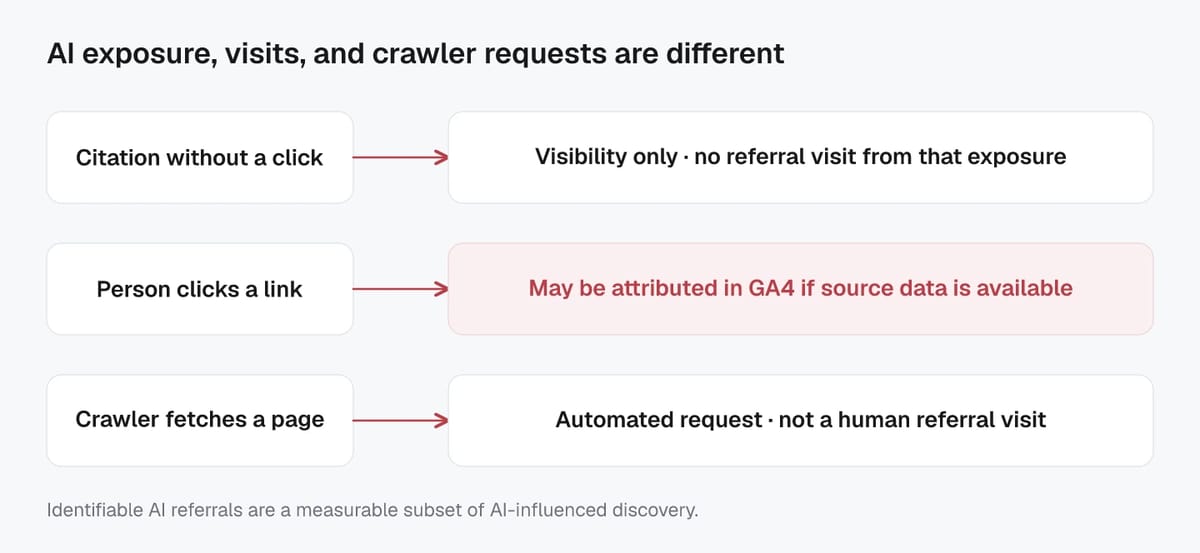
This is different from an AI citation. Your content may be cited, summarized, or recommended in an AI-generated response without producing a website visit. That citation can improve visibility, but GA4 cannot measure it unless the user follows the link and Analytics receives usable attribution data.
Crawler activity is different again. Search-engine and AI crawlers fetch pages to discover, index, or evaluate content. A crawl is not a human referral click and should not be treated as AI referral traffic. If automated requests appear in analytics, investigate them separately from acquisition data, since they can distort engagement and conversion metrics.
Why AI-driven visits may be undercounted
GA4 cannot identify every AI-assisted visit. Some AI tools, browsers, in-app webviews, privacy settings, redirects, ad blockers, or link-sharing flows may not pass a referrer. When GA4 has no clear referral source or campaign parameters, the visit can be reported as (direct) / (none) rather than attributed to the AI product that influenced it.
Attribution is also limited to the data available when the session starts. A visitor might discover your brand in an AI answer, then later search for it, type in your URL, or return through a bookmark. In those cases, GA4 records the later measurable entry point, not necessarily the original AI interaction.
Treat AI referral reporting as a useful but conservative view of AI-driven demand. It is strongest for comparing identifiable referral sessions, their landing pages, and the key events they generate, rather than for estimating every visit influenced by AI.
Existing AI Referrals in the Traffic Acquisition Report
Session source and Session source/medium dimensions
Open Reports > Acquisition > Traffic acquisition to find the AI referrals that GA4 has already recognized. This report is session-focused, so it shows how both new and returning visitors arrived when they started a session.
Use Session source first to see the referring domain or platform. Search for known AI sources, then inspect the sessions, engagement rate, key events, and revenue associated with each one. For more context, switch the primary dimension to Session source / medium. This separates a source such as an AI assistant domain from the method GA4 assigned, which is often referral.
The distinction matters. Session source identifies the origin of traffic, while Session source / medium shows the origin and classification together. A source may appear in more than one medium if campaign tagging, redirects, or other attribution data changes how GA4 processes the visit. Google’s Traffic acquisition report is designed for this type of session-level source analysis.
Avoid relying only on the default Session default channel group. An AI referral may be included within the broader Referral channel, which is useful for a high-level view but not specific enough to identify individual AI platforms.
Date ranges for low-volume AI traffic
AI referral traffic is often low-volume, especially for smaller sites or highly specific topics. A seven-day view can easily show zero sessions even when AI assistants are sending occasional qualified visits. Start with the last 90 days, then expand to six or 12 months if the data remains sparse.
A longer date range helps reveal recurring sources and reduces the chance of overreacting to a single session. Once you find a meaningful pattern, compare the period with the preceding period to see whether AI referral activity is growing, flat, or seasonal. GA4 lets you use custom date ranges and period comparisons directly in reports.
Keep interpretation proportional to the sample size. Ten AI referral sessions with two key events may be promising, but it is not enough to prove a lasting channel trend. Review the report regularly, use consistent date ranges, and focus on changes that persist over several reporting periods.
Regex Filters for Identifying AI Referral Sources
Copy-ready AI source matching pattern
A regex filter lets you group known AI referral domains without reviewing each source one at a time. Apply it to Session source in a report or Exploration, or use it as the source rule for a custom channel group.
(^|\.)(chatgpt\.com|openai\.com|gemini\.google\.com|copilot\.microsoft\.com|claude\.ai|perplexity\.ai|grok\.com|deepseek\.com|you\.com|mistral\.ai)$
This pattern matches the listed domains and their subdomains. It is intentionally specific, which helps prevent unrelated referral sites from being counted as AI traffic. Google Analytics supports regex-based rules for custom channel groups and recommends updating the expression as assistant URLs or the platforms you track change.
Validating source domains in raw GA4 data
Do not treat any copy-ready regex as permanent. Before applying it across reporting, open the Traffic acquisition report, set the primary dimension to Session source, and search for a known AI platform. Check the exact domain GA4 recorded, including any subdomain.
For example, ChatGPT traffic may appear under chatgpt.com or an OpenAI-related domain, depending on the linking flow. Add only domains that appear in your own data or are clearly tied to an AI assistant. This keeps your AI referral report focused and avoids inflating sessions with broad terms such as ai, gpt, or google.
Use the same validation process after a platform changes its domain, launches a new interface, or begins passing a different referrer. The Traffic acquisition report is the appropriate place to review session-level source values before changing your rules.
Common AI referral domains to review
Start by checking for domains associated with ChatGPT, Gemini, Microsoft Copilot, Claude, Perplexity, Grok, DeepSeek, You.com, and Mistral. The most common values may include chatgpt.com, gemini.google.com, copilot.microsoft.com, claude.ai, and perplexity.ai.
Keep the list practical rather than exhaustive. If a platform has never sent measurable visits, there is little value in adding it immediately. Review new referral domains quarterly, then update the regex only when the data supports it.
Custom AI Channel Groups and Channel Rule Order
Checking for GA4’s native AI Assistant channel
Before building a custom rule, check whether GA4 already classifies the traffic as AI Assistant. In the Traffic acquisition report, use Session default channel group as the primary dimension, then look for the AI Assistant row or filter for it.
GA4’s default AI Assistant channel covers visits from recognized sources such as ChatGPT, Gemini, DeepSeek, Copilot, and Grok. Google automatically assigns the medium ai-assistant and campaign (ai-assistant) when its referrer matches an AI assistant on Google’s maintained list. Google AI Overviews and AI Mode are excluded from this channel and remain part of Organic Search attribution.
The native channel is a useful starting point, but it may not include every assistant, domain variation, or new product relevant to your audience. A custom channel group gives you a transparent rule set that you can review and expand as AI referral sources change.
Preventing overlap with Referral traffic
Create a custom channel named AI Assistants and define it with your reviewed Session source regex. Then place that channel above Referral in the channel group order.
This order is essential because GA4 assigns traffic to the first channel whose rules it matches. If Referral appears first, a session from an AI platform that arrives with referral-style source data may be grouped as Referral before GA4 can place it in AI Assistants.
To set this up, go to Admin > Data display > Channel groups, copy the default channel group, add your AI Assistants rule, and reorder the channels. Google’s custom channel group guidance uses this same approach for AI assistant reporting.
Keep the custom AI rule narrow. Match verified assistant domains rather than broad words such as ai or gpt, which can capture unrelated referrals. Also retain the standard Referral channel below it, so ordinary links from publishers, partners, directories, and other websites continue to be reported accurately.
AI Referral Landing Pages, Conversions, and Revenue
Engagement and key event metrics to compare
Finding AI referral sessions is only the first step. The more useful question is whether those visitors engage with the page and complete actions that matter to the business.
In the Traffic acquisition report, compare the reviewed AI referral channel with Organic Search, Referral, and Direct. GA4 defines an engaged session as one that lasts longer than 10 seconds, has a key event, or has at least two page or screen views; see Google’s engagement documentation.
Use key events that reflect real progress, not only page views. Depending on the site, this may include lead-form submissions, account sign-ups, demo requests, purchases, qualified calls, or newsletter subscriptions. Marking these events correctly is essential because GA4 uses them for key-event reporting and session key event rate.
For ecommerce sites, review total revenue alongside purchase-related key events. A small AI referral segment may have limited volume but still be valuable if it produces higher-intent visits or stronger revenue per session. Avoid drawing firm conclusions from a handful of visits. Look for repeatable performance over longer date ranges.
Optional Exploration for landing-page analysis
A Free form Exploration gives you more flexibility than the standard reports. Create a session segment for your AI Assistant channel or AI source regex, then add Landing page + query string as the row dimension. Include sessions, engaged sessions, engagement rate, key events, session key event rate, purchases, and total revenue as values.
This view shows which pages AI users enter first and whether certain content types perform better. Helpful patterns may include product comparison pages, detailed guides, pricing pages, templates, or troubleshooting content that directly answers the question behind an AI-generated recommendation.
You can also use the Landing page report with Session source / medium as a secondary dimension to connect each entry page with its traffic source.
GA4 AI Referral Traffic Limitations and Reporting Caveats
Google AI Overviews and Organic Search attribution
Do not expect clicks from Google AI Overviews or Google AI Mode to appear in GA4’s AI Assistant channel. Google classifies visits from non-ad links in these Google Search experiences as Organic Search, not AI Assistant. That means an increase in AI Overview visibility may be reflected in google / organic sessions rather than in a separate AI referral source.
For that reason, GA4 alone cannot isolate traffic specifically generated by an AI Overview. Review Organic Search landing-page performance alongside Google Search Console data, especially when pages gain or lose visibility around queries likely to trigger AI-generated results. Treat changes as directional unless you have a clear before-and-after pattern and supporting search data.
Missing referrers classified as Direct
Some AI-assisted visits will not retain a usable referrer. If GA4 receives no campaign parameters and no clear referral source, it may classify the session as (direct) / (none). This can happen when browsers, in-app webviews, redirects, URL shorteners, privacy tools, or ad blockers remove or prevent traffic-source information.
Direct traffic is therefore not proof that someone typed your URL or used a bookmark. It is a reporting bucket for sessions without a reliably identifiable source. A person may discover your brand in an AI answer, then visit later through a direct-looking session that cannot be connected to that earlier interaction.
This is why AI referral traffic should be reported as identifiable AI-referred sessions, not as the full impact of AI on discovery or demand.
Reviewing and updating AI source rules
AI products, domains, and referral behavior change regularly. Review your Session source data at least quarterly, and update your custom AI channel group when you find a legitimate new assistant domain or a changed referrer pattern.
Keep a short record of each rule change, including the date, domain added or removed, and reason for the update. This makes trend comparisons easier and prevents unexplained shifts in AI referral reporting. Custom channel groups place traffic into the first matching channel, so keep AI Assistants above Referral and test changes against recent data before relying on the results.
Finally, avoid overly broad regex terms. A precise, maintained list of verified domains produces a smaller but more trustworthy AI referral report.
Verification checklist
| Check | Evidence to record |
|---|---|
| Baseline | URL, date, device or market, and current metric or output |
| Change | Exact action, configuration, and environment |
| Outcome | Re-run the same check and compare the result and limitations |