


New guides and explainers
Move from a well-defined assignment to a structured first draft, then add the subject-matter depth and original examples the final guide needs.
- How-to guides
- Product education
- Technical explainers
Turn a specific title or content brief into a queued article draft. Choose the language, tone, reasoning level, and editorial instructions, then review the generated title, description, keywords, and Markdown before your team publishes anything.
                Title: How to Make Content Optimization More Repeatable
Description: Content optimization is easier to repeat when each update starts with a clear question.
Keywords: content optimization software; seo content generator

## Review the search intent
Compare the page with the questions visitors ask. Update outdated examples,
remove repetition and make headings descriptive.
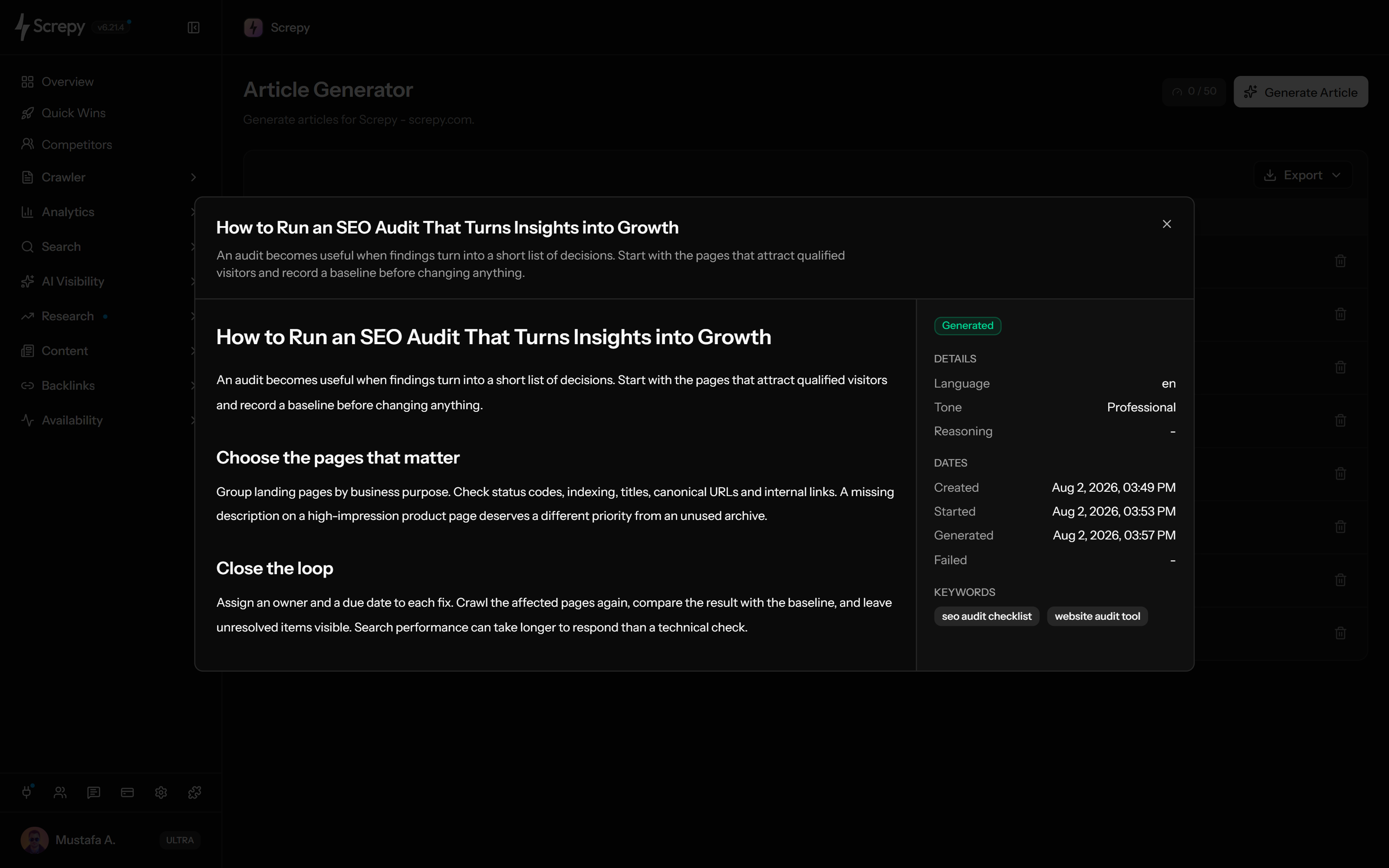
The screenshot shows this generated draft. Check facts, intent, structure, and links before publishing.










Give the AI article generator a clear assignment. Use the title field for the topic or short brief and the optional System field for detailed editorial instructions.
TitleMD
Choose an available output language and describe the tone you want. These controls guide the first draft without replacing a local editor's judgment.
Low, Medium and High reasoning controls are available according to the project's eligibility. Set the generation effort you can use without treating it as proof of accuracy.
ReasoningMedium
Submitting an assignment adds a job to the project rather than immediately publishing a page. Follow its status while generation runs in the background.
/guides/shopexample.comOpen a draft to read its Markdown content alongside the generated metadata and settings. Decide what is useful before preparing the final page in your editorial tools.
ContentMD
Description
Keep draft history within the selected project and return to previous results. Export the article list when an editor needs a status overview.
Article generation uses a daily allowance for the selected project. Check the dashboard counter and remove unwanted entries with a clear understanding of their usage impact.
Used
24Plan your next SEO steps with an AI assistant using supported Screpy project data. SEO MCP does not currently expose AI Article Generator records or actions; use the dashboard for that feature’s workflow.
A useful AI drafting workflow begins before generation and continues after the output. Define the job, control the draft, verify every material claim, and add the evidence only your team can provide.
Decide who the article is for, what they need to understand or do, and what first-hand evidence, product knowledge, or examples will make the page useful.
Write the topic or short brief in the title field. Put the angle, required sections, terminology and editorial boundaries in System instructions so the short input does not have to contain the full assignment.
Select language, tone, and the available reasoning level. Add system instructions when the draft must follow editorial, audience, or brand constraints.
Check the title, description, keywords, structure, factual claims, cited or implied evidence, tone, and missing perspectives before treating the output as content.
Add experience, sources, internal links, visuals, ownership, and final formatting in the publishing workflow. Revisit the page when the topic or product changes.
The workflow fits assignments that already have a real audience, purpose, owner, and review path—not pages created only because a keyword exists.
Move from a well-defined assignment to a structured first draft, then add the subject-matter depth and original examples the final guide needs.
Use an updated brief to rethink an outdated article, then compare the draft with the existing page before preserving, replacing, or expanding sections.
Share a consistent starting point for review using the generated draft, stored settings and generation status. Export the article list for coordination and manage editorial approvals in your team's own process.
Compare Screpy with Ubersuggest when keyword discovery, AI drafting, audits, rankings, AI visibility, pricing, monitoring, and workflow scope affect the decision.
AI output can accelerate drafting, but the publisher still owns accuracy, originality, experience, usefulness, compliance, page quality, and the decision to publish.
Verify facts, dates, quotations, calculations, product behavior, policies, and high-stakes advice against reliable sources before publication.
Generation does not prove demand, intent fit, originality, authority, crawlability, indexation, links, engagement, or organic performance.
The output stays inside the project for review. Your team remains responsible for the CMS, author, approvals, links, media, structured data, and final page.
Original experience, expert judgment, first-party evidence, brand perspective, editorial accountability, and maintenance must come from the people publishing the page.
Create a controlled first draft, research the demand and market behind an idea, or inspect the current result set before assigning a new page.
Create a queued draft from a specific title or brief, then review its structured output and generation details inside the project.
Research a seed topic by country and language, compare demand and intent signals, and decide whether the idea deserves a page.
Inspect the current organic result set and individual page signals before choosing the angle, format, and scope of a new article.
Screpy documentation
Follow the Screpy guide to define the writing job, choose language, tone, reasoning, and instructions, follow the generation queue, review the output, and prepare the draft for an accountable editorial workflow.
Learn the concepts behind this workflow and apply them with practical SEO guidance.
Explore how AI-generated content affects SEO, where it helps, where it creates risk, and how to use it while protecting quality and E-E-A-T.
Read articleLearn what AI detectors and plagiarism checkers can and cannot prove, how false positives happen, and how to review content with reliable evidence.
Read articleDiscover how to use AI for better search rankings through machine learning, NLP, analytics, content optimization, and smarter SEO decisions.
Read articleLearn how AI SEO tools improve keyword research, content creation, technical audits, personalization, and data-driven search performance.
Read articleUnderstand inputs, controls, output, allowances, editorial review, publishing responsibility, and how search guidance applies to AI-assisted drafts.
Low, Medium and High select the available reasoning effort for generation. Advanced options depend on the current project's plan eligibility. Higher reasoning does not verify facts, citations or originality; review every draft regardless of the setting.
A completed job can include a generated title, description, keyword list, and Markdown article content, together with its language, tone, reasoning, status, and generation dates.
Yes. The generation form includes language and tone controls. Treat the result as a first draft and have an editor confirm that localization, terminology, and brand voice are correct for the intended audience.
Enter a specific topic or short brief in the required title field. Put detailed instructions about the reader, angle, sections, terminology and boundaries in the optional System field. Research and verify source material separately.
Google focuses on whether content is accurate, useful, original, relevant, and created for people. Using automation to produce many low-value pages for ranking manipulation can violate its scaled content abuse policy.
Yes. Check every material claim, date, quotation, link, calculation, product statement, and high-stakes recommendation. Add reliable sources and first-hand expertise before publication.
The dashboard shows a daily article allowance for the selected project. Accepted generation requests count even when they fail or are later deleted, and deletion does not restore the allowance. Check the current counter and plan for the applicable limit.
No. Screpy creates and stores drafts inside the project. Your team reviews, edits, approves, formats, and publishes the final page in its own CMS or editorial workflow.