

An SEO MCP server connects an AI assistant to SEO tools and data through the Model Context Protocol. Instead of asking a model to guess why your traffic fell, you can give it access to a selected Search Console property, completed website crawls, or a licensed keyword database. The assistant can retrieve evidence, compare records, and help you decide what to investigate next.
The useful distinction is what the connection actually exposes. A server that reads crawl results cannot automatically supply competitor search volumes, edit your website, or submit pages for indexing. Those tasks require their own supported tools and permissions.
At Screpy, the practical starting point is a small question with a verifiable answer: which page appears for a particular query, what data supports that finding, and what should an SEO specialist check before making a change? That approach works across compatible clients, including Codex, ChatGPT, Claude, and Cursor. It also makes the limitations visible before you trust the recommendation.
What an SEO MCP server actually connects
Model Context Protocol is an open standard for connecting AI applications to external systems. An SEO MCP server applies that connection to search-related tools. It is an integration layer, rather than a new search engine or a replacement for the underlying SEO platform.
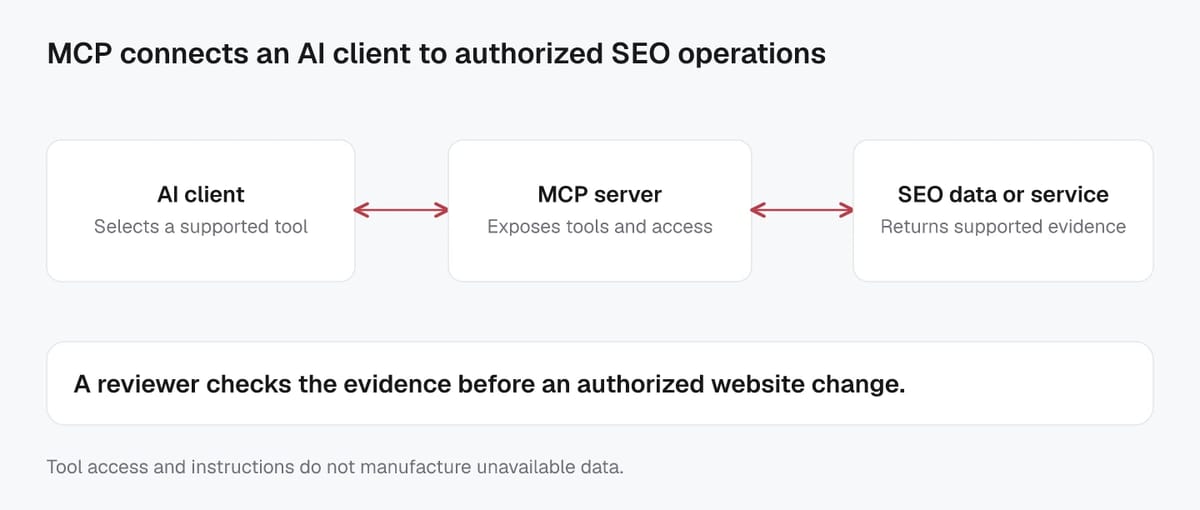
Four responsibilities matter:
| Layer | Responsibility | SEO example |
|---|---|---|
| Data source | Measures or stores evidence | Search Console records a property's search performance |
| MCP server | Exposes supported operations and checks access | A tool retrieves filtered query-and-page rows |
| AI client | Chooses available tools and interprets results | An assistant compares two date windows |
| Reviewer or authorized execution system | Checks conclusions and implements changes | An editor updates a title after reviewing the page |
The flow is straightforward: a person asks a question, the client calls a supported tool, the server returns data, and the client explains what that data supports. You can inspect the tool arguments and result instead of accepting a polished paragraph without evidence.
This also explains the difference between MCP, an API, and an SEO skill. An API is a programmatic interface to a service. A server can wrap API operations so compatible AI clients can discover and call them. A skill supplies reusable instructions for doing a task, such as comparing equivalent periods before diagnosing a traffic decline. Instructions alone do not grant access to Search Console or a keyword database.
For example, a skill might say, “Confirm the property and compare page-level clicks.” The MCP connection provides the authorized data retrieval. The assistant combines the instructions and results. If the property is unavailable, more detailed instructions cannot manufacture its numbers.
The connection standard helps different clients use the same provider, but supported transports, sign-in methods, and workspace policies still matter. Screpy's MCP documentation describes a remote connection with browser-based OAuth. A locally launched community server may need a different setup. Verify the actual server and client combination before following a configuration example.
What you can do with MCP for SEO
The question to ask is “Which source answers this task?” rather than “Can AI do SEO?” A server can return excellent crawl evidence and still be the wrong connection for researching an unfamiliar market.
| Task | Evidence you need | Useful output | Important boundary |
|---|---|---|---|
| Investigate broken internal links | Completed crawl and source-page relationships | Destination, status, and pages containing the link | A past crawl does not prove the current response |
| Diagnose a search-performance change | Your property's Search Console data | Comparable periods, affected queries, and pages | A decline alone does not establish its cause |
| Review tracked rankings | Stored keyword analyses for the selected market and device | Position movement and ranking URLs | Stored results are not a fresh live search |
| Research keyword demand | Licensed keyword database | Market-specific volume estimates and historical observations | AI-generated ideas are not measured volume |
| Check search intent | A dated, geographically scoped SERP observation | Result types and competing pages | One result snapshot is not every user's SERP |
| Investigate AI brand mentions | Stored answers, mentions, and citations | The answer and source behind an observation | Observed prompts do not represent every AI conversation |
| Check Google's indexed view of a URL | URL Inspection data | Coverage or indexing information for that URL | Inspection is neither a live test nor a submission |
The current Screpy SEO MCP server exposes project-scoped crawl, Search Console, Rank Tracker, stored AI Visibility, and monitoring tools. Page, link, and image tools let an assistant narrow an issue to the records behind it. For a broken link, retrieving the pages that reference the destination is more actionable than repeating the overall error count.
Screpy's member MCP tool set does not currently expose market search-volume research or live SERP lookup. A capability elsewhere in a product interface should never be assumed to exist in that product's MCP connection. Use a provider with the relevant supported tools when the job requires external market data.
Combining sources can be useful. A Search Console query may identify an existing page to investigate, while a crawl reveals its metadata and internal links. Screpy Website Audit supplies technical context for that second step. These observations can support a recommendation, but they do not automatically establish that the recommendation will improve rankings.
Keep each conclusion attached to its source. “The crawl found this redirect” and “Google recorded fewer clicks” are different statements with different collection times.
A real SEO MCP workflow: investigate one search query
A useful first workflow is to find the page associated with a query your website already appears for. It requires no website change and produces a result you can check independently.
We ran this read-only sequence on Screpy's own account on October 1, 2026:
- List accessible projects and select the Screpy project.
- Check the connected Search Console property.
- Request web-search performance for July 1 through September 28, 2026.
- Group by query and page, with an exact query filter for “seo mcp.”
- Preserve the returned period, row, and completeness warning.
The observed row was:
| Query | Page | Impressions | Clicks | Average position |
|---|---|---|---|---|
| seo mcp | /feature/seo-mcp/ | 188 | 0 | 27.1383 |
These are actual returned Search Console metrics for the stated window, across countries and devices. They are not hypothetical traffic projections. The request used final data and returned a warning that Search Console does not guarantee every query or page row.
That result supports a narrow conclusion: Google recorded appearances of the feature page for this query during that period. It does not tell us total market demand, conversion potential, or why the page had no clicks. Average position is an aggregated reporting metric, rather than a promise that every user saw the result in that exact position.
An illustrative prompt for repeating the process on your own site is:
Select my website project, confirm its Search Console property, and return query-and-page performance for [start date] through [end date] using an exact filter for [query]. Show the period, search type, metrics, and any missing-data warnings. Read existing data only.
The next step is to review the ranking page against the query's intent. Check whether it answers the reader's question, then inspect the actual page and relevant crawl evidence before proposing an edit. Screpy's Search Console feature provides the first-party performance context; content decisions still need page-level review.
The workflow succeeds when the result is traceable. A confident recommendation without the property, dates, and source row is not an adequate substitute.
Connect the client you already use
You do not need to move all SEO work into one assistant. Choose a client that supports your server's transport and authentication, then keep the first task small enough to verify.
For Screpy, the shared connection process is:
- Open the client's MCP, app, or connector settings.
- Add the remote server endpoint:
https://mcp.screpy.com. - Complete browser-based sign-in with the Screpy account that has access to the intended project.
- Ask the assistant to list your projects.
- Confirm the expected website before retrieving deeper data.
Use the Screpy MCP setup guide for the current connection requirements. Screpy supplies client-specific guides for ChatGPT, Claude, Codex, Cursor, VS Code, and Gemini CLI. Their menus differ, and access can depend on client or workspace settings. A general tutorial should not pretend the same settings screen exists everywhere.
Screpy MCP uses OAuth. A Screpy REST API key is not the credential for this connection. Successful sign-in also does not mean every data source is available: a project may still need its Google Search Console connection, a completed crawl, or feature access.
If a project is missing, first check which account completed authorization and whether the project is owned by or shared with that account. If tools appear but return unavailable data, investigate the underlying source rather than repeatedly rewriting the prompt.
For any provider, verify a simple result before requesting a large report. “List my projects” or another supported discovery task checks that the connection works. A second request should verify that the chosen data source has the expected dates and records. Separating those checks makes setup failures much easier to locate.
Keep analysis, automation, and website changes separate
An SEO MCP connection can support an agent workflow without making the whole workflow autonomous. Reading evidence, proposing a change, executing it, and checking the result remain separate responsibilities.
Consider a completed crawl that reports a missing page description. The assistant can retrieve the affected URL and its metadata. It can then suggest wording based on the actual content, if it has a supported way to read that content. The report alone does not establish that it has read the page's full text.
Applying the suggestion requires another authorized capability. A coding assistant might use its repository tools to edit the template. A CMS integration might update a specific record. Screpy's SEO MCP does not become an arbitrary website or CMS editor because it can retrieve crawl findings.
An illustrative handoff should identify:
- The affected URL and exact observed issue.
- The source record and collection date.
- The proposed change and its intended reader benefit.
- The file, template, or CMS field to review.
- The validation needed after implementation.
For the description example, validation includes checking the rendered page and confirming that the change did not affect unrelated URLs. If fresh crawl evidence is needed, obtain it through the authorized crawl workflow; do not call a stored report a post-change test.
Scheduling is another separate layer. A compatible host or workflow runner can execute recurring tasks, but the MCP protocol itself is not a scheduler. A recurring report needs a defined account, data window, runtime, failure behavior, and delivery destination. “Check this every Monday” is not proof that any job was actually created.
Screpy supports particular controlled actions, including starting a crawl and managing tracked keywords. Capacity-consuming or destructive operations have their own explicit intent and confirmation requirements. Review the actual tool before treating “audit my site” as authorization to change project settings.
This division makes agentic SEO workflows easier to evaluate. The assistant can help coordinate the process while the evidence, permissions, and success criteria remain visible.
How to recognize a trustworthy MCP answer
A useful SEO MCP answer should make it possible to retrace the recommendation. Ask for enough context to distinguish an observation from an interpretation.
For search-performance analysis, retain the property, dates, search type, filters, dimensions, and completeness warnings. For crawl analysis, retain the selected crawl, completion time, URL, and finding. For licensed keyword research, retain the provider, country, language, metric definition, and observation date.
These details resolve common mistakes:
| Answer you receive | What to check |
|---|---|
| “This page has no search traffic” | Was the page absent from limited rows, or did a correctly scoped request return zero clicks? |
| “Traffic fell because of the release” | Is the release timing supported, and were alternative causes investigated? |
| “This keyword gets 500 searches” | Which provider, market, and period produced that estimate? |
| “The page is fixed” | Was current rendered output checked, or only an older crawl retrieved? |
| “The URL is indexed” | Is the statement based on Google's indexed view, and what does the returned result actually say? |
Google's Search Analytics API documentation states that internal limitations mean it does not guarantee all rows. Following every available page of results does not remove that limitation. Missing rows require cautious wording.
The same discipline applies to freshness. Retrieving a result today does not mean the underlying measurement was collected today. A recent request can return an older crawl, a cached analytics response, or a keyword database's earlier monthly observation.
Prefer conclusions such as “This is a candidate for review because…” followed by evidence and the next check. Reject unsupported certainty about root causes, rankings, or revenue. A good assistant can explain what it does not know without stopping the useful part of the investigation.
Your acceptance test is practical: can another person reproduce the request, understand the limits, and review the proposed action? If so, the connection is helping you work from evidence rather than merely producing more persuasive SEO advice.
Choose your next MCP workflow
Start with the SEO question you already need to answer, then choose the connection that supplies the evidence.
Choose the focused guide that matches your next task:
- Google Search Console MCP: setup and SEO analysis covers connecting your property, explicit requests, and interpreting performance.
- Best SEO MCP servers for your workflow compares data sources, supported tasks, permissions, and cost.
- Keyword research with MCP joins licensed volume and SERP evidence with existing-page coverage.
If you need to understand a technical finding, select a completed crawl and inspect one affected URL before expanding the audit. Keep your first task focused enough to reproduce.
An SEO MCP server is valuable when it reduces the distance between a question and a verifiable result. You still need the right source, sound interpretation, and a reviewed action.
For your first session, use this illustrative request:
Use my connected SEO data to investigate one specific problem on [website]. Identify the source and dates, show the supporting records, explain the limits, and recommend the smallest next check. Retrieve existing data only; do not change the website or start new analyses.
Once that works, expand the workflow deliberately. A small, traceable answer is a stronger foundation than an all-in-one report whose numbers and actions you cannot verify.