

A bulk URL checker should finish the list you actually have and return evidence you can match back to it. For a large migration inventory, that means more than a generous headline limit: check the import ceiling, host restrictions, redirect output and cost of repeating the job.
These nine tools support supplied URL lists, with configurations for hundreds of pages or substantially larger inventories. Some run on your computer; others queue a hosted job. Start with the limits table, then choose by the report you need. A successful HTTP response is useful evidence, but it does not prove that a URL reaches the right content or is indexed by Google.
Compare job limits before comparing prices
This comparison uses official product pages and documentation checked on October 27, 2026. It is not a hands-on speed or accuracy benchmark. Each option accepts an existing URL list and documents a configuration for at least 500 URLs. An advertised maximum is not a promise that your machine, account balance or target website can sustain it.
Screpy publishes this guide. Its own free HTTP checker accepts 50 URLs per run, which can help verify a small exception set. It does not meet this comparison's larger-job threshold.
| Tool | Suitable workflow and relevant features | Capacity and important limits | Free offering or trial | Starting paid price and billing |
|---|---|---|---|---|
| Screaming Frog SEO Spider | Desktop list-mode checks with additional SEO fields and original-order export | Paid volume depends on memory/storage; keep list-only scope configured | Free edition: 500 URLs | GBP199 per user/year |
| HEADMasterSEO | Focused desktop status/redirect checks; HEAD or GET; CSV export | Basic: 10,000 URLs/import; Pro: 100,000; Enterprise advertised without a list ceiling | Free: 500 URLs | Basic: $49 once per user, excluding sales/VAT taxes; perpetual licence. Dollar currency code not stated on the page |
| Netpeak Checker | Windows bulk URL analysis with selected on-page fields; CSV/XLSX | Pro has no stated URL ceiling; hardware still matters; 2 devices per user | Free edition: 20 URLs; 3-day Pro trial | USD28/month or USD269/year, for one user |
| URL Profiler | Desktop HTTP-status and redirect-end-result collection alongside research data | Solo: 5,000 URLs/import; Pro: 1,000,000, subject to resources; monthly URL count not metered | 14-day trial; no card required | Solo: USD29.95/month, or USD19.95/month equivalent billed yearly; one device |
| Sitebulb Desktop | URL-list audits with broader technical findings | Lite: 10,000 URLs/audit; Pro default: 500,000. List must match the starting subdomain | 14-day Pro trial | Numeric starting price unavailable in the retrieved pricing page; verify the chosen currency and billing period |
| Botster Response Code Bulk Checker | Hosted basic response inventory; XLSX, CSV and JSON export | Up to 5,000 submitted URLs; account required. Documented fields are URL, status and message | This specific bot is described as free of charge | No paid checker tariff stated; do not infer a platform-wide free allowance |
| Bulk URL Checker | Hosted large jobs, redirect reports and repeat checks | Up to 100,000 URLs/job; available credits are a separate limit | First month: 15,000 checks, no card; a trial rather than ongoing free usage | USD5 for 3,000 prepaid credits, or USD9/month for 15,000 checks |
| tidytools Bulk URL Status Checker on Apify | API-friendly list, file, sitemap and redirect-map checks | Up to 100,000 URLs; billing is per answered URL event, with plan-dependent rates | Free platform has a USD5 usage allowance; this Actor still has a usage price | USD1/1,000 answered URLs on Free/Starter. Optional Starter platform: USD19/month, including USD19 usage; extra usage costs more |
| Patrick Stox Bulk HTTP Status Checker | Free server-side batch review, redirect detail and CSV/snapshot exports | Up to 500 URLs/run; follows at most 5 redirect hops | Free; no account required | No paid version listed on the tool page |
An annual monthly equivalent requires annual billing. A perpetual licence is a one-time purchase, while a prepaid credit pack is consumed by checks. Keep those units attached when comparing costs.
For example, a 100,000-URL job ceiling does not mean a 15,000-credit trial can finish that job. A 5,000-row import ceiling does not become unlimited because the product has no monthly URL meter. Start with the size and shape of your list, then price the configuration that can actually process it.
1. Screaming Frog: inspect a list with audit context
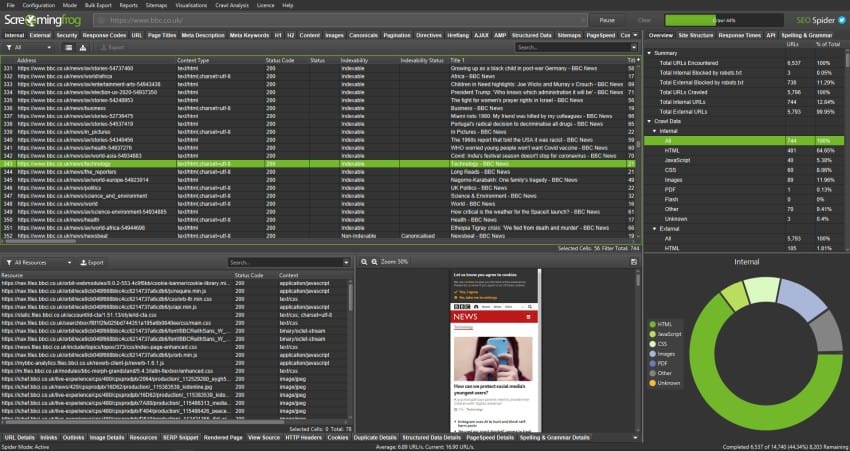
Product-homepage image: Screaming Frog.
Choose Screaming Frog when a response-code sweep needs the surrounding SEO data available in a crawler. Its official list-mode guide documents file upload, pasted lists and sitemap input.
Switch to Mode > List and check the scope before starting. List mode sets crawl depth to zero so ordinary link discovery does not expand the inventory. JavaScript rendering can still request page resources, and changing the depth setting can change what gets collected.
The export beside the Upload and Start controls is particularly useful for joining results to another sheet: the guide says it preserves the original upload order, including duplicate URLs and normalization changes. Keep an input ID as well, especially when several rows refer to the same address.
For migration work, enable the documented redirect-following configuration and inspect the All Redirects report. Checking only the final replacement URLs would miss what happens to the old addresses.
The free edition's 500-URL allowance can cover a pilot. Larger work requires the appropriate licence and enough local resources. If you need a narrow status-only desktop workflow, HEADMasterSEO may involve less audit context to manage; if the job must run independently of your laptop, consider a hosted option.
2. HEADMasterSEO: focus on status and redirect checks
Product-homepage image: HEADMasterSEO.
HEADMasterSEO is a focused desktop option for a list of destinations rather than a whole-site discovery exercise. It documents text, CSV and sitemap imports, CSV export, redirect-chain inspection and a choice of HEAD or GET requests.
That method choice matters. HEAD requests retrieve headers without the response body. They can reduce transferred data, but they cannot establish that a successful page contains the expected content. Some servers also handle HEAD differently from GET. Preserve the method in your report and repeat a questionable observation with GET as a separately recorded check.
For a redirect inventory, retain both the submitted address and the final destination. The tool documents following up to nine redirects; an unfinished longer chain should not be recorded as an ordinary successful page.
The licence tiers limit list size per import: free checks cover 500 URLs, Basic covers 10,000 and Pro covers 100,000. Enterprise is advertised without a list ceiling. Its documented low-memory mode processes small batches and writes results to CSV, but that does not remove licensing, disk or network constraints.
Choose it for focused status/redirect work and explicit request-method control. Choose a broader auditor when you also need rendered-page or site-structure analysis. No vendor throughput claim is treated here as an independently measured result.
3. Netpeak Checker: add selected page metrics

Product-homepage image: Netpeak Checker.
Netpeak Checker fits a Windows workflow where HTTP responses are one part of a larger URL research sheet. Its product page documents status codes, redirects, response times and other on-page parameters, with CSV/XLSX export.
Start with the fields needed for the decision. A migration inventory might need the input address, response, destination and a title check. Collecting every available metric adds complexity without necessarily answering whether the old URL reaches its intended replacement.
The product also connects to other data services. Check those requirements separately: an optional integration's account or API allowance is not the same thing as the checker's own URL capacity. Do not assume that buying the desktop application includes every external dataset.
The current pricing comparison distinguishes a 20-URL free edition from Pro, which has no stated URL ceiling and offers a three-day trial. One Pro user can use two devices. A no-ceiling licence still depends on your computer and the workload; it is not a promise of a particular processing time.
Choose Netpeak Checker when selected page metrics will help triage the response report. For a simple cloud-hosted status/message export without desktop software, Botster serves a narrower job. For one-domain list audits with a guided technical report, Sitebulb is another workflow to consider.
4. URL Profiler: join status results to a research sheet
URL Profiler is useful when the URL list already carries research data and you want to add response information. Its homepage describes checking HTTP status for each URL and returning the end result for redirects. That is a narrower documented claim than a full hop-by-hop redirect trace.
Keep the original sheet as the master inventory. Add a stable row ID, preserve the submitted URL and join the returned information back to it. Inspect duplicate rows and missing results before treating the completed spreadsheet as a complete audit.
The pricing page makes a consequential distinction: Solo allows 5,000 URLs per import, while Pro allows up to 1,000,000, subject to local resources. An unmetered monthly URL count does not expand Solo's import ceiling.
Solo is USD29.95 with monthly billing, or USD19.95 per month equivalent billed yearly. Pro is USD39.95 monthly, or USD25.95 per month equivalent billed yearly. The homepage offers a 14-day trial without a card. Confirm operating-system compatibility before purchase rather than relying on the older system-version examples on the pricing page.
Choose it for combining a response inventory with other URL research. If detailed redirect hops are essential, verify the required output on a small sample or choose a tool that explicitly documents them, such as HEADMasterSEO.
5. Sitebulb: audit a list from one subdomain
Sitebulb is a useful choice when the list belongs to one website and you want technical findings beyond response codes. Its URL-list documentation describes a restriction worth checking before importing: list URLs must match the starting URL's subdomain. A mixed backlink export containing many unrelated hosts is a different job.
Create the audit, set the appropriate starting URL and open Crawl Sources. Select URL List, upload a CSV or TXT file and uncheck Crawl Website when you want the supplied list to define the scope. Leaving discovery enabled can produce a different denominator from the one in your original inventory.
The desktop plan comparison lists 10,000 URLs per audit for Lite and a 500,000 default for Pro, with practical scale dependent on the computer. It offers a 14-day Pro trial. Numeric prices did not load in the retrieved pricing page, so an older quoted starting price would be misleading; check the current selected plan and currency.
Choose Sitebulb for a bounded, same-subdomain list that benefits from an audit report. Choose a tool accepting mixed-host lists when you are checking external references. In either case, keep the submitted inventory and compare it with the collected results before counting missing addresses as failures.
6. Botster: export a basic hosted status inventory

Product-homepage image: Botster.
Botster's Response Code Bulk Checker documents up to 5,000 submitted URLs and exports in XLSX, CSV or JSON. Its FAQ describes this specific bot as free of charge, with an account required.
The documented basic output is straightforward: input URL, status and message. That can be enough for an initial availability inventory. It is not evidence that the report includes every redirect hop, an expected-destination comparison or rendered-page content.
For a job, paste one URL per line, give the result a meaningful name and retain the original input file. After downloading the output, compare the returned addresses against that file. Separate missing rows and unfinished checks from actual responses such as 404 or 503.
Choose Botster when a basic hosted status report meets the task and you want a downloadable spreadsheet without a desktop installation. Confirm current job access before committing a critical deadline; the free claim for this bot is not an unlimited allowance for every Botster product.
For migration sign-off, where the main question is whether each old URL reaches its intended new address, choose a tool that explicitly documents redirect-map or chain evidence rather than assuming that one status column is sufficient.
7. Bulk URL Checker: queue a large hosted job

Product-homepage image: Bulk URL Checker.
Bulk URL Checker advertises hosted jobs of up to 100,000 URLs, with pasted or uploaded lists and reports covering responses, redirect chains and final destinations. Its documented reporting separates unavailable or refused checks from URLs classified as missing. These are vendor-described capabilities, not independently measured accuracy results.
Choose it when the job should continue without occupying a local desktop. For a migration inventory, retain the old URL and expected replacement alongside the exported observation. A report returning a final 200 still needs the intended-destination comparison.
The current pricing separates job size from spending capacity. Starter is USD9 per month for 15,000 checks; the initial month offers 15,000 trial checks without a card. That trial is not a permanent free tier. A one-time USD5 pack provides 3,000 credits, with unused pack credits rolling over.
A six-figure job ceiling therefore does not mean the starter allowance can fund a six-figure run. Budget the whole inventory and any repeat checks before launching it. Compare recurring plans with prepaid packs according to how often you expect to repeat the list.
Choose a local desktop checker if keeping processing on your own machine is the priority. For a hosted workflow controlled through code, the specific Apify option below offers a different integration model.
8. Apify: automate a URL list with a specific Actor
Product-homepage image: tidytools Bulk URL Status Checker.
Apify hosts many independently maintained tools. This entry refers specifically to tidytools/bulk-url-status-checker, a community-maintained Actor documenting up to 100,000 input URLs, list/file/sitemap sources, redirect-map checks and CSV output. Do not assume that a similarly named Actor has the same schema, limits or billing.
Choose it when a supplied-list check needs an API-driven handoff. Keep the source file, Actor identity, input settings, run ID and output together. For a migration, compare the observed final address with the expected replacement rather than using the status code alone.
The Actor's actual pricing tab is more informative than its lowest headline rate. Free and Starter use USD1 per 1,000 answered URLs. The USD0.80 rate applies to the much more expensive Business platform plan. A returned 404 is still an answered URL; the documentation distinguishes it from uncharged unfinished timeouts.
At USD1 per 1,000, 10,000 answered URLs represent USD10 of Actor events before considering your platform allowance. This is a rate calculation, not a promised invoice. The platform has a USD5 Free allowance; Starter costs USD19 per month with USD19 of usage included and additional usage charged separately.
Choose a simpler web tool if you only need a one-off spreadsheet. For automation, first confirm that the returned fields, event charges and run limits match your workflow.
9. Patrick Stox: review a free 500-URL batch
Product-homepage image: Patrick Stox's HTTP Status Checker.
Patrick Stox's checker is an option for a free batch of up to 500 URLs, without an account. The tool page documents redirect details, sitemap import, CSV export and local snapshot comparison. It follows at most five redirect hops.
Choose it for an inventory that fits that limit or a representative batch before moving a larger job to another tool. Inspect the original URL, final response, final destination and chain together. A final 2xx label can coexist with redirects, so it does not mean the submitted URL returned a direct 200.
Requests run from the tool's servers. Its user-agent choices do not make them originate from a verified search engine's IP range. A request labelled Googlebot is therefore not proof that the real Googlebot can fetch the page. A refusal is evidence about that request context, not necessarily every visitor.
Keep the exported snapshot with your source list if you plan to compare a later check. Record what changed between observations rather than overwriting the first report and losing the history.
For substantially more than 500 addresses, a tool that can accept the full inventory is often easier to reconcile. Splitting one large list into many manual batches adds another opportunity for missed rows and inconsistent settings.
Validate the report before assigning repairs
A large job is complete only when you can explain what happened to the submitted inventory. Keep a stable input ID, the original URL, the request settings and the observation time. If a tool normalizes or deduplicates addresses, retain the mapping back to the source rows.
Start with a small permitted sample that includes an unchanged page, a redirect, an intentionally removed page and an unavailable destination. Use pages you control or have permission to check. Keep request rates appropriate for the target site rather than treating maximum concurrency as a recommended setting.
Reconcile the rows and the counting units
The following CSV is a fictional report-review example, not output observed from any listed tool. Replace the example addresses with your own inventory and keep intended outcomes alongside observations:
id,input_url,first_code,final_code,final_url,outcome,review
1,https://example.com/current,200,200,https://example.com/current,Response,Expected page
2,https://example.com/old,301,200,https://example.com/new,Response,Expected replacement
3,https://example.com/wrong,301,200,https://example.com/home,Response,Wrong destination
4,https://example.com/retired,410,410,https://example.com/retired,Response,Intentional removal
5,https://example.com/restricted,403,403,https://example.com/restricted,Response,Investigate request access
6,https://example.com/silent,,,,Unavailable,Timeout needs a separate check
This example contains six submitted rows, five completed HTTP responses and one unavailable observation. Three rows finish with 200, but only two reach the intended successful destination. The two redirected rows also belong to the final-200 group, so adding those category totals would double-count them.
For the full job, reconcile submitted rows, unique normalized URLs, returned rows and unfinished checks separately. A site-scoping restriction, rejected input or an interrupted batch can explain a missing result. None should silently become a 404.
Check the method and the actual destination
HEAD requests obtain headers without the response body. If you need to establish that the destination contains the expected product or article, inspect its content separately. Record a later GET check as another observation, particularly when the initial HEAD response looks suspicious.
A redirect ending at the homepage may be technically successful while failing the migration mapping. Preserve the first response and compare the final URL against the intended replacement. The redirect-chain repair guide explains the next step when the path itself needs correction.
Separate access problems from missing content
An HTTP 403, a rate-limit response, a DNS failure and a timeout warrant different follow-ups. For 429 Too Many Requests, pause or reduce the request rate and respect Retry-After when supplied. Do not work around a security challenge just to turn the report green.
Once the large report isolates a small set of exceptions, Screpy's Bulk HTTP Status Checker can recheck up to 50 public URLs with initial responses, final destinations and observed chains. It uses public GET requests and does not render JavaScript. Its timeout or redirect limits can leave a check unfinished, so preserve those unavailable states too.
Finally, separate a destination inventory from an editable-source report. Finding which pages contain a bad link requires source-page tracing. A response sweep alone does not discover those relationships.
Google's HTTP-status guidance also makes clear that a 2xx response does not guarantee indexing. Close the job when the inventory is reconciled and the important destinations have been verified, with unavailable observations and intentional responses explicitly accounted for.