

A free Screaming Frog alternative is useful only if its free version can finish the audit you need. SiteOne Crawler and LibreCrawl offer local crawling with browser-rendering options. Ahrefs Free suits verified websites that fit its monthly credit allowance. Smaller hosted plans and desktop editions can work when their page and reporting limits match your site.
These eight options offer ongoing free access rather than only a timed trial. They are not identical replacements: some charge for cloud features, some restrict saved projects or exports, and local tools still consume your machine's resources.
This comparison uses official documentation and pricing checked on October 18, 2026. It is not a hands-on speed benchmark. Start with the limits table, then choose the tool whose free workflow produces the evidence you actually need.
Compare the eight free crawling options
The most important number is the allowance with its unit attached. Five thousand monthly credits are different from 500 URLs on each crawl, and neither tells you whether a report can be saved or exported.
| Tool | Best fit and core workflow | Ongoing free allowance | Important constraint | Starting paid option |
|---|---|---|---|---|
| SiteOne Crawler | Local desktop or CLI audits with HTML/JSON reports | No licence-metered crawl credit quota | Your configuration, hardware and browser workload still limit a run | Free MIT software; no paid licence required |
| LibreCrawl | A locally hosted graphical crawler with data exports | Local mode removes tier and rate restrictions | Standard guest mode has different limits; you maintain the installation | Free MIT software; hosting and optional services can cost money |
| Ahrefs Free | Cloud Site Audit for websites you verify | 5,000 crawl credits per verified project per month | Credits count successful HTML pages; ownership verification required | Starter: US$29/month |
| squirrelscan | Local CLI audits and structured reports | Up to 10,000 pages per local audit | Cloud audits and browser rendering use a separate credit model | Pro: US$19/month, including 3,000 cloud credits/month |
| Seobility Basic | A hosted audit dashboard for a small website | One project, 100 pages per crawl | The free plan is a limited Website Audit | Premium: EUR59.90/month, plus applicable VAT |
| Semrush Free | A small technical audit inside a broader SEO account | 100 URLs per month; up to 100 per audit | Free allowance is shared across reruns; JavaScript rendering requires a higher paid tier | SEO: US$139/month |
| Visual SEO Studio Community | A Windows or Mac desktop crawl with saved sessions | 500 pages and two concurrent HTTP connections | URL-list crawling and HTTP authentication are not included | Professional: EUR149/year per PC, plus applicable VAT |
| WebSite Auditor Free | An in-app desktop audit and on-page review | 500 URLs, with no time expiry | No project saving; full data exports require an appropriate paid edition | Standalone Professional: US$149/year |
Prices are the public options checked on the date above, not currency conversions. Monthly figures refer to monthly billing; the two desktop annual prices are annual subscriptions, not monthly equivalents. Verify taxes, current checkout terms and the exact feature you need before upgrading. A starting paid plan does not necessarily unlock every rendering or export feature.
We selected tools that offer a multi-page crawl or technical audit without an expiry date. Single-page graders, indexing reports and paid-only trials do not meet that criterion. Local open-source software can be free to license while still requiring setup time, storage and computing resources.
Screpy publishes this guide. Our full-site audit plans currently offer a seven-day trial, so Screpy does not qualify for this free-only shortlist. Our free website analyzer checks an individual page; it serves a different task from a full-site crawl.
Check what Screaming Frog Free already includes
Switching tools is unnecessary if the existing free edition already handles your task. Screaming Frog's official product page allows up to 500 URLs in a single free crawl. That is a per-crawl ceiling, not a stated allowance of 500 URLs for an entire month.
The free edition can be useful for finding broken links, reviewing titles and metadata, and inspecting a small site's basic technical signals. Its restrictions also matter: saving crawls, advanced configuration, JavaScript rendering, custom extraction and API integrations are limited or reserved for the paid version. The current paid licence is GBP199 per year.
Identify the feature you are missing before comparing alternatives. If the problem is the 500-URL ceiling, a free local crawler may help. If it is rendering client-side content, compare the rendered workflow. If it is handing a repair list to a colleague, prioritize the report and export rather than the biggest advertised crawl number.
A crawler's interface and its coverage are separate questions. Screpy's guide to how SEO crawlers find technical website issues explains the discovery and inspection process behind those reports.
1. SiteOne Crawler
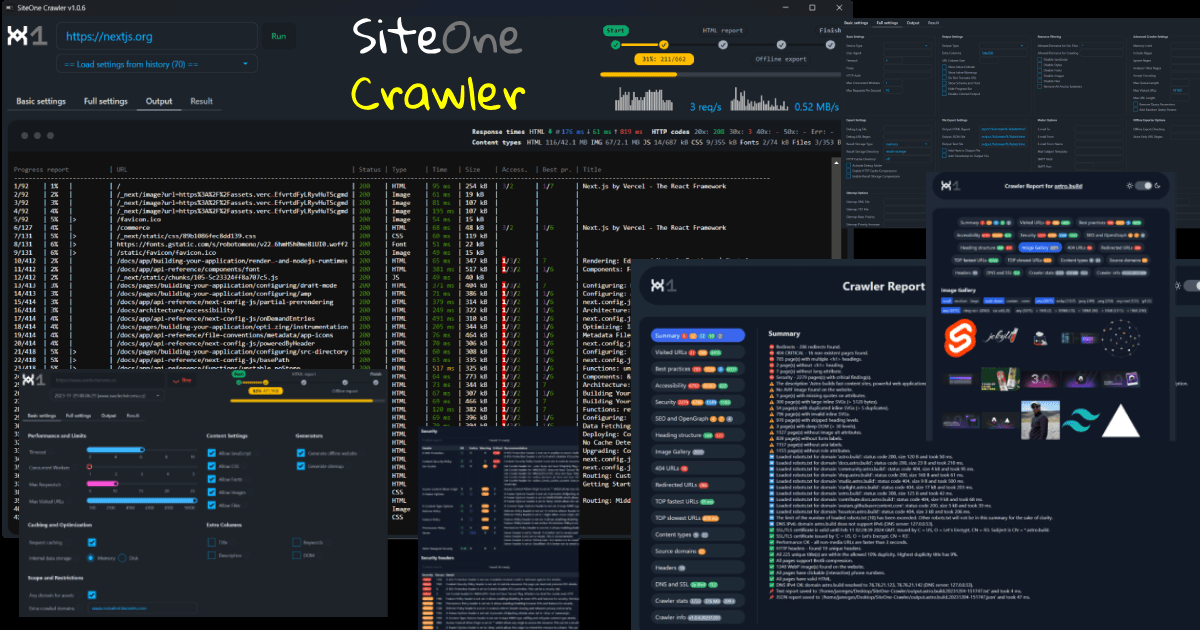
SiteOne is a strong candidate when the job needs a free local crawl, a graphical desktop interface or a repeatable command-line run. Its official feature documentation describes technical checks, HTML audit reports and JSON exports under an MIT licence.
The practical advantage is control over the workflow. You can keep a report locally, inspect findings by page and hand the structured output to another process without buying a cloud crawl allowance. The software supports Windows, macOS and Linux.
For a first pass, set a deliberate page limit instead of allowing a large site to consume all available resources. After installing the official CLI, a bounded example is:
siteone-crawler --url=https://example.com --max-visited-urls=300
Replace the example URL with a site you are authorized to audit. Check whether the report includes the pages you expected, then expand the crawl deliberately.
For content that appears only after JavaScript runs, SiteOne documents a browser-rendering mode using --browser. It requires Chromium and adds work compared with an ordinary HTTP crawl. Do not assume the default fetch and the rendered result inspect identical content.
Choose SiteOne when local reporting and configurable crawling matter most. Choose a hosted account instead if you need an immediately accessible dashboard and do not want to maintain a local tool. Free licensing does not eliminate memory, storage or runtime constraints.
2. LibreCrawl
LibreCrawl fits people who want a graphical crawler they can run themselves. It is a Python and Flask application with a browser-based interface, rather than a hosted account you must keep paying to use. The official repository documents metadata and link analysis, Playwright rendering, and CSV, Excel, JSON and XML exports.
Its operating mode changes the free-access story. Standard mode includes authentication and tiers; guest users are limited to three crawls per 24 hours. The documented local mode removes those tier and rate restrictions for personal use.
After following the repository's installation instructions, the local launch command is:
python main.py --local
Use that mode as a personal local installation. It automatically gives users administrative-tier access, so it is not the same setup as an authenticated service shared with other people.
A useful workflow is to crawl a representative section, filter a concrete issue such as missing titles, and export the affected URLs. Open that export before committing to a larger run: the benefit is the usable repair list, not merely the number of rows visible in the interface.
There is no paid software subscription required for that local workflow. You do need to manage dependencies, configuration and your machine's capacity. Browser rendering is slower than HTTP-only crawling, and optional external services can have their own limits or costs. Choose SiteOne instead if its packaged desktop or CLI distribution better matches your setup preferences; choose LibreCrawl when a self-hosted web interface and flexible exports are the stronger fit.
3. Ahrefs Free
Ahrefs Free, the current name for Ahrefs Webmaster Tools, is useful when you own or manage the website and want a cloud audit. It requires verification of the websites you add. It is not a free entitlement to audit any unrelated competitor's site.
The official free-account page provides 5,000 Site Audit crawl credits per verified project per month. Its counting rule is unusually important: credits are consumed by HTML pages returning HTTP 200. Broken URLs, redirects and non-HTML resources do not consume that allowance.
That makes a direct comparison with a simple "5,000 URLs" label misleading. Record the number of successful HTML pages and the number of repeat crawls you need, then budget across the month. The allowance is per verified project, rather than one combined 5,000-credit pot for every website in your account.
For a practical first audit, verify the project, run Site Audit, open a high-priority issue and inspect its affected URLs. Check a few reported pages yourself before turning the issue total into a repair task. If a downloadable file is essential to your process, check the export available in your free account during that first pass.
The entry paid option shown on Ahrefs' pricing page is Starter at US$29 per month. Do not assume that buying the cheapest paid plan automatically grants every advanced auditing feature. Choose this free option for owned-site cloud analysis; prefer a local crawler when ownership verification or the monthly credit budget does not fit the task.
4. squirrelscan
squirrelscan is a good fit for a terminal-based workflow, especially when the report needs to be read by another program or coding assistant. Its open-source repository documents a local CLI and reports in formats including JSON, HTML and Markdown.
Keep local and cloud operation separate. The current product page says the CLI is free while signed out, or when using --offline; signed-in audits spend credits. The official September update raised the local audit ceiling to 10,000 pages. That is a ceiling, not a promise that every computer will comfortably complete that workload.
After installing the official CLI, a local structured-output example is:
squirrel audit https://example.com --offline -f json
Inspect which checks ran, which pages were included and which results were skipped. The documentation places browser rendering in the cloud, so a free offline audit should not be treated as equivalent to a cloud-rendered audit of a JavaScript application.
The free cloud plan is a separate offer: 500 monthly credits and a maximum of 500 pages per cloud audit. Those credits do not mean 500 complete audits. Pro is US$19 per month with 3,000 cloud credits; the pricing page explains what consumes them.
Choose squirrelscan when its CLI output and local checks fit your process. Choose SiteOne or LibreCrawl when free local browser rendering is essential. The decision should follow the content your site actually serves and the report you can use, rather than the presence of an AI-related label.
5. Seobility Basic
Seobility Basic is an option for a small website whose owner prefers a hosted audit dashboard to a desktop application. The current official pricing page lists one website project and 100 pages per crawl, with no time limit on the free account.
The 100-page figure deserves attention because many older comparisons still mention 1,000 pages. Use the current allowance when deciding whether the free plan can cover your site. A website with 600 important pages will not receive a complete audit merely because its most visible 100 pages look healthy.
For a small business site, start by checking whether the crawl reaches its main service, contact and conversion pages. Open individual findings and inspect the affected URL before acting. If the site is larger, treat a limited crawl as a sample, and record what was not included.
Seobility describes the Basic offering as a limited Website Audit. Do not assume every export, rendering or advanced feature shown under its paid plans is also included for free. Confirm any feature that your workflow depends on inside the account before switching.
The current Premium starting price returned by the official page is EUR59.90 per month, plus applicable VAT. That is the displayed euro price, not a converted estimate. For broader free coverage on a verified website, compare Ahrefs' monthly allowance; for a locally controlled crawl, compare SiteOne or LibreCrawl.
6. Semrush Free

Semrush Free makes sense when you want a small technical audit alongside the platform's other account tools. Its free-account guide describes ongoing free access without a credit card, separately from the seven-day paid-plan trial.
The Site Audit documentation sets two relevant limits without a paid SEO Toolkit: 100 pages per month and up to 100 pages in a single audit. Only one audit can run at a time. Unused monthly allowance does not roll over, and the monthly budget resets on the first day of the month.
A 100-page first pass followed by a full 100-page recheck is therefore not the same budget as a tool allowing 100 pages on every independent run. Plan a smaller sample if you need to verify repairs within the same month.
The same documentation reserves JavaScript rendering for Guru or Business SEO Toolkit entitlements and corresponding Semrush One tiers. Do not choose the free account to inspect a client-rendered application unless an appropriate rendered workflow is actually available to you.
Exports also depend on the subscription: format, row allowance and daily frequency can vary. Check the file you can obtain before promising a complete client deliverable. The currently listed entry SEO plan is US$139 per month; that starting price is not a promise that every advanced audit feature is included.
This option works best for a deliberately small audit in an account you already use. It is a poor choice when your main requirement is frequent free recrawls of a large site.
7. Visual SEO Studio Community
Visual SEO Studio Community is worth considering when you want a free desktop interface and the ability to store a crawl for later review. It is available for Windows and macOS, with a Community edition distinct from the 15-day Professional trial.
The official edition comparison gives Community a 500-page crawl limit and two concurrent HTTP connections. Its included features cover titles and metadata, HTTP problems, broken links, robots directives and sitemap work. The comparison explicitly includes automatically storing and loading crawls.
That saved-session capability can be more useful than a larger headline limit if your normal process involves reviewing findings over several days. Crawl a small site, close the session, reopen it and confirm that the information needed for your repair work remains available.
Two restrictions can rule it out early: Community does not include crawling a supplied URL list or HTTP authentication. If you need to check an exact migration list or an authenticated staging environment, verify the required edition before building the process around it.
The official homepage currently lists version 2.5.3 downloads dated February 2023. We have not installed that version or verified compatibility with your current operating system. Check the official system requirements and installer compatibility for your machine.
Professional is EUR149 per year per PC, plus applicable VAT. Choose Community for a small desktop audit with retained sessions; use a different workflow when its access or input restrictions block the actual job.
8. WebSite Auditor Free
WebSite Auditor Free offers a desktop route into technical and on-page analysis. The official product page lists Windows, macOS and Linux versions and describes in-app audit reports available in the free edition.
The free allowance is 500 URLs with no time expiry. The tradeoff is important: the current pricing page describes free use without project saving. Treat it as a tool for reviewing a small audit in the application, rather than assuming you can keep an unlimited archive of free projects.
For a first check, create a project for a website you are authorized to inspect, run the crawl and open an issue affecting several pages. Look at the page details and the suggested correction. Decide whether the in-app result is sufficient for your work before relying on it for a client report or a repeatable export process.
Paid pricing also needs the right product scope. The standalone WebSite Auditor Professional subscription is US$149 per year, not the price of the full SEO PowerSuite bundle. Professional adds saved projects and removes the crawl ceiling; the standalone Enterprise edition is US$359 per year and lists data export in CSV, SQL and HTML among its additional features.
Those are different deliverables. Viewing a report inside the app, saving a project, exporting an optimized page and downloading a flat file of audit data are not interchangeable capabilities. If your main requirement is a free machine-readable repair file, compare the local export workflows in SiteOne or LibreCrawl before choosing this edition.
Compare crawl limits before comparing totals
A crawler can stop because it reaches a per-run ceiling, exhausts a monthly budget, follows an exclusion rule or cannot discover another page. Those outcomes can look similar in a summary, but they require different decisions.
| Limit type | What to record | Why it changes the comparison |
|---|---|---|
| Per-crawl page or URL ceiling | Maximum and actual count for that run | A second run may be possible without increasing the first run's coverage |
| Monthly crawl budget | Used, remaining and reset date | Rechecking fixes can consume the same allowance again |
| Credit-based counting | Which responses actually consume a credit | A successful HTML page may be charged differently from a redirect or image |
| Local configuration and resources | Requested cap, exclusions, rendering and available memory/storage | Free licensing does not guarantee a completed crawl |
| Reporting allowance | Saved sessions, visible rows and export limits | The interface may show more information than you can deliver in a file |
Consider an illustrative Ahrefs budget. If a verified project produces 1,200 chargeable HTTP-200 HTML pages on each run, four equivalent runs consume 4,800 crawl credits. That fits within a fresh 5,000-credit monthly allowance, assuming no other chargeable crawls. Five runs would require 6,000 credits. A different discovered page set changes the calculation.
Do the same arithmetic for your own workflow instead of comparing vendor headline numbers. Record requested versus completed coverage, then inspect why any expected page is missing. A report with fewer errors may simply contain fewer pages; it is not evidence that the website improved.
Run a small comparison before moving your workflow
Use the same small, authorized sample to evaluate your two strongest candidates. Twenty representative pages are more informative than an unrestricted crawl you cannot explain. Include important templates such as a service page, an article, a product or category page, and a page whose main content depends on JavaScript if your site has one.
This is a proposed acceptance check, not a test performed for this comparison:
- Fix the scope. Record the starting URL, hostnames, allowed sections, exclusions, page cap and rendering mode. A list of expected pages can be your own checklist even when the free tool cannot import URL lists.
- Check discovery. Confirm that the expected pages were actually reached. Investigate missing pages before interpreting a score or an issue count.
- Verify one finding. Inspect the page yourself and compare its title, status, canonical or link with the report. For rendered content, check that the report includes content that is absent from the initial HTML.
- Check the handoff. Save or export the evidence available in the free edition. Can the person fixing it identify the affected page, the relevant element and the observation date?
- Budget a second run. Confirm what the follow-up consumes and whether you can retain the result. A free first pass is less useful when its required verification step exceeds your allowance.
For link repairs, a destination alone is often insufficient. You need the page containing the link, and sometimes the original destination before redirects. Keep the source and original destination in the repair record so the next person can find the element to edit.
Choose the option that completes this workflow with acceptable effort. If every free candidate fails one essential requirement, consider whether a paid licence solves that specific gap. A higher crawl ceiling is valuable only when the tool can inspect the right content and return a usable result.